Fish|Hunt FL
- 992.00
- 4.0
- Installs
- 500.00K
- Price
- Free
Screenshots
Analysis by Reviewed
For a first trip in Florida, the hardest part can be knowing what to check before you leave and where to find it once you’re there. Fish|Hunt FL is a free lifestyle app from FWC Developer that brings fishing and hunting information into one place. I’d treat it as a practical planning companion, especially if you’re new to the state’s outdoor rules, rather than as a replacement for paying attention to conditions on the ground.
What to expect from a Florida-focused companion
The app is aimed at people who fish or hunt in Florida, so its appeal is narrower and more useful than a general outdoor app if that’s where you spend your time. It has an average rating of 4.0 from around 2,200 ratings, and it has been installed over 500,000 times. It is rated for Everyone, and its current version is 2025.242.0. That gives a new user a quick sense of its reach, while the real question is whether its tools match the way you plan a trip.
I’d start by thinking of it as a single place to check trip essentials, not as an all-purpose navigation or weather service. A general map app may be better for driving directions, and a dedicated forecast tool may suit someone who needs highly detailed weather planning. Fish|Hunt FL makes more sense when Florida fishing or hunting information is the main thing you want close at hand.
All About Convenience
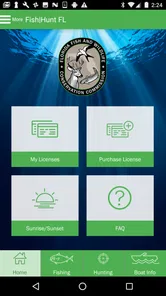
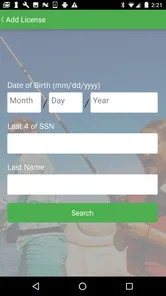
I don’t know about you, but I always found it a hassle to keep track of all the licenses, regulations, and locations for fishing and hunting in Florida. With Fish|Hunt FL, those days are gone. The app is designed to keep all your info in one place, making it super convenient to plan your trips. You can purchase and store your licenses right within the app. No more fumbling through papers or worrying about forgetting your license at home.
Start with the trip you actually plan to take
For a first-time user, I’d avoid tapping through every section without a purpose. Pick one realistic outing—such as a morning fishing trip—and use the app to check the relevant license and rules before packing. That creates a simple first success: you arrive with the key information already reviewed instead of trying to sort it out at the water’s edge. If you’re going hunting rather than fishing, make the same check part of your preparation, but focus on the activity and location you have in mind.
Keeping a license in an app is convenient, but I’d still make sure I can access what I need before leaving home. A phone battery, a weak signal, or a last-minute change of plan can turn a handy digital record into a nuisance. I’d treat the app as a way to reduce paper clutter, while keeping sensible trip habits and checking the details before setting out.
Real-Time Updates
One of the coolest features is the real-time updates on regulations and weather conditions. Imagine being out there, ready to catch a big one, and realizing you’re not up-to-date on the latest rules. This app sends you notifications so you’re always in the loop, ensuring you’re compliant and safe. Plus, it gives you the latest weather forecasts so you can plan your trips around the best conditions.
More From Our News Desk

Weather by Xiaomi Review: Clear at a Glance, Less Clear Up Close

X Under Pressure: Can It Recover When Posting Goes Wrong?

Clash of Clans Is Won Between the Battles

Android Auto Makes the Case for Quieter Car Software

MobiOffice: Transforming Mobile Productivity with Seamless Integration

EA SPORTS FC™ Mobile Soccer: Redefining Mobile Sports Gaming
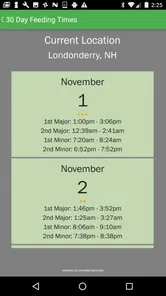
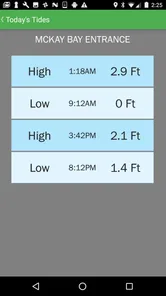
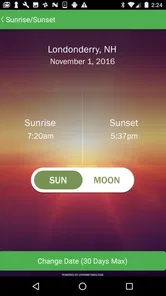
As someone who loves hitting the water early in the morning, having access to tide charts and sunrise/sunset times is incredibly helpful. It’s like having a personal fishing guide right in your pocket.
Use updates as a prompt, not a substitute for judgment
A useful habit is to check conditions and rules while planning, then review them again if the outing changes. A different place or activity can mean different details matter, so I wouldn’t assume that a check for one plan covers another. Weather information is most valuable when it helps you decide whether to go, when to leave, or when to turn back; it can’t make a poor day on the water safe by itself.
That distinction is especially helpful for newcomers. Notifications can bring a change to your attention, but they do not remove the need to understand the rule that applies to your situation. I’d read the relevant information rather than relying on a quick alert alone, particularly when a regulation affects what you can do on a specific trip.
Maps and More
Ever spent hours trying to find the perfect spot to fish or hunt? The app’s interactive maps are a lifesaver. They show you the best locations based on your preferences, whether you’re looking for freshwater or saltwater spots. You can even mark your favorite spots and share them with friends. It’s like being part of a secret club of the best fishing and hunting locations in Florida.
And if you’re like me, who occasionally forgets where I parked my boat, the GPS feature will guide you back without any stress.
Make the map useful before you arrive
Rather than waiting until you’re already outdoors, I’d look at the map while planning and decide on a primary location plus a backup. Saving a favorite spot can make repeat trips easier, and sharing a location with a companion can help you coordinate where to meet. It also gives you a useful reference if plans split up. Those are small steps, but they turn a map from something you browse into part of a practical outing plan.
There is a trade-off: a marked location is a planning aid, not a promise that it will suit every day, access need, or personal preference. I wouldn’t assume that a suggested place guarantees a catch or that a saved point replaces local judgment. If you need detailed route guidance or offline navigation, a dedicated mapping tool may be a better partner for the trip.
Community and Resources
What I love about this app is the sense of community it fosters. There are forums and resources where you can connect with fellow outdoor lovers, share tips, and even find some new buddies to join you on your next adventure. The app also provides a wealth of knowledge for beginners, from identifying species to the best fishing techniques.
Who will get the most from it?
I’d recommend it most to Florida residents and visitors who fish or hunt often enough to want local information in one place, particularly beginners who are still learning how to prepare. For someone planning a weekend fishing trip, a sensible routine is to check the rules and forecast, look over the map, save a location, and then share the plan with a friend. That’s a more reassuring start than searching across several unrelated apps at the last minute.
On the other hand, if you rarely do either activity, spend most of your time outdoors outside Florida, or mainly need advanced navigation, a broad outdoor map or a tool built for your specific activity may be more useful. The app’s Florida focus is its strength, but it also sets a clear boundary: it is most relevant when your plans involve fishing or hunting in the state.
A first outing, step by step
Picture deciding after work to fish early the next morning. I’d check the rules and license information first, then review the weather and the sunrise or tide details that matter to my plan. Next I’d choose a spot on the map, save it, and send the meeting point to the person coming along. Before leaving, I’d make sure my phone is charged and that I know what information I need to access. That sequence keeps the app focused on decisions, rather than turning trip prep into aimless browsing.
If the outing changes—say, the group picks another location—I’d revisit the relevant information rather than carrying over assumptions from the first plan. That is one of the less obvious benefits of having the tools together: the app can make a change easier to check, but only if you remember to check it. For hunting, I’d apply the same deliberate approach and avoid treating a fishing plan’s saved details as automatically relevant.
Where it fits among alternatives
Compared with the usual mix of separate map, forecast, and reference apps, Fish|Hunt FL is appealing because the Florida outdoor context is gathered in one place. That convenience matters most when you want to make a quick, informed plan without juggling several searches. Separate apps can still win for a specialist need, such as more extensive navigation or a forecast workflow you already trust. I’d use this app for its state-specific fishing and hunting role, then add another tool only when the trip calls for something more specialized.
Make the first check count
If you’re unsure where to begin after installing it, I’d use a small checklist rather than trying to learn every part of the app at once. Choose the outing, identify which information applies to that activity, and check it before making other plans. Then use the map to narrow down a place and consider whether the weather and timing still make that choice sensible. This order is useful because it starts with the decisions that can change whether the trip is workable at all.
For a newcomer, the tricky part is often not opening an app but knowing what counts as a complete preparation. I’d avoid treating a license check as the entire job: the location, activity, and conditions are also part of the decision. If you’re going with someone more experienced, compare your plans together and ask them to point out anything you may have overlooked. That turns the app into a shared reference rather than a substitute for learning.
Small habits that prevent avoidable friction
Before repeating a trip, I’d revisit saved places instead of assuming an old favorite is still the best choice. A familiar pin helps you return to a starting point, but it doesn’t tell you whether today’s conditions suit it or whether the group’s needs have changed. A backup location is especially helpful when you’re bringing someone new, since you can adapt without scrambling to search from the car or shoreline.
I’d also make sure a companion knows the plan in plain terms, not just that a pin has been shared. Agree on where to meet and what you’ll do if the plan changes. The map can make coordination easier, but it cannot settle every practical detail for you. This is a modest habit, yet it helps the app’s location tools work as part of a real outing rather than as a feature you only discover when you’re already separated.
Fishing and hunting call for different preparation
Because the app covers both activities, it may be tempting to think of them as one general outdoor workflow. I’d resist that. A fishing trip and a hunting trip can involve different rules, timing, and location considerations, so I would start a fresh check for each instead of reusing assumptions from the last outing. That is particularly important if your usual routine is fishing and you are planning a hunt for the first time.
The same distinction applies when you’re helping a friend get started. Ask what they are actually planning to do, then guide them through the information relevant to that activity rather than giving a broad tour of the app. For a casual fishing companion, map sharing and timing may be the first useful steps. For a hunting plan, the initial priority should be confirming the applicable details before treating a location as settled.
When a second tool is worth keeping
I wouldn’t uninstall a trusted map or weather app just because this one gathers useful Florida outdoor information. The best arrangement depends on what makes you hesitate before a trip. If it is remembering state-specific fishing or hunting details, this app can help bring those checks together. If it is finding a route, tracking a trail, or getting a style of forecast you already depend on, a specialist tool may still deserve a place on your phone.
That combination is not a failure of convenience; it is a sensible division of jobs. I’d rather use one Florida-focused resource for the information it handles well and a separate tool for a need it does not replace than assume one app can answer every question. For an occasional outing, that also keeps expectations realistic: open it for the decisions it can support, and don’t make it the sole basis for safety or navigation.
Final Thoughts
In a nutshell, Fish|Hunt FL is not just an app; it’s a must-have tool for anyone serious about fishing and hunting in Florida. Whether you’re a seasoned pro or a newbie, this app will make your outdoor adventures easier and more enjoyable. Trust me, once you try it, you’ll wonder how you ever managed without it. So, gear up and get ready for some amazing outdoor experiences with Fish|Hunt FL!
My more measured recommendation is to install it if Florida fishing or hunting is part of your routine, then use it for one planned outing and see whether its combined information suits your habits. It is free, has been available since December 8, 2014, and supports Android 8.0 or later. I find the strongest case for it is practical preparation: check the details, choose a place, and go out with a clearer plan. If your needs are broader or more specialized, pair it with the tools you already rely on rather than expecting one app to cover every outdoor task.
Fish|Hunt FL Frequently Asked Questions
Who is Fish|Hunt FL designed for?
Fish|Hunt FL is aimed at people who fish or hunt in Florida and want outdoor information and activity tools on their phone. Its focus is practical rather than entertainment: it brings together resources such as maps, weather information, regulations, and personal logs. The app is listed in the Lifestyle category, so it may also suit users who want one place to organize outdoor pursuits.
What is Fish|Hunt FL and how does it work?
Fish|Hunt FL is a mobile application designed for outdoor enthusiasts in Florida, providing essential tools for fishing and hunting. The app offers features such as interactive maps, weather forecasts, and real-time information on fishing and hunting regulations. Users can log their catches and hunts, making it easier to track their outdoor activities and comply with local laws.
Is Fish|Hunt FL available for both Android and iOS devices?
Yes, Fish|Hunt FL is available for download on both Android and iOS devices. Users can find it on the Google Play Store for Android and the Apple App Store for iOS. The app is designed to provide a seamless experience across different mobile platforms, ensuring users have access to the same features and functionalities regardless of their device.
Do I need an internet connection to use Fish|Hunt FL?
While Fish|Hunt FL offers offline capabilities, certain features require an internet connection. Interactive maps and real-time updates on regulations and weather forecasts need connectivity to function optimally. However, users can still access previously downloaded maps and logs without an internet connection, making it convenient for use in remote areas.
What Android version do I need to install Fish|Hunt FL?
For Android, Fish|Hunt FL requires Android 8.0 or later. Check your device’s software version before downloading so you can confirm it meets that requirement. The app is developed by FWC Developer, and its store summary is “FWC Mobile App.” If your device runs an older Android version, it may not be compatible with the current release.
Pros
- Comprehensive fish and wildlife data.
- Real-time updates on fishing spots.
- User-friendly interface.
- Offline access to maps and data.
- Regular app updates and support.
Cons
- Limited to Florida region only.
- Requires GPS for full functionality.
- Occasional app crashes reported.
- No social media integration.
- High battery usage on some devices.











