Fieldy - AI note taker
- 132.00
- 4.4
- Installs
- 10.00K
- Price
- Free

Screenshots
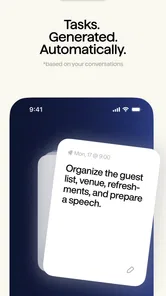
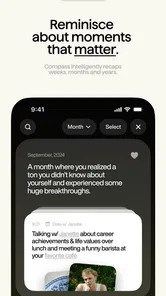
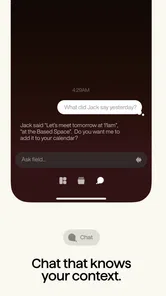
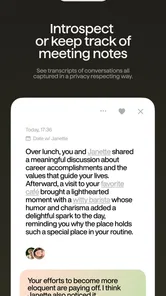
Analysis by Reviewed
Fieldy - AI note taker is a lifestyle app from Field Labs Inc built around a simple but appealing idea: helping you hold on to the details of daily life instead of relying entirely on memory. I approached it less like a conventional notes app and more like a personal record of moments, thoughts, and information that I might want to revisit later. That distinction matters, because its usefulness depends on whether you want an organized memory companion rather than just another blank page for typing.
After spending time with it, my impression is that Fieldy is most interesting for people who collect small details throughout the day and often lose them in ordinary phone notes, chat messages, screenshots, or scattered reminders. It is free to start, rated for Everyone, and sits in the Lifestyle category rather than presenting itself as a business productivity tool. That positioning makes sense: the strongest use cases are personal reflection, remembering conversations, capturing ideas, and building a searchable record of everyday experiences.
The app has a 4.4 average from around 638 ratings, with roughly 132 written reviews, and has passed 10 thousand installs. Those numbers suggest a modest but real user base rather than a heavily established mainstream service. Field Labs Inc released it on April 20, 2024, and the current version is 2.40. I would not treat those figures as a guarantee that it will fit everyone, but they do provide useful context: this is a relatively focused app with enough public feedback to show that people are trying it, while still feeling more specialized than the usual note-taking giants.
How Fieldy fits into everyday memory keeping
The first thing I noticed is that the concept changes how I think about notes. In a standard notes app, I usually create a document because I already know what I want to save: a shopping list, a meeting outline, an address, or a draft. Fieldy makes more sense when the starting point is a moment or thought that may become useful later. That could be a detail from a conversation, an idea for a weekend, a personal observation, or something I want to remember about a person or place.
This makes it a better match for informal memory capture than for formal document management. If your main goal is formatting long documents, managing shared work files, or maintaining complex checklists, a conventional notes or task app will probably remain more practical. Fieldy’s appeal is the personal layer: the feeling that your notes are connected to your life rather than simply stored as isolated text blocks.
One realistic scenario is a busy day when several small things happen that seem unimportant at the time. A friend recommends a restaurant, a colleague mentions a book, and you think of a solution to a problem while commuting. By evening, those details are competing with messages, appointments, and ordinary distractions. Capturing each one as it occurs gives Fieldy a role that a calendar cannot fill. Later, the value is not only in finding the note but in recovering the context surrounding it.
I also found that the app’s lifestyle focus makes it suitable for people who dislike the pressure of traditional journaling. Many journaling tools expect a long entry, a regular routine, or a reflective mood. A memory-oriented note taker can be more casual. You can record a short thought without turning it into a polished diary entry. That lower commitment is important for consistency, because the best memory system is usually the one you will actually use on ordinary days.
More From Our News Desk

Weather by Xiaomi Review: Clear at a Glance, Less Clear Up Close

X Under Pressure: Can It Recover When Posting Goes Wrong?

Clash of Clans Is Won Between the Battles

Android Auto Makes the Case for Quieter Car Software

MobiOffice: Transforming Mobile Productivity with Seamless Integration

EA SPORTS FC™ Mobile Soccer: Redefining Mobile Sports Gaming
At the same time, I would avoid expecting Fieldy to create perfect memories automatically. An app can help preserve what you choose to record, but it cannot reconstruct every meaningful detail you forgot to capture. The habit still begins with you. My practical advice is to use it at natural transition points: after a conversation, when leaving a new place, or before going to sleep. Those moments make recording feel less intrusive than stopping constantly throughout the day.
What the free starting point means
Fieldy is free to download and use as an entry point, which makes trying the concept relatively easy. That is valuable because this type of app is personal: you cannot know whether an AI note-taking workflow suits you until you have used it during real days, not just looked at screenshots. I would begin with a small experiment rather than immediately moving my entire note history into it. Capture a few recurring categories, such as ideas, people, places, and personal reflections, then see whether returning to them feels natural.
The app also includes in-app purchases ranging from $4.99 to $599.99 per item. That is a very wide range, so I would be careful about interpreting “free” as meaning that every possible capability is free. The sensible approach is to start without paying, understand what the free experience delivers, and examine each purchase screen before committing. The lower end may be reasonable for someone who finds genuine daily value, while the highest listed price is a serious commitment that deserves particularly careful consideration.
Because the purchase options vary so widely, the app’s value cannot be judged by the download price alone. Free access is enough to test the basic idea, but paid value depends on the exact feature or access level attached to a purchase and how often you use it. I would not pay simply because the app promises a better memory. I would pay only after it has already become part of my routine and solved a problem I regularly have.
This is also where Fieldy differs from a completely free, manual notes workflow. A basic notes app may cost nothing and offer more familiar control, but it leaves the organization and retrieval process largely to you. Fieldy’s potential advantage is reducing that mental effort. The trade-off is that you are evaluating a more specialized service, with purchase choices that may be less straightforward than creating folders in a standard notes application.
Where the app can save real effort
The most useful benefit is not merely storing another sentence. It is reducing the friction between having a thought and preserving it in a form you can use later. If entering a memory feels too formal, you may postpone it and lose it. A dedicated AI note-taking experience can make the act feel more conversational and less like maintaining a database. That difference sounds small, but it can determine whether an app becomes a habit.
A second benefit is the possibility of turning scattered personal information into something easier to revisit. Instead of remembering which note contained a recommendation or searching through old messages, you have a more intentional place for those details. I would especially value this for recurring personal information: gift ideas, travel observations, names of books, lessons from difficult situations, or patterns I notice in my own routines.
A third, less obvious use is preparing for conversations. Before meeting someone, I could review earlier notes about topics they mentioned, plans we discussed, or questions I wanted to ask. That is not about manufacturing a perfect social record. It is about avoiding the awkward experience of forgetting something important simply because it was buried in a different app. Used carefully, a memory tool can make attention feel more consistent without replacing genuine listening.
Fieldy may also work well for people who think in fragments. Some users generate ideas while walking, cooking, commuting, or waiting in line, but those ideas do not arrive in a neat sequence. A traditional document encourages structure too early. Capturing fragments first and making sense of them later is often more realistic. The app’s value, in that case, comes from respecting how thoughts actually appear rather than demanding that every note be complete.
Practical habits that make the experience better
I would use a consistent wording pattern when recording notes. Start with the subject, then add the detail that will help later: who, where, why, or what should happen next. A vague entry such as “good idea today” is much less useful than a short note that identifies the idea and its context. This is not busywork; it gives any intelligent organization or recall system better material to work with.
I would also separate temporary reminders from memories worth keeping. A grocery list and a meaningful conversation have different lifespans. Mixing them together can make the app feel cluttered and reduce the emotional value of the notes you actually want to revisit. Fieldy is more compelling when used for information that benefits from context, not when forced to replace every task manager, calendar, or shopping-list tool on your phone.
Another useful workflow is a weekly review. Rather than opening the app only when you forget something, spend a few minutes revisiting recent entries and deciding which ones deserve follow-up. A recommendation might become a plan, an idea might become a project, and a personal observation might reveal a recurring pattern. This turns passive storage into an active memory practice and helps you judge whether the app is delivering enough value to justify any paid option.
I would keep the capture habit deliberately small. A few clear entries are better than a flood of low-value notes. If every passing thought goes into the same place, retrieval becomes harder and the app begins to reproduce the clutter it was meant to reduce. Fieldy is most useful when I treat it as a curated extension of memory rather than an automatic dumping ground.
Trade-offs compared with familiar alternatives
Compared with Apple Notes, Google Keep, or another standard notes app, Fieldy is more purpose-built for personal recollection. The familiar alternatives generally win when I need folders, formatting, quick checklists, document editing, or broad device integration. They are also easier to recommend to a household or work team because most people already understand the basic model.
Compared with a journaling app, Fieldy appears better suited to short, irregular entries. A journal is often about writing a narrative and reflecting on a day, while a memory tool is about preserving useful fragments before they disappear. If you enjoy long-form writing and want prompts, mood tracking, or a dated diary structure, a dedicated journal may be the better choice. If you want lightweight capture without making every entry feel like a diary page, Fieldy has a clearer reason to exist.
Compared with a task manager, it serves a different purpose. A task manager is built around action, deadlines, and completion. Fieldy is more valuable for context and recall. I would not put time-sensitive obligations there unless the app’s workflow clearly supports them for your needs. Forgetting whether you enjoyed a restaurant is harmless; forgetting an appointment is not. Keeping those responsibilities in a dedicated calendar or task system remains the safer choice.
The AI angle introduces another trade-off. Intelligent interpretation can make notes feel easier to use, but it also means I would think more carefully before recording highly sensitive material. I would avoid treating any note-taking app as a private vault for information that could cause serious harm if exposed. That is not a criticism unique to Fieldy; it is a sensible boundary for any service that handles personal memories, conversations, or intimate reflections.
There is also a learning curve in deciding what belongs in the app. A normal notes app is predictable because it behaves like a digital sheet of paper. Fieldy asks me to develop a personal capture style and trust its memory-focused approach. Some people will find that refreshing, while others will prefer direct control over every folder and file. The right choice depends less on technical ambition and more on whether the app’s way of organizing life matches your habits.
Who is likely to get the most value
I think Fieldy is a strong candidate for people who frequently say, “I know I wrote that somewhere,” or who remember the feeling of an experience but lose the useful details. It can also suit anyone building a personal knowledge habit without wanting to maintain a complicated system. Students, creative workers, travelers, caregivers, and people managing many social commitments may appreciate having one intentional place for small but meaningful information.
It is particularly promising for someone who wants to remember people better. Notes about preferences, previous conversations, important dates, or shared plans can help you be more thoughtful. The key is using that ability respectfully. A memory aid should support attention, not turn relationships into a rigid record-keeping exercise. I would keep entries considerate and avoid writing anything I would not feel comfortable explaining later.
The app may also help people who are beginning to journal but cannot maintain a daily schedule. Short entries remove some of the pressure. You can record one observation after a difficult day or one highlight from a trip without needing to produce a full page. Over time, those fragments may become more valuable than a forced routine that lasts only a week.
On the other hand, I would skip Fieldy if your main requirement is a robust work notebook, collaborative document editor, advanced project planner, or highly structured archive. The app’s lifestyle orientation is a strength for personal memories, but it is also a boundary. People who want complete manual control may feel more comfortable with a conventional notes system, while people who need accountability should choose a task-focused tool.
I would also be cautious if you are unwilling to build a capture habit. No memory app can provide much value when opened only occasionally. The free starting point makes experimentation sensible, but the app still requires regular input and review. If you prefer to rely on photos, calendar entries, or handwritten journals, those alternatives may remain more natural and therefore more effective for you.
My verdict on paying or skipping
My recommendation is to try Fieldy without paying first and judge it by one practical question: does it help me recover personal details faster or more naturally than the tools I already use? If the answer is no, there is little reason to change systems. A free conventional notes app may be enough, especially for lists and documents.
If the answer is yes, then a paid option could make sense, but only after I understand exactly what I am purchasing. The listed in-app purchase range of $4.99 to $599.99 per item makes it especially important to distinguish a modest experiment from a major commitment. I would start with the smallest relevant option, read the purchase terms carefully, and avoid assuming that a higher price automatically means a better memory system.
Fieldy earns its place when it becomes a reliable bridge between daily experience and later recall. Its strongest promise is not that it will remember everything for me, but that it can make intentional remembering easier. That is a meaningful benefit for the right person, particularly someone tired of scattered notes and unfinished journal entries.
Overall, I see it as a focused lifestyle companion rather than a universal replacement for notes, calendars, or task managers. The free access lowers the barrier to testing it, the Everyone rating makes it broadly approachable, and the 4.4 average indicates a generally positive reception. Still, the purchase range and the need for a consistent habit mean I would recommend a measured trial rather than an automatic upgrade.
My bottom line: Fieldy is worth trying if you want a lighter, more personal way to preserve everyday thoughts and conversations. I would keep it if it helps me find meaningful details that would otherwise vanish, and I would skip the paid route if it merely duplicates the notes system I already use. For memory-minded users, that distinction is where the real value lies.
Fieldy - AI note taker Frequently Asked Questions
Can I use Fieldy for meetings, classes, and personal reminders?
Fieldy is intended to help capture and revisit information, so it may suit a range of everyday situations, including meetings, classes, interviews, personal ideas, and task planning. Its usefulness depends on how you prefer to take notes and which features are available in your version. Review important details after using it, especially when you need an accurate record of decisions or commitments.
What is Fieldy - AI note taker, and what can it do?
Fieldy - AI note taker is designed to help users capture, organize, and review information with the assistance of artificial intelligence. Depending on the available features, it may turn spoken conversations or typed notes into structured summaries, highlight important points, and make information easier to search later. It can be useful for meetings, classes, interviews, personal ideas, and everyday task planning.
How accurate are Fieldy’s AI transcriptions and summaries?
Fieldy can save considerable time by processing notes and conversations automatically, but its results should not be treated as perfect. Accuracy may vary with background noise, multiple speakers, accents, technical vocabulary, recording quality, and the language being used. After each transcription or summary, it is advisable to review names, dates, numbers, decisions, and action items before sharing or relying on the information.
Does Fieldy require an internet connection to work?
Many AI note-taking functions depend on cloud-based processing, so an internet connection may be required when uploading recordings, generating transcripts, or creating summaries. Basic note creation might remain available offline, depending on the version and device. Users should check the app’s current requirements and consider mobile data usage, particularly when processing long recordings away from a Wi-Fi network.
Is my information private and secure when using Fieldy?
Before recording meetings or storing sensitive information in Fieldy, review its privacy policy, permissions, and data-handling practices. AI note-taking services may transmit audio, text, or account information to remote servers for processing. Avoid entering confidential material unless you understand how it is stored, retained, and deleted. You should also obtain consent from other participants before recording conversations where required by law.
Pros
- Automatically captures key points from meetings and conversations.
- AI summaries make long recordings faster to review.
- Searchable notes help you find important details quickly.
- Useful for organizing ideas
- tasks
- and follow-up information.
- Can reduce the need to write notes manually during discussions.
Cons
- Transcription accuracy may drop with accents
- noise
- or multiple speakers.
- AI summaries can miss context or misunderstand technical terms.
- Recording conversations may require consent and raise privacy concerns.
- Some useful features may be limited behind a subscription.
- Battery and storage use can increase during long recording sessions.











