

FeedFan - Instafeet App
- 19.00
- 4.4
- Installs
- 10.00K
- Price
- Free

Screenshots
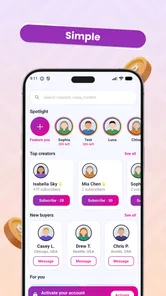



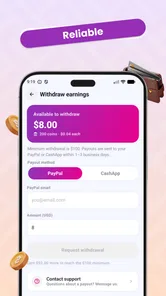
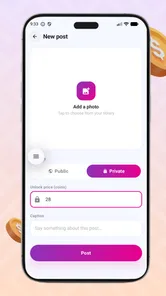


Analysis by Reviewed
FeedFan - Instafeet App is a beauty-focused social app built around discovering creators and their exclusive content. I approached it less like a general photo feed and more like a focused place for following people whose work or style interests me. That distinction matters: it is not trying to replace every social platform on your phone. Its appeal comes from bringing verified creators and their content into one dedicated experience.
After spending time with the app, my overall impression is that it will suit users who prefer a creator-centered feed instead of a broad, noisy timeline. The free entry point makes it easy to explore, while the presence of paid content means you should treat it as a browsing app first and a purchasing platform only after checking what you actually want. The best reason to try FeedFan is its focused relationship between creator and follower, not a long list of unrelated social tools.
How FeedFan feels in everyday use
I find FeedFan easiest to judge when I treat each visit as a small, deliberate check-in rather than an invitation to keep scrolling. This section looks at how that focused rhythm can help you decide which creators deserve your attention and when it may be better to step away. A useful starting habit is to choose one reason for opening the app before you begin browsing.
A focused way to discover creators
The central idea is simple: connect with verified creators and view content that may not appear in their usual public channels. In practice, that gives the app a more intentional feel than opening a mainstream social network and hoping the recommendation system eventually shows something relevant. I found the concept most useful when I already knew the kind of creator I wanted to follow, or when I wanted to browse within the beauty and creator-content space without mixing it with news, messages, shopping alerts, and unrelated trends.
That focus can also be a limitation. A specialized feed is only as useful as the creators available to you and the quality of their updates. Someone looking for a huge variety of general entertainment may feel more at home on a conventional social app. FeedFan makes more sense for a user who values a narrower, more personal selection and is comfortable spending time deciding which creators deserve attention.
The word “verified” is important to the experience because it gives the creator side of the app a clearer identity. Still, I would not treat verification as a substitute for personal judgement. Before following or paying for anything, I would look at how consistently a creator posts, whether the content matches my interests, and whether the promised value feels clear. That habit is particularly useful in any app where exclusive material can involve purchases.
What the free starting point means
FeedFan is free to install, so the initial decision is low risk. You can explore the app’s basic environment before deciding whether it belongs in your regular routine. The app is aimed at teenagers and older users, which is reflected in its Teen content rating, but I would still recommend that younger users involve a parent or guardian when paid content or creator interactions enter the picture.
More From Our News Desk

 Gmail
GmailGmail in a Busy Inbox: Who Benefits Most?
From first account to crowded workday, Gmail earns its place through dependable search and flexible sorting—but its best fit depends on how much inbox maintenance you can tolerate.

 Prime Video
Switching to Prime Video: What Changes in Your Viewing Routine
Prime Video can make a compelling second home for streaming, but switching means learning a different catalog, rental layer, and route from browsing to playback.

 Universal TV Remote Control
Universal TV Remote Control Works Best as a Reliable Backup
A phone remote earns its place through quick setup and reliable habits. Here is how to get more from Universal TV Remote Control—and where its limits show.

 Weather - By Xiaomi
Weather by Xiaomi Review: Clear at a Glance, Less Clear Up Close
Xiaomi’s weather app makes everyday forecasts quick to scan, but its calm surface can leave useful details and recovery paths harder to find than they should be.

 X
XX Under Pressure: Can It Recover When Posting Goes Wrong?
A resilience-focused review of X, examining setup, mistaken posts, interruptions, weak connections, and the gaps that matter when recovery needs to be dependable.

 Clash of Clans
Clash of Clans Is Won Between the Battles
Its raids are quick; its community is a long-term project of coordination, teaching, rivalry, and shared responsibility—with all the friction that entails.
Latest News



The commercial model is worth understanding before you become heavily invested in a creator. In-app purchases range from $4.99 to $99.99 per item. That is a wide gap, so I would avoid treating every locked post or exclusive offer as an impulse purchase. My practical approach would be to begin with free browsing, identify one or two creators I genuinely care about, and set a personal spending limit before unlocking anything.
This workflow avoids a common mistake: paying because a post is presented at the exact moment curiosity is highest. A creator-focused app can make that temptation stronger because the content feels more personal than a normal advertisement. FeedFan is easier to enjoy when you decide in advance what kind of access is worth paying for.
Speed expectations while browsing
From a user’s perspective, the app’s speed matters mainly during feed browsing, creator discovery, and opening exclusive material. Those are the moments when delays become noticeable because the experience depends on moving from one piece of content to the next without losing interest. I found the best approach was to use it in short, deliberate sessions rather than expecting it to serve as an endlessly active social hub.
I would not judge FeedFan solely by how quickly a feed opens on one connection. Creator content can be more demanding than a simple text timeline, especially when images or other media are involved. If something takes time to appear, the cause may be the network, the size of the content, or the device handling the request. That makes a stable connection more important than chasing the newest phone.
A useful speed habit is to separate discovery from viewing. I would first browse creator profiles and save mental notes about who interests me, then return to the strongest candidates when I have enough time to view their content properly. This reduces the frustration of opening several media-heavy posts while distracted or connected through an unreliable network.
What happens during heavier use
FeedFan is likely to feel most demanding when you rapidly move between multiple creator profiles, open several exclusive items, and keep the app active for a longer session. That pattern creates more work than checking one profile and leaving. If the app begins to feel less responsive during a long browsing session, my first response would be to close other demanding apps, return to FeedFan, and continue with a smaller number of profiles at a time.
I also recommend avoiding a large number of simultaneous purchase decisions. This is not only a financial precaution; it keeps the experience organized. When several creators and locked items compete for attention, it becomes harder to remember why you wanted a particular item. A simple note of the creator, the type of exclusive content, and the reason it interests you can make the process calmer and more deliberate.
For users who keep many apps open, resource use may become more noticeable on older or entry-level devices. I would not assume that a short browsing session and a long media-heavy session place the same demand on a phone. The practical test is whether FeedFan remains comfortable after your normal routine: discovering creators, opening content, switching away briefly, and returning. If it struggles only after extended use, shorter sessions may be the sensible compromise.
Stability and recovering from interruptions
Reliability is not just about avoiding crashes. For an app like this, it also means recovering sensibly when a connection drops, the operating system pauses the app, or you switch to another task. I pay attention to whether I can return to the same creator without repeating unnecessary steps, and whether an incomplete content load is easy to retry. Those recovery details matter more than a fast opening animation.
My advice is to treat a failed load as a temporary interruption rather than immediately repeating a purchase action. First check whether the content has actually opened, whether the connection has returned, and whether the app has refreshed. This is especially important when paid items are involved. A cautious pause can prevent confusion and gives you a clearer record of what you intended to access.
If FeedFan stops responding, the sensible recovery sequence is straightforward: leave the screen, reopen the app, and check the creator or content area before trying the same action again. On a device that is low on free storage or running many background processes, basic maintenance can help any media-oriented app behave more consistently. I would also keep the application updated when a newer version is offered, since the current release is version 1.1.3.
Device requirements and practical limits
FeedFan supports Android devices running version 7.0 or later. That gives it a broad compatibility range, including phones that are not recent, but operating-system compatibility does not guarantee identical performance across every model. Two devices can meet the same minimum requirement while differing greatly in memory, storage speed, display quality, and network hardware.
On an older phone, I would use the app with realistic expectations. It may be perfectly suitable for checking a few creators, while longer sessions involving repeated media loading could feel less comfortable. If your phone already struggles with other social or visual apps, FeedFan is unlikely to transform that hardware into a smooth browsing device. In that situation, a newer lightweight social app may be a better everyday choice, even if it offers less specialized creator content.
Storage is another practical consideration. Creator-focused browsing can encourage you to keep returning to media, and a phone with very little free space often behaves poorly under general use. I would clear unnecessary downloads and review unused apps before blaming FeedFan for sluggishness. This is a small preparation step, but it gives the app a fairer test and can improve the entire phone.
Battery expectations should also be tied to your habits. Occasional profile checks are very different from extended sessions spent opening one item after another. I would use FeedFan in shorter blocks if battery life is important, especially while travelling or away from a charger. That is not a criticism unique to this app; it is a sensible trade-off for any service centered on visual creator content.
A realistic daily scenario
Imagine finishing work or school and wanting a brief, focused break. Instead of opening a general social network and scrolling through a mixture of posts, you open FeedFan to check two creators you already follow. You browse their latest material, decide that one free update is worth saving your attention for, and leave without spending anything. On another day, you may find an exclusive item from a creator you trust and decide whether its price fits your budget.
That scenario shows where the app works best: intentional visits with a clear reason for opening it. It is less convincing as a background app that you keep refreshing throughout the day. If you want constant conversation, broad community tools, or a large range of unrelated content, a traditional social network will probably feel more complete. If you want a smaller creator list and more purposeful checking, FeedFan has a clearer advantage.
How it compares with familiar alternatives
The usual alternative is a mainstream social platform where creators publish public posts, short videos, messages, and promotional updates. Those services generally offer more variety and larger communities, but they also bring more distractions. FeedFan’s narrower purpose can make it easier to concentrate on selected creators, particularly when exclusive content is the reason you are visiting.
Another alternative is a subscription or membership service dedicated to one creator. That option can be better when you already know exactly whose work you want and prefer a single, clearly defined relationship. FeedFan becomes more attractive when you want to discover several verified creators in one place rather than managing separate services for each person.
There is a trade-off between breadth and focus. A large social platform may be better for finding conversations, trends, and spontaneous recommendations. A single-creator service may be better for a deep, predictable membership. FeedFan sits between those choices: it offers a dedicated creator environment without requiring you to commit to only one person from the start. Whether that middle ground helps depends on how you normally discover content.
Who should try it, and who should skip it
I would recommend FeedFan to users who enjoy beauty-related creator content, want a more focused feed, and are willing to evaluate paid access carefully. It is also a reasonable option for someone tired of general-purpose social apps where relevant posts are buried under unrelated recommendations. The free installation makes exploration simple, and the Teen rating communicates the intended audience clearly.
I would skip it if you are looking for a fully featured replacement for a major social network, a free-only content experience, or a platform where every creator interaction is guaranteed to be equally valuable. The purchase range means budget-conscious users should be especially deliberate. I would also hesitate if your phone is already near its performance limits or if you mainly want text conversations rather than creator media.
The developer is FF Media official, and the app has passed 10K+ installs. That gives FeedFan an established starting audience, although I would still make my decision based on the creators and content I can actually access rather than the install figure alone. A specialized service grows more useful when the people you care about are active there.
Small habits that improve the experience
My first tip is to build a small, intentional following list instead of subscribing to every interesting profile immediately. A crowded creator feed can recreate the same problem FeedFan is meant to solve: too much content and not enough attention. Start with a few profiles, watch how consistently they match your interests, and expand only when the app remains easy to manage.
My second tip is to separate curiosity from commitment. Open an exclusive item because you understand what you are considering, not simply because it is locked. With individual purchases ranging from $4.99 to $99.99, a personal spending rule is more useful than relying on the excitement of the moment.
My third tip is to test the app during both a quick visit and a longer session. A fast check tells you whether the basic navigation suits you; a longer session reveals whether your device, battery, and connection remain comfortable. This two-part test is more informative than deciding after the first launch.
Finally, keep recovery in mind. If a page fails to load, avoid repeatedly tapping a purchase or refresh control. Reopen the relevant creator area, confirm what happened, and then continue. That simple habit protects both your time and your budget while making interruptions less stressful.
My performance verdict
FeedFan’s performance should be judged as part of its focused creator model. It is not an app I would choose for constant, wide-ranging social activity, but it can be a comfortable tool for purposeful browsing when the device and connection are in good shape. Short sessions are the easiest fit, while extended media-heavy use deserves more attention to battery, storage, and background apps.
I like the balance between free exploration and the option to access exclusive material, but the paid range means users need discipline. The app’s strongest quality is its concentration on verified creators; its main weakness is that this focus may feel narrow if your interests are broad or if you expect a complete social ecosystem.
For me, the decision is simple: I would install FeedFan - Instafeet App if I already had creators in mind or wanted a dedicated beauty-content feed. I would not install it expecting a universal social replacement. Used selectively, with sensible purchase limits and realistic expectations for an older device, it offers a more deliberate way to follow creators and explore content that feels separate from the usual public feed.
In the end, FeedFan is best understood as a focused creator-content app rather than an all-purpose network. Its free starting point lowers the barrier to trying it, its Android compatibility reaches older devices, and its exclusive-content model gives committed followers another way to stay connected. The experience is most rewarding when you choose creators carefully, browse with a purpose, and treat every paid item as a considered decision.
FeedFan - Instafeet App Frequently Asked Questions
What devices and operating systems can run FeedFan - Instafeet?
FeedFan - Instafeet is an app in the Beauty category, and its Android minimum operating system is 7.0. Check your device’s software settings before installing so you know it meets that requirement. The app is developed by FF Media official and has a current version of 1.1.3, so keeping your device and app updated can help you access the latest available experience.
Who makes FeedFan - Instafeet, and how can I find the official app?
FeedFan - Instafeet is published by FF Media official. When looking for it, check that the developer name matches before downloading, particularly if search results show similarly named apps. The app’s short description is “FeedFan,” while its summary says it connects users with verified creators and provides access to exclusive content. Downloading from an official app store is a sensible way to reduce the risk of installing an imitation.
What is FeedFan - Instafeet, and what can users do with it?
FeedFan - Instafeet is a social content app focused on discovering and viewing creator profiles, photos, and other feed-based media. After installing it, users can browse available content, explore profiles, and interact with the platform’s features depending on account access and creator settings. The exact experience may vary by region, subscription status, and app updates, so reviewing the current store description is recommended before downloading.
Is FeedFan - Instafeet free to download and use?
The app is free to download, but some content or functions can require registration, in-app purchases, subscriptions, or other forms of payment. Free access does not necessarily mean that every profile or feature is unlocked. Before confirming a purchase, check the pricing, billing period, renewal conditions, and cancellation instructions shown in the app and in the Google Play or App Store listing. In-app purchases range from $4.99 to $99.99 per item.
Do I need an account to use FeedFan - Instafeet?
Some basic browsing may be possible without immediately creating an account, while features such as following creators, saving content, messaging, or accessing restricted material may require registration. Users should expect to provide account details and possibly verify an email address or other information. Use a strong, unique password and review the privacy policy to understand how profile and activity data are handled.
Pros
- Simple interface makes browsing creator profiles quick and straightforward.
- Search and discovery tools help users find new feet-focused content easily.
- Profile previews provide useful context before opening individual posts.
- Regular content updates can keep the feed feeling fresh for returning users.
- Works well for users interested in a specialized social content community.
Cons
- Content quality and posting frequency may vary considerably between creators.
- Some features or profiles may require in-app purchases or paid access.
- The niche focus may limit appeal for users seeking broader social content.
- Privacy and account settings should be reviewed carefully before sharing information.
- The experience may depend heavily on a stable internet connection.











