favorited
- 938.00
- 3.7
- Installs
- 500.00K
- Price
- Free

Screenshots



Analysis by Reviewed
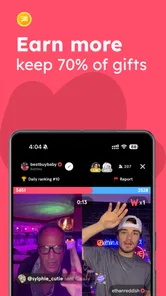
I see Favorited as a lifestyle app for people who enjoy discovering things through live video rather than simply scrolling through a list. Its current identity is built around livestreaming and community, so I’d approach it as a place to spend time watching and joining conversations, not as a conventional directory for cafes, books, or restaurants. That distinction matters: it will suit you best if the social, live element is the point.
What the app is like now
Favorited is free to download, developed by favorited.com, and aimed at Teen users. It has an average rating of 3.8 from around 4,800 ratings, with more than 500,000 installs. Those figures suggest a real audience, though they don’t tell me whether a particular livestream community will match your interests. I’d judge it by the people and topics you find once you open it, rather than treating popularity as a guarantee of a good fit.
Livestreaming is the main draw
The key decision is whether you want a live, participatory experience. Compared with a typical social feed, livestreams can feel more immediate: you can tune in while something is happening and follow a conversation as it develops. Compared with video-on-demand services, though, the experience is less convenient if you prefer to choose a specific clip and watch it on your own schedule. I’d try it when I have time to browse, not when I need a quick, predictable answer.
Who is likely to enjoy it
I’d recommend giving it a look if you like discovering creators and communities through live sessions, or if you enjoy the possibility of interacting instead of watching passively. It can also be a useful option when you want a casual way to fill a break: open the app, see what is happening, and stay only if a stream holds your attention. If you mainly want polished, searchable tutorials, a focused video platform may be a better choice. If you dislike live social spaces or prefer to avoid spontaneous interaction, this may not be your kind of app.
Small choices that improve the experience
One practical approach is to browse with a purpose. Decide whether you’re looking for a particular topic, a new creator, or simply something entertaining, then leave quickly if the live options don’t fit. That keeps an open-ended feed from turning into aimless scrolling. I’d also treat live chat as a public social setting: share only what you’re comfortable saying in front of other viewers, and take a moment to understand a room’s tone before joining in. These habits matter more in real-time spaces than they do when you’re watching a recorded video alone.
For example, if I have a short break after dinner, I might open Favorited to see whether a live session catches my interest. If it does, I can watch for a few minutes and decide whether the community feels welcoming; if not, I can switch to a more targeted app rather than keep browsing out of habit. That’s a better use for it than relying on it to deliver a specific piece of information at a precise moment.
Version, costs, and what to keep in mind
The app’s current version is 2.0.88, and it was released on November 16, 2022. That gives existing users a concrete version to compare against, but a version number alone doesn’t show which features changed or how the experience has evolved. I’d check the current app experience after updating rather than assume older impressions still apply. The download is free, while in-app purchases range from $0.49 to $499.99 per item, so review any purchase prompt carefully and make sure you understand its price before continuing.
More From Our News Desk

Weather by Xiaomi Review: Clear at a Glance, Less Clear Up Close

X Under Pressure: Can It Recover When Posting Goes Wrong?

Clash of Clans Is Won Between the Battles

Android Auto Makes the Case for Quieter Car Software

MobiOffice: Transforming Mobile Productivity with Seamless Integration

EA SPORTS FC™ Mobile Soccer: Redefining Mobile Sports Gaming
A common question is whether it costs anything to start: the app is free, but optional in-app purchases can be substantial, so I’d use it without buying anything until I know what value a purchase would add. Another is whether a live community will suit a younger user; its Teen rating is useful context, but I’d still encourage sensible boundaries around chat and spending. For someone choosing between Favorited and a standard social network, the deciding factor is the live format—not simply the promise of finding people or content. I’d pick Favorited when I want to explore what’s happening now, and a search-first or on-demand service when I already know exactly what I want.
What I’d watch for as a regular user
If you already use Favorited, pay attention to whether the streams you find are consistently worth your time and whether the community makes you want to return. That is a more useful measure of progress than expecting every update to transform the app. If you’re considering joining, start with a short browse, follow the topics and creators that genuinely interest you, and avoid spending just to see whether the basic experience works for you. My overall view is that Favorited is most appealing when its live community feels like a destination in itself; if you want a quiet, tightly organized library, another kind of app will probably serve you better.
Making the live format work for your routine
The strongest way to try Favorited is to treat it as a window onto a live moment, not a task manager for your leisure time. I’d open it when I have enough flexibility to stay if something is engaging, but not when I’m trying to fit a specific answer into a narrow gap. Live content often rewards a little patience, yet patience should not turn into obligation. Give a session a fair chance, then leave if it is not for you. That small boundary makes an open-ended app easier to enjoy without letting it quietly take over a break.
It also helps to decide what “a good session” means before you start. Perhaps you want a lively conversation, a chance to hear a creator’s perspective, or simply a few minutes of light entertainment. Those are different goals, and the same stream may work for one but not another. If you are looking to learn a procedure or verify a detail, a search-led source will usually be more efficient; if you want to see how a conversation unfolds in real time, this format has a reason to exist. I would not judge it by whether every visit produces a discovery. I would judge it by whether the live visits that do catch your attention feel worth the time.
Choosing it over other social apps
Against a conventional social network, Favorited’s appeal is the possibility of arriving while a conversation is happening rather than relying only on posts that have already been published. That can make participation feel more immediate, but it also means the experience depends on what is live when you visit. A broad feed of short clips is often easier when you want quick entertainment without committing to a room or conversation. A video library is better when you need a particular subject, a replayable explanation, or a predictable viewing length. I see Favorited as a complement to those options, not a replacement for all of them.
For someone who already follows creators elsewhere, it may be useful to explore whether the live format adds something different: a less polished exchange, a chance to follow a discussion as it develops, or a sense of being present with other viewers. Those are potential benefits of live viewing, not guarantees that every session will deliver them. If your priority is a carefully curated archive, sorting and search will matter more than immediacy, and a platform designed around recorded material is the more practical pick. If you want spontaneous social discovery, Favorited has a clearer case.
Getting a better first impression
On a first visit, I would avoid trying to evaluate the whole app from one stream. The first session may simply be a mismatch of timing or topic. Instead, browse briefly, notice which kinds of live rooms appeal, and return another time if the idea interests you. This is a useful way to separate a temporary lack of suitable content from a more fundamental dislike of livestreaming. If the live format itself feels tiring, there is little point in pushing through just because the app has an active audience.
For a returning user, the practical question is whether the people and subjects you care about remain easy to find and enjoyable to revisit. The app’s evolution should be judged through that everyday experience: does opening it still lead to something you want to watch, and does joining feel comfortable? The version number offers a point of reference, but not a changelog or a promise about what comes next. I would welcome improvements that make discovery clearer and spending choices easier to understand, while keeping any expectations about future changes separate from what is available now.
Spending and personal boundaries
Because optional purchases can reach a high price, I would make a deliberate rule before using any paid item: decide whether you are willing to spend, set a limit that suits you, and pause to read the full amount whenever a prompt appears. The free starting point is useful for testing whether the community is enjoyable without paying. In my view, a purchase should never be the shortcut for deciding whether the core experience is right for you; spend only if you already understand what you are buying and why it matters to your use.
For families considering the app for a Teen, the age label is a starting point for a conversation, not a substitute for one. I would talk about how to handle public chats, what personal details should stay private, and what to do if an interaction feels uncomfortable. I would also agree on expectations around optional spending before a purchase screen appears. That advice is particularly relevant to live spaces, where a quick reply can feel natural in the moment. A little forethought can help a younger viewer participate without sharing more than they intended or making an impulsive purchase.
Discover and Organize
When I first opened the app, I was greeted with a sleek and intuitive interface. It's designed to help you discover new places and experiences while keeping track of the ones you already cherish. The home screen features a feed of recommendations based on your interests, which I found surprisingly accurate. It's like having a personal assistant who knows exactly what you love.
Personalized Recommendations
The magic of Favorited lies in its recommendation engine. The more you use it, the better it gets at suggesting things you'll love. I was impressed by how quickly it learned my preferences. One of the coolest features is the ability to follow other users and see what they're favoriting. It's a great way to discover hidden gems you might not stumble upon otherwise.
Easy Navigation and Use
Navigating the app is a breeze. You can easily search for specific places or browse by category. Whether you're looking for a cozy cafe or a lively bar, Favorited makes it easy to find exactly what you're in the mood for. Plus, it allows you to create lists of your favorite places, so you can keep everything organized and accessible.
Stay Updated
One of my favorite features is the notifications. You can set alerts for new events or promotions at places you love. This way, you'll never miss out on a happy hour special or a book signing by your favorite author. It's like having a little insider tip-off right in your pocket.
Overall, Favorited is a must-have app for anyone who loves exploring new places and keeping track of their favorite spots. It's user-friendly, packed with useful features, and it feels like it was designed just for me. If you're someone who hates missing out on the latest trends or events, give it a try. You won't be disappointed!
A note on what to expect
There is a noticeable tension between the live-community experience and the place-discovery tools described in the later feature impressions. I would not assume that a recommendation feed, venue search, lists, or event alerts define the current app simply because those details appear in older accounts. The clearest current picture is the live social experience, so I would assess the app on that basis first and treat any place-focused functions as something to verify in the version you are using. That keeps expectations grounded and helps avoid choosing it as a dependable local guide when what you actually need is current business information.
In practical terms, use a dedicated maps or local discovery service when you need opening details, directions, or a reliable shortlist for tonight. Favorited makes more sense when your goal is to see what a live community is doing and decide whether you want to join in. That distinction also answers a common concern about whether the app is useful without purchases: you can begin with the free experience and decide whether its social side earns a place in your routine before considering any optional spending.
My recommendation
I would try Favorited if the live format sounds appealing and you are comfortable with the variability that comes with real-time communities. Go in with a simple purpose, keep your first visits short, and judge the app by the topics and people you actually encounter rather than by its audience size or feature promises. If what you want is searchable information, a quiet collection of saved places, or content you can pause and replay on demand, another app is likely to be more useful. For a viewer who enjoys spontaneous discovery and conversation, though, it is worth a careful look.
favorited Frequently Asked Questions
Who develops Favorited, and what kind of app is it?
Favorited is a lifestyle app developed by favorited.com. Its store summary presents it as a place to join a fast-growing livestream community, so users looking for a social, creator-focused experience may find it relevant. The app is free to download, with optional in-app purchases available. Its audience rating is Teen, which is worth considering before installing it for a younger user.
What is Favorited, and what does it do?
Favorited is an innovative app designed to enhance your social media experience by allowing you to bookmark and organize your favorite posts, videos, and images across various platforms. It acts as a personal hub where you can easily access, categorize, and share your preferred content with friends and followers, making content curation more streamlined.
Is Favorited available for both Android and iOS devices?
Yes, Favorited is available for download on both Android and iOS devices. The app is designed to be compatible with a wide range of smartphones and tablets, ensuring that users across different platforms can enjoy its features. You can find it on the Google Play Store and the Apple App Store.
How does Favorited ensure the privacy and security of my saved content?
Favorited takes privacy and security seriously by implementing robust encryption methods to safeguard your data. The app ensures that your saved content is accessible only to you, with no third-party access. Users can trust that their bookmarks and personal information are protected from unauthorized access and data breaches.
Can I share my saved content with others using Favorited?
Absolutely! Favorited allows you to share your saved content seamlessly with friends and followers across various social media platforms. Whether it's a funny meme or an insightful article, you can easily share your favorite content with just a few taps, enhancing your social media interaction and engagement.
Pros
- User-friendly interface for easy navigation.
- Customizable lists for organizing favorites.
- Cross-platform syncing available.
- Offline access to saved content.
- Fast search functionality.
Cons
- Limited free version features.
- Occasional sync delays.
- Ads in the free version.
- No dark mode available.
- Limited customization options.











