FastVid AI: Photo to Video
- 11.00
- 3.4
- Installs
- 100.00K
- Price
- Free

Screenshots
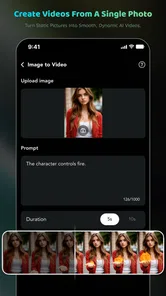
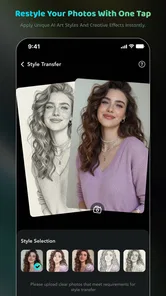
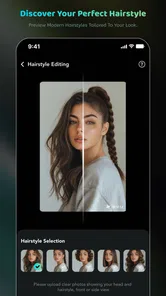
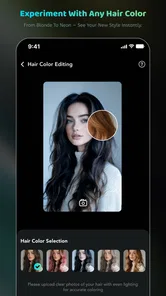
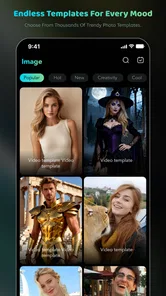
Analysis by Reviewed
Turning a still image into something that feels alive is the main reason I would open FastVid AI: Photo to Video. It is a free lifestyle app from Ankit20 that combines AI video creation with photo editing, magic effects, and templates. Rather than treating a photograph as a finished image, it gives you a quicker way to present that image as a short visual moment. That focus makes it more interesting than a basic photo filter, although it also means it is not a full replacement for a serious video editor.
I tested it with the mindset of someone who wants to make a shareable clip without spending a long time learning a complicated timeline. The appeal is easy to understand: start with a photo, apply a visual treatment or template, and shape it into a more dynamic result. The experience is aimed at casual creators, social posts, personal memories, and quick experiments rather than filmmakers who need detailed control over every frame.
The app sits in the lifestyle category, carries a Mature 17+ content rating, and is available at no upfront cost. Its average rating is 3.5 from roughly a hundred ratings, while its install count has passed the hundred-thousand mark. Those figures suggest a product with a real audience but also a mixed experience, so I approached it as a useful creative shortcut rather than a polished professional suite.
Making a still photo feel like a video
The most important capability here is the photo-to-video workflow. A normal photo editor asks me to improve a single frame; this app encourages me to think about presentation, movement, and mood. That difference matters when the original picture is good but looks flat in a gallery, messaging thread, or social feed.
In practical terms, the tool is most useful when I have one strong image and want to give it a little more presence. A portrait can become a short visual greeting, a travel photo can be turned into a more engaging memory, and an ordinary product or food picture can be presented with more energy. The result is not necessarily a complete story on its own, but it can make one image easier to notice.
The included magic effects and templates are important because they reduce the amount of creative planning required. Instead of beginning with a blank editing canvas, I can start from a visual direction and decide whether it suits the picture. This is helpful for people who know what they want to communicate but do not know how to build the effect manually.
The real advantage is speed from idea to shareable visual. I do not have to assemble a project from several clips just to make one photograph feel less static. That makes the app especially approachable for quick personal content, where spending half an hour editing would defeat the purpose.
More From Our News Desk

Weather by Xiaomi Review: Clear at a Glance, Less Clear Up Close

X Under Pressure: Can It Recover When Posting Goes Wrong?

Clash of Clans Is Won Between the Battles

Android Auto Makes the Case for Quieter Car Software

MobiOffice: Transforming Mobile Productivity with Seamless Integration

EA SPORTS FC™ Mobile Soccer: Redefining Mobile Sports Gaming
What changes when a photo becomes a clip
A still image gives me complete control over one moment. A generated video adds a sense of sequence, even when the source material is only one photograph. That can make the image feel more suitable for a status update or a short social post, but it also introduces a risk: movement and effects can distract from the subject if the chosen treatment is too strong.
I found that the best results come from matching the effect to the image instead of choosing the most dramatic option. A clean portrait usually benefits from restraint, while a celebratory picture may handle a more noticeable template. This is a small but meaningful distinction. The app can provide the ingredients, but it cannot decide whether a particular visual style fits the emotion of the original photograph.
That is why I would not judge the app only by how impressive an effect looks in isolation. The better question is whether the finished clip still feels like the photo I wanted to share. When the answer is yes, the animation adds value. When the effect becomes the main subject, the result can feel decorative rather than personal.
How I would use the workflow in practice
I would begin with a photo that already has a clear subject and reasonable composition. AI effects can make an image more active, but they cannot reliably rescue a picture that is blurry, poorly framed, or visually confusing. Starting with a stronger source image gives the template less work to do and makes the final result feel more intentional.
After selecting the image, I would preview several styles rather than committing to the first one. The useful comparison is not just “which looks coolest?” I would check whether the subject remains easy to recognize, whether the effect changes the mood in a desirable direction, and whether the visual treatment feels appropriate for the person or event shown.
For a family memory, I would favor a subtle presentation that keeps attention on the people. For a playful greeting, I might accept something more expressive. For a small business post, I would use the tool only if the effect supports the product instead of making the post look like a generic template. This kind of selection is where the app rewards a little patience.
One practical tip is to keep the original photo untouched and treat the generated version as a separate presentation copy. That gives me freedom to try different effects without losing the clean image I may want later. It also helps when the same picture needs different treatments for a private message, a celebration, and a public post.
A realistic everyday scenario
Imagine I have taken a picture of a birthday cake before the guests arrive. The image is attractive, but a plain still photo does not convey the anticipation of the moment. I could use the app to turn it into a short visual greeting, choose a template that fits the celebration, and send it to relatives who cannot attend.
In that situation, the value is not professional production quality. It is the ability to create something warmer than a static attachment without opening a desktop editor or collecting several video clips. The finished piece can act as a quick invitation, a reminder, or a small memory to share after the event.
The same workflow could suit a seller photographing one handmade item, a traveler revisiting one landmark photo, or a parent creating a simple message from a child’s drawing. In each case, the app works best when the user has a clear purpose for the image. It is less useful when the goal is to produce an entire narrative from a single photograph.
Where it fits beside ordinary alternatives
A conventional photo editor is usually better when I want careful cropping, color correction, retouching, or precise adjustments. A traditional video editor is better when I need multiple clips, exact timing, layered audio, captions, transitions, and a carefully controlled sequence. FastVid AI occupies the space between those two options: it is more expressive than a static filter and simpler than a full editing timeline.
That middle position is its strongest argument. Someone who finds standard video software intimidating can get a more animated result without learning a large collection of tools. On the other hand, a user who already enjoys detailed editing may find the experience limiting because templates and automated effects do not offer the same level of control.
I also would not choose it as my only tool for important work. If a presentation, advertisement, event film, or client deliverable needs consistent branding and exact revisions, a dedicated editor is the safer choice. The app is better viewed as a fast creative layer for individual images, not as a complete production environment.
The tradeoffs behind the convenience
Automation saves time, but it also reduces predictability. A template can produce a pleasing result quickly, yet the user may have less influence over exactly how the image is treated. That tradeoff is acceptable for casual sharing, but it becomes more noticeable when I want a particular visual rhythm or a very specific mood.
The free entry point is another reason to try it, but the app includes in-app purchases ranging from around two dollars to nearly a hundred dollars per item. I would pay close attention to the purchase screen before confirming anything, especially if I am experimenting casually. A free download does not mean every creative option follows the same cost model.
The Mature 17+ rating is also worth noticing before recommending it to younger users. Parents should not assume that an app centered on photos and effects is automatically suitable for children. I would make the age rating part of the decision, particularly on a shared family device.
The current version is 1.0.2, so I would keep expectations realistic about polish and consistency. A relatively early version can be perfectly usable while still feeling less refined than established editing platforms. If a particular effect behaves differently from what I expected, I would treat that as part of the app’s developing character rather than relying on it for a time-sensitive professional project.
Small decisions that improve the result
One non-obvious lesson is that the most detailed photograph is not always the best source. Effects need visual space to work. A crowded image may become harder to read once motion, overlays, or decorative treatment are added. A picture with one clear subject often gives the generated result a stronger center of attention.
A second useful approach is to create the visual for its destination. A clip intended for a private message can be personal and understated, while a public post may need a clearer opening impression. I would avoid choosing a style simply because it is fashionable; the right template depends on whether the viewer should feel warmth, excitement, humor, or curiosity.
A third tradeoff involves repetition. Templates are convenient, but using the same kind of treatment for every image can make a personal feed feel predictable. I would reserve the most recognizable effects for moments where they add meaning and use simpler treatments for ordinary updates. That keeps the app from turning every photograph into the same visual pattern.
I would also review the finished clip before sharing it, even when the process feels automatic. Look for faces or important details that have become visually crowded, sudden changes that weaken the mood, and effects that make the image feel less authentic. A quick preview is a small step, but it separates a thoughtful result from an impulsive export.
Who will get the most from it
FastVid AI is a good match for people who have plenty of photos but little interest in learning complex video software. It can help casual creators make a birthday greeting, a travel memory, a simple announcement, or a more engaging post from one image. It is also suitable for someone who wants to experiment with AI-assisted visual ideas without starting from a blank project.
It may be particularly useful for users who feel that their pictures are meaningful but visually quiet. The app provides a bridge between keeping a photo private and turning it into something with a little more movement. That does not guarantee a remarkable result every time, but it lowers the effort needed to try.
I would recommend skipping it if you need exact editing control, a multi-scene story, dependable professional output, or a carefully managed brand style. In those situations, a dedicated video editor will usually be the better investment of time. I would also hesitate to recommend it to anyone uncomfortable with the Mature 17+ rating or with the possibility of optional purchases inside a free app.
My final take after using the concept
What I like most about FastVid AI is that it focuses on a specific creative problem: making one photograph feel more active without asking me to become a video editor. The combination of AI video generation, photo editing, effects, and templates gives casual users a practical starting point, especially when speed matters more than precision.
Its limitations are closely tied to that strength. The faster and more automated the workflow becomes, the less control I have over every detail. The mixed 3.5 average rating reflects a product that may appeal strongly to some users while leaving others wanting more refinement or flexibility. With over a hundred thousand installs, it has clearly found interest, but I would still approach it as a focused tool rather than a universal editing solution.
My recommendation is simple: try it when you have a strong single photo and a clear reason to give that image motion. Keep the original, compare styles carefully, preview before sharing, and remember that the free download can lead to optional purchases. Used with those expectations, FastVid AI: Photo to Video can be a convenient way to turn everyday pictures into more expressive visual messages.
FastVid AI: Photo to Video Frequently Asked Questions
What devices and operating systems can run FastVid AI: Photo to Video?
FastVid AI: Photo to Video is listed for Android devices running Android 7.0 or later. Before downloading, check your device’s Android version and make sure you have enough available storage for the app and the videos you create. The app is categorized as a Lifestyle app, and its current version is 1.0.2.
Is FastVid AI: Photo to Video appropriate for all ages?
FastVid AI: Photo to Video carries a Mature 17+ content rating, so it may not be suitable for younger users. Parents and guardians should review the rating and decide whether the app is appropriate before allowing a download. The app is developed by Ankit20 and is intended for people interested in creating and editing AI-assisted video content.
What is FastVid AI: Photo to Video, and what can it do?
FastVid AI: Photo to Video is a creative app designed to turn still images into short animated videos using artificial intelligence. After selecting a photo, users can apply motion effects, transitions, templates, music, and other visual adjustments to create content suitable for social media, messaging apps, or personal projects. Results can vary depending on the image quality and selected effect. Its store summary describes it as an AI video generator and photo editor with magic effects and templates.
How do I create a video with FastVid AI: Photo to Video?
To create a video, open the app, choose one or more photos from your device, and select an available animation style or AI effect. You can usually customize the duration, music, transitions, text, and aspect ratio before previewing the result. Once satisfied, export the finished video to your device or share it directly through a supported platform.
Does FastVid AI: Photo to Video require an internet connection?
An internet connection may be required for some of the app’s AI-powered features, especially when image processing takes place on remote servers. Basic editing options may work differently depending on the version installed and the device being used. If you plan to create videos while traveling or offline, check which tools remain available without a connection before starting a project.
Pros
- Turns still photos into engaging short videos with minimal effort.
- AI effects can add motion and energy to otherwise static images.
- Useful for social media posts
- stories
- and quick visual presentations.
- Simple workflow makes it approachable for users without editing experience.
- Supports creative experimentation through varied animation and style options.
Cons
- AI results may vary depending on image quality and subject composition.
- Some advanced effects or exports may require a paid subscription.
- Generated videos can feel repetitive if used with similar templates.
- Processing may take longer on older phones or with high-resolution photos.
- Privacy terms should be checked before uploading personal or sensitive images.











