

Exxon Mobil Rewards+
- 11.31K
- 3.6
- Installs
- 1.00M
- Price
- Free
Screenshots
Analysis by Reviewed
I tend to get the most from a fuel rewards app when I treat it as part of my usual stop, not as a reason to take a detour. That is the practical way I’d approach Exxon Mobil Rewards+: check whether an Exxon or Mobil station already fits the route, then use the app to handle the rewards and, where available, payment. The distinction matters because points can make a regular purchase more worthwhile, but they do not automatically make a station the best choice for every trip.
A routine that keeps the stop simple
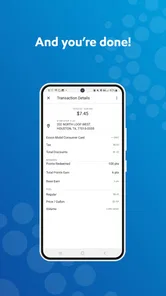
Before driving, I’d open the app while parked and check the nearby station options and any offer that could affect the purchase. At the pump, having the app ready before I pull in is a small but useful habit: it avoids juggling navigation, payment, and a pump number while standing beside the car. Once I’m finished, I’d take a moment to confirm that the visit registered as expected rather than assuming every stop qualifies.
For a recurring commute, this can become a steady routine: use a familiar participating station, keep the rewards account available, and save points for a later purchase instead of treating each stop as a separate event. If I’m on a long drive, I’d still compare route convenience and fuel needs first. A rewards balance is only useful when the station works for the journey.
Settings and habits worth checking
I’d review account and payment choices before relying on app payment for the first time. The original text describes linking a card, but I would not make a new payment method part of a rushed fuel stop; setting it up in advance gives me time to check the details and understand the on-screen steps. I’d also keep notifications purposeful. Promotions can be helpful, but a constant stream of alerts can make it harder to notice the offer that actually fits a planned purchase.
A useful habit is to read the terms attached to an offer before buying extra items or choosing a different fuel grade. Rewards programs can distinguish between purchases, participating locations, or promotional conditions, so I would not assume every item earns the same way. That quick check helps avoid spending more just to chase points, which is a poor trade if the purchase was not needed anyway.
Where it fits among navigation and fuel apps
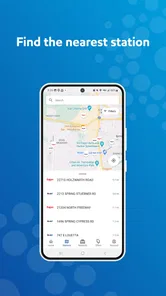
As a Maps & Navigation app, this is most compelling for drivers whose routine already includes Exxon or Mobil. It is not a substitute for a general-purpose map when I need broad route planning, traffic context, or a comparison across many fuel brands. I’d use a navigation app to decide where to go, then turn to Rewards+ when an Exxon or Mobil stop makes sense and I want to manage the visit or rewards.
That makes it a focused companion rather than an all-purpose travel tool. A driver who regularly buys fuel from whichever station is cheapest may prefer a broader station-search option and use this app only when its locations are convenient. Someone who rarely visits Exxon or Mobil is less likely to build a useful routine around it. The best fit is a driver who values a familiar brand network and is willing to check the conditions instead of assuming every stop offers the same benefit.
More From Our News Desk

 Weather - By Xiaomi
Weather by Xiaomi Review: Clear at a Glance, Less Clear Up Close
Xiaomi’s weather app makes everyday forecasts quick to scan, but its calm surface can leave useful details and recovery paths harder to find than they should be.

 X
XX Under Pressure: Can It Recover When Posting Goes Wrong?
A resilience-focused review of X, examining setup, mistaken posts, interruptions, weak connections, and the gaps that matter when recovery needs to be dependable.

 Clash of Clans
Clash of Clans Is Won Between the Battles
Its raids are quick; its community is a long-term project of coordination, teaching, rivalry, and shared responsibility—with all the friction that entails.

 Android Auto
Android Auto Makes the Case for Quieter Car Software
The car interface is no longer judged by how much it can do, but by how quietly it helps. Android Auto shows what drivers now expect—and what still gets in the way.

 MobiOffice: Word, Sheets, PDF
MobiOffice: Transforming Mobile Productivity with Seamless Integration
MobiOffice: Word, Sheets, PDF is redefining mobile productivity with a surprising blend of functionality and innovation.

 EA SPORTS FC Soccer Mobile 26
EA SPORTS FC™ Mobile Soccer: Redefining Mobile Sports Gaming
Dive into EA SPORTS FC™ Mobile Soccer, where immersive gameplay and strategic depth transform mobile sports gaming.
Latest News



Limits that matter on a real trip
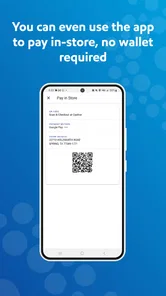
Phone-based payment adds convenience, but it also makes the stop depend on having the phone ready and being comfortable with the app’s pump-selection process. If the app is slow to open, the signal is poor, or I am unfamiliar with the station layout, paying another way may be the smoother option. I would keep a backup payment method available rather than treating the app as the only way to finish a fill-up.
The same caution applies to rewards: points are a gradual benefit, not an instant guarantee of meaningful savings on every visit. I’d compare the final value with the effort of using the program and avoid changing my route or buying more than planned just to accumulate them. The app is most useful when it quietly fits a purchase I was already making.
Using rewards without letting them run the trip
For me, the best way to use this app is to keep it in a supporting role: navigation helps decide where I’m going, while the rewards account helps organize a stop I already planned. The distinction is easy to lose when an offer catches my eye, so I make the route and the needed purchase the starting point. Only then do I check whether the app adds a worthwhile benefit.
What’s the Buzz About?
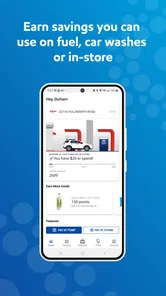
The Exxon Mobil Rewards+ app is essentially your one-stop shop for all things Exxon Mobil and Mobil. Whether you’re looking to earn points on every drop of fuel, snagging a snack, or even that much-needed car wash, this app has got your back. You earn points for every purchase, which can be redeemed for savings on future buys. It’s like having a little piggy bank that fills up every time you fuel up.
Easy Peasy Setup
Getting started with the app is a breeze. Download it from your app store, sign up with a few quick taps, and you’re in. The user interface is intuitive, making navigation as smooth as a well-oiled engine. Plus, linking your credit card for payments is straightforward, so you don’t have to fumble around with cash or cards at the pump.
Perks and Points
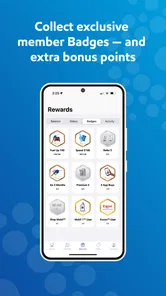
Now, let’s get to the juicy part - the rewards. Every time you make a purchase at participating Exxon and Mobil stations, you earn points. These points rack up faster than you’d think! For every gallon of fuel, you earn points, and even more for premium fuel. Not to mention, there are bonus points for car washes and in-store purchases. Before you know it, you’ve got enough points to shave a nice chunk off your next purchase.
Seamless Payments
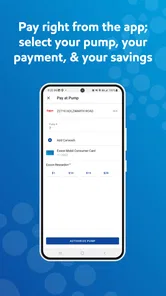
One of the standout features is the seamless payment process. You can pay directly through the app, which makes the whole process super convenient. Just pull up to the pump, open the app, select your pump number, and voila! You’re ready to fuel up without ever having to leave your car. It’s perfect for those cold or rainy days when you don’t want to step outside more than necessary.
Stay in the Loop
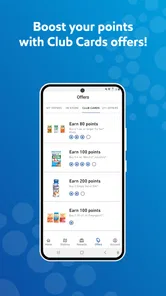
The app does a great job of keeping you informed about the latest promotions and offers. You’ll get notifications about exclusive deals, ensuring you never miss out on a chance to earn extra points. It’s like having a personal assistant constantly scouring for deals on your behalf.
In conclusion, the Exxon Mobil Rewards+ app is more than just a rewards program; it’s an essential companion for anyone who finds themselves frequently at the pump. It’s streamlined, efficient, and genuinely rewarding. If you haven’t jumped on the bandwagon yet, now’s the time. Trust me, your wallet will thank you, and hey, who doesn’t love a good deal?
Who will get the most from it
I’d recommend it most to someone whose weekly routine already includes Exxon or Mobil: a commuter who passes the same station, a family making regular fuel stops, or a driver who often combines fuel with a wash or a quick shop visit. ExxonMobil develops the app, and its focused design makes more sense when those locations are already convenient. It is free, rated for Everyone, and has a 3.7 average from around 33,000 ratings, so I’d see it as a practical loyalty tool rather than a must-have for every driver.
Making a familiar stop work harder
Picture a weekday evening when I’m already stopping for fuel on the way home. I can check an offer before leaving, use the app at a participating station, and let the points build toward a later saving. The useful trick is to make the reward follow the errand, not the other way around: I wouldn’t drive farther or choose a more expensive option simply because a promotion looks tempting. If I’m buying a snack or arranging a car wash anyway, checking whether that purchase qualifies is a sensible extra step.
For someone new to the app, I’d start with one ordinary visit rather than trying every option at once. Learn where pump selection appears, see how the purchase is handled, and check the rewards activity afterward. That gives a clear feel for the workflow before depending on it during a busy stop. If a transaction does not go as expected, keep the receipt and use the app’s available account support rather than assuming the points will appear immediately.
Version, compatibility, and the trade-off
The current release is version 6.3.0, and the app requires operating system version 9 or later. It has been available since July 30, 2013, has more than one million installs, and has drawn around 11,000 written reviews. Those figures suggest an established product, but the everyday test is simpler: whether the stations you actually use participate and whether the app’s payment flow feels dependable on your phone.
I would skip it if I rarely visit Exxon or Mobil, prefer to pay only at the pump, or mainly need a tool to compare fuel options across brands. In those cases, a general navigation app or a broader station finder is a better first choice; this one is strongest when loyalty, offers, and a familiar stop all line up. For regular customers, I think it can make an existing routine a little more organized and rewarding, provided the points remain a bonus rather than the reason for the trip.
Small habits that make the workflow smoother
I find it useful to separate the decisions that are easy to make at home from those that belong at the station. Before leaving, I can check whether a participating location is already convenient and review any promotion I might use. At the pump, I only need to follow the relevant payment or rewards steps. This reduces the temptation to read offer details while other drivers are waiting and makes it easier to notice if I have selected the wrong pump.
For a household with more than one regular driver, it is worth agreeing on a simple routine rather than assuming everyone will handle the account in the same way. The person using the app should know which account and payment method they intend to use, and whoever tracks household spending can check the transaction afterward. That is especially helpful when a fuel purchase is combined with a shop or wash, since the receipt gives a practical reference if the rewards activity looks different from what was expected.
Choosing between loyalty and flexibility
There is a real trade-off between sticking with a familiar brand for rewards and keeping every stop open to comparison. If I’m travelling through an unfamiliar area, I would not plan a detour around a points balance without first checking distance, timing, and the available alternatives. A general map or station-finding tool is better for comparing the broader field; this app becomes useful after I have decided that an Exxon or Mobil location fits the trip.
That division also helps answer whether it is worth installing if I already use another navigation app. I would not replace a route planner with a brand-focused rewards tool. I’d keep the two roles distinct: use the navigation app for the journey and this one for eligible purchases and the pump process at a suitable station. Drivers who want one place to search across brands may find that arrangement less convenient than a broad fuel finder, while regular customers can appreciate the narrower focus.
What I would check before depending on it
Before making app payment part of a commute, I would try it during a low-pressure stop and give myself time to read each prompt. That first run is a chance to learn how the pump number is chosen and how the purchase is confirmed, without holding up a rushed departure. I’d also keep the ordinary payment option within reach. The app can simplify a familiar routine, but a phone-based process should not become a single point of failure when the signal or the device is uncooperative.
I would also treat an offer as a set of conditions, not as a blanket promise that every purchase qualifies. Checking the location and purchase requirements before changing what I buy is a modest habit with a practical payoff: it keeps the rewards program from nudging me into unnecessary spending. If an offer does not suit the stop I already planned, skipping it is often the smarter choice.
A fit for regular customers, not every driver
In practical terms, the app suits someone who can name a few Exxon or Mobil stations they already pass and expects to return to them. For that driver, using the account consistently and checking the transaction afterward can make rewards easier to follow than trying to remember each visit. It is less compelling for an occasional visitor, a driver whose main priority is comparing prices across brands, or anyone who wants to avoid doing payments on a phone.
My verdict is that this is a focused companion for a familiar fuel routine, not a reason to change one. Its useful habits are simple: check before setting out, learn the pump flow while parked, read offer conditions, and keep another payment method available. If those steps fit the way you already buy fuel, the app can add convenience and a gradual rewards benefit. If they do not, a broad navigation or station-search app is likely to serve you better.
Exxon Mobil Rewards+ Frequently Asked Questions
Can I use Exxon Mobil Rewards+ to find a station while planning a drive?
Yes. Exxon Mobil Rewards+ is listed in the Maps & Navigation category and has a station-finding purpose alongside its rewards features. It can be useful when you want to look for Exxon or Mobil locations as part of a trip, then use the same app to engage with the fuel rewards program. Its focus is specifically on Exxon and Mobil stations.
Is Exxon Mobil Rewards+ available on both Android and iPhone?
Exxon Mobil Rewards+ is available for Android and iOS devices, and its minimum operating system requirement is version 9. Check your device’s software version before downloading so you can confirm it meets that requirement. The app is free to download, and its content rating is Everyone, making it suitable for a broad audience.
What devices and operating systems can run Exxon Mobil Rewards+?
Exxon Mobil Rewards+ is available for Android and iOS devices, and its minimum operating system requirement is version 9. Check your device’s software version before downloading so you can confirm it meets that requirement. The app is free to download, and its content rating is Everyone, making it suitable for a broad audience.
What is Exxon Mobil Rewards+ and how does it work?
Exxon Mobil Rewards+ is a loyalty program app designed for users who frequently purchase fuel, snacks, and other items at Exxon and Mobil stations. By using the app, users can earn points on each purchase, which can later be redeemed for discounts on fuel or eligible in-store purchases. Simply sign up, link your payment methods, and start earning rewards with every transaction.
How can I earn and redeem points with Exxon Mobil Rewards+?
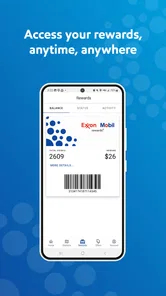
You can earn points with Exxon Mobil Rewards+ every time you make a purchase at participating Exxon and Mobil stations. Simply use the app or provide your linked phone number at checkout. Points can be redeemed for savings on fuel or in-store purchases. Typically, 100 points equate to a $1 discount, but it's always good to check the app for the latest redemption offers and details.
Pros
- Easy to use interface.
- Quick points accumulation.
- Convenient for regular Exxon users.
- Allows tracking of fuel purchases.
- Offers mobile app support.
Cons
- Limited to Exxon and Mobil stations.
- Points expire after a year.
- No cash back option.
- Requires personal data for signup.
- Limited customer support.











