

EOOEIES
- 129.00
- 4.6
- Installs
- 50.00K
- Price
- Free

Screenshots
Analysis by Reviewed
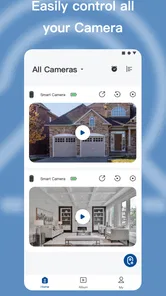
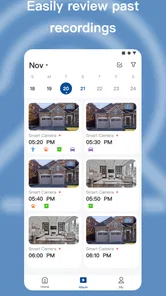
I approached EOOEIES as a practical home-monitoring tool rather than as another app I would open for entertainment. Its purpose is straightforward: it connects with EOOEIES security cameras so I can check what is happening around home from a smartphone. That focus makes the buying decision less about collecting features and more about fit. If I already use the matching camera system, the app may be the most direct way to view it. If I am still choosing a camera platform, the important question is whether keeping the phone experience tied to this ecosystem suits the way I want to monitor my space.
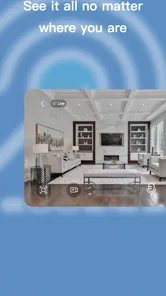
In daily use, I find the strongest appeal is convenience. A camera is much more useful when checking it does not require sitting in front of a computer or handling a separate recorder. I can think of several ordinary moments where a phone-based view matters: checking the entrance while I am away, looking in on a room before going to bed, or confirming what caused a sound outside. Those are small tasks, but they are exactly the reason most people install a security camera app in the first place.
How I Would Decide Whether EOOEIES Fits
I would make this section a practical fit check: begin with whether the matching EOOEIES camera is already part of your plan, then consider how often you would genuinely use phone-based monitoring. I’d also test the normal viewing routine before paying for extras, so the decision reflects a useful habit rather than the initial appeal of a new camera.
Start with the camera, not the app icon
The first decision criterion is compatibility with the hardware I actually own or plan to buy. EOOEIES is not presented as a general-purpose viewer for every camera brand. It is the companion app for EOOEIES security cameras, so its value depends on being inside that camera family. That is an important distinction from broader smart-home apps, which may bring devices from several manufacturers into one place but can involve more setup or fewer brand-specific controls.
I would therefore install it with a clear goal: manage and monitor an EOOEIES camera from a phone. I would not choose it simply because the app itself is free. The free download removes one barrier to trying the software, but it does not turn an incompatible camera into a supported device. For someone comparing camera systems, the hardware and the phone experience should be treated as one purchase decision.
Think about the kind of monitoring you actually do
EOOEIES makes the most sense for people who want occasional or routine visual checks rather than a complicated surveillance workstation. A homeowner might use it to glance at a doorway, keep an eye on a shared area, or check a property while traveling. I see it as especially suitable for users who prefer a simple phone workflow and do not want to learn a large security platform before they can perform a basic check.
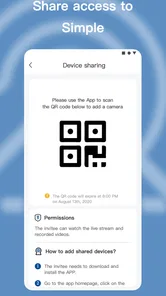
It is also worth considering who else will use the camera. If several family members need access, the ease of the app matters, but so does the way the wider camera system handles sharing and account management. I would test that before relying on it for a household. A system that works well for one primary user may feel less convenient when multiple people need regular access.
More From Our News Desk

 Gmail
GmailGmail in a Busy Inbox: Who Benefits Most?
From first account to crowded workday, Gmail earns its place through dependable search and flexible sorting—but its best fit depends on how much inbox maintenance you can tolerate.

 Prime Video
Switching to Prime Video: What Changes in Your Viewing Routine
Prime Video can make a compelling second home for streaming, but switching means learning a different catalog, rental layer, and route from browsing to playback.

 Universal TV Remote Control
Universal TV Remote Control Works Best as a Reliable Backup
A phone remote earns its place through quick setup and reliable habits. Here is how to get more from Universal TV Remote Control—and where its limits show.

 Weather - By Xiaomi
Weather by Xiaomi Review: Clear at a Glance, Less Clear Up Close
Xiaomi’s weather app makes everyday forecasts quick to scan, but its calm surface can leave useful details and recovery paths harder to find than they should be.

 X
XX Under Pressure: Can It Recover When Posting Goes Wrong?
A resilience-focused review of X, examining setup, mistaken posts, interruptions, weak connections, and the gaps that matter when recovery needs to be dependable.

 Clash of Clans
Clash of Clans Is Won Between the Battles
Its raids are quick; its community is a long-term project of coordination, teaching, rivalry, and shared responsibility—with all the friction that entails.
Latest News



What the published app profile tells me
This is a free tools app from EOOEIES, aimed at Everyone and available for devices running Android 7.0 or later. It was released on May 25, 2023, and the current version is 1.0.4. Those details make it approachable for many Android users, including people who are not using the newest phone, although I would still keep the app updated and make sure the phone itself is supported by the camera setup.
The app has a 4.6 average from around 1.2 thousand ratings, with about 129 written reviews, and it has passed 50 thousand installs. I read that as a sign that the basic idea is landing well with a meaningful group of users, not as proof that every household will have the same experience. Camera apps are unusually dependent on the model of camera, network conditions, phone permissions, and the user’s expectations, so a strong overall rating should inform the decision without replacing a compatibility check.
My practical setup approach
If I were setting up EOOEIES for the first time, I would begin close to the camera and router rather than trying to complete the process from another room. That simple choice reduces one common source of confusion: not knowing whether a problem comes from the app, the camera, or a weak connection. I would also decide in advance where the camera will be placed and what it genuinely needs to show. A camera pointed at a busy window, reflective surface, or unnecessary private area can create more alerts and uncertainty than useful information.
After setup, I would spend a few minutes checking the view at different times of day. A doorway that looks clear in daylight may have glare after sunset, while a room that seems well framed from one angle may leave an important approach outside the picture. This is not a special feature of the app, but it is a useful EOOEIES workflow: use the phone view to judge whether the camera’s position supports the monitoring goal before assuming the software is the problem.
Where EOOEIES Wins and Where Another Category Fits Better
Here I’d compare the focused camera companion approach with broader smart-home dashboards and more specialized surveillance tools. The key trade-off is whether you value a direct, single-camera-family workflow or need to bring several brands and a larger monitoring setup together; that distinction helps identify when another category may suit your home better.
The advantage of a focused companion app
EOOEIES wins when I value a direct relationship between camera and app. There is less conceptual distance between the device in the room and the screen in my hand. Instead of building a broad smart-home dashboard around many unrelated products, I can treat this as a dedicated way to access EOOEIES cameras. For a first-time camera owner, that narrower purpose can be easier to understand.
That focus is also helpful in a realistic everyday scenario. Imagine I am away for the evening and receive a message from a neighbor that something may have happened near the front entrance. I do not need to open a desktop system or remember a complex monitoring routine. I can use the phone app to check the camera’s view, decide whether the situation needs attention, and then contact someone nearby if necessary. The useful part is not that the app replaces judgment; it gives me a quicker way to make an informed judgment.
Another strength is the low initial software cost. The app itself is free, so I can evaluate the phone side of the experience without paying simply to download it. However, in-app purchases range from $5.99 to $149.99 per item. That makes it important to distinguish between the cost of getting the app and the possible cost of optional services or features connected to the wider experience. I would review any purchase screen carefully before confirming, especially if the camera is intended for long-term use.
Three less obvious habits that improve the experience
First, I would use the app as a verification tool, not as a substitute for a complete home-safety plan. A camera can help me see what is happening, but it does not automatically prevent an incident. I would combine the phone checks with sensible lighting, secure doors and windows, and a clear plan for contacting a trusted person. This keeps the app in its proper role and prevents the common mistake of treating a live view as total protection.
Second, I would create a short checking routine instead of opening the app repeatedly without a purpose. For example, I might check the entrance before leaving, after arriving home, and whenever a specific concern arises. That approach makes the camera information easier to interpret because I know why I am looking. It also reduces the temptation to react to every unexplained movement or change in the scene.
Third, I would test the app from the places where I will really use it. A camera may look fine when I am standing beside the router but be less convenient when I am outside the home using a mobile connection. I would not assume that a successful first setup proves every remote situation will feel equally smooth. Testing the actual routine early is a better way to decide whether this ecosystem deserves a permanent place in my home.
Where a broader smart-home platform may be better
The usual alternative is a multi-brand smart-home app that brings cameras, lights, sensors, locks, and other devices into one interface. That category may suit me better if my home already contains products from several manufacturers and I want one central dashboard. The trade-off is that a broad platform can be more complicated, and support for a particular camera may not feel as direct as using its dedicated companion app.
A second alternative is a more advanced surveillance platform designed around several cameras, recording workflows, and detailed administration. I would look in that direction if I needed a larger installation or wanted to manage monitoring as a structured security system rather than as a convenient phone check. I am not assuming that EOOEIES cannot handle a particular setup; the point is that a focused camera companion is not automatically the best category for every scale of use.
There is also a privacy and household-management decision. Some users want a camera system that fits into a wider account structure with carefully defined access for different people. Others prefer one brand’s simpler arrangement. Before choosing EOOEIES, I would discuss who should be able to view the camera and when. That conversation is more important than chasing a long feature list, because the wrong sharing arrangement can make a technically good camera uncomfortable to use.
Limitations I would keep in mind
The main limitation is the ecosystem relationship. If I replace the camera with a different brand later, the app may no longer be central to my setup. That creates a switching cost that is easy to overlook when the download is free. I would consider the camera purchase, the learning time, and any optional in-app spending together rather than evaluating only the app’s price.
The second limitation is that a rating cannot tell me how the app will behave with my exact phone, network, and camera placement. A smooth experience for one household does not guarantee identical results elsewhere. I would be patient during setup, keep the phone software current, and avoid judging the entire system after one failed connection attempt. At the same time, repeated friction in my normal location would be a valid reason to choose a different camera category.
I would also be cautious about paying for anything until I understand what it adds to my routine. The purchase range is wide, and a low-cost app can still lead to a much larger total commitment if I add several optional items or services. My advice is to start with the basic monitoring task, identify the exact limitation I am trying to solve, and only then decide whether an additional purchase is worthwhile.
What switching would really involve
Moving to EOOEIES from another camera system is not just a matter of downloading a new app. I would need to consider camera placement, account access, household habits, and whether existing recordings or routines depend on the old platform. Even when the new app feels simpler, everyone who uses the camera has to learn where to find it and how to respond to what they see.
Moving away can be just as inconvenient. The camera may need to be replaced, the new app may require a different account, and any optional purchases made within the old ecosystem may not transfer to another brand. For that reason, I would choose EOOEIES most confidently when I am buying into its camera family for a clear reason, not when I am experimenting with several unrelated platforms at once.
My recommendation for different users
I recommend EOOEIES to someone who owns or intends to use EOOEIES security cameras and wants a straightforward smartphone-based way to monitor home. It is a sensible choice for routine checks, occasional remote awareness, and households that prefer a focused companion app over a large automation dashboard. The free app, Everyone content rating, and support for Android 7.0 or later make the starting point accessible to a broad range of Android users.
I would skip it if I need a camera platform chosen independently of the manufacturer’s app, if I am building a complex multi-brand smart home, or if I want a more specialized surveillance workflow. In those cases, I would compare broader smart-home tools or dedicated security platforms before committing to the EOOEIES ecosystem. The right alternative depends on the scale and structure of the home, not on a generic promise that one app is universally better.
My final view is positive but practical. EOOEIES does not need to be treated as an all-purpose security command center to be useful. Its best role is narrower: giving EOOEIES camera owners a convenient way to look in from a phone and make better-informed everyday decisions. I would install it when the matching camera is already part of my plan, test the real remote-monitoring routine before spending on extras, and keep expectations realistic. Choose it for the camera-and-app fit, not for the free download alone.
For me, that is the clearest reason to recommend it. A focused tool can be more valuable than a crowded alternative when it handles the one task I actually repeat. As long as the EOOEIES hardware matches my needs and I am comfortable with the ecosystem commitment, this tools app is an approachable way to bring home-camera checking onto an Android phone.
EOOEIES Frequently Asked Questions
Can EOOEIES help me monitor my home from my phone?
EOOEIES is a Tools app developed by EOOEIES for using security cameras to monitor your home from a smartphone. Its store summary describes that central purpose, so it may suit someone who wants to keep an eye on home-camera activity through a mobile app. Before downloading, consider whether the app fits your camera-monitoring needs and check its current store page for details relevant to your device.
What operating-system version do I need to install EOOEIES?
EOOEIES requires Android 7.0 or later. Check your device’s Android version before downloading so you can avoid compatibility problems. If you use an iPhone or iPad, review the relevant official store page for compatibility details before installing. Keeping your device’s operating system up to date can also help with app compatibility and security.
What is EOOEIES and what can I use it for?
EOOEIES is an app whose purpose and available features should be checked carefully on its official store listing before installation. Depending on the version and platform, it may provide tools, content, or interactive functions designed for a particular type of user. Read the description, screenshots, developer information, and recent reviews to confirm that its features match your expectations.
Is EOOEIES free to download and use?
The download price and available features may vary between Android and iOS, so users should verify the current store listing before proceeding. Some apps are completely free, while others include advertisements, optional purchases, subscriptions, or locked premium functions. Check the pricing section, subscription terms, and cancellation policy carefully, especially if the app requests payment details during setup.
Is EOOEIES safe and trustworthy to install?
Before installing EOOEIES, download it only from the official Google Play Store or Apple App Store and confirm the developer name, rating, update history, and number of downloads. Pay attention to the permissions requested during installation. If the app asks for access that seems unrelated to its purpose, consider refusing that permission or researching the developer and privacy policy first.
Pros
- Simple interface makes core features easy to find.
- Lightweight design should run smoothly on many devices.
- Useful for quick sessions without a steep learning curve.
- Responsive controls provide a generally comfortable experience.
- Regular use can be convenient for users seeking a focused tool.
Cons
- The app’s purpose may feel too limited for advanced users.
- Some features may require patience to understand at first.
- Performance can vary depending on device and operating system.
- The experience may become repetitive with frequent daily use.
- Privacy and permission details should be checked before installation.








