Email for Outlook, Hotmail
- 65.00
- 3.3
- Installs
- 1.00M
- Price
- Free

Screenshots


Analysis by Reviewed
I find an email app earns a lasting spot on my phone only if it makes a routine task easier without demanding much attention in return. Email for Outlook, Hotmail is aimed at people who want to handle Outlook and Hotmail accounts from a single mobile app. Its first-week appeal is clear: it gives you one place to check messages and move between accounts, rather than making you keep separate inboxes open.
What the first week reveals
The early benefit is less about learning a new way to manage email and more about reducing the small bits of friction around checking it. If Outlook and Hotmail are already part of your day, trying this app is a relatively direct experiment: add the addresses you use, check how account switching feels, and see whether the combined setup actually saves effort. I would give particular attention to the moments when you need to reply, not just the speed of opening the inbox.
That first-week test should include the less convenient parts too. Do the accounts you need show up in the places you expect? Are the alerts useful, or do they create more interruptions? Does the app feel comfortable on the phone you use every day? A quick trial around your normal routine is more revealing than a few minutes spent tapping through menus, because email is a tool you return to in small bursts.
Who will find it useful
If you use one address for personal messages and another for work, appointments, or online purchases, having both within reach can make quick checks less fussy. Picture a weekday commute: you scan a work message, switch to your personal inbox to find a delivery update, then return to the first account without opening a different app. That kind of small convenience is where a combined inbox setup can earn its keep.
It can also suit someone who uses an Outlook or Hotmail address for a specific slice of life, such as family correspondence, bills, or messages from an organization, while keeping a separate account for everyday communication. The useful question is whether those addresses are genuinely checked often enough to justify a place on your phone. An old account that receives only occasional newsletters may not need the same prominence as one tied to appointments or ongoing conversations.
The trade-off is that this is a focused choice, not a universal email home. It makes the most sense if Outlook or Hotmail is already central to your routine. If your day revolves around another provider, or you want one app that fits a broader mix of services, your usual email client may be a better match. I would decide based on the accounts you actually check every week, not on the appeal of putting several inboxes in one place.
Choosing it over familiar alternatives
The obvious alternative is to keep using separate apps for separate accounts. That can make each address feel distinct and reduce the risk of replying from the wrong one, but it means switching between apps when you are handling messages across accounts. A combined app trades some of that separation for convenience. If your inboxes are clearly divided in your own habits, the switch can feel natural; if you rely on strong visual boundaries, separate apps may be safer and easier to understand.
You May Like

Clash of Clans Is Won Between the Battles

Android Auto Makes the Case for Quieter Car Software

MobiOffice: Transforming Mobile Productivity with Seamless Integration

EA SPORTS FC™ Mobile Soccer: Redefining Mobile Sports Gaming

How Microsoft OneDrive Became a Mobile Productivity Giant

How Google Translate Breaks Language Barriers Effortlessly
A general-purpose email client is another option, especially if you regularly use addresses from several providers. Those broader clients may suit a mixed-account setup better, while this app is more appealing when Outlook and Hotmail are the main reasons you need a mail app. I would not choose it simply because one place for everything sounds tidy. First check whether the services you depend on fit the app you intend to use, then judge it by the everyday tasks you actually perform.
First Impressions
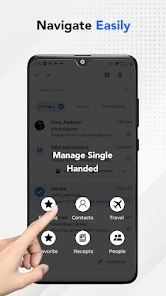
From the get-go, Email for Outlook, Hotmail is all about simplicity and efficiency. The installation process was a breeze, and within a few taps, I was up and running. The app’s interface is clean and intuitive, which is a huge plus for those of us who’ve had to deal with cluttered screens in other email apps. You can tell they’ve put thought into the user experience, making it super easy to navigate through your inbox.
Features and Functionality
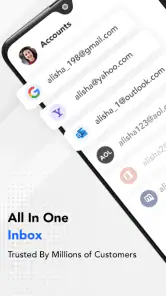
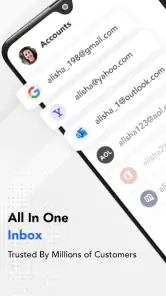
One of the standout features is the seamless integration with Outlook and Hotmail accounts. It’s like having your desktop email setup right in your pocket. The app supports multiple accounts, so if you’re managing personal and work emails, this app has got you covered. You can easily switch between accounts without breaking a sweat.
For recurring use, I’d treat the inbox as a place to process messages rather than a running to-do list. A practical habit is to search for a sender or a phrase when you need to recover an older message, instead of scrolling through weeks of mail. If you check several accounts, taking a moment to confirm which inbox you’re viewing before replying is a simple safeguard against sending a work response from a personal address.
That account check is especially useful when replying quickly from a notification or while moving between tasks. I would make a habit of verifying both the sender identity and the recipient before sending anything sensitive, committing to a date, or attaching a document. The extra glance is a small cost for avoiding the kind of mistake that can be awkward to correct later. If you have a complicated work process involving shared mailboxes or coordinated team handoffs, though, a specialized workplace client may fit better than a straightforward mobile inbox.
The app also offers a robust set of notification settings. Whether you want to be alerted for every single email or just the important ones, you can customize it to suit your needs. Plus, the search functionality is top-notch. I was able to dig up an email from months ago in seconds, which is a lifesaver when you’re in a hurry.
Month-to-month value and upkeep
Email is a habit app: its value comes from dependable access, not from novelty. The app is free to install, while in-app purchases range from $2.99 to $26.99 per item, so I’d check what an optional purchase covers before paying and decide whether it solves a problem you encounter regularly. With a 3.3 average from around 3.4 thousand ratings and over a million installs, it has a sizeable audience, though those figures alone don’t tell me whether it will suit your particular workflow.
I would judge its value after the novelty of consolidating accounts has worn off. If it remains the easiest place to check the addresses you use every week, it has earned its space through repetition. If you find yourself opening another mail app anyway because it better matches your habits, then the convenience is not enough to justify maintaining two routines. Since the app is free to install, testing that distinction before considering an optional purchase is a sensible way to decide.
A little upkeep can prevent the convenience of multiple accounts from turning into inbox clutter. I’d review which addresses deserve notifications, mute the ones that rarely need an immediate response, and periodically remove accounts I no longer use. If you rely on email for time-sensitive work, keep your important account’s alerts easy to notice; if constant prompts interrupt you, checking at chosen times may be calmer. That balance is personal, and it is worth adjusting after the first few days rather than accepting every default.
One useful routine is to separate “needs a reply” from “worth keeping” when clearing messages. Search helps when you need to retrieve something later, but it does not make an overflowing inbox easier to scan in the moment. I’d use a short check-in to deal with quick replies and identify messages that need more time, then leave longer tasks for a deliberate follow-up rather than repeatedly reopening the same email. This keeps the app in the role of a communication tool instead of letting every message dictate the day.
Performance
Performance-wise, the app runs smoothly with no noticeable lags. Emails load quickly, and attachments open without a hitch. Even with multiple accounts linked, the app handles everything like a champ. Battery usage is minimal, which is great news for those of us who are constantly on the move and need our phones to last through the day.
In a practical daily scenario, that means checking a work note before a meeting, then switching to a personal address to confirm an appointment or delivery while waiting for transport. The app’s value in that moment is not a sophisticated workflow; it is keeping those checks close together. I would still avoid treating a quick glance as a guarantee that a message has been fully handled. If something needs a thoughtful response, flag it in your own system or return to it at a time when you can focus.
Where friction can build
Multiple inboxes are helpful only when the boundaries between them remain clear. Switching accounts is convenient, but it also asks you to stay alert about the address you are using, especially when a reply contains private details or a work commitment. For important messages, I’d take a second to check the sender account and recipient before sending; that small pause matters more than shaving off another tap.
The same convenience can create a false sense that everything is equally visible. When several addresses sit within reach, a message may be easy to check but still easy to overlook if you do not have a regular way to revisit it. I would decide which account is the one that needs prompt attention and build a simple checking rhythm around it. If you need formal assignment, shared tracking, or a clear team record of who owns a response, a dedicated work platform is a better fit than relying on an individual email inbox.
Notifications can also become the part that wears thin. An alert for every message may be useful during a busy period, but repeated low-priority pings can make email feel like an endless interruption. I’d start with fewer alerts and expand them only for accounts where a quick response genuinely matters. People who prefer a tightly managed, feature-rich work system may be happier in a dedicated workplace client, while those who want minimal alerts may prefer to check email manually.
Security
In today’s age, we can’t talk about email apps without touching on security. The developers have done a solid job here. The app uses strong encryption protocols, ensuring that your emails and data are kept secure. There’s also an option for two-factor authentication, adding an extra layer of protection, which gives peace of mind when accessing sensitive information.
Even with account protection in place, I would treat the app as one part of a careful email routine, not a reason to relax about suspicious messages or unexpected requests. Check the sender and the destination of links before acting, and take extra care when an email asks for personal or financial details. These habits matter regardless of which inbox you use, and they are particularly worthwhile when several accounts are accessible from the same phone.
A1 Office Apps is the developer, and the app is listed as suitable for Everyone. It was released on July 3, 2021; the current version is nativemail-1.36.0-play, and it requires Android 8.0 or later. Those details make it relevant to check compatibility before installing on an older device. I’d also keep the app and phone software current and use account-level protection for mail that matters, rather than treating any email client as a substitute for careful account security.
Who should look elsewhere
I would skip this app if Outlook and Hotmail are only occasional parts of your online life, or if your primary address belongs to a different provider and you want a single home for all of your mail. In that case, your existing provider’s app or a broader email client may reduce the amount of switching and setup you need to do. It is also not my first choice for someone who expects a highly organized team workflow from a mobile inbox; the appeal here is convenient personal access, not managing a whole department’s correspondence.
It may also be the wrong fit if having several accounts together makes you less confident about which identity is active. Some people find separate apps reassuring because the account boundary is obvious before they even open a message. If that describes you, a few fewer taps are not worth the extra checking. The best setup is the one that lets you respond correctly and consistently, not necessarily the one with the fewest icons.
Does it deserve a regular place?
For someone already using Outlook or Hotmail who wants a straightforward way to check more than one account, this is a reasonable option to try. Compared with switching among separate provider apps, its appeal is convenience; compared with a general-purpose email client, its strongest fit is narrower. The right choice depends less on a long feature checklist than on whether it makes your daily inbox check simpler without adding distractions.
My answer to the practical question of whether to keep it is to watch what happens after the first week. If you use it naturally for the accounts that matter, its place on your phone is justified. If it becomes one more inbox to maintain, or its alerts pull you into messages that could wait, adjust the notification routine before deciding it has failed. If a simpler setup still feels better, there is no reason to keep a separate app just because the first impression was pleasant.
Overall, Email for Outlook, Hotmail is a reliable and efficient email app for anyone looking to keep their digital correspondence organized and accessible. It’s a great choice for both personal and professional use. So, if you’re in the market for a new email app, this one might just be worth checking out!
Email for Outlook, Hotmail Frequently Asked Questions
Is Email for Outlook, Hotmail free to download, and are there in-app purchases?
Email for Outlook, Hotmail is a free communication app, so you can download it without paying upfront. It also offers optional in-app purchases, priced from $2.99 to $26.99 per item. Consider whether those purchases suit your needs before choosing them; the app’s free price does not mean every optional feature or item is included at no cost.
Which devices can install Email for Outlook, Hotmail?
The app is for Android devices running Android 8.0 or later. Before downloading, check your device’s Android version and available storage in the Play Store. The app is developed by A1 Office Apps, and its age rating is Everyone. These details can help you decide whether it is suitable for your device and the people who may use it.
What features does the Email for Outlook, Hotmail app offer?
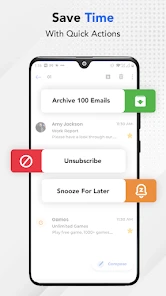
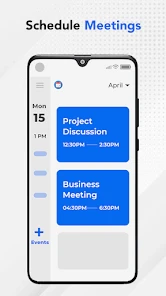
The Email for Outlook, Hotmail app offers a wide array of features including seamless integration with Outlook and Hotmail accounts, real-time email notifications, calendar synchronization, and the ability to manage multiple email accounts in one place. It also provides enhanced security features such as two-step verification, as well as a user-friendly interface for easy navigation.
Is the Email for Outlook, Hotmail app secure?
Yes, the app is designed with security as a top priority. It includes two-step verification to ensure that only authorized users can access your email account. Additionally, the app encrypts data both in transit and at rest, protecting your sensitive information from potential threats. Regular updates are also provided to patch any security vulnerabilities.
Can I use the Email for Outlook, Hotmail app offline?
While the Email for Outlook, Hotmail app primarily requires an internet connection to send and receive emails, it does offer offline capabilities. Users can compose emails offline, which will be sent automatically when an internet connection is re-established. Additionally, emails and calendar events can be accessed offline, allowing users to stay productive even without connectivity.
Pros
- Seamless integration with Microsoft services.
- User-friendly interface with customizable views.
- Efficient email organization and categorization.
- Robust security features for data protection.
- Supports multiple email accounts in one place.
Cons
- Limited offline functionality.
- Occasional sync issues with calendar events.
- Ads can be intrusive for free users.
- Lacks advanced email filtering options.
- Some features require a subscription.

- Category
- Communication
- Version
- nativemail-1.36.0-play













