

Electrify America
- 2.82K
- 4.6
- Installs
- 500.00K
- Price
- Free

Screenshots
Analysis by Reviewed
For an EV driver, a charging app matters most when a stop needs to fit into a real trip, not just look convenient on a map. I find Electrify America most useful as a companion for locating and planning around its own charging network. It is a free Maps & Navigation app from Electrify America LLC, and its role is refreshingly focused: help drivers find a place to charge and keep track of charging activity. That focus is useful, but it also means I would not treat it as a complete substitute for broader route planning.
How quickly it helps with a charging decision
When I open a charging app, I want to answer a practical question quickly: is there a relevant stop that fits the trip? Electrify America’s focused purpose makes it a natural place to check when I am considering one of its stations. I would search and compare possible stops while parked or before setting off, rather than expecting the app to replace the wider decisions involved in planning a journey.
There is an important distinction between app speed and charging speed. A map or session screen can help me organize a stop, but it cannot make the vehicle charge faster or guarantee that a planned break will take a particular amount of time. I would leave flexibility in the schedule, especially on a long drive, and avoid planning an arrival so tightly that any delay becomes a problem.
For a familiar local trip, I may only need the app when I know I will use the network. For an unfamiliar route, I would check station options ahead of time and decide on a backup before the battery is low. That workflow is more useful than repeatedly searching at the last moment, and it keeps the phone from becoming a distraction while I am driving.
The High-Speed Charging Network
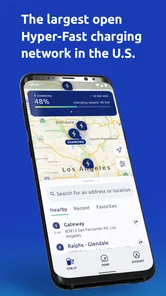
Electrify America offers one of the most extensive and high-speed charging networks across the United States. Whether you’re in bustling urban centers or exploring remote highways, there’s a good chance you’ll come across one of their stations. What I really appreciate about this app is the real-time station locator feature. It’s like having a personal assistant in your pocket, helping you plan your route strategically, so you're never too far from a power boost. Its network includes over 500 charging stations, which gives the app a clear purpose for drivers whose journeys pass through places it serves.
Planning a stop, not just finding a pin
The practical question is not simply where a station is, but whether it makes sense for the journey I am taking. I would check the app before leaving, identify a likely stop, and keep a second option in mind rather than waiting until the battery is low to search. On a familiar commute, that preparation may be unnecessary; on a longer drive, it can reduce last-minute detours. The app is most valuable when an Electrify America station already fits the route, not when I need a neutral map of every charging network.
Compared with a general maps app, a network-specific tool can keep charging information and session details together. A general map may be better for seeing a wider range of destinations and services, while this app is the more focused choice when I want to plan around Electrify America. I would use both when traveling somewhere unfamiliar: the wider map for the overall journey and this app to check the network I intend to use. That division of labor is more dependable than assuming one app will answer every route question.
More From Our News Desk

 Weather - By Xiaomi
Weather by Xiaomi Review: Clear at a Glance, Less Clear Up Close
Xiaomi’s weather app makes everyday forecasts quick to scan, but its calm surface can leave useful details and recovery paths harder to find than they should be.

 X
XX Under Pressure: Can It Recover When Posting Goes Wrong?
A resilience-focused review of X, examining setup, mistaken posts, interruptions, weak connections, and the gaps that matter when recovery needs to be dependable.

 Clash of Clans
Clash of Clans Is Won Between the Battles
Its raids are quick; its community is a long-term project of coordination, teaching, rivalry, and shared responsibility—with all the friction that entails.

 Android Auto
Android Auto Makes the Case for Quieter Car Software
The car interface is no longer judged by how much it can do, but by how quietly it helps. Android Auto shows what drivers now expect—and what still gets in the way.

 MobiOffice: Word, Sheets, PDF
MobiOffice: Transforming Mobile Productivity with Seamless Integration
MobiOffice: Word, Sheets, PDF is redefining mobile productivity with a surprising blend of functionality and innovation.

 EA SPORTS FC Soccer Mobile 26
EA SPORTS FC™ Mobile Soccer: Redefining Mobile Sports Gaming
Dive into EA SPORTS FC™ Mobile Soccer, where immersive gameplay and strategic depth transform mobile sports gaming.
Latest News



Choosing the right tool for the route
The choice between this app and a multi-network charging map depends on what I need to decide. If I already expect to stop at an Electrify America station, a dedicated app keeps my attention on that network. If I am comparing providers, looking for the broadest set of possibilities, or trying to build a route without a preferred network, a multi-network tool is a better starting point. Neither approach is automatically best for every drive: the useful one is the one that answers the question I have at that moment.
My practical habit would be to plan with a general map, then check the network-specific app for the intended stop. I would also keep an alternative in mind instead of treating the first result as a guaranteed solution. This is especially worthwhile when I am traveling through an unfamiliar area or have a firm arrival time. The trade-off is an extra check, but it is a small one compared with needing to rethink a route after I have already committed to it.
User Experience and Interface
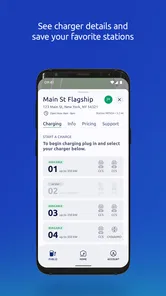
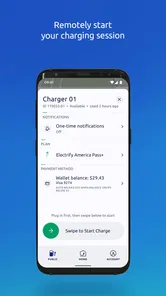
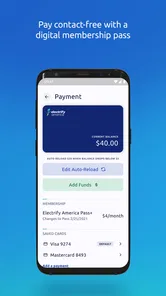
Let’s talk about the user interface. It’s sleek and intuitive, something I always look for in an app. The design is clean, with a focus on functionality. Finding a station, checking its status, and even making payments is incredibly straightforward. I found myself navigating through the features with ease, which is a huge plus when you’re on the go.
Speed in this context is about getting to useful information quickly, rather than assuming the app can make a charging session itself faster. For a quick stop decision, a direct station search is more helpful than digging through unrelated tools. During a busy travel day, I would look up the intended stop before setting off, then avoid repeatedly reopening the app while driving. The driver should make those checks while parked; a simple interface does not make phone use behind the wheel a good idea.
Using it on a busy travel day
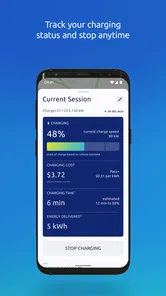
Consider a realistic day trip: I am leaving home for an appointment in another town, with enough time to plan but not enough to improvise comfortably on the way. Before departing, I would check whether an Electrify America station fits the route and decide where I would look next if it did not. Once parked at a stop, I could use the app to follow charging activity and make the break useful, rather than constantly checking the phone while moving.
If the route changes, I would not assume that the original station remains the most sensible choice. I would stop somewhere safe, reassess the journey with a broader map, and then return to the network app if an Electrify America location still makes sense. This is a simple but useful distinction: the dedicated app helps with its own charging context, while the overall trip may require a wider view.
Features That Stand Out
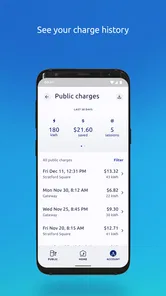
One of the standout features is the ability to track your charging history. For those of us who love data (and let's be honest, who doesn’t in this digital age?), this is a treasure trove of information. You can view details about your past charging sessions, including costs and locations, which is great for budgeting and planning purposes.
That history can be more than a record to browse: I would use it to compare repeated trips, notice which stops I tend to choose, and make a more realistic estimate of charging expenses for a similar journey. It is especially handy for someone who charges away from home often. For a driver who rarely uses public charging, the record may have little day-to-day value, so it is a useful extra rather than a reason on its own to install the app.
A small but practical way to use that record is to review it after a trip, while the route is still fresh in my mind. I can remember which stop was convenient and whether it was a sensible place to take a break, then use that experience when planning a similar journey. I would not treat past costs as a promise about a future session; the useful point is the personal record of where and when I have charged, not a guarantee that another visit will be identical.
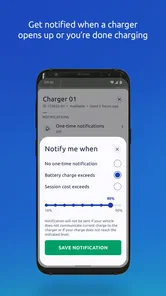
Another handy feature is the notifications system. The app sends you updates on your charging status, so you can grab a coffee or take a quick walk without constantly checking your phone. These little touches make a big difference in enhancing the overall user experience.
Reliability during a real trip
A realistic use case is a driver heading out for an afternoon visit beyond their usual area. Before departure, I would check whether an Electrify America stop suits the route, then use the app to keep an eye on the session while taking a break. If a stop does not fit, I would switch to a broader charging map rather than forcing the trip around this network. That backup habit matters: a station locator is helpful, but sensible planning should leave room for another option.
The app’s value also depends on the situation. In a region where its stations align with my route, it can make the charging routine more organized. If nearby coverage from other providers is more convenient, a multi-network map is the better first stop. I would not rely on a single network’s app as my only plan for a long drive, particularly when timing matters; checking alternatives before setting out is a small effort that can prevent a stressful scramble.
When a second option matters
Reliability for a trip is not only about whether an app opens; it is also about having a workable plan if the first choice no longer suits the journey. I would check a station before departure, but keep a broader charging map available for comparison if plans change. That does not mean carrying out constant checks or trying to predict every possible problem. It means knowing where I would turn next, instead of having to make the whole plan from scratch under pressure.
For everyday use, the best routine is less demanding. If I am making a short trip and already know where I expect to charge, the dedicated app can be enough for that stop. When I am crossing unfamiliar territory, the network’s boundaries matter more: I would not choose a longer detour simply to use this app if another provider or a wider search gives me a more convenient option. That is where a network-specific tool is helpful but not sufficient on its own.
Device fit and everyday trade-offs
The app is rated for Everyone, has an average rating of 4.5 from around 19,000 ratings, and has been installed over 500,000 times. It was released on May 22, 2019, and version 7.29.2 requires Android 8.0 or later. Those details make the compatibility check straightforward for Android users: if a device is older than that minimum, it is not a suitable install. On a compatible phone, I would still keep the app updated and make sure the device has enough battery for navigation and charging tasks during a long day.
For performance, I would judge it by whether it lets me find a relevant station and follow a session without adding needless steps. The app’s focused job should be relatively easy to approach, but the overall experience still depends on the phone, connection, and the charging stop itself. I would avoid interpreting a smooth interface as a guarantee that every trip will be frictionless. If the app or connection is temporarily unhelpful, having a second way to locate charging options is a practical recovery plan.
Phone limits and practical recovery
For Android users, the minimum operating-system requirement is a concrete first check before installing. Beyond that, I would think about the phone as part of the travel setup: if I am using it for maps, session updates, and other trip tasks, preserving battery matters. I would avoid unnecessary screen use while driving and make the important decisions before setting off or after parking. That is more useful than expecting any charging app to solve the broader demands of a long day on the road.
If the app is slow to provide what I need or my connection is not cooperating, I would not keep tapping through the same screen while parked at the roadside. I would use a safe stopping place, try a broader map or another known way to find charging, and revise the plan before continuing. This is a general recovery habit rather than a promise about how the app behaves in every circumstance, and it helps keep the trip from depending on one source of information.
Who will get the most from it
I would recommend it most to drivers who regularly use Electrify America and want a focused way to locate its stations, follow charging activity, and look back at previous sessions. It also makes sense for someone who is new to public charging and wants one network’s app ready before a planned stop. The free price removes a purchase decision, but the app is only useful if its network fits the places the driver actually goes.
It is less compelling as the only charging tool for someone who routinely compares several providers, drives routes where the network is not convenient, or wants one broad view of every available option. In those cases, I would begin with a multi-network service or a general map and keep this app as a supporting tool for relevant Electrify America stops. A driver who rarely uses public charging may not get enough everyday value from charging history or session updates to make it a regular part of their routine.
Ending Thoughts
In conclusion, if you’re an EV owner, Electrify America is a must-have app. It simplifies the entire charging process, offering convenience, speed, and reliability. Plus, it’s continually expanding, so the future looks bright for road trips and everyday commutes alike. So, next time you’re planning a journey, make sure to have this app downloaded, and enjoy the ride with peace of mind.
My recommendation is more specific: it is a sensible free download for drivers who expect to use Electrify America stations and want station finding, session notifications, and charging history in one place. If your priority is comparing several charging networks or building a broader trip plan, pair it with a general map or multi-network charging tool. That way, the app supports the trip without becoming the whole plan.
Electrify America Frequently Asked Questions
Can I use Electrify America to plan a route before I leave?
Electrify America is a Maps & Navigation app intended to help drivers locate public charging stations and plan around them. Its map can help you look for stations near your current location or along a journey, so you can check possible charging stops before setting off. It is worth reviewing the route and station information in the app before you travel.
Does the app show whether a charging station is available?
The app provides station availability information to help you decide where to charge. You can use its map to find nearby locations and review the details shown for a station before driving there. Availability can be useful when comparing possible stops, especially during a trip, but checking the app shortly before you arrive is a sensible way to make your plans.
Can I use Electrify America without an internet connection?
The app is designed around maps, station searches, and charging information, so an internet connection is useful when you need current details or want to access its services. You can explore the app before traveling and familiarize yourself with the map and account options. For a trip, it is practical to check the route and charging locations while you have a reliable connection.
Is Electrify America free to download?
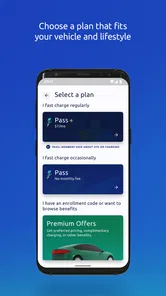
Yes. Electrify America is free to download, so you can install it and explore its map and available features without paying for the app itself. Keep in mind that downloading the app is separate from using charging services, and the app includes pricing information for charging. Checking those details before starting a session can help you understand the cost of a planned stop.
Who develops the Electrify America app?
Electrify America LLC develops the app. It focuses on helping EV drivers find and use Electrify America charging stations, with tools for station searches, route planning, and managing charging activity. If you are considering a download, the developer name can help you distinguish the official app from other apps with similar charging or navigation purposes.
Pros
- Wide network of charging stations
- Fast charging speeds available
- User-friendly mobile app
- 24/7 customer support
- Compatible with most EVs
Cons
- Limited rural coverage
- Occasional app glitches
- Pricing can be high
- Some stations overcrowded
- Membership required for discounts











