EarnIn: Why Wait for Payday?
- 140.54K
- 4.8
- Installs
- 10.00M
- Price
- Free

Screenshots

Analysis by Reviewed
When an expense lands before payday, I think the most important question is not simply how quickly an app can move money, but whether using it fits the way you manage your next paycheck. EarnIn is a finance app from Activehours Inc. that offers a way to access some earned pay early. Its appeal is clear, but I’d treat it as a timing tool, not extra income: money taken now still has to be accounted for when payday arrives.
That distinction matters in everyday use. Imagine your car needs an unexpected repair a few days before payday. An early advance might help you cover it without turning to a more expensive short-term option, but it can also leave less money for groceries or bills later. I’d first check what is due between now and payday, then decide whether receiving part of my pay early solves the problem or merely moves it forward.
Where early access fits—and where it doesn’t
The app is most relevant to someone with earned wages coming in and a short-lived cash-flow gap. It is less suitable if the underlying issue is that regular expenses consistently exceed income. In that situation, repeatedly drawing pay forward can make the next pay period tighter. A bill extension, a conversation with the provider, or a budget adjustment may be a better first step when those options are available.
Compared with a credit card, a bank overdraft, or a payday loan, early access to earned wages works differently: it draws on pay you have already earned rather than offering a conventional line of credit. That difference may make it useful for a one-off timing problem, but it does not make the decision automatic. I would compare the total cost, repayment timing, and effect on my next paycheck before choosing any option.
Trust, setup, and the details I’d check
Getting started involves connecting bank and employment information, so I would pause to review the requested access and the choices presented during setup. I would also look over the app’s current privacy information and account controls before linking financial accounts. That is a sensible habit with any finance app; I would not assume that a familiar interface alone answers questions about data handling.
For work verification, the original experience describes timesheets or a GPS option. Those are meaningfully different choices: a timesheet-based workflow may suit someone with clear records, while location-based verification can raise practical privacy concerns for someone who would rather not use location access. I’d select only the method that fits my work situation and read the permission prompt rather than enabling access without checking what it allows.
One useful habit is to treat an available advance as a ceiling, not a target. Before requesting money, I’d note the amount needed for the immediate expense and the bills due before the next paycheck, then take only what addresses the shortfall. I’d also avoid making a recurring expense depend on an advance; that can turn a temporary bridge into a routine that is difficult to unwind.
More From Our News Desk

 Bolt: Request a Ride
Bolt and the Shift from One-Tap Rides to More Legible Trips
Bolt shows how ride-hailing is shifting from a one-tap taxi request toward a more legible, choice-driven trip, while leaving the hardest questions of price and reliability unresolved.

 Farm Land - Farming life game
Farm Land Review: A Small Island Farm with a Satisfying Loop
A bright, breezy island farm turns a few quick chores into a satisfying cycle of planting, harvesting, expanding, and deciding what to build next.

 Android Auto
’s Community Takes Shape in the Passenger Seat
Its most valuable network is not a public feed but a shared set of routes, voice habits, app integrations, and advice that make driving less isolating—and sometimes more complicated.

 My Talking Angela
 Makes the Virtual Pet Feel Personal
A polished pet-raising game built on small rituals, playful customization, and a character who gives everyday screen time a surprisingly personal rhythm.

 Google Translate
 Review: A Pocket Tool for the Small Frictions of Travel
From menus and signs to quick conversations, Google Translate earns its place by cutting the little delays that make unfamiliar language feel like a barrier.

 Shazam: Find Music & Concerts
Shazam’s Best Trick Is Turning a Song Into a Night Out
A few seconds of recognition can settle an argument, rescue a half-remembered chorus, and point toward a live show. Shazam’s real trick is what happens after the match.
Latest News



Meet EarnIn
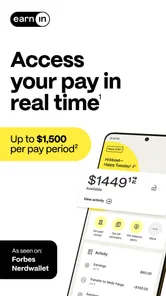
EarnIn is an innovative app that allows you to access the money you've already earned, rather than waiting for your paycheck to hit your bank account. This app is a game-changer for those of us who live paycheck to paycheck or occasionally find our budgets a bit too tight for comfort. Essentially, it brings your payday forward without any hidden fees or high-interest rates.
How Does It Work?
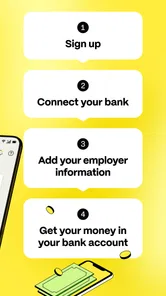
The app operates on a simple principle: you work, you earn, and you get paid as soon as you need it. You connect the app to your bank account and employment information. Once set up, EarnIn keeps track of the hours you've worked and allows you to cash out those hours before payday. It’s a straightforward process that involves uploading your timesheets or using the GPS feature to verify your work location.
What's even better is that the app doesn’t charge you interest or mandatory fees. Instead, it operates on a "pay what you think is fair" model. You can choose to tip the app for the service it provides, which is a refreshing change from traditional payday loans.
Features That Stand Out
One of my favorite features is the Balance Shield. It’s essentially a safety net that prevents overdraft fees by notifying you when your balance is running low. You can even set it to automatically cash out a certain amount when your balance dips below a specified level. Talk about peace of mind!
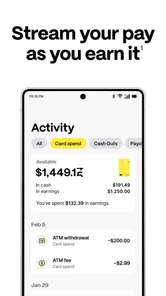
The app also integrates seamlessly with your existing financial routine. You don’t have to switch banks or set up complicated transfers. Plus, there's a handy budgeting tool that helps you track your spending and plan for future expenses. This kind of financial insight is invaluable for maintaining a healthy budget.
What I’d weigh before relying on it
Those features can be convenient, but I would not treat an alert or automatic cash-out as a replacement for checking my account. If I were considering an automatic setting, I’d make sure I understood when it could trigger and how a cash-out would affect the money left for upcoming bills. A tool that responds to a low balance may help with timing, but it cannot fix a budget that is short month after month.
For a practical routine, I’d use the app only after confirming the expense, checking the amount needed, and considering what will remain after payday. I’d also review any optional tip choice each time rather than assuming the same selection is right for every request. That small pause helps keep convenience from hiding the true trade-off: getting money sooner means having less pay available later.
Making a cash-out decision that fits the week
A useful way to decide is to write down the next few unavoidable payments before opening the cash-out screen. I’d separate essentials due before payday from expenses that can wait, then compare the shortfall with the amount I have already earned. This keeps a tempting available balance from becoming a shopping budget and makes it easier to stop once the immediate problem is covered.
For example, if a utility bill is due before payday and a provider cannot move its date, an advance could be more practical than paying a late charge or using a costly form of credit. But if the bill is only one of several expenses that will leave the account short again next week, I’d contact the provider and look at the broader budget first. The key question is not simply whether I can cash out, but whether the resulting payday still covers the rest of the month’s plan.
I would also keep a simple note of each cash-out and its purpose. That makes it easier to spot whether the app is helping with isolated timing mismatches or becoming part of the normal monthly routine. If advances start covering groceries or recurring bills every pay cycle, I’d take that as a prompt to reassess the budget rather than increase reliance on early access.
Who is likely to find it useful
I can see this working best for someone whose pay is dependable but whose expenses occasionally arrive at awkward times. A worker with a one-off repair, an urgent prescription, or a bill that falls just before payday may value a way to bridge a small gap using wages already earned. It may also appeal to someone who wants to avoid a conventional loan for a brief cash-flow problem and is comfortable reviewing bank and work information during setup.
It is a weaker fit for people whose income is irregular, whose hours are difficult to verify, or who cannot comfortably share the information needed to connect accounts and confirm work. Anyone who needs a fixed repayment schedule and a clearly defined borrowing cost may prefer a regulated credit product with terms they can compare in advance. And if the next paycheck is already committed to rent, debt payments, and essentials, receiving part of it early may not create meaningful breathing room.
People who want to avoid any possibility of choosing an optional tip should pay close attention to the choices shown during a request. I would not assume that an optional payment is irrelevant simply because it is not described as mandatory; I’d check the selection before confirming and include any amount I choose in my cost comparison. The practical benefit depends on the whole transaction, not just the fact that the app does not charge interest.
How it compares with other ways to bridge a gap
A credit card can be more suitable when I need a payment method accepted directly by a merchant and can repay the balance under terms I understand. An overdraft may be simpler if my bank already provides one, though I would check its charges and limits rather than treating it as free backup. A payday loan is a different form of borrowing, so I would compare its repayment obligation and total cost carefully instead of assuming that all fast cash options are interchangeable.
Earned-pay access occupies a narrower role: it is about bringing forward part of pay that has already been earned. That can be a helpful distinction for a short gap, but the amount is still money I would otherwise have received later. Unlike a budget adjustment, it does not reduce the expense; unlike a bill extension, it does not change the due date. I’d choose the option that resolves the actual problem with the least strain on the following pay period.
One trade-off worth considering is convenience versus control. An automatic response to a low balance can reduce the need to react in the moment, but it may also make it easier to take money without revisiting the reason for the shortfall. If I prefer to decide case by case, I would keep the process manual and check the upcoming bills before acting. If I do use an automatic setting, I’d review it after a change in income or regular expenses so an old choice does not keep driving new cash-outs.
Privacy choices and account control
Because this is a finance app, I’d treat account linking as a meaningful decision rather than a routine setup tap. I would read the permission prompts closely, use the work-verification method that makes sense for my job, and check the available account controls before providing access. In particular, location-based verification may not suit someone who does not want to grant location permission; a different verification route, if available for their situation, may be preferable.
I’d also review the app’s current privacy information and revisit account access if my circumstances change or I stop using the service. That is a practical check, not a claim about what information is collected or how long it is kept. For me, trust comes from understanding the choices presented and being comfortable with them, rather than relying on popularity or a polished setup experience.
Before making an urgent payment dependent on an advance, I would allow time for the setup and verification steps and avoid assuming that access will be immediate in every case. If the bill is due within hours, calling the provider to ask about a payment arrangement may be the safer first move. A cash-flow tool is most useful when I have enough time to make a considered choice, not when I am counting on an untested process at the last minute.
Why I Love It
Personally, I find EarnIn incredibly empowering. It offers a level of financial flexibility that feels almost liberating. No more stressing over unexpected expenses or waiting anxiously for payday. It's like having a financial safety net that you can rely on anytime.
Moreover, the community aspect of the app sets it apart. You can see how others are using the app and share experiences, creating a sense of solidarity among users. It’s more than just an app—it’s a community of people helping each other make it to the next payday with ease.
EarnIn is free to download, rated for Everyone, and has a 4.7 average from around 279,000 ratings. It has been available since January 21, 2014, and its current version is 16.21, with Android 8.0 as the minimum operating system. Those details make it easy to judge basic compatibility, but they do not change the personal calculation: I’d still check the amount, timing, and account choices before using it.
Its scale—more than 10 million installs and around 138,000 written reviews—suggests many people have tried it, but popularity alone is not a reason to connect a bank account or take an advance. I’d read recent user feedback with a specific question in mind, such as whether the setup suits my kind of employment or whether the cash-out timing works for my bank. Experiences can differ, so I would not plan an urgent payment around an assumption that every request will work the same way.
In conclusion, if you’re looking for a way to make every day feel like payday, I highly recommend giving EarnIn a try. It’s user-friendly, reliable, and has genuinely improved my financial wellbeing. Go ahead and download it—you won’t regret it!
My more cautious recommendation is to consider it when a specific, short-term gap makes early access useful and you have a clear plan for the next paycheck. If you need a predictable borrowing arrangement, prefer not to connect financial or employment information, or are already relying on advances to cover ordinary bills, another approach may be a better fit. Used deliberately, it can offer flexibility; used without checking the follow-on impact, it can make the next payday harder rather than easier.
EarnIn: Why Wait for Payday? Frequently Asked Questions
What information should I have ready before setting up EarnIn?
EarnIn is designed around your work and pay details, so it helps to be prepared to provide employment information and connect a bank account during setup. Those details support the app’s process for tracking work and accessing earned wages. Before you begin, consider whether you are comfortable linking financial information and review the app’s account permissions and setup steps.
Can I use EarnIn to replace a regular paycheck or cover ongoing expenses?
EarnIn is intended to provide early access to a portion of wages you have already earned, rather than function as a replacement for your paycheck. It may offer short-term flexibility between paydays, but cashing out reduces what remains for payday. Consider your ongoing budget and whether you can manage expenses without repeatedly relying on early access before deciding whether the app fits your needs.
Is EarnIn available for my phone?
EarnIn is a finance app for Android and iOS, so it may suit users who want to manage early access to earned wages on a mobile device. The Android version requires Android 8.0 or later. Before downloading, check that your device meets the system requirements and that the app is available through your usual app store.
What is EarnIn and how does it work?
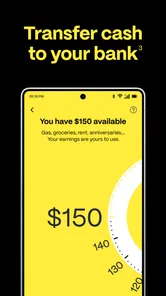
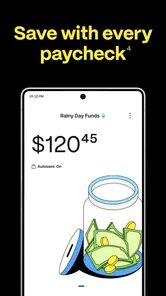
EarnIn is a financial app designed to help employees access their earned wages before payday. Users connect their bank accounts and provide employment information, allowing them to track hours worked and cash out a portion of their earnings. The app promotes financial flexibility without the burden of high-interest loans and is available for both iOS and Android devices. Its store summary describes access of up to $150 a day, with a maximum of $1,000 per pay period, though individual eligibility and limits may vary.
How much does EarnIn cost to use?
EarnIn is free to download and use, but it operates on a tip-based model. Users can choose to leave a voluntary tip when they cash out their earnings, which helps support the app's operations. There are no mandatory fees or interest charges, making it a cost-effective alternative to traditional payday loans. Consider whether optional tips fit your budget when deciding how you want to use the service.
Pros
- Instant access to earned wages.
- No hidden fees or charges.
- Boosts financial flexibility.
- Easy-to-use interface.
- No credit check required.
Cons
- Limited to specific employers.
- Requires bank account linking.
- May encourage overspending.
- Withdrawal limits apply.
- Privacy concerns with data sharing.