EAGLE Security UNLIMITED
- 20.00
- 4.4
- Installs
- 1.00K
- Price
- $5.49

Screenshots
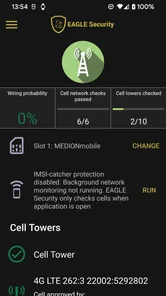
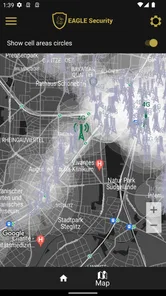
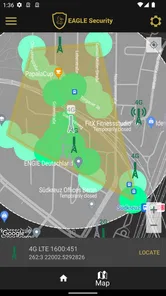
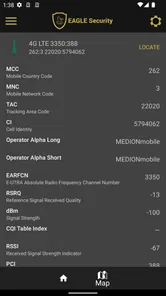
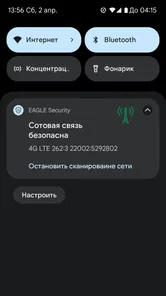
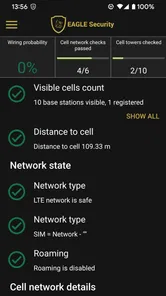
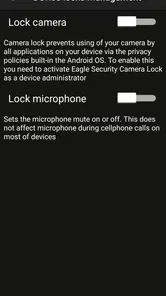

Analysis by Reviewed
I pay particular attention to whether a security app is understandable and usable in everyday situations, not just whether its feature list sounds reassuring. EAGLE Security UNLIMITED is a paid communication app from Int64 Team, aimed at people who want help identifying suspicious mobile-network activity. Its focus makes it different from the antivirus and messaging tools many people think of first, but it also means expectations need to be clear: a network-security tool is not a guarantee that every part of a phone or online account is protected.
Readability and getting oriented
The first useful question is whether I can tell what the app is meant to help with. Its purpose is to watch for signs associated with IMSI catchers—equipment that can imitate a mobile network and potentially expose information about nearby phones. That is a narrower concern than general malware scanning or blocking unwanted messages. I would treat the app as a specialist layer for network awareness, rather than a replacement for careful browsing, device updates, or account security.
Its interface is described as approachable, which matters for a tool whose subject can sound technical. Still, clarity is more than a tidy screen: alerts need to explain what they mean and what a person can sensibly do next. If you are new to mobile-network security, I would take time to learn the app’s terminology instead of treating every warning as proof that someone is targeting you. A helpful habit is to note where and when an alert appears, then compare it with your normal routine before drawing conclusions.
That habit is especially useful when a warning arrives somewhere you visit often. Rather than trying to interpret it while rushing through a station or crossing a street, I would make a brief note and revisit it somewhere calm. The point is not to dismiss alerts, but to separate a change worth investigating from a message that merely needs context. This kind of patient use is a better match for a specialist monitor than expecting a single notification to provide a complete security verdict.
Motor and sensory considerations
Security apps are often checked briefly, sometimes while someone is walking, commuting, or trying to finish another task. That makes readable text, understandable alerts, and a low-effort route to the information that matters especially valuable. I would review the app in a calm setting first, so that a warning on the move is less likely to feel confusing or urgent simply because its language is unfamiliar.
People who find small controls, dense screens, or frequent notifications tiring should consider how they prefer to manage phone tools. A specialist monitor is most useful when its messages can be read and interpreted without rushing. If alerts are distracting in a noisy or busy environment, waiting until you can check them properly is more sensible than making a security decision on the spot.
For users with low vision, limited dexterity, or sensory sensitivities, the practical question is not only whether the app runs, but whether its information can be checked comfortably. I would explore the available display and notification settings on the phone itself, then see whether the app remains manageable with those preferences. A phone’s built-in accessibility options can sometimes improve legibility or reduce interruptions, but they do not change what an alert means. If a warning depends on small details or unfamiliar terminology, it may still take extra time to understand.
More From Our News Desk

 Gmail
Gmail in a Busy Inbox: Who Benefits Most?
From first account to crowded workday, Gmail earns its place through dependable search and flexible sorting—but its best fit depends on how much inbox maintenance you can tolerate.

 Prime Video
Switching to Prime Video: What Changes in Your Viewing Routine
Prime Video can make a compelling second home for streaming, but switching means learning a different catalog, rental layer, and route from browsing to playback.

 Universal TV Remote Control
 Works Best as a Reliable Backup
A phone remote earns its place through quick setup and reliable habits. Here is how to get more from Universal TV Remote Control—and where its limits show.

 Weather - By Xiaomi
Weather by Xiaomi Review: Clear at a Glance, Less Clear Up Close
Xiaomi’s weather app makes everyday forecasts quick to scan, but its calm surface can leave useful details and recovery paths harder to find than they should be.

 X
X Under Pressure: Can It Recover When Posting Goes Wrong?
A resilience-focused review of X, examining setup, mistaken posts, interruptions, weak connections, and the gaps that matter when recovery needs to be dependable.

 Clash of Clans
 Is Won Between the Battles
Its raids are quick; its community is a long-term project of coordination, teaching, rivalry, and shared responsibility—with all the friction that entails.
Latest News



When it fits into daily life
A practical use case is someone who travels through unfamiliar areas and wants an additional signal about mobile-network conditions, or a privacy-conscious user who already understands the limits of phone-based security tools. On a regular commute, I would use it as a source of context rather than a reason to panic: check a notification when convenient, consider whether the location or network change is unusual for you, and avoid sharing sensitive information over a connection you do not trust.
Imagine arriving in a new neighborhood and seeing an alert while you are trying to find an address. I would first finish the immediate task, then check the notification when I could focus. If I were about to handle something sensitive, I would postpone it or use a connection I already trust rather than treating the alert as proof of a specific attack. That workflow makes the app a prompt to pause and assess, not a substitute for judgement.
This is not the same job as a VPN. A VPN can protect some internet traffic between a device and a VPN service, but it does not tell you that a mobile network is trustworthy. Likewise, an antivirus app focuses on different risks, while a messaging app’s privacy features concern conversations rather than radio-network behavior. Choosing among them is not always an either-or decision; the right tool depends on the threat you are trying to reduce.
Compared with familiar security apps that scan files or block suspicious websites, this one addresses a less visible layer: the mobile network around the phone. That makes it potentially useful for someone who has already covered everyday basics and wants to pay attention to this particular risk. It is a poor match for someone seeking a single dashboard that handles every security concern, or someone who expects a network warning to explain exactly who is responsible and what they intend.
Limits, cost, and who should choose another tool
The key trade-off is specialization. A person looking for a straightforward all-purpose security suite may find this app too narrow, while someone expecting it to prevent every form of tracking or fraud may expect more than a network monitor can offer. It cannot replace strong account passwords, cautious handling of links, operating-system updates, or a trusted method of communication when privacy is critical.
It costs $5.49, so I would decide whether mobile-network awareness is important enough to justify a dedicated purchase before installing it. Its audience rating is Everyone, and it has a 4.4 average from around 150 ratings, with over 1,000 installs. Those figures offer some context, but they do not establish whether the app suits your particular phone, needs, or comfort with technical alerts.
The app’s release date is July 14, 2019, and its current version is 3.1.86. I would check that it is compatible with your device before paying, particularly if your phone is older; it supports Android 7.0 and later. The paid price also changes the decision: if you only want broad malware protection, a tool aimed at that need may be a better use of your money. If this specific network concern matters to you, a dedicated purchase may make more sense than expecting a general security app to cover it.
What to check before relying on it
Before making it part of a routine, I would check that the version available for your device is compatible and then spend a few minutes learning what its notifications actually indicate. The current version is 3.1.86, and the app supports Android 7.0 and later. A useful personal test is to observe how it behaves in familiar places first; that gives you a baseline, making an unexpected message easier to assess without assuming the worst.
Another worthwhile trade-off is attention. A security app can only help if you understand its output, but checking it constantly can turn ordinary network changes into a source of stress. I would set a practical boundary: review information at moments when you can think clearly, and use established precautions for sensitive tasks instead of treating a single app as your only safeguard.
Before relying on any warning, ask yourself what decision it can realistically support. It may prompt you to avoid a sensitive task on a connection you do not trust, or to look for a pattern in a place you visit repeatedly. It should not be the sole reason to accuse someone, make an urgent change, or assume that every other connection is safe. This distinction helps keep a monitoring tool useful without letting it create needless alarm.
People who need a simple, broad package for malware, account protection, and web browsing may be better served by a general security product that explicitly covers those needs. People who want to understand possible mobile-network risks, and are willing to interpret a specialist tool cautiously, are a more natural fit here. If clear explanations or accessible controls are essential to your decision, try the interface before depending on it in a high-pressure situation.
Getting Started with EAGLE Security UNLIMITED
First things first, downloading and setting up EAGLE Security UNLIMITED is a breeze. Available on both Android and iOS, you can easily find it on the respective app stores. Once installed, the app greets you with a sleek and intuitive interface. It’s designed to be user-friendly, even for those who might not be tech-savvy. With just a few taps, you’re on your way to securing your device.
Features That Wow
One of the standout features of EAGLE Security UNLIMITED is its real-time threat detection. The app continuously scans your device for malware, phishing attempts, and other security threats. I found this feature incredibly reassuring, knowing that the app is always on the lookout for potential dangers. Plus, the app doesn’t just alert you to threats; it actively blocks them, providing a proactive approach to security.
Another fantastic feature is the app’s VPN service. In today’s digital age, using a VPN is almost a necessity, and EAGLE Security UNLIMITED offers a robust VPN that encrypts your internet traffic. This means you can browse safely, even on public Wi-Fi networks, without worrying about prying eyes.
User Experience and Interface
Let’s talk about the user experience for a moment. The app’s design is clean and modern, making navigation a breeze. I appreciated the straightforward layout, with all the main features accessible from the home screen. The settings menu is well-organized, allowing you to easily customize your security preferences.
Moreover, the app sends regular updates and security tips, helping users stay informed about the latest security trends and practices. It’s like having a personal security advisor right in your pocket!
Why You Should Consider It
In a world where digital threats are becoming increasingly sophisticated, having an app like EAGLE Security UNLIMITED is essential. It offers comprehensive protection, ensuring that your personal information remains private and secure. Plus, the peace of mind it provides is invaluable. Whether you’re a tech guru or someone who just wants to keep their data safe, this app is worth checking out.
In conclusion, EAGLE Security UNLIMITED is more than just a security app; it’s a reliable companion for anyone looking to enhance their digital security. Its user-friendly interface, powerful features, and constant updates make it a top choice for mobile security. So, if you’re on the hunt for a dependable security solution, give it a try. Trust me, you won’t regret it!
EAGLE Security UNLIMITED Frequently Asked Questions
Who develops EAGLE Security UNLIMITED, and what should I know before installing it?
EAGLE Security UNLIMITED is a communication app developed by Int64 Team. It is presented as a smart, simple anti-wiring application and an IMSI-catchers catcher, so its purpose is more specialized than a general-purpose antivirus suite. It is listed for users of all ages, and the app’s overall rating is 4.4. Consider whether this kind of communication-security tool fits what you need before downloading.
What is EAGLE Security UNLIMITED and what does it offer?
EAGLE Security UNLIMITED is a comprehensive security application designed for both Android and iOS devices. It provides a wide range of features including real-time malware scanning, anti-theft protection, and a secure VPN for safe browsing. The app also offers privacy protection tools to safeguard your personal data from unauthorized access, ensuring your device is secure at all times.
How does EAGLE Security UNLIMITED protect my device against malware?
EAGLE Security UNLIMITED employs advanced scanning technologies to detect and eliminate malware threats in real-time. The app continuously monitors your device for suspicious activities and provides instant alerts if any threats are detected. It also includes a robust database of known malware signatures, which is regularly updated to protect against the latest threats, ensuring comprehensive security.
Can EAGLE Security UNLIMITED be used on multiple devices?
Yes, EAGLE Security UNLIMITED supports usage on multiple devices. With a single subscription, you can protect various devices, whether they are Android or iOS. This makes it convenient for users who own multiple gadgets, allowing them to secure all their devices under one account with ease and efficiency.
Does EAGLE Security UNLIMITED offer a VPN service and how does it work?
EAGLE Security UNLIMITED provides a built-in VPN service that encrypts your internet connection, making your online activities private and secure. This feature ensures that your data is protected from hackers and other cyber threats when using public Wi-Fi networks. The VPN also allows users to access region-restricted content by masking their IP address, offering both security and flexibility in browsing.
Pros
- High-level encryption for data security
- User-friendly interface for easy navigation
- Real-time threat detection alerts
- Cross-platform compatibility
- Regular updates for enhanced features
Cons
- Premium features require subscription
- May slow down older devices
- Limited customer support hours
- Occasional false-positive detections
- No free trial available