

Driver: Driving & Dash Cam App
- 289.00
- 4.5
- Installs
- 100.00K
- Price
- Free

Screenshots
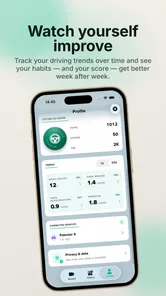
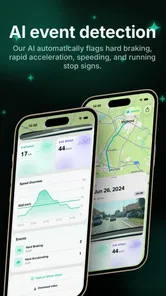
Analysis by Reviewed
I tried Driver: Driving & Dash Cam App as a practical companion for recording and sharing journeys, and my first impression was that it serves a narrower purpose than a full navigation app. It is built around the trip itself: starting a drive, capturing what happens on the road, and giving you something you can share afterward. That makes it interesting for drivers who want a visual record, but it also means you should not approach it expecting the broad route planning, live traffic intelligence, or public-transit coverage of a conventional maps service.
The app sits in the Maps & Navigation category, although its value is closer to a travel recorder than a replacement for an everyday map. It is free to install, suitable for Everyone, and comes from TryDriver. Its average rating is 4.5 from around 4.7K ratings, with more than 100K installs, so it has attracted a meaningful audience without feeling like a universal, one-size-fits-all driving platform. It was released on Mar 29, 2017 and requires at least OS 10, which is worth checking before you plan to use it on an older phone.
From an ordinary drive to a shareable trip
The most useful way to understand Driver is to follow a complete journey. Imagine leaving home for a weekend drive, a scenic route, or a commute you want to document. With a normal navigation app, the starting question is usually “How do I get there?” Here, the question is different: “What do I want to preserve from this drive?” That change in purpose affects how you prepare, when you start recording, and what you do with the result.
Before setting off, I would decide whether the trip is worth capturing from beginning to end or whether a shorter section is enough. A long recording can be more meaningful for a road trip, while a brief route may be easier to review and share. This is one of the app’s less obvious trade-offs: the best experience depends on treating the recording as a planned part of the journey rather than tapping it casually after the car is already moving.
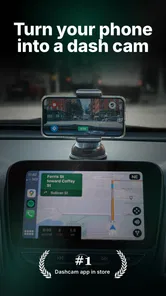
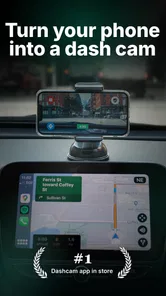
I also recommend preparing the phone before driving. Mount it where it can capture the road without becoming a distraction, connect any power source you normally use for longer journeys, and choose the route before you pull away. That workflow matters because a dash-cam-style app is only useful when the phone remains stable and available for the entire capture. A loose phone, a nearly empty battery, or a last-minute setup can turn a promising trip into a frustrating one.
Driver’s store summary is “Capture & share your trips!”, and that focus comes through clearly. The app is not trying to make every part of driving happen inside one screen. Instead, it encourages a simple sequence: prepare, drive, capture, then decide what is worth showing someone else. I found that separation helpful because it keeps the purpose understandable, especially for people who do not want a complicated collection of driving tools.
Starting the recording without adding risk
The first handoff is from the driver to the app. You begin with a phone in your possession, a route in mind, and a decision about what you want to record. The safest routine is to complete setup while parked. I would avoid changing capture settings, searching through menus, or trying to frame a shot once the vehicle is moving. Even a well-designed driving app cannot remove the basic distraction of handling a phone behind the wheel.
More From Our News Desk

 Weather - By Xiaomi
Weather by Xiaomi Review: Clear at a Glance, Less Clear Up Close
Xiaomi’s weather app makes everyday forecasts quick to scan, but its calm surface can leave useful details and recovery paths harder to find than they should be.

 X
XX Under Pressure: Can It Recover When Posting Goes Wrong?
A resilience-focused review of X, examining setup, mistaken posts, interruptions, weak connections, and the gaps that matter when recovery needs to be dependable.

 Clash of Clans
Clash of Clans Is Won Between the Battles
Its raids are quick; its community is a long-term project of coordination, teaching, rivalry, and shared responsibility—with all the friction that entails.

 Android Auto
Android Auto Makes the Case for Quieter Car Software
The car interface is no longer judged by how much it can do, but by how quietly it helps. Android Auto shows what drivers now expect—and what still gets in the way.

 MobiOffice: Word, Sheets, PDF
MobiOffice: Transforming Mobile Productivity with Seamless Integration
MobiOffice: Word, Sheets, PDF is redefining mobile productivity with a surprising blend of functionality and innovation.

 EA SPORTS FC Soccer Mobile 26
EA SPORTS FC™ Mobile Soccer: Redefining Mobile Sports Gaming
Dive into EA SPORTS FC™ Mobile Soccer, where immersive gameplay and strategic depth transform mobile sports gaming.
Latest News



This is also where Driver differs from a standard navigation app. Navigation tools are usually judged by how quickly they get you to a destination and how clearly they announce the next turn. Driver is judged by whether it can stay out of the way while preserving the drive. If your main need is turn-by-turn guidance, I would use a dedicated navigation service instead and treat this app as a companion, not the driver of the workflow.
A useful habit is to give each recording a purpose before starting. You might be documenting a coastal road for friends, keeping a visual memory of a holiday, or creating a record of a route for later review. That small decision helps prevent a common problem with recording apps: collecting hours of footage without knowing what you actually want from it. Driver becomes more valuable when the capture has a clear endpoint or audience.
What happens while the trip is underway
Once the journey begins, the app’s central job is to capture the trip rather than compete for attention. This is where simplicity is a strength. You do not need to keep interacting with it to make the idea useful. The best workflow is deliberately boring: start the session, drive normally, and leave the phone alone. If you are constantly checking whether the app is still active, the tool is already creating too much friction.
For a scenic drive, the appeal is obvious. A route that feels special in the moment can become a short visual memory to send to someone who was not there. For a new driver, a recorded journey can also help with personal reflection after the car is parked, such as remembering where the road became confusing or identifying a section that deserves a slower revisit. That is not the same as formal driver training, but it is a more thoughtful use than recording everything indiscriminately.
There is a practical limitation here: a phone-based recording depends heavily on the conditions around the phone. Glare, vibration, poor placement, and changing light can all affect the usefulness of the final result. I would not assume that every trip will produce polished footage simply because the app is designed for driving. The quality of the outcome is partly an installation and preparation problem, not just an app problem.
Another important trade-off is attention. Driver may help you capture a journey, but it does not make phone interaction while driving acceptable. If you need to respond to a message, change a setting, or inspect what has been captured, wait until you are safely parked. For me, the app works best when it is treated as a passive recorder, with all meaningful decisions made before departure or after arrival.
The handoff from road to review
When the trip ends, the workflow changes from driving to handling the result. This is the point where the app’s sharing purpose becomes more important. Instead of asking whether the route was efficient, you ask whether the recording communicates something: a landscape, a memorable stretch of road, a useful reference, or simply the feeling of being there.
I would review a recording with a specific recipient in mind. A friend may enjoy a short highlight from a scenic journey, while a family member might appreciate a broader sense of the route. If you are sharing a drive publicly or with people who were not in the car, context matters. A recording without an explanation can be difficult to interpret, especially when several similar road sections appear together. The app can support the capture-and-share workflow, but the human part—choosing what matters and explaining it—still determines whether the result is worth watching.
This is one of the strongest non-obvious lessons from using a trip recorder: capture length and sharing value are not the same thing. A longer session may preserve more of the journey, but it can make the handoff less convenient because the recipient has more to sort through. I would rather record a complete drive when the memory itself matters, then share only the meaningful portion if the app’s available workflow allows that comfortably, than expect another person to sit through every uneventful minute.
It is also sensible to think about storage and battery before making Driver part of every commute. The longer and more frequently you record, the more demanding the habit becomes. Even when the app is free to install, the wider cost can be practical: charging, organizing footage, and deciding what to keep. That does not make it a poor choice, but it means the app rewards selective use more than automatic recording of every journey.
A realistic everyday example
Consider a Saturday morning drive to visit relatives in another town. I would mount the phone while parked, prepare the route using the navigation tool I already trust, and open Driver specifically to capture the journey. During the drive, I would avoid touching the phone and let the recording serve as a quiet passenger. After arriving, I would check the result when I had time, identify the parts that show the character of the route, and share those with family members who wanted to see the drive.
In that situation, Driver fills a gap that ordinary navigation does not. A map can tell me where I went, but it does not necessarily preserve the visual experience of the road. The app is especially appealing when the journey is part of the memory rather than merely the distance between two places. It can also be useful for someone who regularly travels through visually interesting areas and wants a simple way to keep or share those trips.
However, if the same journey is stressful, unfamiliar, or dependent on frequent rerouting, I would prioritize a navigation app with strong live guidance. Trying to make one phone perform navigation, recording, messaging, and route changes at once can create a poor handoff between tasks. Driver is better when its role is clear and limited.
How it compares with familiar alternatives
Compared with a conventional maps app, Driver is more personal and less comprehensive. Maps are usually the better choice for finding an address, comparing routes, checking traffic, or navigating an unfamiliar city. Driver’s advantage is the record of the trip itself. It adds a layer of memory and sharing that route instructions alone do not provide.
Compared with a dedicated dash cam, a phone app is more approachable because you may already have the necessary device. That can make Driver attractive for occasional trips, holiday drives, or people who do not want to install separate hardware. The trade-off is that a dedicated camera is generally designed around continuous vehicle recording, stable mounting, and a permanent setup. If you need a dependable, always-ready system for daily driving, specialized hardware may be the better fit.
Compared with a social travel app, Driver appears more focused on the act of driving than on building a public travel identity. That is useful if you want to share a particular journey without turning every trip into a social post. On the other hand, users looking for extensive discovery tools, community interaction, or destination planning may find a broader travel platform more suitable.
Where the workflow starts to break
The biggest weakness is not a single missing button; it is the number of conditions required for a smooth result. The phone must be mounted well, the driver must resist interacting with it, the recording must be worth keeping, and the final handoff must be manageable. If any one of those steps fails, the app can feel less useful than expected.
Older devices deserve particular attention because the minimum requirement is OS 10. Anyone below that threshold cannot make it part of the same workflow, so checking compatibility before relying on it for a planned trip is sensible. Even on a compatible phone, I would test the setup while parked before committing to an important journey. A quick trial can reveal problems with placement or the way the phone fits into your car.
The free entry point is welcome, but the app includes in-app purchases ranging from $0.99 to $94.99 per item. That broad range makes it important to understand what you actually need before paying for extras. I would begin with the free experience and only consider a purchase after confirming that Driver fits my recording habits. Someone who records only a few scenic trips may have no reason to spend more, while a frequent user may judge additional options differently.
There is also a mismatch between the app’s simple promise and the effort involved in producing a worthwhile share. Capturing is easy to understand; curating the result takes judgment. If you want an instant, polished clip with no review or editing decisions, this may feel too hands-on. If you enjoy choosing the meaningful parts of a journey, that extra step is part of the appeal.
Who should use it, and who should skip it
I would recommend Driver to occasional road-trippers, scenic-route enthusiasts, families who like sharing travel memories, and drivers who want a phone-based way to preserve journeys without buying a dedicated dash cam immediately. It is also a reasonable option for someone who understands that recording is the main task and navigation is secondary.
I would skip it if your priority is accurate turn-by-turn guidance, live traffic decisions, public transit, cycling directions, or a permanent security camera for the car. Those needs point toward specialized alternatives. I would also avoid making it part of your routine if you cannot mount the phone safely or if you know you will be tempted to interact with it while driving. No captured trip is worth creating a distraction.
For families, I would set expectations before sharing. A recording can show the route and atmosphere, but it may not automatically tell the viewer why a particular section mattered. Adding a short message with the destination or memorable moment can make the handoff much more successful. For solo travelers, the app can become a lightweight travel diary, provided they are comfortable reviewing and organizing the material afterward.
My final take after following the full journey
Driver: Driving & Dash Cam App makes the most sense when you see it as a focused trip recorder rather than a complete navigation replacement. Its workflow is easy to explain: prepare the phone, capture the drive without touching it, review the result while parked, and share the parts that deserve attention. That clarity is its main strength.
I like the fact that it gives ordinary drives a possible second life. A route can be more than a line on a map, and a recording can preserve the visual character of a journey in a way standard navigation cannot. At the same time, the app asks you to take responsibility for setup, safe usage, storage, and selection. It does not remove those practical decisions.
The app’s free price makes trying it straightforward, while the Everyone age rating keeps its audience broad. The presence of optional purchases means I would approach upgrades carefully rather than assuming they are necessary. Overall, I would recommend starting with a short, low-pressure trip and judging the complete handoff—from mounting the phone to sharing the finished recording—not just the moment you press start.
My recommendation is simple: choose Driver when the journey itself is something you want to remember or show, and choose a traditional navigation tool or dedicated dash cam when guidance or continuous vehicle recording matters more. Used within that boundary, it is a useful, focused addition to a driver’s phone rather than an overpromising replacement for every road app.
Driver: Driving & Dash Cam App Frequently Asked Questions
Is Driver: Driving & Dash Cam free to download and use?
Driver: Driving & Dash Cam is free to download, with optional in-app purchases ranging from $0.99 to $94.99 per item. You can try the app without paying upfront, but check any purchase details before confirming a transaction. Whether a particular feature is included for free can depend on the version and the options available inside the app.
What is Driver: Driving & Dash Cam, and what can it do?
Driver: Driving & Dash Cam is designed to combine driving assistance with dash-cam recording features. Depending on your device and app version, it may let you record the road ahead, review saved clips, and use driving-related tools while traveling. It is best understood as a companion app rather than a replacement for a dedicated vehicle camera or professional navigation system.
Does Driver: Driving & Dash Cam work without an internet connection?
The basic camera-recording function may work without mobile data once the app has access to your phone’s camera and storage. However, features such as maps, traffic information, cloud backup, location-based services, advertisements, or account synchronization can require an internet connection. Before driving, open the app and confirm that the tools you need are available offline, especially when traveling through areas with weak reception.
Will using the app drain my battery or require a phone mount?
Continuous video recording, GPS use, a bright screen, and mobile data can consume battery quickly and may make the phone warmer during longer journeys. For safe and reliable use, the phone should be secured in a stable dashboard or windshield mount and connected to a suitable car charger. Never hold or operate the phone while driving, and configure the app before starting your trip.
Where are dash-cam recordings saved, and can I manage storage?
Recordings are generally saved to the phone’s internal storage or an available storage location selected by the app. Video files can become large, particularly when recording at higher resolution, so storage may fill faster than expected. Check whether the app supports loop recording, automatic deletion of older clips, manual file management, or exporting videos before relying on it for important footage.
Pros
- Records driving footage automatically while you navigate.
- Can provide useful evidence after accidents or disputes.
- Voice controls help reduce the need to touch the phone.
- Supports hands-free route guidance during everyday trips.
- Loop recording can save storage by replacing older footage.
Cons
- Continuous recording may drain the battery during long journeys.
- Phone heat can increase when navigation and recording run together.
- A suitable dashboard mount is needed for a stable camera view.
- Video quality depends heavily on your phone’s camera and lighting.
- Some features may require in-app purchases or a subscription.











