

Drive Smarter
- 1.64K
- 4.7
- Installs
- 100.00K
- Price
- Free

Screenshots
Analysis by Reviewed
I spent time with Drive Smarter as a companion for compatible in-car cameras, and my first impression was that it is much more focused than a normal navigation app. It is made by Cedar Electronics for selected Cobra and Escort Dash Cams, so its usefulness depends less on having a clever map and more on whether your camera belongs to the supported family. That distinction matters before you install it.
In the Maps & Navigation category, many apps try to replace a dashboard screen, plan a route, warn about traffic, or find a nearby business. This one has a narrower job. It is intended to help a driver get more from a supported dash cam while keeping the phone involved in the driving setup. I found that specialization both refreshing and limiting: the app makes sense when it matches your hardware, but it is not a universal answer for someone simply looking for turn-by-turn directions.
How the app fits into a real driving setup
The most important thing to understand is the relationship between the phone, the app, and the camera. Drive Smarter is not something I would choose in isolation. I would first identify the exact Cobra or Escort dash cam in the car, then check whether this companion app is the intended mobile tool. That small preparation step can prevent the common disappointment of downloading an app that cannot serve the camera already mounted on the windshield.
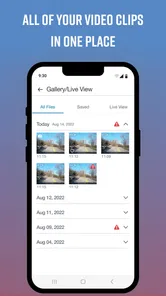
Once the hardware match is right, the app becomes a practical second part of the camera system. Rather than treating the dash cam as a device that records silently in the background, the phone gives the setup a more accessible control and review point. That is particularly useful when I want to deal with recordings away from the camera itself, instead of trying to navigate a small built-in interface or remove storage and handle files manually.
I also like the fact that the app has a clear purpose. There is no need to learn a large collection of unrelated travel tools before getting to the camera-related functions. The experience is easier to judge: if you own a compatible Cobra or Escort camera and want a phone-based companion, it is relevant; if you do not, most of its appeal disappears.
A realistic example is a commuter who has a dash cam installed but rarely checks it. After a minor incident in a parking lot, that person may want a less awkward way to look for the relevant recording, organize the next step, or use the camera system more actively. The app does not turn an ordinary phone into a dash cam, but it can make a supported camera feel less isolated from the rest of the driver’s digital routine.
What I would check before relying on it
I would not wait until an incident to learn the app. My preferred setup is to install it at home, pair or connect it with the camera, and perform a short test drive. That lets me see whether the phone stays connected in the way I expect, whether the camera appears correctly, and whether I can reach the recordings or controls without distraction. A companion app should be tested during calm conditions, not discovered on the roadside.
More From Our News Desk

 Weather - By Xiaomi
Weather by Xiaomi Review: Clear at a Glance, Less Clear Up Close
Xiaomi’s weather app makes everyday forecasts quick to scan, but its calm surface can leave useful details and recovery paths harder to find than they should be.

 X
XX Under Pressure: Can It Recover When Posting Goes Wrong?
A resilience-focused review of X, examining setup, mistaken posts, interruptions, weak connections, and the gaps that matter when recovery needs to be dependable.

 Clash of Clans
Clash of Clans Is Won Between the Battles
Its raids are quick; its community is a long-term project of coordination, teaching, rivalry, and shared responsibility—with all the friction that entails.

 Android Auto
Android Auto Makes the Case for Quieter Car Software
The car interface is no longer judged by how much it can do, but by how quietly it helps. Android Auto shows what drivers now expect—and what still gets in the way.

 MobiOffice: Word, Sheets, PDF
MobiOffice: Transforming Mobile Productivity with Seamless Integration
MobiOffice: Word, Sheets, PDF is redefining mobile productivity with a surprising blend of functionality and innovation.

 EA SPORTS FC Soccer Mobile 26
EA SPORTS FC™ Mobile Soccer: Redefining Mobile Sports Gaming
Dive into EA SPORTS FC™ Mobile Soccer, where immersive gameplay and strategic depth transform mobile sports gaming.
Latest News



It is also worth deciding where the phone belongs in the car. If the app requires attention for a particular task, I would complete that task before moving. The value of a dash-cam companion is reduced if it encourages fiddling with the screen while driving. I see it as a preparation and review tool, not as something that should compete with the road.
Another useful habit is to keep the camera and phone workflow separate in your mind. A phone connection can make access more convenient, but it does not remove the need to check that the camera is powered, positioned correctly, and recording as intended. The app improves access to a compatible camera; it does not replace basic dash-cam setup discipline.
The cost is simple, but the value depends on hardware
Drive Smarter is free to install, which makes trying it relatively low-risk for owners of compatible equipment. The app is marked for Everyone, and its current version is 4.9.1.0 with a minimum operating system requirement of Android 9. Those details make it approachable for many reasonably recent Android phones, although anyone using an older device should check compatibility before planning a setup around it.
There are in-app purchases shown from $4.99 to $49.99 per item. I would treat that range carefully rather than assuming every driver needs to pay. The free entry point is clear, but the practical value of any optional purchase depends on what you want from the connected camera system and which purchase is presented on your device. I would not pay automatically just because the app is installed; I would first use the available functions and decide whether an added capability solves a problem I actually have.
That distinction is important when comparing it with a standard navigation app. A conventional maps app may be free and useful even if you own no special vehicle hardware. Drive Smarter’s free access is more conditional: it becomes meaningful when paired with the right Cobra or Escort dash cam. In other words, the app can be inexpensive to start with, but the broader value is tied to an existing equipment investment.
The public response is encouraging, with an average rating of 4.7 from around 13 thousand ratings and more than 100 thousand installs. I see that as a useful sign that many users find the concept worthwhile, but not as a guarantee for every phone-camera combination. Companion apps often live or die by the exact hardware and connection situation, so I would still judge it using my own camera model and driving routine.
Where it delivers more value than a generic alternative
The strongest benefit is focus. A regular maps app is designed to help almost anyone navigate, while Drive Smarter is designed around select dash cams. If my priority is accessing and working with dash-cam functions from a phone, a generic navigation tool cannot provide the same relationship with the camera. Its maps may be excellent, but they do not solve that specific problem.
This focus can make a difference after a stressful event. If I need to inspect footage, I would rather use a companion designed for the camera family than improvise with unrelated file-management tools. A purpose-built connection can reduce the number of steps between the recording and the phone, which is exactly where a dash-cam app earns its place.
There is also a maintenance advantage in having one recognized companion rather than collecting several unrelated utilities. When a driver uses a camera regularly, a familiar app can become part of a repeatable routine: check the camera before a long trip, connect when needed, review important clips afterward, and return to normal navigation for the rest of the journey. I find that kind of division cleaner than expecting one application to do every driving task.
One less obvious use is reviewing the camera system after changing cars or phone settings. A driver may move the phone mount, replace the phone, or adjust how the camera is used. Testing the companion at that point can reveal a connection problem before it matters. I would regard this as a practical diagnostic habit, not an exciting feature, but it can be more valuable than downloading another app that duplicates ordinary maps.
Trade-offs I noticed in the narrower design
The biggest limitation is also the app’s identity: it is not for every dash cam and not a replacement for a full navigation service. If your main need is live route planning, traffic-aware directions, public transport, walking routes, or discovering places, I would choose a mainstream maps app instead. Drive Smarter may sit in the Maps & Navigation section, but I would not install it expecting the breadth of a general-purpose map.
There is a second trade-off around dependence on compatible hardware. Someone browsing for a free driving app may see the price and rating and assume it will be useful immediately. In practice, the camera relationship comes first. Without a supported Cobra or Escort Dash Cam, the app’s specialized purpose is difficult to justify. This is a case where the store category can make the product look broader than it really is.
The phone-based workflow can also add friction. A camera that is already recording may not need constant interaction, while the app becomes most useful when I deliberately connect, review, or manage something. That means the benefit is occasional but meaningful rather than continuous. Drivers who want an app that provides value on every short trip may prefer a navigation tool that actively helps with routes.
I would also be cautious about treating the app as a complete record-keeping solution without first learning its workflow. Important footage should be reviewed and handled promptly, especially after an incident. My practical rule would be to test how quickly I can locate a clip, understand what it contains, and preserve it somewhere appropriate before I need it. That is a user habit rather than a promise about a particular feature, and it is essential for getting real value from any camera companion.
Small workflows that make it more useful
My first recommended workflow is a pre-trip check. Before a long drive, I would confirm that the camera is mounted properly, start the companion connection if needed, and make sure I understand where recent recordings can be reached. Doing this before leaving avoids turning the first few minutes of a journey into a technical experiment.
My second workflow is incident-first review. If something unusual happens, I would wait until it is safe to stop, then use the app to inspect the relevant recording rather than scrolling through unrelated clips. Narrowing the time window in my own memory—where I were, roughly when it happened, and what direction I was facing—can make the review less frustrating. The app is most helpful when paired with an organized approach.
My third tip is to separate routine footage from footage that matters. I would not assume that every recording deserves the same attention. If a clip documents an important event, I would mark or preserve it according to the tools available in the camera workflow and avoid leaving it buried among ordinary driving footage. The exact handling will depend on the connected equipment, but the principle is straightforward: review valuable clips while they are still easy to identify.
A fourth useful habit is testing after updates or phone changes. The app was released on August 11, 2020, and its current version is listed as 4.9.1.0, so it has had time to develop as a product. Even so, a new phone, a system update, or a change in camera settings can alter the experience. I would perform a short connection test after any major change instead of assuming yesterday’s setup will behave identically today.
Who is likely to get the most from it?
I would recommend it first to an owner of a supported Cobra or Escort Dash Cam who wants a more convenient phone companion. It is especially sensible for drivers who already value recorded journeys and want an easier way to incorporate the camera into daily use. The free installation makes it reasonable to try before considering any optional purchase, provided the phone meets the Android requirement and the camera is supported.
It can also suit someone buying a compatible camera for practical reasons rather than entertainment. A commuter, frequent road-tripper, or driver who wants a consistent way to review recordings may appreciate the dedicated relationship between the app and the camera. The value is not that it replaces every other driving tool; the value is that it gives one specific vehicle accessory a more usable mobile side.
I would be less enthusiastic for a person who only wants directions. That driver would probably get more from a conventional navigation app, because route search and guidance are the central needs. I would also tell owners of unrelated dash-cam brands to look for the companion made for their own hardware. A high rating cannot overcome a basic compatibility mismatch.
Likewise, someone who dislikes managing connected devices may find the setup more trouble than it is worth. If you want to mount a camera and never interact with it again, a phone companion may not change your habits enough to matter. The app rewards drivers who are willing to perform a little preparation and review footage deliberately.
My verdict on free access and optional spending
For the right camera owner, I think Drive Smarter is worth trying because the entry cost is free and the purpose is clear. I would use the no-cost access first, establish that the phone and camera work comfortably together, and only then consider an in-app purchase between $4.99 and $49.99 if the particular addition directly matches my needs. I would not describe paid access as automatically good value for every driver; its value has to be measured against how often I use the camera and what problem the purchase solves.
The app’s strongest case is not that it is a better map than the usual alternatives. It is that it can make a selected Cobra or Escort dash cam more practical to live with. That is a narrower promise, but for the intended owner it is also a more relevant one. The rating of 4.7 and its audience of over 100 thousand installs suggest solid interest, while the hardware requirement remains the deciding factor for me.
My buy-or-skip decision is therefore straightforward. I would install it if I owned a compatible camera, used that camera regularly, and wanted phone-based access to its companion workflow. I would skip it if I needed ordinary navigation, owned an unsupported camera, or had no interest in reviewing and managing dash-cam recordings. For the right setup, Drive Smarter is a useful specialist rather than a universal driving app, and that honest limitation is exactly how I would explain its value to a friend.
Drive Smarter Frequently Asked Questions
Can I use Drive Smarter on both Android and iPhone?
Drive Smarter is designed as a mobile companion for select Cobra and Escort dash cameras. Before downloading, check that your phone’s operating system is supported and that your specific camera works with the app. Compatibility is important because many of the app’s connected features rely on pairing with supported hardware rather than working as standalone navigation tools.
Who makes Drive Smarter, and how established is the app?
Drive Smarter is developed by Cedar Electronics and is intended to accompany select Cobra and Escort dash cameras. It has more than 100,000 installs, around 13,000 ratings, and about 1,600 written reviews, with a 4.7 average rating. Those figures can help you understand its reach, but your experience will depend most on whether the app supports your equipment and meets your needs.
Is Drive Smarter useful without a compatible Cobra or Escort device?
Drive Smarter is intended as an in-car companion for select Cobra and Escort dash cameras, so its main purpose is to connect with supported hardware. Without a compatible device, it may have limited practical value for everyday navigation or driving. If you are considering the app on its own, first check whether your existing equipment is supported and whether the features you want depend on pairing.
What is Drive Smarter, and what does the app do?
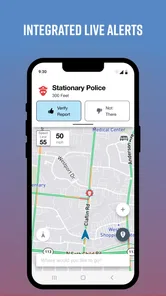
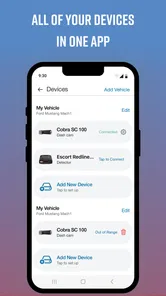
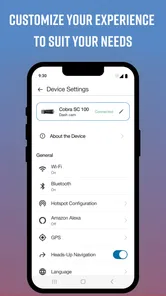
Drive Smarter is a connected-driving companion app designed to work with compatible vehicle accessories, such as dash cameras and radar or safety devices. After pairing supported hardware, the app can provide device controls, live status information, trip records, alerts, and access to saved footage. Its exact features depend on the product model, phone permissions, and the services available in your region.
Which devices and vehicles are compatible with Drive Smarter?
Drive Smarter is primarily intended for compatible connected car accessories rather than functioning as a complete standalone driving app. Before downloading, check the official compatibility list for your specific dash camera, detector, or other supported device. Some features may require particular hardware, a newer firmware version, Bluetooth or Wi-Fi access, and a compatible Android or iPhone operating system.
Pros
- Provides useful driving insights to help improve everyday habits.
- Can make vehicle information easier to access from one app.
- Helpful alerts may encourage safer and more attentive driving.
- Supports a more connected experience for compatible vehicles.
- Trip data can help users review journeys and driving patterns.
Cons
- Many features require a compatible vehicle or connected device.
- Some functions may depend on an active subscription or service plan.
- Location and driving data collection may concern privacy-conscious users.
- Battery and background activity can increase on some smartphones.
- App usefulness may vary depending on vehicle model and region.











