DREO
- 2.10K
- 4.8
- Installs
- 500.00K
- Price
- Free

Screenshots
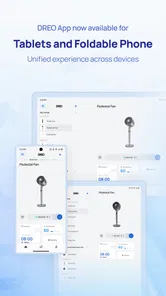
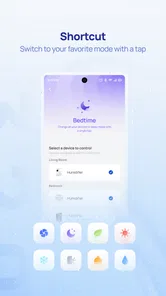
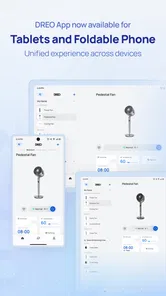
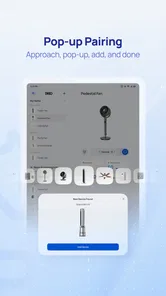
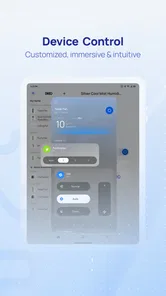
Analysis by Reviewed
I approached DREO as a practical lifestyle companion rather than an app I would open just to browse. Developed by DREO Corp, it is designed to bring supported DREO products into one place, so the useful question is not whether it looks impressive on the first screen, but whether it makes everyday control easier. After spending time with its device controls and organization, I found that its value grows when I use it as part of a repeatable routine instead of treating it like a remote control I launch only when something needs changing.
The app is free, available to everyone, and belongs to the lifestyle category. It has built a strong audience, with a 4.8 average from around 28 thousand ratings and more than 500 thousand installs. Those figures suggest that many owners find the central idea worthwhile, but they do not remove the need to check whether your particular DREO device is supported and whether you actually want app-based control. For me, the strongest case is convenience: common adjustments, device status, and product management are easier to handle when they are gathered in one familiar place.
How I built a reliable everyday workflow
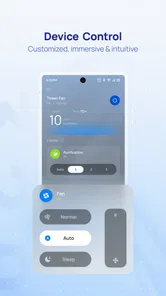
My baseline workflow was deliberately simple. I started by treating the app as the main place to organize my DREO equipment, rather than jumping between individual product controls or relying on memory. The first useful habit was to give myself a moment to understand the home screen and identify where the device controls, account-related areas, and product management options lived. That small orientation step matters because an app like this becomes frustrating when every adjustment feels like a search exercise.
Once a product is connected, I prefer to make one change at a time and watch how the device responds before building a more complicated routine. This is especially helpful when I am adjusting comfort-related settings. If I change several options together, it becomes difficult to know which setting produced the result I wanted. A slower first pass gives me a dependable baseline, and later changes become easier to reverse.
In a realistic evening scenario, I might return home to a room that feels uncomfortable. Instead of walking over to the device repeatedly, I open the app, select the relevant product, make the main adjustment, and leave the device running while I settle in. Later, I can make a smaller correction from the same place. The benefit is not dramatic automation; it is the removal of several small interruptions that would otherwise accumulate during the day.
I also found it useful to think in terms of “normal,” “temporary,” and “special” use. Normal use is the setting I return to most often. Temporary use is a quick adjustment for a particular moment, such as a warmer or cooler room. Special use is anything that needs closer attention because the surrounding conditions have changed. Keeping those categories separate prevents me from constantly redesigning my preferred setup.
What the first setup experience tells you
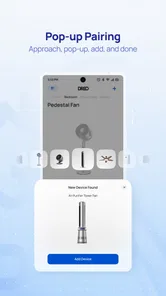
The initial setup deserves patience. The app is most useful when the product connection is clear and the device is easy to identify later. I would not rush through the early screens while distracted, because a few minutes spent understanding the structure can save repeated confusion. If you are setting up more than one DREO product, I recommend adding them in a calm sequence and checking each one before moving to the next.
More From Our News Desk

Weather by Xiaomi Review: Clear at a Glance, Less Clear Up Close

X Under Pressure: Can It Recover When Posting Goes Wrong?

Clash of Clans Is Won Between the Battles

Android Auto Makes the Case for Quieter Car Software

MobiOffice: Transforming Mobile Productivity with Seamless Integration

EA SPORTS FC™ Mobile Soccer: Redefining Mobile Sports Gaming
This approach also helps answer an important practical question: is the app suitable for your household? If several people need control, the experience depends on how comfortable they are with the app and the way devices are organized. Someone who prefers a physical button may still want to use the product directly. Someone who regularly adjusts settings from a distance will likely appreciate having a consistent digital control point.
One limitation became clear during this stage: the app cannot make an unsupported product behave like a supported one. Before investing time in a detailed setup, I would identify the exact DREO model and check that it belongs in the app’s ecosystem. This is a more important decision factor than the attractive promise of controlling everything from one screen. If your equipment is mixed across brands, a broader smart-home platform may be a better central hub.
Settings I would check before using it every day
I recommend reviewing the app’s available settings before settling into a routine. I pay particular attention to device organization, because a tidy list is more valuable than it sounds. When I am tired or in a hurry, I want the correct product to be obvious. Clear naming and a sensible order reduce the chance of changing the wrong device, especially when products serve similar rooms or purposes.
I also check how the app presents the current state of each product. A control is more useful when I can distinguish the setting I requested from the condition the device is actually reporting. That distinction matters when a product has taken time to respond or when I am checking it from another room. I avoid assuming that a button press alone proves the physical result; I look for the updated device state when the interface provides it.
Another worthwhile check is the app’s notification behavior. I prefer alerts that help me notice something meaningful, not a constant stream of reminders that I quickly learn to ignore. If notifications are available for your connected products, I would tune them around situations where they genuinely save attention. The best notification is one that prevents a needless check; the worst is one that turns the app into another source of digital noise.
It is also sensible to review account and connection details after installation. I do this not because the app is difficult, but because connected-device problems are easier to solve when I know which account is active and which product is associated with it. If a family member is helping with setup, agreeing on one clear ownership arrangement can prevent duplicate attempts and unnecessary reconfiguration.
The current version is 3.7.0, and the app requires Android 8.0 or later. That makes the minimum requirement approachable for many Android users, but I would still keep the operating system and app reasonably current. Updates can change the location of controls or refine the connection experience, so I give myself a quick orientation after an update rather than assuming every screen is unchanged.
Small habits that make control faster
Experienced use is less about discovering a secret function and more about reducing repeated decisions. My first shortcut is to establish a default setting for each frequently used product. Once I know what “comfortable” means for me, I can return there quickly instead of experimenting from scratch every time. I then reserve fine adjustments for moments when the room or my routine genuinely requires them.
A second shortcut is to make changes in a consistent order. For example, I adjust the primary comfort control first, wait briefly, and only then refine secondary options if necessary. This keeps the process predictable and makes troubleshooting easier. If the result is not right, I know where to look rather than wondering which of several simultaneous changes caused the problem.
A third habit is to use the app before a predictable transition. I check the relevant product when I am leaving a room, going to bed, or preparing to spend time in another part of the home. This is more effective than opening the app repeatedly throughout the day. The app becomes a checkpoint attached to an existing habit, not a separate task competing for attention.
For households with several DREO products, I would group my thinking by room and purpose rather than by the order in which the devices were added. Even if the interface does not provide every organizational option I would like, my own naming discipline can make the list easier to scan. I avoid vague labels and use names that tell me immediately what I am about to control.
There is also a useful trade-off between convenience and precision. Remote control encourages frequent small adjustments, but too much tinkering can make a device feel unpredictable. I get better results when I make a meaningful change, allow it time to work, and then decide whether another adjustment is needed. That habit is particularly valuable when the app is being used for comfort rather than a simple on-or-off action.
Where the app is stronger than usual alternatives
Compared with managing a DREO product only through its physical controls, the app gives me a clearer way to organize and revisit settings. Physical controls are excellent for immediate, local interaction, but they are less convenient when I am across the room or trying to remember how I configured the device previously. The app is strongest when distance, repetition, or multiple products make direct control inconvenient.
Compared with using a separate generic remote-control solution, DREO’s own app has the advantage of being focused on DREO equipment. That focus can make the experience easier to understand for someone who owns mainly products from this developer. I do not have to translate a generic smart-home concept into the product’s own controls. On the other hand, the same focus is a weakness if my home contains many brands and I want one universal dashboard.
Compared with a broad smart-home platform, this app feels more approachable for a DREO-centered setup. A general platform may be better for combining equipment from different manufacturers or building a wider home automation system. I would choose the broader option when cross-brand routines are the priority. I would choose DREO’s app when I want a straightforward place to manage compatible DREO products without adding an extra layer of complexity.
The app also sits between two extremes: it is more capable than a basic product remote, but it should not be mistaken for a complete replacement for understanding the physical device. I still need to know what the product is doing, where it is located, and which settings make sense for the situation. The app improves access; it does not remove the need for sensible use.
Advanced use and the limits I noticed
The most advanced approach I can recommend without overcomplicating things is to build a repeatable sequence around your real schedule. Decide which settings belong to waking up, leaving home, returning, relaxing, and sleeping, then use the app as a quick checkpoint for those moments. This is not about endlessly customizing every possibility. It is about making the common cases easy while keeping unusual cases visible.
I would be cautious about assuming that every DREO product exposes the same controls or behaves in exactly the same way. Product-specific differences matter. A feature that makes sense for one type of device may not be available, useful, or presented the same way on another. I therefore judge the app by how well it handles the products I actually own, not by an imagined universal experience.
Connection reliability is another practical boundary. Any app-controlled device depends on the communication between the phone, the app, and the product. If a change does not appear to take effect, I avoid pressing the same control repeatedly. Instead, I check the selected device, confirm the visible state, and give the connection a moment. Repeated taps can create uncertainty about which command was received.
This is also why I would not make the app the only way to operate an essential household product. I want to remain comfortable with local controls and the product’s normal operation. The app is a convenience layer, and convenience layers are most useful when they supplement rather than replace basic familiarity.
Privacy and comfort with connected devices should influence the decision as well. Some people are happy to manage household products through an account-based app; others prefer the smallest possible digital footprint and direct controls. Neither preference is unreasonable. If you strongly dislike app-dependent setup or remote management, the free price does not change the fact that the app may not suit your habits.
The same applies to older phones. Android 8.0 is the stated minimum, but the quality of the experience can still depend on the phone’s general condition, network behavior, and how many other apps are competing for attention. I would not install it on a device that already struggles with basic connectivity and then blame the app for every delay.
Who will get the most from it
I think this app is a good fit for people who own compatible DREO products and regularly adjust them from different places in the home. It is especially useful for anyone who values a consistent control method, prefers making small comfort changes without walking to the device, or wants a single DREO-focused space rather than several disconnected product interactions.
It can also help households where one person handles setup and another mainly uses the controls. A clear device list and a small number of agreed routines can make the experience approachable. I would spend time teaching the basic path once, then keep the everyday workflow simple. The app works best when it reduces decisions rather than asking every user to understand every setting.
I would skip it if you do not own compatible DREO hardware, if you only use physical controls and have no interest in changing that, or if your main goal is to coordinate a large collection of products from unrelated brands. In those cases, a universal smart-home platform or the manufacturer apps for each product may fit better, even if that means accepting a more complicated overall setup.
For me, the deciding factor is not the rating or the download count. It is whether the app saves enough small moments of effort to justify becoming part of my routine. When I use it with a clear baseline, sensible device names, and a limited number of repeatable adjustments, the answer is yes. When I expect it to solve every smart-home problem or replace product knowledge, the answer becomes much less convincing.
My verdict after making it part of a routine
DREO Home is a focused lifestyle app that earns its place through practical repetition. I like it most when I use it to manage compatible DREO products with a calm, predictable workflow: identify the right device, make the main adjustment, confirm the result, and move on. That approach feels faster and more reliable than constantly exploring settings or treating every interaction as a new setup.
Its limitations are equally clear. The experience depends on compatible hardware, product-specific controls, and a connection that behaves properly. It is not the best answer for someone seeking a universal control center, and it will not appeal to people who want to avoid app-based household management altogether. Those are not minor details; they define who should install it.
Still, the free entry point makes it easy for DREO owners to test whether the app improves their day. It is rated for Everyone, and its broad Android compatibility begins with version 8.0. With a 4.8 average and around 2.1 thousand written reviews, it has clear user interest, but my recommendation is more specific: use it as a dependable routine tool, not as a collection of settings to constantly explore.
After using it that way, I would recommend it to a friend who owns DREO equipment and wants easier access to everyday controls. I would tell that friend to start with one product, establish a comfortable default, organize the device clearly, and add complexity only when a real need appears. That method brings out the app’s strongest quality: it turns scattered, small adjustments into a manageable part of the day without pretending to be more than a DREO-centered control companion.
DREO Frequently Asked Questions
Can I use DREO without owning a DREO appliance?
DREO is primarily a companion app for compatible DREO home-comfort products, so its main controls and smart features are useful when you have an appliance to connect. You can download the app and explore its setup experience, but functions such as changing device settings or creating schedules depend on a supported product being linked to your account. Check that your appliance is compatible before relying on DREO as a standalone app.
What permissions or connections might DREO need during setup?
Pairing a smart appliance can involve Wi-Fi and Bluetooth, and the app may request permissions such as location or notifications to support discovery, setup, and alerts. The exact requests can depend on your phone and the product you are connecting. Read each permission prompt and allow the access needed for the feature you want to use. A stable internet connection is also helpful when linking devices and using remote controls.
Can more than one person in my household use the same DREO device?
DREO manages compatible appliances through an account and connected home setup, which can make it useful for households where several people interact with the same equipment. The way access is shared may depend on the appliance and the app’s available account or home features. Before setting up a shared device, review the in-app options and make sure household members understand which settings and controls they can access.
What is DREO, and what can I use it for?
DREO is a smart-home companion app designed to control and manage compatible DREO devices, such as fans, heaters, humidifiers, air conditioners, and other home-comfort products. After pairing a supported appliance, you can typically adjust settings, change operating modes, create schedules, monitor status, and access device-specific features from your Android or iOS phone. The exact tools depend on the DREO product you own.
Who makes DREO, and what is the app’s general focus?
DREO is a lifestyle app from DREO Corp, built around managing connected home-comfort products through a phone. Its purpose is practical rather than entertainment-focused: once you have a compatible appliance, the app can provide a central place to access its controls and supported smart features. It is free to download, and its overall experience depends on which DREO products you use.
Pros
- Precise temperature control helps maintain a comfortable room environment.
- Clean
- modern design fits well with most home interiors.
- App controls make it easy to adjust settings remotely.
- Scheduling features can help automate daily heating or cooling routines.
- Many models operate quietly enough for bedrooms and offices.
Cons
- Some advanced features may require creating an account in the app.
- Compatibility varies between DREO models and smart-home platforms.
- Initial setup can take time if Wi-Fi pairing is unsuccessful.
- Performance depends on room size and proper placement of the device.
- Certain replacement filters or accessories may add ongoing costs.











