Digital Grading Co
- 97.00
- 4.5
- Installs
- 50.00K
- Price
- Free

Screenshots

Analysis by Reviewed
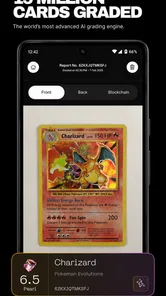
When I look at a card and wonder whether it is worth grading, the hardest part is often not the card itself. It is deciding whether the time, cost, and uncertainty of checking it are justified. Digital Grading Co. is built for that decision point. This free lifestyle app from HOBBY LABS LTD combines AI-powered card grading, augmented-reality authentication, and collector-focused insights in one mobile experience. After spending time with it, I see it less as a replacement for a professional grading service and more as a practical first filter for collectors who want a faster way to organize their thinking.
The app is called Digital Grading Co., and its approach makes sense for people who handle cards regularly but do not want to inspect every one with the same level of effort. Its average rating is 4.5 from around 1.2 thousand ratings, and it has passed 50 thousand installs. Those figures suggest that it has found an audience among collectors who want digital help without turning their hobby into a complicated research project.
How I would decide whether it belongs in my collecting routine
My first decision criterion is the kind of answer I need. If I want a quick indication of condition, a visual check through the phone, or a broader way to think about a card’s place in my collection, this app is relevant. If I need a legally meaningful authentication result, a slab from a recognized grading company, or a formal valuation for a serious transaction, I would treat the app as preparation rather than the final authority.
That distinction matters because “grading” can mean several things to different collectors. A beginner may simply want to know whether a card looks clean enough to protect and set aside. An experienced collector may want to decide which cards deserve professional submission. A seller may want a more disciplined description before listing an ungraded card. Digital Grading Co. is most useful in the space between casual inspection and formal third-party grading.
I also consider how much friction an app adds. A useful card tool should help me make a decision without forcing me to build a separate database, learn specialist terminology, or photograph every card under perfect studio conditions. The appeal here is the combination of visual assistance and collector insights. Instead of switching between a camera, notes app, search engine, and spreadsheet, I can begin the review process in one place.
There is still a human judgment step, and I would not remove it. Lighting, camera angle, sleeves, reflections, centering, surface marks, and the quality of the card itself can all affect what a phone-based system sees. I therefore use the app to slow down impulsive decisions, not to replace my eyes. That is an important mindset: the result is a useful signal, not a guarantee.
A practical workflow for sorting a mixed collection
A realistic use case is a collector who has just opened a box of cards and does not know which ones deserve closer attention. I would start by separating obvious bulk cards from anything with unusual artwork, strong condition, personal value, or possible resale interest. Then I would use the app on the smaller group instead of scanning everything automatically. That keeps the process focused and makes the insights easier to act on.
More From Our News Desk

Weather by Xiaomi Review: Clear at a Glance, Less Clear Up Close

X Under Pressure: Can It Recover When Posting Goes Wrong?

Clash of Clans Is Won Between the Battles

Android Auto Makes the Case for Quieter Car Software

MobiOffice: Transforming Mobile Productivity with Seamless Integration

EA SPORTS FC™ Mobile Soccer: Redefining Mobile Sports Gaming
For each card, I would first make sure the card is flat and the surface is easy to see. I would avoid judging a card while it is inside a highly reflective sleeve, because glare can make a clean surface look damaged or hide a flaw. I would also capture the front and back consistently. This is a small habit, but it creates a more reliable comparison between cards and helps me avoid ranking one card simply because it was photographed better.
The non-obvious advantage of this workflow is that it turns grading into triage. I am not asking the app to settle every question. I am asking it to help me divide my collection into three groups: cards worth protecting, cards worth researching further, and cards that are unlikely to justify additional expense. That is more useful than chasing a precise-looking result for every item.
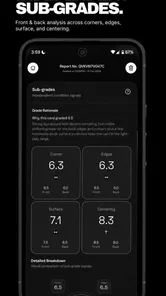
For a seller, the same process can improve discipline. Before writing a listing, I could use the app as a reminder to inspect corners, edges, centering, and surface appearance rather than relying on a quick glance. I would still describe the card conservatively, but the inspection can reduce the chance of overlooking a visible issue. The app is especially helpful when several cards appear similar and I need a consistent order for checking them.
Where the visual tools make the biggest difference
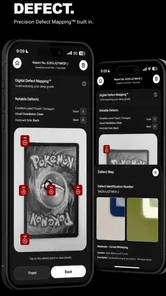
The augmented-reality authentication feature is the most distinctive part of the package. In everyday use, I would treat it as an interactive inspection layer rather than a magic authenticity certificate. It can make the act of examining a card more engaging and may help a collector notice details that are easy to skip during a rushed manual check.
That is valuable for newer collectors who are still learning what to look at. A phone-based visual prompt can encourage a repeatable process instead of an instinctive “this looks real” reaction. It is also useful when teaching someone else how to inspect cards, because the conversation becomes more concrete: we are looking at the same object through the same workflow rather than comparing vague impressions.
At the same time, I would be careful with high-value cards. A digital result should not be presented as proof that a card is authentic, especially when money, trade value, or a dispute is involved. Print quality, altered surfaces, trimming, recoloring, and sophisticated counterfeits can require specialist equipment and trained examination. Digital Grading Co. can help me decide whether a card deserves deeper attention, but I would not use it alone to close a major deal.
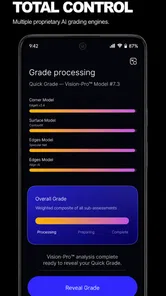
The AI grading angle has a similar strength and limitation. It gives the collector a structured way to think about condition, which is better than making a decision based only on excitement. But condition is not perfectly objective, and a phone cannot eliminate the effect of photography. I would repeat a scan when the result seems surprising, then inspect the physical card under neutral light. If the app and my eyes disagree, that disagreement is itself a reason to investigate further.
Collector insights are most useful when they lead to an action
The insights side of the app is more valuable when I connect it to a clear decision. I would not open it simply to collect opinions about every card. I would use it before choosing whether to store, trade, sell, submit, or keep a card for personal reasons. The app becomes more useful when its information changes what I do next.
One effective approach is to create a short review queue. I can put cards with uncertain condition or possible importance at the top, examine them carefully, and leave routine cards for later. This prevents a common collecting mistake: spending most of an evening researching cards that were never likely to matter while ignoring the few that deserve proper protection.
Another useful insight is that a card’s emotional value and market decision are not always the same. A card connected to a favorite player, character, set, or childhood memory may be worth keeping even if it is not a strong grading candidate. Digital Grading Co. can support the practical side of the decision, but I still decide what belongs in my collection. I would not let an automated assessment turn a personal hobby into a purely financial ranking exercise.
For organized collectors, the app can also serve as a checkpoint before moving cards between storage boxes. I would review a card before placing it in a “consider later” pile, because that pile often becomes a place where decisions disappear. A quick, consistent inspection gives me a reason to label the card mentally as protect, research, submit, trade, or keep. That is a small improvement, but it can make a growing collection easier to manage.
Where it wins, where alternatives fit, and what switching really costs
I find the choice between this app and other card tools comes down to what you want to decide: whether a card merits closer attention, or whether you need a formal record or verdict. Switching from a manual routine is less about moving data and more about adopting a repeatable inspection habit; that distinction matters when judging whether the app will keep earning a place in your collecting routine.
Why this app is stronger than a purely manual approach
Compared with using only a magnifying glass, a desk lamp, and personal judgment, Digital Grading Co. offers a more guided starting point. Manual inspection remains essential, but it can be inconsistent. I may notice a corner on one card and overlook the same issue on another because I am tired or distracted. A repeatable mobile workflow gives me a better chance of treating similar cards similarly.
It also beats a scattered setup for quick decisions. A collector who currently takes photos with the regular camera, writes observations in notes, searches for authentication advice, and then forgets which card was which may appreciate having these activities centered around a card-focused app. I would still use specialist references when needed, but the app can reduce the number of loose steps at the beginning.
The free entry point is important here. Since the app is free to download and use as the starting point, it is easier to test without committing to a new collecting system immediately. That makes it a reasonable experiment for someone who has never used digital grading tools. The age rating is Everyone, and the minimum operating-system requirement is Android 7.0, so it is positioned to work for a broad range of mobile users rather than only people with recent devices.
There are optional purchases ranging from $4.99 to $99.99 per item. I would not spend on those immediately. My advice is to first test whether the basic workflow actually changes your decisions. If you only inspect a few cards each month, paid tools may not justify themselves. If you regularly sort collections, prepare cards for submission, or need more structured collector insights, the upgrade path may make more sense, but the value depends on how often you use it and how much uncertainty it removes.
When a different category of tool is the better choice
A professional grading company is the better option when the card’s value or importance justifies formal handling. That route may involve shipping, waiting, and a higher overall commitment, but it serves a different purpose. Digital Grading Co. is a screening and decision aid; professional grading is the route I would consider when an official grade, encapsulation, or recognized authentication matters.
A collection-management app may be better for someone whose main need is inventory. If I care most about tracking purchase history, duplicates, locations, trades, and a large catalog, I would compare this app with tools designed specifically around databases and collection records. Digital Grading Co. is more appealing when condition, visual inspection, and authentication are central to the task.
A marketplace search is also a different alternative. It can help me understand what similar cards are being offered for, but it does not automatically tell me whether my copy has the same condition or authenticity. I would use market research alongside the app, not instead of it. A listed price is not the same as a completed sale, and a digital condition estimate is not the same as a professional grade.
Finally, some collectors should skip this type of app altogether. If you already have a trusted local expert, own very few cards, or prefer a completely hands-on process, the extra digital layer may feel unnecessary. It is also not the right choice for someone who expects an AI result to settle disputes or guarantee resale value. The app rewards a practical, skeptical user who is willing to combine its guidance with physical inspection.
The cost of switching is mostly behavioral
Moving from a manual routine to Digital Grading Co. does not require abandoning everything that already works. The real cost is learning to inspect cards in a consistent sequence. At first, that can feel slower than looking at a card and making an instant decision. The benefit appears later, when I can explain why a card moved into a particular pile and repeat the process without relying on memory.
There is also a risk of becoming too dependent on the app’s output. If I begin accepting every result without checking lighting, sleeves, and physical details, I may create false confidence. My solution is to use the app as a second opinion. I inspect the card first, record my own impression, then compare it with the digital assessment. This keeps the tool helpful without allowing it to replace basic collecting knowledge.
Another switching cost is deciding where paid features fit. Because purchases can reach a substantial amount per item, I would set a personal limit before exploring them. For a casual collector, the free experience may be enough to decide whether the concept is useful. For a frequent seller or serious grader, spending can be evaluated against the time saved, but I would still avoid treating any in-app purchase as a substitute for professional verification.
The current version is 1.6.1, and I would keep the app updated through the normal app-store process so that the experience remains aligned with its supported environment. I would also make a habit of checking important cards physically before storing or shipping them. That final step costs almost nothing and protects against the most common mistake: confusing a convenient digital assessment with a complete examination.
My recommendation depends on the kind of collector you are
I recommend Digital Grading Co. to collectors who want a faster first pass, especially people sorting a mixed collection, preparing cards for possible submission, or learning how to inspect condition more carefully. Its combination of AI-assisted grading, AR-based authentication support, and collector insights gives it a clearer purpose than a basic camera tool. I like that it can turn an uncertain “should I bother with this card?” into a more organized next step.
I would recommend starting slowly. Choose a small group of cards with different conditions, photograph them carefully, and compare the app’s guidance with your own inspection. Try the workflow on a card that is interesting but not financially important. That lets you learn how much trust to place in the results without making an expensive decision based on a first impression.
I would not recommend relying on it as the final word for a high-value purchase, a serious authenticity dispute, or a card that needs recognized professional grading. In those situations, the app can still help me prepare questions and decide whether further review is worthwhile, but another category of service is more appropriate for the final decision.
Overall, I see this as a sensible companion for the early stages of card evaluation. It is free to begin, approachable for an Everyone audience, and developed by HOBBY LABS LTD with a focused idea rather than a vague collection of hobby tools. Its best quality is not that it promises certainty; it is that it encourages a more repeatable inspection process. Use it to narrow your decisions, not to outsource your judgment.
If you collect often, that distinction makes the app worth trying. If you only need an official grade or a formal authentication result, I would go directly to a professional alternative. For everyone between those two extremes, Digital Grading Co. is a useful digital checkpoint that can make card sorting more deliberate, more efficient, and less driven by guesswork.
Digital Grading Co Frequently Asked Questions
What does Digital Grading Co. do with trading cards?
Digital Grading Co. is a lifestyle app focused on card collecting, with tools described as AI-powered card grading, AR authentication, and collector insights. It is intended for people who want to explore a card’s condition and authenticity through a mobile app. If you are considering it, think of it as a digital companion for collecting rather than a substitute for a physical evaluation when a card’s value or authenticity is especially important.
Who develops Digital Grading Co., and what does it cost to download?
Digital Grading Co. is developed by HOBBY LABS LTD and is free to download. The app also offers in-app purchases, with listed prices ranging from $4.99 to $99.99 per item, so some paid options may be available after installation. It has an Everyone content rating. Before choosing any optional purchase, check its details in the app and consider whether it suits the features you want to use.
What is Digital Grading Co. and who is it designed for?
Digital Grading Co. is an educational grading and assessment app designed to help teachers organize assignments, record marks, calculate results, and manage student performance digitally. It may be useful for individual educators, tutors, schools, and other academic environments that want to reduce paperwork and keep grading information in one place. Before downloading, check whether its supported grading methods and classroom features match your institution’s needs.
How does grading work in Digital Grading Co.?
The app is intended to make everyday assessment more convenient by allowing users to enter grades, review student results, and track academic progress from a mobile device. Depending on the version and account setup, you may be able to work with different classes, assignments, categories, or grading scales. Teachers should confirm the available calculation options before relying on the app for official report cards.
Can Digital Grading Co. be used on both Android and iOS devices?
Availability can depend on the current release, region, and device requirements, so users should verify the official store listing before installing Digital Grading Co. on Android or iOS. It is also worth checking the required operating-system version, storage space, and whether certain features need an online connection. If you use multiple devices, look for information about synchronization and account compatibility.
Pros
- Speeds up marking with reusable digital grading tools.
- Keeps grades and feedback organized in one accessible workspace.
- Supports clearer
- more consistent feedback for students.
- Reduces paper use and avoids carrying physical assignments.
- Can make progress tracking easier across multiple classes.
Cons
- Initial setup may take time for classes
- rubrics
- and grading workflows.
- Some features may depend on a stable internet connection.
- Digital marking can feel slower on smaller phone screens.
- Teachers may need time to learn all available grading options.
- Compatibility with school systems or file formats may vary.











