Diary Pro - Diary With Lock
- 740.00
- 4.2
- Installs
- 1.00M
- Price
- Free

Screenshots




Analysis by Reviewed
I like a diary best when it can fit around an ordinary day rather than demand a perfect writing routine. Diary Pro - Diary With Lock is a lifestyle app from RHEANNA LYNN that brings private writing, work notes, and everyday records together in one place. I’d consider it if I wanted an easy way to capture thoughts on my phone, with a lock and simple organization tools, instead of building a journal system from scratch.
Choose a journal habit you can actually keep
The most useful way to begin is to decide what you want the diary to do for you. A few lines about the day, a note about a difficult conversation, or a brief work reflection are all manageable starting points. I wouldn’t set myself the goal of recording every detail: a journal that feels like another task is easy to abandon. A small entry that takes a minute is more likely to become a repeatable habit.
For example, after finishing work, I might write down one thing that went well, one loose end to remember, and how I felt about the day. That gives the entry a clear purpose without turning it into a full report. If I want to return to a thought later, I can add a relevant tag rather than trying to make every entry perfectly organized as I write.
Use privacy and personalization deliberately
A lock can make journaling on a shared sofa or during a break feel more comfortable, but it works best as part of a broader routine. I’d close the diary when I finish, choose the available access method that suits my phone habits, and avoid treating a lock as a substitute for thinking carefully about what I store on a device. People with particularly sensitive writing should review the app’s current settings before relying on it for that purpose.
Themes and fonts can make the writing screen feel more inviting, and that is worth something if it helps you open the app. I’d still favor a readable setup over constant customization. Picking a comfortable style once and then getting on with the writing keeps the focus on the entry, especially when I’m tired or jotting something down in dim light.
Tags, mood indicators, and photos are most useful when they answer a question you might have later. A small set of labels such as “work” or “family” can help narrow a search; a mood marker might make a recurring pattern easier to notice. I’d add photos when they genuinely anchor a memory, not automatically, since a diary with lots of attachments can be slower to browse than one built around short written entries.
Make search useful before you need it
Search is most valuable when your entries have a little structure. I’d put names, places, or a clear topic into the text when they matter, then use tags for broad themes. That gives me two ways to find an older note without forcing a complicated filing system. It is a practical middle ground for anyone who wants to remember a detail but doesn’t want journaling to feel like office administration.
More From Our News Desk

Clash of Clans Is Won Between the Battles

Android Auto Makes the Case for Quieter Car Software

MobiOffice: Transforming Mobile Productivity with Seamless Integration

EA SPORTS FC™ Mobile Soccer: Redefining Mobile Sports Gaming

How Microsoft OneDrive Became a Mobile Productivity Giant

How Google Translate Breaks Language Barriers Effortlessly
There is a trade-off: a tag only helps if you use it consistently. If I label similar entries in several different ways, searching becomes less dependable. I’d choose a handful of plain labels and stick to them, adding new ones only when a genuinely recurring subject calls for it. That simple rule is more useful than trying to categorize every passing thought.
Know what a lock and device access can—and cannot—do
The app is designed for personal writing, but privacy and preservation are separate concerns. A lock can help discourage someone casually opening your diary; it does not automatically tell you how entries are stored, how recovery works, or what happens if you change devices. Before making the app the only home for writing that matters deeply, I’d check its current options and keep important material somewhere else as well.
It can also help to decide which entries belong here and which belong in a work account, shared document, or another system. A personal diary is a good place for private reflection, but I wouldn’t use it as the official record for a team or as the sole location for information other people need. That boundary keeps the diary useful without asking it to replace tools built for collaboration or formal recordkeeping.
Who will get the most from this approach
I’d recommend trying it if you want a personal journal that is more organized than loose notes but less involved than a full writing or productivity setup. It can suit someone starting a daily reflection habit, keeping a private account of workdays, or collecting small memories with the occasional photo. If you mainly need a place to jot down a thought and find it again, tags and search offer a sensible reason to use a diary-specific app.
I’d look elsewhere if your priority is collaboration, advanced document formatting, or a journal workflow that depends on detailed control over storage and recovery. A paper notebook may be a better match if you want to write without a screen or app access; a general notes tool may be better for shared plans and quick reference material. The right choice depends less on how many features sound appealing and more on whether the tool fits the way you already write.
A practical routine for getting started
Getting started with Diary Pro - Diary With Lock is as simple as pie. Once you download the app from your respective app store, you’re greeted with a sleek and intuitive interface. No need to be a tech wizard to figure things out here! The onboarding process is straightforward, and before you know it, you’re ready to pen down your thoughts.
Make the lock part of your routine
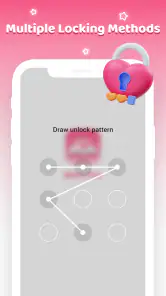
One of the standout features of this app is its robust security. With the ability to set up a password or use biometric authentication, your entries are kept safe from prying eyes. I tried breaking into my own diary (for research purposes, of course!) and found the security measures quite reassuring. It’s like having a personal vault for your thoughts!
For a calmer daily workflow, I’d decide what belongs in this diary before writing: a quick account of the day, a work reflection, or something I want to remember later. That small choice keeps entries focused and makes it easier to return to the habit. If privacy matters at home or around coworkers, I’d also make locking the app part of the same routine as putting the phone away, rather than relying on remembering it only when an entry feels especially personal.
Personalize for readability, not just looks
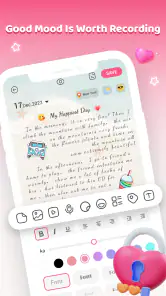
Let’s talk about the aesthetics for a moment. The app offers a range of themes and fonts to choose from, allowing you to personalize your diary to match your style. I particularly enjoyed switching up the themes based on my mood. Whether you’re feeling bright and cheerful or dark and mysterious, there’s a theme for that!
My practical tip is to settle on a theme and font that stay comfortable in different lighting, then leave them alone long enough to build a familiar writing space. Frequent changes can be fun, but they do little for consistency if you spend more time adjusting the screen than recording a thought. If you write at night, readability should matter more than decoration.
Turn tags and search into a retrieval habit
The app also comes packed with features to help you keep track of your entries. With options to add photos, tags, and even mood indicators, organizing your thoughts has never been easier. The search function is pretty nifty too, making it a breeze to find that one entry from months ago.
A useful way to get more from those organizing tools is to use a small, repeatable set of tags instead of inventing a new label every day. For example, I’d keep work reflections distinct from personal notes and use mood markers only when they help me notice a pattern. Photos can give an entry context, but I’d add them selectively; a diary can become harder to scan if every short note turns into a collection of attachments.
Keep access expectations realistic
What’s a diary app if you can’t access it whenever you need to? Diary Pro - Diary With Lock syncs seamlessly across devices, ensuring your entries are always at your fingertips. I tested this feature by switching between my phone and tablet, and the transition was smooth as butter.
In a real day, I might jot down a thought during a commute, then return to it at home to add context or a photo. That kind of short-and-later workflow suits a diary better than waiting for a perfect stretch of free time. Still, if your journal contains records you absolutely cannot afford to lose, I’d keep a separate backup routine rather than treating any single app as the only copy. A lock helps with access privacy; it is not the same thing as a personal archive strategy.
Where it fits among journal options
Diary Pro is free, has an Everyone age rating, and has reached over a million installs. Its average rating is 4.2 from around 2,500 ratings, with about 740 written reviews. It was released on May 29, 2023, and version 1.0.5 requires Android 8.0 or later. Those details make it approachable for many Android users, but I’d still check that the current version suits your device before building a long-term habit around it.
Compared with a paper notebook, a digital diary is easier to search and can keep photos beside written memories, while paper avoids screen time and app-based access concerns. Compared with a general notes app, Diary Pro is more clearly shaped around private journaling, but someone who needs shared documents, project boards, or a tightly integrated work system may be better served by a dedicated productivity tool. I’d choose this app for personal writing, not as a replacement for every kind of note-taking.
Settings, limits, and the right kind of user
Before settling in, I’d check the lock option that fits how I actually use my phone and choose a consistent naming and tagging habit. The password or biometric choices are useful trade-offs: a quick unlock is convenient, while a password may feel preferable in some situations. I would not assume that a lock alone answers every question about storage, recovery, or moving entries between devices; anyone with strict privacy or preservation needs should review the app’s current settings and keep a copy of important writing elsewhere.
This is a good fit for someone who wants a straightforward personal, work, or daily journal with ways to protect and find entries. It is less suitable if you need a feature-rich writing studio, collaboration, or a paper-free guarantee that does not depend on a device. The most reliable way to use it is modest: write a few lines when something happens, add a tag only when it will help later, and revisit older entries through search rather than trying to document every detail.
My take after weighing the trade-offs
Diary Pro is free, which makes it easy to try without committing money to a journaling habit that may or may not stick. It is rated for Everyone, has passed a million installs, and holds a 4.2 average from roughly 2,500 ratings, alongside around 740 written reviews. It arrived on May 29, 2023; version 1.0.5 calls for Android 8.0 or later. I’d check compatibility on the device I plan to use, then start with a short entry rather than spending the first session configuring everything.
The app’s appeal is its focus: a lock, journal-style writing, and tools for finding entries make more sense for private reflection than a general-purpose notes app. The opposite is true when I need to share a document, manage a team task, or keep a formal work record. Paper still wins for distraction-free writing and independence from a phone, while a diary app is more convenient when I want search and photos in the same place.
Final Thoughts: All in all, Diary Pro offers an approachable way to keep personal writing organized and protected from casual access. I’d use it for brief reflections, workday notes meant for myself, or memories I may want to search later—not as my only archive or as a substitute for collaborative tools. If that balance sounds right, it is worth trying with a simple routine: write a little, lock it when you finish, and organize only what you expect to revisit.
Diary Pro - Diary With Lock Frequently Asked Questions
Is Diary Pro - Diary With Lock free, and what devices can run it?
Diary Pro is a free lifestyle app developed by RHEANNA LYNN, so you can try its journaling features without paying to download it. It is rated for Everyone and requires Android 8.0 or later. Before installing, check that your device meets that operating-system requirement and has enough available space for the app and any diary content you plan to keep.
What should I check before installing Diary Pro on my device?
First, make sure your device runs Android 8.0 or later, since that is the minimum operating-system requirement. It is also worth considering how you prefer to write: the app is designed for keeping personal, work, secret, and daily journal entries. Diary Pro is free and has an Everyone content rating, so those details can help you decide whether it suits your device and intended use.
What features does Diary Pro - Diary With Lock offer for personal journaling?
Diary Pro - Diary With Lock offers a comprehensive suite of features tailored for personal journaling. Users can enjoy customizable themes, rich text formatting, and the ability to add images and emojis to entries. Additionally, the app supports voice-to-text input, making it easy to document thoughts on the go. With cloud backup, users can safely store their entries and access them from multiple devices.
How secure is Diary Pro - Diary With Lock?
Security is a top priority for Diary Pro. The app provides a robust locking mechanism to ensure that your personal entries remain private. Users can set up a password or use biometric authentication, such as fingerprint or facial recognition, to access their diaries. Regular updates ensure the app's security features remain up-to-date, safeguarding your data effectively.
Can I sync my Diary Pro entries across different devices?
Yes, Diary Pro supports syncing across multiple devices. By enabling cloud backup, you can easily access your entries from any device where the app is installed. This feature ensures that your journal is always up-to-date, regardless of whether you're using a smartphone or tablet. All data is securely encrypted during the syncing process to protect your privacy.
Pros
- User-friendly interface for easy navigation
- Strong security with password protection
- Rich text editing for detailed entries
- Sync across devices effortlessly
- Customizable themes to suit preferences
Cons
- Limited free version features
- Occasional sync issues reported
- Ads in free version can be intrusive
- No offline mode for free users
- Limited export options for entries

- Category
- Lifestyle
- Version
- 1.0.5