Days To | Countdown
- 928.00
- 4.6
- Installs
- 1.00M
- Price
- Free

Screenshots

Analysis by Reviewed
I like countdown apps most when they change how I experience the wait, not when they become another inbox to maintain. Days To | Countdown is best understood as a visual companion for a handful of dates I’m looking forward to or need to keep in mind. Its lasting value depends on picking events that benefit from being visible, then keeping the list light enough that I still want to look at it.
Why the first week feels satisfying
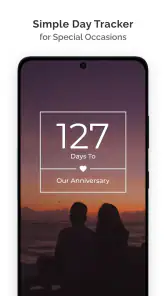
Setting up a trip, birthday, anniversary, or personal milestone gives the app an immediate purpose: instead of a date buried in a calendar, there is a clear sense of how close it is. Adding an event name and choosing an icon can make the first setup feel personal without requiring a long planning session. I’d start with one event I’m genuinely anticipating, rather than entering every deadline at once. That makes it easier to tell whether seeing a countdown actually adds something to my routine.
A realistic example is preparing for a weekend away. I might add the departure date so it stays in view, then use the shrinking number as a cue to book transport or check what I still need to pack. The countdown itself will not organize those tasks, and I would keep the practical details in a checklist or calendar. Used this way, it creates a useful prompt without pretending to replace the tools that handle the work.
Useful when a date needs more than a calendar alert
A realistic use is planning a trip: I could add the departure date, choose an icon that makes the entry easy to spot, then glance at the countdown while deciding what still needs doing. That number is motivating, but it doesn’t replace packing reminders or a travel checklist. I’d keep those in a calendar or notes app and use the countdown as a visual prompt, not as the place where every detail lives.
The same distinction helps with birthdays, anniversaries, exams, or a recurring household task. A countdown works best when knowing how close the date is changes what I do today. For something that simply needs to happen at a precise time, a regular calendar notification is usually the safer and more practical tool.
What keeps it useful after the first week
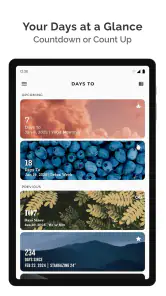
In its first few days, adding events and choosing their appearance can be enjoyable. The longer-term question is whether checking them becomes a habit. The home-screen widget can help because it puts dates in view without requiring me to remember to open the app. I’d keep the display focused on a small set of events that genuinely matter; filling it with every minor deadline risks turning a helpful glance into visual clutter.
Days To is a free lifestyle app from miniminiapps, and its audience figures suggest it has found a substantial user base: it has over a million installs and a 4.6 average from around 22,000 ratings. It is rated for everyone, so it can suit a broad range of users. The current version is 6.0.36, and the app requires Android 8.0 or later. Optional in-app purchases range from $1.99 to $9.99 per item, so I’d check what is included before paying; the basic appeal is the countdown itself.
More From Our News Desk

Clash of Clans Is Won Between the Battles

Android Auto Makes the Case for Quieter Car Software

MobiOffice: Transforming Mobile Productivity with Seamless Integration

EA SPORTS FC™ Mobile Soccer: Redefining Mobile Sports Gaming

How Microsoft OneDrive Became a Mobile Productivity Giant

How Google Translate Breaks Language Barriers Effortlessly
Using Days To | Countdown over time
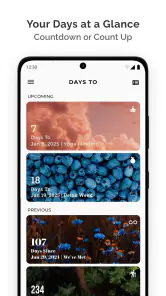
Upon launching Days To | Countdown, I was immediately struck by its user-friendly interface. The app makes it incredibly easy to set up countdowns for any event you can imagine. Whether it’s a vacation, an anniversary, or even a reminder to water your plants, this app has got you covered. With just a few taps, you can add the event name, date, and even select from an array of icons to personalize your countdown.
Visual Appeal and Customization
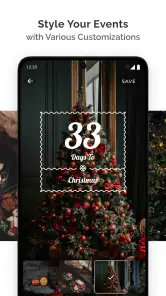
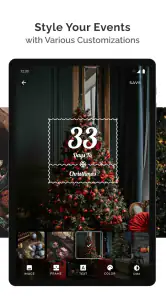
One of the standout features of this app is its customization options. You can choose from a variety of themes and backgrounds, making each countdown unique and tailored to the event’s mood. The visual appeal is heightened by the app’s clean design and smooth animations, which make checking your countdowns a delightful experience.
Moreover, the app allows you to set reminders for each countdown, ensuring you never miss a beat. The notification feature is particularly handy for forgetful folks like me who need that extra nudge.
Sharing the Excitement
What’s a countdown without sharing the excitement with friends and family? Days To | Countdown makes it easy to share your countdowns on social media or via messaging apps. You can even invite others to join in the countdown, making it a shared experience. This feature adds a social element to the app, making it more than just a personal organizer.
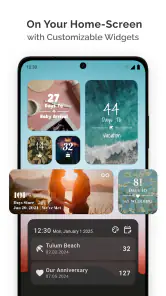
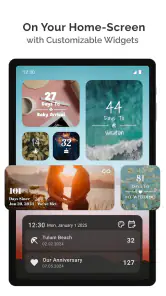
The app also offers a widget for your home screen, so you can keep an eye on your countdowns without even opening the app. This small but mighty feature ensures that your important dates are always front and center.
Making the widget earn its space
The widget is most helpful when it answers a quick question at a glance: what am I looking forward to, and how close is it? I would avoid treating it as a miniature task board. A short event title is easier to scan than a sentence explaining the whole plan, and a distinctive icon can do some of that identifying work without making every entry visually busy. If several dates compete for attention, I’d keep the ones with emotional or practical value most visible and let the calendar handle the rest.
There is a small but meaningful trade-off here. A widget can turn a passive wait into a gentle nudge, but seeing a date repeatedly does not automatically make me better prepared. For a deadline, I would pair the countdown with a calendar alert or a task list that says what to do next. For a holiday or family celebration, the countdown may be enough because the point is anticipation rather than a sequence of actions.
A sharing feature with a clear boundary
Sharing a countdown makes sense when the other person is looking forward to the same event: it gives the occasion a common visual marker and can make the wait feel shared. I would not rely on it as the main way to communicate arrangements. A countdown does not replace messages about meeting places, changes, or responsibilities, so I’d send those details through the usual channel and use the shared entry for the fun part.
This distinction also helps answer whether the app suits a couple, family, or group of friends. It can add a lightweight shared ritual around one occasion, but it is not the choice I’d make for coordinating several people’s calendars or assigning jobs. If the group needs to know who is doing what and when, a shared planner will be more useful; if everyone simply wants to watch the same date approach, a countdown is a better fit.
When personalization helps—and when it becomes upkeep
Themes and backgrounds can make an event feel distinct, but I would not spend time styling every entry just because the option is available. The practical test is whether the design helps me recognize the occasion or makes me enjoy checking it. If it adds no value, a clear title and simple appearance are enough. Keeping customization selective also makes it easier to add a new event quickly when a date comes up unexpectedly.
For an annual birthday or holiday, I would decide whether the countdown deserves a fresh entry each year or whether a recurring calendar event is more dependable for planning. A countdown is tied to a particular date, so keeping an old entry after the occasion has passed can make the list feel stale. A quick review after each event—remove it, update it, or deliberately keep the idea for next year—prevents that quiet buildup.
Ending on a High Note
Overall, Days To | Countdown is a fantastic tool for anyone looking to add a bit of excitement to their wait for upcoming events. Its ease of use, customization options, and social sharing capabilities make it a standout choice for countdown apps. If you’re someone who loves to keep track of time in a fun and engaging way, this app is definitely worth checking out. So go ahead, start your countdown today and watch as the days fly by!
A small maintenance routine makes the difference
My practical advice is to review the list whenever an event passes. Remove or update finished countdowns rather than letting old entries accumulate; otherwise, the screen gradually becomes less about what’s ahead and more about dates that no longer matter. For annual occasions, decide whether you want to create a fresh entry each year or rely on a calendar for repeat scheduling. A countdown is clearest when its date is current and its purpose is obvious.
There is also a trade-off between personalization and upkeep. Themes and backgrounds can make important events easier to recognize, but customizing every entry takes time and may not add much if you only check the number. I’d reserve the extra styling for events I care about, and use simple names for practical reminders. That keeps the app quick to scan and reduces the chance that decoration becomes another task to manage.
When another tool is the better fit
Compared with a calendar, this app puts the approaching-day perspective first; a calendar is better for seeing schedules, coordinating appointments, and managing repeating commitments. Compared with a plain reminder, the countdown can make a distant occasion feel present, while a reminder is more direct when I need to act at a specific time. I see them as complements, not replacements. If you need shared planning with assignments, detailed notes, or a complete agenda, I’d choose a dedicated organizer instead.
Sharing can add a pleasant communal angle when friends or family are anticipating the same occasion. I’d still treat the shared countdown as a celebration aid rather than a source of coordination: send the event details separately if timing or logistics matter. That small distinction avoids assuming a visual countdown handles the practical planning too.
Who will keep it installed?
I’d recommend it to someone who enjoys visual reminders and has a handful of dates they like to anticipate. It can also suit a household that wants a visible reminder for a planned event, provided everyone is comfortable using a countdown rather than a shared calendar. People who rarely check widgets, dislike maintaining another list, or only need occasional alerts may get more lasting value from the calendar already on their phone.
It is also a poor fit for someone who wants one app to manage the entire route from intention to completion. The countdown can keep a date mentally present, but a packing checklist, study plan, or work schedule needs more than a number of days. I would skip it if I know I never look at home-screen widgets or if maintaining a second set of dates would feel like duplication. In those cases, improving the reminders in a calendar already used every day is likely the lower-friction choice.
The month-to-month test
After the novelty of adding colorful entries fades, the useful question is whether I still glance at the dates without forcing myself to. If I naturally check the widget while unlocking my phone, it can earn a small, durable place in my routine. If I have to remember to open the app, the benefit shrinks, especially when the same date is already visible in a calendar. I’d treat the first few weeks as a simple trial: keep only dates I care about, then remove anything I consistently ignore.
That approach also limits notification fatigue. I would set a reminder only when the date needs an action or when a timely nudge would genuinely help. If every countdown produces an alert, the app risks becoming noise rather than a pleasant prompt. The visual number can do the everyday work for occasions that need no alert; calendar notifications can cover the moments when timing matters.
Who gets the most recurring value
The strongest long-term case is for people who enjoy anticipation: someone counting down to a trip, a student keeping a major exam in view, or a family looking forward to a gathering. It can also give a recurring household goal a visible finish line, provided the date is real and the countdown is not mistaken for a schedule of chores. The app is less compelling for users whose dates are mostly appointments and obligations, because a standard calendar already shows those in the context needed to act.
For an everyday workflow, I’d add a trip date, keep the widget focused on it, and use the number as a weekly prompt to check the separate packing list. As departure approaches, a calendar can carry exact reminders for tickets or leaving home. Once the trip ends, I’d clear the countdown rather than letting it linger. That small loop—add with a purpose, use as a cue, then remove—makes the app feel intentional instead of like another list left behind.
Long-term verdict
Days To has a clear, modest job: make selected dates feel present. It does not need to become a planner to be worthwhile, and trying to use it that way would expose its limits. I’d keep it installed if its widget gives me a pleasant, useful glance at events I care about and if maintaining a short list takes little effort. I’d move on if the dates become clutter, notifications feel repetitive, or the app duplicates my calendar without adding anticipation.
Days To was released on May 12, 2021, and its continued usefulness depends less on collecting events than on choosing the right ones. I would start with a few upcoming dates, give each a clear label, and set reminders only where a nudge would genuinely help. If I find myself checking the widget naturally, it has earned its place; if the list becomes clutter or duplicates my calendar without adding excitement, I’d pare it back. That feels like the fairest test of its long-term value.
Days To | Countdown Frequently Asked Questions
Can Days To | Countdown help me remember birthdays and other recurring dates?
Days To | Countdown is designed to keep important dates visible through countdowns, making it useful for occasions such as birthdays, anniversaries, milestones, and deadlines. You can add an event and use its countdown to see how much time remains. For dates that come around again, check how the app handles recurring events when setting one up, so its setup suits the way you prefer to track them.
Does Days To | Countdown send reminders or notifications?
Days To | Countdown focuses on counting down to important events, and its event setup is intended to help you keep those dates in view. The app’s description highlights avoiding missed dates, while notifications can depend on the options available in the app and your device’s notification settings. Before relying on an alert for a deadline or celebration, check the event and notification settings on your device.
Can I use Days To | Countdown without paying?
Yes. Days To | Countdown is free to download, so you can try its countdown approach without paying upfront. The app also offers in-app purchases, with items priced from $1.99 to $9.99. Those purchases are optional, so consider whether the app’s available features meet your needs before choosing any paid extras.
Is Days To | Countdown suitable for everyday use?
Days To | Countdown is a lifestyle app for keeping upcoming dates visible, whether you are planning a celebration, tracking a personal milestone, or remembering a deadline. Its central idea is simple: add an event and use the countdown to see how much time remains. The app is free to download, so you can try this date-tracking approach before deciding whether its available extras are useful to you.
What is Days To | Countdown and how does it work?
Days To | Countdown is a user-friendly app designed to help you keep track of important events by counting down the days, hours, and minutes until they occur. Whether it's a birthday, anniversary, or a project deadline, this app allows you to set reminders and notifications, ensuring you never miss an important date again. Simply input the event details, and the app will display a personalized countdown timer.
Pros
- Highly customizable countdowns
- User-friendly interface
- Supports multiple events
- Syncs across devices
- Includes widgets for quick view
Cons
- Ads may interrupt usage
- Limited free features
- No offline mode
- Occasional sync issues
- Battery drain on prolonged use

- Category
- Lifestyle
- Version
- 6.0.36