Daybook - Diary, Journal, Note
- 5.12K
- 4.6
- Installs
- 1.00M
- Price
- Free

Screenshots
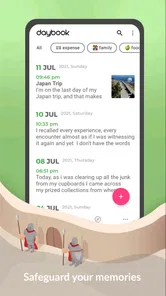



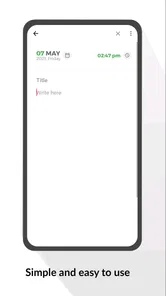
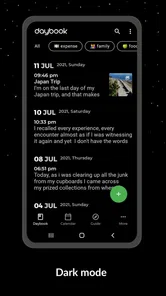


Analysis by Reviewed
I usually judge a personal journal by a simple question: would I feel comfortable opening it on an ordinary day, when I have only a minute to write and something private on my mind? Daybook - Diary, Journal, Note takes a practical approach to that habit. It is a lifestyle app from Daybook Labs Inc that lets me record thoughts by speaking or typing, with the goal of making memory keeping feel less like a formal writing task.
After spending time with it, I found the strongest part of the experience is not decoration or complicated organization. It is the reduced effort between having a thought and saving it. That matters when I am tired, walking home, or trying to remember a small moment before it disappears. The app is free to start, available for Everyone, and has built a substantial audience, with over one million installs and a 4.6 average from around fifty-nine thousand ratings.
That popularity does not automatically make a journal trustworthy, though. A diary can contain health concerns, relationship details, travel plans, financial reflections, or private memories. My view of Daybook is therefore cautious but positive: it is approachable and useful for building a journaling routine, yet anyone choosing it should pay close attention to the controls and choices shown inside the app before recording especially sensitive material.
What using Daybook feels like in everyday life
The first thing I noticed is how well the app fits short entries. Traditional journaling often creates unnecessary pressure: I imagine needing a quiet room, a blank page, and enough time to write something meaningful. Daybook makes a smaller commitment feel valid. A brief note about a conversation, a sentence about my mood, or a spoken recollection after an outing can all become part of the record.
The speak-to-write approach is especially useful when my hands are busy or my thoughts are arriving faster than I can type. I would use it after a walk, during a commute when it is safe to do so, or at the end of a long day when typing feels like work. Speaking naturally can also produce a more honest first draft than stopping to correct every sentence. I still recommend checking the result before treating it as a finished entry, because voice transcription can misunderstand names, places, or quiet speech.
Typing remains the better choice when precision matters. If I am recording a medication observation, a detailed plan, or a list of tasks connected to a personal goal, I would rather review every word as I enter it. This is one of the app’s important trade-offs: voice capture lowers friction, while manual writing gives me tighter control over wording and privacy at the moment of creation.
The diary format also changes how I think about consistency. Instead of waiting for an important event, I can use a simple pattern: one sentence about what happened, one sentence about how I felt, and one detail I want to remember. That workflow is more sustainable than promising myself a long reflective entry every night. Daybook is at its best when it supports this kind of modest routine rather than encouraging perfectionism.
More From Our News Desk

Weather by Xiaomi Review: Clear at a Glance, Less Clear Up Close

X Under Pressure: Can It Recover When Posting Goes Wrong?

Clash of Clans Is Won Between the Battles

Android Auto Makes the Case for Quieter Car Software

MobiOffice: Transforming Mobile Productivity with Seamless Integration

EA SPORTS FC™ Mobile Soccer: Redefining Mobile Sports Gaming
A realistic evening workflow
Imagine coming home after a difficult workday. I might open the app and speak for a minute: what caused the frustration, what I handled well, and what I want to do differently tomorrow. Before saving, I would reread the transcription, remove anything too sensitive for the device or account environment I am using, and make the entry more useful by adding a clear personal takeaway.
The next morning, that note could help me remember the situation without reconstructing it from scattered messages. The value is not that the app solves the problem. It gives me a place to capture the event while it is still fresh, which is often the hardest part of journaling.
For memory keeping, I would use a different rhythm. After a family gathering or short trip, I could record several small observations rather than trying to produce a polished story. The details that seem insignificant at the time—a funny phrase, an unexpected meal, or the feeling of arriving somewhere new—are often the parts I most want later. A journal that makes these fragments easy to save has a genuine advantage over a notebook that stays closed.
Trust starts with what the app asks me to choose
Because Daybook is a personal journal rather than a casual game or a disposable note pad, I would not judge it only by its writing interface. Trust comes from visible choices: how the app handles account access, what permissions it requests, what privacy or security controls it presents, and whether those choices are understandable before I commit sensitive material.
I prefer to make those decisions deliberately instead of tapping through setup screens. If the app asks for microphone access, I would allow it only when I want to use voice entry. If it presents notification choices, I would decide whether reminders support my routine or create pressure. If it offers account or synchronization controls, I would review them with the understanding that convenience and exposure can increase together.
The important point is that I would not treat a journal as private merely because it looks private on screen. A lock screen, a personal account, or a quiet interface may help, but none should replace reading the app’s visible explanations and settings. Daybook’s usefulness depends on my willingness to manage those choices actively.
The developer is Daybook Labs Inc, and the app has been available since January 1, 2017. It currently appears as version 6.38.0 and supports Android 6.0 or newer. Those details make it accessible to people using older Android devices, but I would still keep the operating system updated where possible, especially when storing personal writing.
Controls I would review before writing anything sensitive
My first check would be the microphone permission. Voice journaling is one of the app’s clearest conveniences, but I would keep microphone access off when I am not using that function if the device allows that choice. This is not about assuming bad behavior; it is a sensible boundary for any app that can receive spoken words.
Next, I would inspect notification settings. A reminder can be helpful, but a journal notification appearing on a shared lock screen could reveal more than intended. I would choose wording and timing carefully, and I would disable reminders if they make the habit feel intrusive. A private routine should not accidentally become visible to people nearby.
I would also look at account controls before building a long history. If signing in is optional or if multiple access methods are offered, I would consider whether convenience, recovery, and separation from other accounts matter to me. I would use a strong, unique password for any account connected to personal writing and avoid saving sensitive details in entry titles or notification previews.
Finally, I would examine the app’s privacy and data explanations in the current version rather than relying on assumptions based on the word “journal.” Policies and settings can change, and a careful user should make decisions from the controls actually displayed. I can recommend checking those screens; I cannot responsibly turn a general impression into a guarantee about data handling.
When the content is more sensitive than usual
Some entries carry much higher consequences than others. A note about a pleasant lunch is not the same as a detailed account of a medical condition, a legal dispute, a password hint, or private information about another person. I would use extra restraint in those situations, regardless of how convenient the app feels.
One practical habit is to separate reflection from identifying details. I can write about feeling anxious before an appointment without including a full medical record. I can process a disagreement without naming every person involved. I can record a financial goal without placing account numbers or access codes in the diary. This keeps the journal emotionally useful while reducing the damage if an entry is exposed.
I would also avoid treating the app as a secure vault for secrets. A diary can help me think, but it is not the right place for authentication credentials or information that must be protected with specialized security controls. For those needs, a dedicated password manager or another purpose-built tool is more appropriate.
Voice entry deserves an additional pause. Speaking privately is not always possible, and dictating sensitive thoughts in a public place can expose them to people nearby. I would use typing when the surroundings are uncertain, and I would review the transcription for mistakes before saving. A wrong name or altered sentence can change the meaning of a personal record.
Where Daybook is stronger than familiar alternatives
Compared with a paper notebook, Daybook is easier to search through once I have accumulated entries, and speaking can be much faster than handwriting. Paper still wins for people who want a completely offline-feeling ritual, a tactile experience, or no account and permission decisions. If the act of closing a physical notebook is what makes someone feel safe and consistent, a digital journal may add more complexity than value.
Compared with a general notes app, Daybook feels more focused on personal reflection. A notes app is excellent for shopping lists, work drafts, clipped information, and quick reminders, but those mixed purposes can bury meaningful memories. A dedicated diary encourages me to keep events and feelings together instead of scattering them across unrelated folders.
Compared with a full productivity system, it is less likely to turn reflection into project management. I would not choose it as my only tool for deadlines, shared tasks, or structured planning. That limitation is also a strength: the app has a clearer emotional purpose, so I can open it without feeling that I am entering another work dashboard.
Compared with a highly customizable journaling platform, Daybook may appeal more to people who value speed over endless configuration. I do not want to spend the first week designing templates before writing the first entry. On the other hand, users who need elaborate tagging, specialized prompts, advanced export workflows, or strict control over where every file is stored should compare those requirements carefully with what the app visibly offers in their version.
Cost, access, and the point where the fit changes
Daybook is free to download and use at its basic entry point, with optional in-app purchases ranging from $1.99 to $199.99 per item. I would not assume that every useful function is included without checking the purchase screen. Before paying, I would identify exactly what the upgrade changes, whether it supports my actual routine, and whether I am buying convenience or a capability I genuinely need.
The broad price range is a reason to slow down rather than make a quick purchase. A person who only wants occasional text entries may need very little. Someone planning to use voice journaling frequently, maintain a long personal archive, or rely on additional controls should read the current offer carefully and consider the long-term value. I would also confirm the billing terms shown by the platform before accepting anything.
The Everyone age rating makes the app approachable for a wide audience, but that label should not be confused with advice for every kind of content. Younger users may still need guidance about what to record, which permissions to allow, and whether an account should be connected to a family device. A journal can be emotionally personal even when its age category is broad.
I would skip Daybook if my top priority is absolute simplicity with no digital account decisions, or if I need a specialized encrypted repository with controls designed for high-risk information. I would also look elsewhere if I want a collaborative journal, a task manager, or a tool built primarily around visual scrapbooking. Daybook makes more sense for one person who wants an accessible place for thoughts and memories.
Small habits that make the app more useful
I recommend creating an entry before deciding whether the day was “important.” The best journal material is often ordinary, and waiting for a dramatic event makes the habit fragile. A short note after a normal day can later reveal patterns in mood, energy, or recurring stress that a collection of occasional highlights would miss.
For voice entries, I would begin with a spoken label such as “today’s challenge” or “one thing I want to remember,” then pause and continue naturally. That gives the entry a clear shape without forcing me to write an essay. After transcription, I would correct names and add one concrete detail. This two-step workflow is faster than composing perfectly while speaking and more reliable than saving the raw result without checking it.
I would keep sensitive context out of titles and notifications. A neutral title can still help me find an entry later, while reducing the chance that a private subject appears on a shared screen. I would also review older entries occasionally, not to edit my past into something polished, but to remove information I no longer want to keep and confirm that my storage habits still match my comfort level.
Another useful approach is to give the journal a defined job. I might use it for emotional decompression, memory capture, gratitude, or tracking personal experiments, but I would not ask one stream to replace every other tool. A clear purpose makes it easier to decide what belongs in an entry and when another app is the safer or more suitable option.
My cautious verdict
Daybook - Diary, Journal, Note is a convincing choice for people who want journaling to be quick, personal, and easy to start. Its combination of typing and speak-to-write entry makes it particularly practical for short reflections and memories captured at the moment they happen. I appreciate that it can fit around real life instead of demanding a carefully prepared writing session.
My recommendation comes with boundaries. I would review microphone, notification, account, and privacy choices before using it regularly, and I would keep passwords, financial credentials, and highly sensitive records elsewhere. I would also check any purchase screen carefully, since the free starting point and optional items do not mean every capability has the same cost.
The app is best for a solo user who wants a friendly digital diary and values low effort more than deep customization. It is less suitable for someone seeking a paper-like experience, a dedicated secure vault, a collaborative space, or a complete productivity system. With those expectations set correctly, I think Daybook can become a dependable place for small daily observations and meaningful memories.
My final advice is to start with low-risk entries, inspect the visible controls, and build trust through your own choices rather than assumptions. If the writing flow feels natural and the privacy decisions fit your comfort level, the app is worth trying. If those decisions feel unclear or the journal’s purpose is more demanding than simple personal reflection, choosing a more specialized alternative would be the wiser move.
Daybook - Diary, Journal, Note Frequently Asked Questions
Can I use Daybook without paying?
Daybook is free to download, so you can try its basic journaling experience without an upfront purchase. The app also offers in-app purchases, which may appeal to people looking for additional options. If you are considering a purchase, check the current price and what it includes in your device’s app store before confirming, since the available options can vary.
Does Daybook let me speak instead of typing my journal entries?
Yes. Daybook’s short description highlights speak-to-write journaling, which can make it easier to capture a thought when typing is inconvenient. This may suit quick reflections or moments you want to record right away. You can still use the app as a personal journal for written entries, choosing the approach that feels most comfortable for your routine.
Is Daybook a good choice for keeping a daily writing habit?
Daybook can work well for a flexible journaling habit because you can begin with a brief note and write more whenever you have time. There is no need to make every entry a long reflection; recording a memory, mood, or thought can be a practical starting point. Its simple personal-journal focus makes it suitable for fitting writing around everyday life.
What devices and operating systems can I use Daybook on?
Daybook is a Lifestyle app available for Android and iOS, making it an option for people who want to keep a personal journal on a mobile device. Before downloading, check that your device meets the minimum operating-system requirement: Android 6.0 or later. You can also review the app’s current store page for compatibility with your particular device.
Is Daybook suitable for beginners who have never kept a journal?
Yes. Daybook is designed as a simple personal journal, so you can begin with short notes about your day rather than following a strict writing routine. You might record a memory, a mood, or a thought whenever you have a moment. Its flexible approach also leaves room to write longer reflections later, if journaling becomes part of your routine.
Pros
- Clean
- distraction-free interface for quick daily entries.
- Supports photos
- audio recordings
- and mood tracking in one place.
- Calendar view makes browsing past memories simple.
- Useful reminders help maintain a consistent journaling habit.
- Entries can be protected with a PIN or biometric lock.
Cons
- Some advanced features require a premium subscription.
- Cloud backup and syncing may depend on account setup.
- The free version may display ads or promotional prompts.
- Limited formatting options for users wanting richly styled entries.
- Export and migration tools may not cover every preferred format.











