

Daily Nanny
- 60.00
- 3.4
- Installs
- 10.00K
- Price
- Free

Screenshots
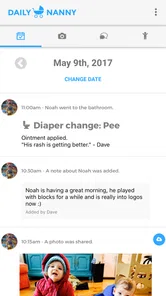
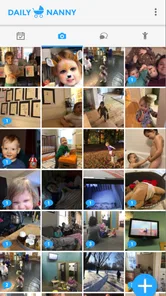
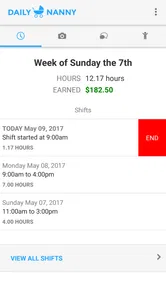
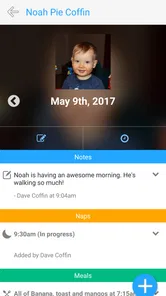
Analysis by Reviewed
Keeping parents and nannies in the same loop sounds simple until the day becomes busy. A pickup changes, a child needs something from home, or a small detail gets forgotten between messages. Daily Nanny is a communication app built around that relationship, and I found its appeal easy to understand: it aims to give families and caregivers a shared place to stay connected instead of scattering every update across ordinary chats.
I would describe it as a focused tool rather than a complete family-management platform. That distinction matters. If you want a dedicated channel for parent–nanny communication, it is worth considering. If you expect a full calendar, extensive childcare records, sophisticated scheduling, or a large community of caregivers, you may find the experience narrower than expected. My overall impression is that its value depends less on flashy features and more on whether both sides consistently agree to use it.
What Daily Nanny is really trying to solve
The app belongs to the communication category, and that is the best way to approach it. It is not something I would install casually for general messaging. Its purpose is more specific: helping parents and nannies keep everyday information connected to the childcare arrangement. That focus can be useful because important notes are less likely to disappear among unrelated family conversations, work messages, and notifications.
In a realistic weekday scenario, a parent might need to tell a nanny that the afternoon plan has changed, while the nanny may need to pass along an update from the day. A dedicated space makes that exchange easier to identify later. I especially like the idea for households where more than one adult needs visibility, because a shared communication habit can reduce the familiar “I thought you told them” problem.
Still, the app cannot create good communication on its own. Both the parent and caregiver need to check it, understand what belongs there, and decide how urgent messages should be handled. For an immediate safety issue, I would not rely on an app notification alone; I would use the fastest direct method available and treat Daily Nanny as the organized record for normal updates.
A focused tool from an independent developer
Daily Nanny is developed by Dave Coffin. Its presentation feels more like a practical, purpose-built utility than a broad social service, which may appeal to people who do not want to build a large online profile or join a public network. The app is free to install, although in-app purchases range from $4.99 to $39.99 per item. That makes it sensible to explore the basic experience first and understand what is included before paying for anything.
The app is rated for Everyone, so it is positioned for a broad audience. That rating should not be confused with a promise that every family situation is covered. Parents still need to decide whether the communication process suits the age of the child, the responsibilities of the caregiver, and the household’s own privacy expectations.
More From Our News Desk

 Gmail
GmailGmail in a Busy Inbox: Who Benefits Most?
From first account to crowded workday, Gmail earns its place through dependable search and flexible sorting—but its best fit depends on how much inbox maintenance you can tolerate.

 Prime Video
Switching to Prime Video: What Changes in Your Viewing Routine
Prime Video can make a compelling second home for streaming, but switching means learning a different catalog, rental layer, and route from browsing to playback.

 Universal TV Remote Control
Universal TV Remote Control Works Best as a Reliable Backup
A phone remote earns its place through quick setup and reliable habits. Here is how to get more from Universal TV Remote Control—and where its limits show.

 Weather - By Xiaomi
Weather by Xiaomi Review: Clear at a Glance, Less Clear Up Close
Xiaomi’s weather app makes everyday forecasts quick to scan, but its calm surface can leave useful details and recovery paths harder to find than they should be.

 X
XX Under Pressure: Can It Recover When Posting Goes Wrong?
A resilience-focused review of X, examining setup, mistaken posts, interruptions, weak connections, and the gaps that matter when recovery needs to be dependable.

 Clash of Clans
Clash of Clans Is Won Between the Battles
Its raids are quick; its community is a long-term project of coordination, teaching, rivalry, and shared responsibility—with all the friction that entails.
Latest News



The current version is 7.6.0, and the app requires Android 7.0 or newer. That requirement is not especially demanding for many devices, but it is worth checking before asking a nanny to install it on an older phone. A communication system only works when every necessary participant can access it reliably.
Trust starts with what you can actually control
When I assess an app used around children and caregivers, I pay attention to user control before convenience. I want to know who is expected to participate, what information people choose to share, and whether the app can fit a household’s boundaries. With Daily Nanny, I would begin by setting clear rules outside the app: which updates belong in the shared channel, which details should not be posted, and which situations require a phone call.
The strongest privacy habit is deliberate sharing, not automatic sharing. I would avoid treating the app as a place for every piece of family information. A nanny may need practical childcare details, but that does not mean the communication space should contain unrelated financial, medical, or household information. Keeping messages limited to what the caregiver needs makes the arrangement easier to review and reduces unnecessary exposure.
I would also make sure everyone understands who can see each message before using it for sensitive topics. This is particularly important when multiple parents, guardians, or caregivers are involved. A message intended for one person can become confusing if the group around it is not clearly understood. The safest workflow is to establish the audience first, then write only what that audience needs.
Because the app is designed for an ongoing relationship, account access deserves practical attention. Parents and nannies should use their own accounts where applicable, avoid sharing passwords, and remove access when a childcare arrangement ends. These are simple steps, but they matter more than an attractive interface when the app is part of a household routine.
How I would use it during a normal day
I would keep the communication rhythm simple. At the beginning of the day, a parent could share the details the nanny needs for that day. During the day, the nanny could add relevant updates without turning the conversation into a constant stream of minor observations. At the end, both sides could use the same space to close the loop on what changed or what needs attention tomorrow.
The useful insight here is that Daily Nanny works best when it becomes a shared handoff routine, not merely another inbox. A short message written at the right time can be more valuable than a long conversation that nobody reviews. I would encourage families to agree on a consistent format, such as starting with the child’s name or the day’s topic, then keeping urgent matters clearly separate from ordinary notes.
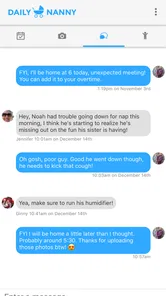
For example, a parent leaving for work might send a concise update about a revised pickup plan and anything the nanny needs to know before the afternoon. The nanny could respond after confirming the change, then later add a note about how the day went. This creates a readable sequence and reduces the need to reconstruct events from memory.
I would not use the app as the sole place for emergency instructions unless every user has tested how quickly notifications arrive and how reliably they notice them. Phones can be muted, batteries can run down, and people can miss messages. The app is better suited to planned communication and documented handoffs than to replacing urgent contact methods.
Where the communication model helps
Compared with ordinary texting, a dedicated childcare app can make boundaries clearer. A normal messaging app is familiar and often faster to open, but it mixes childcare information with everything else. That makes older details harder to find and can encourage important updates to remain buried in a personal conversation. Daily Nanny’s narrower purpose is its main advantage: it gives the relationship its own communication context.
Compared with broad family-organizing apps, Daily Nanny may feel less overwhelming if your main need is contact between parents and a nanny. Larger platforms often combine calendars, task lists, meal planning, records, and reminders. Those tools can be better for households coordinating several children, multiple caregivers, school activities, and extensive schedules. The trade-off is that they may require more setup and more agreement about how the household will use them.
Compared with email, Daily Nanny seems better suited to frequent everyday exchanges, while email remains useful for longer documents or formal records. Compared with a private group chat, it offers a more focused destination, but a familiar chat may win if every participant already checks it constantly. The right choice depends on whether the family values a dedicated childcare space enough to change its existing habits.
My practical recommendation is to avoid running several overlapping channels for the same information. If a parent sends schedule changes by text, daily notes through the app, and important reminders by email, confusion can increase rather than decrease. Pick one primary place for routine childcare communication and state clearly when another method should be used.
Data-sensitive moments need extra care
Childcare communication can become sensitive very quickly. A message may mention a health concern, a change in routine, a location, or details about another family member. I would pause before posting anything that is not necessary for the caregiver’s immediate responsibility. A useful test is simple: if the nanny does not need the information to care for the child or complete the agreed task, I would leave it out.
I would also review messages before sending them when emotions are high. A dedicated app can preserve a conversation, which is helpful for clarity but can also make impulsive wording harder to take back. Writing in practical terms—what changed, what action is needed, and by when—keeps the channel useful and avoids turning it into a place for arguments.
Another non-obvious trade-off is convenience versus permanence. A shared record can help settle misunderstandings about a pickup or instruction, but it can also encourage people to document more than necessary. I would avoid posting full identifying details, unnecessary photos, or information about people who are not part of the childcare arrangement. The app should support coordination, not become an informal archive of the family’s private life.
Before relying on it for a particularly sensitive exchange, I would inspect the visible account and privacy choices on the device and in the app. I would look for options related to notifications, profile information, account access, and deletion or sign-out, using only controls that are actually presented. If a setting is unclear, I would choose the more conservative behavior rather than assuming the app handles it in a particular way.
Giving parents and nannies a fair say
A communication tool can quietly become one-sided if only one person decides how it is used. I think Daily Nanny works better when parents and nannies agree on the routine together. The nanny should know what kinds of updates are expected, and parents should accept that constant reporting is not the same as effective care. A few useful messages are preferable to pressure for continuous status updates.
I would establish expectations around response time without treating every notification as urgent. For instance, routine questions can wait until the caregiver has a suitable moment, while a time-critical change should use direct contact. This protects the nanny’s attention and gives parents a clearer understanding of what the app can realistically do.
It is also worth deciding what happens when the arrangement changes. If a nanny leaves, the family should review who still has access and stop using the old communication space for new information. If a new caregiver joins, I would explain the household’s rules before sharing details. These steps give users more agency than simply installing the app and assuming the default setup will match their needs.
For a nanny caring for children from more than one household, separation is especially important. I would keep each family’s communication distinct and avoid copying details from one arrangement into another. The app may be useful as a dedicated channel, but the responsibility for maintaining those boundaries remains with the people using it.
What the rating and adoption suggest
Daily Nanny has an average rating of 3.4 from around 131 ratings, with about 60 written reviews, and it has passed 10 thousand installs. Those figures suggest a modest user base rather than the reach of a mainstream messaging service. I would not treat that as a reason to dismiss it, but I would take compatibility and mutual commitment seriously: a specialized app is only valuable when the people involved are willing to keep using it.
The relatively focused audience can be a benefit. You are not choosing it because everyone already has it; you are choosing it because its purpose matches a specific childcare relationship. That makes the decision more deliberate. I would suggest a short trial with a few ordinary updates before moving important routines into it. If the parent and nanny both find it easy to check, write, and respond, the app has earned a place in the workflow.
On the other hand, a family that needs universal reach may be better served by a communication method already installed on every participant’s phone. The most feature-rich option is not always the most reliable one. If a nanny has limited storage, an older device, inconsistent internet access, or little interest in adding another app, insisting on Daily Nanny may create friction that outweighs its organizational benefit.
Who should choose it, and who should look elsewhere
I would recommend Daily Nanny to parents who want a dedicated communication space for a nanny and who are prepared to agree on clear sharing rules. It is also a reasonable option for caregivers who need a cleaner separation between childcare updates and personal messaging. The app makes the most sense when the relationship is ongoing and both parties want a repeatable handoff process.
I would be more cautious if your needs center on complex scheduling, shared task management, detailed records, or coordination across a large care team. In that situation, a broader family organizer may be a better fit. If the main requirement is instant emergency contact, a phone call or familiar messaging method should remain part of the plan. If nobody wants to check a separate app, the best alternative may simply be the communication tool everyone already uses responsibly.
I would also skip it if you are looking for a public directory, a way to find a nanny, or a complete employment-management service. Daily Nanny’s value is in communication within an existing childcare arrangement, not in replacing every part of that arrangement.
My cautious verdict
After looking at Daily Nanny as a communication tool rather than a cure-all, I see a sensible idea with a specific audience. Its free entry point makes experimentation easy, while the optional purchases mean I would check the available choices carefully before spending money. The app’s strongest quality is its focus: parents and nannies can give their everyday communication a dedicated home instead of letting it vanish inside unrelated conversations.
My recommendation comes with one condition: use it intentionally. Decide what belongs there, keep sensitive information to a minimum, establish an urgent-contact backup, and review access when caregivers or family arrangements change. Those habits build trust more effectively than relying on an app to make privacy and communication decisions for you.
For a parent and nanny who want a simple shared channel and are willing to make it part of the daily routine, Daily Nanny is worth trying. For households needing a full scheduling system, broad collaboration, or guaranteed immediate contact, another option may be more appropriate. I see it as a practical, specialized choice—not the universal answer, but a potentially useful one when its narrow purpose matches the way your family actually communicates.
Daily Nanny Frequently Asked Questions
Which devices and operating systems support Daily Nanny?
Daily Nanny is an app for coordinating communication between parents and nannies. Before downloading, check that your device meets the app’s operating-system requirements and that the version available in your app store is compatible with your phone or tablet. Compatibility can affect whether the app installs and runs as expected, so it is worth checking the listing before setting up accounts with other caregivers.
Who develops Daily Nanny, and is it still maintained?
Daily Nanny is developed by Dave Coffin and is intended to help parents and nannies keep in touch. Its release history and current version can help you understand whether the app has received updates, while recent store feedback may offer insight into other users’ experiences. Review the current app-store page before downloading, especially if your family depends on the app for regular childcare communication.
What is Daily Nanny and who is it designed for?
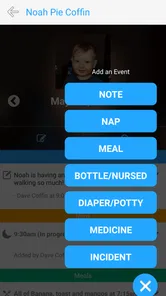
Daily Nanny is a childcare organization and management app designed to help parents, guardians, and caregivers coordinate a child’s daily routine. Depending on the available features, it may be used to record activities such as meals, naps, diaper changes, appointments, tasks, and notes. It can be especially useful for families working with a nanny or sharing childcare responsibilities between multiple adults.
What information can I manage with Daily Nanny?
The app is intended to keep important childcare details organized in one place. Users may be able to create schedules, track daily activities, add reminders, record observations, and share updates with other authorized caregivers. Before downloading, check the current feature list and privacy policy because the exact tools can vary by version, device, subscription plan, or region. Avoid entering sensitive information unless you understand how it is stored and shared.
Can parents and nannies use Daily Nanny together?
Daily Nanny is most useful when everyone involved in a child’s care can access the same up-to-date information. Parents may use it to communicate routines, instructions, appointments, and special requirements, while nannies can provide activity updates and notes throughout the day. Shared access, invitations, permissions, and messaging options may differ, so review the app’s account and collaboration settings before relying on it for essential communication.
Pros
- Simple way to organize childcare tasks
- routines
- and daily notes.
- Useful reminders can help parents keep track of important nanny-related details.
- Centralized information makes sharing instructions easier between caregivers.
- Daily records may help identify patterns in meals
- naps
- moods
- or activities.
- A dedicated childcare app can reduce reliance on scattered paper notes.]
Cons
- Some features may require both parents and caregivers to use the app consistently.
- Privacy settings should be reviewed carefully before storing sensitive child information.
- The app’s usefulness depends on accurate and regular updates from caregivers.
- Notifications may become distracting when many reminders are enabled.
- Limited customization could make it less suitable for complex childcare routines.











