Cync (the new name of C by GE)
- 11.58K
- 4.5
- Installs
- 1.00M
- Price
- Free

Screenshots



Analysis by Reviewed
When I first opened Cync, formerly known as C by GE, I wanted to know whether it could make everyday control of connected home devices feel straightforward rather than fussy. It is a free lifestyle app from Savant Systems, Inc., and the main idea is simple: use your phone to manage compatible Cync and C by GE products. The app has a 4.5 average from around 83,000 ratings, and more than a million installs, so it is a familiar option for people building a connected home. My main advice for a first-time user is to start with one device and one useful routine; that makes it much easier to see whether the app fits your home.
Getting started and finding a first win
Getting started with Cync is as easy as pie. Once you download the app, it guides you through the setup process with step-by-step instructions that even my tech-averse friend could follow. It’s compatible with Alexa and Google Assistant, which is a big plus for those of us who are trying to create a seamless smart home ecosystem.
Before setup, it helps to have the device you want to add nearby and to know which room you want it associated with. I would begin with a single light or other compatible product rather than trying to organize a whole home in one sitting. That gives you a quick way to check that the device appears where you expect and responds to a basic command. If you are setting up a shared space, decide on room names that everyone at home will recognize; clear naming becomes more useful as you add products.
Make one action useful before adding more
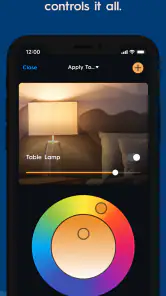
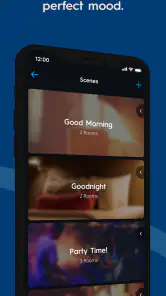
The app offers a plethora of features that make life so much easier. You can control everything from lights to thermostats with just a few taps on your phone. One of my favorite features is the ability to create "scenes". Imagine you’re coming home from a long day at work. With one tap, you can dim the lights, set the perfect room temperature, and even play your favorite playlist. It’s like having a personal assistant at your fingertips!
For a first successful action, I’d keep a scene modest: choose a change you genuinely want to make together, such as adjusting the lighting when you settle in for the evening. Then try it from the app before building a more elaborate routine. This simple test helps separate a useful setup from one that sounds clever but is rarely used. It also gives you a clear starting point if a device does not respond as expected, because you can check each part of the routine rather than troubleshoot several new additions at once.
Schedules, scenes, and the small trade-offs
Another great feature is the scheduling option. You can set your lights to turn on or off at specific times, which is perfect for when you’re on vacation and want to make it look like someone’s home. Plus, the energy-saving tips provided by the app are a sweet bonus for those looking to cut down on their electric bill.
Schedules work best when they match a habit you can describe plainly: for example, turning a light on at a regular time in the evening. A scene is more flexible when you want several changes at once, while a schedule is better for a predictable time-based action. I would review both after your routine changes, since a schedule that suited your old day can become inconvenient. Treat the energy suggestions as prompts to consider your usage, not as a guarantee of a particular bill reduction.
More From Our News Desk

Clash of Clans Is Won Between the Battles

Android Auto Makes the Case for Quieter Car Software

MobiOffice: Transforming Mobile Productivity with Seamless Integration

EA SPORTS FC™ Mobile Soccer: Redefining Mobile Sports Gaming

How Microsoft OneDrive Became a Mobile Productivity Giant

How Google Translate Breaks Language Barriers Effortlessly
What to expect from daily use
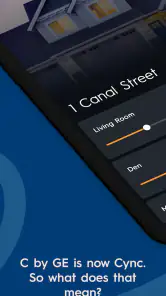
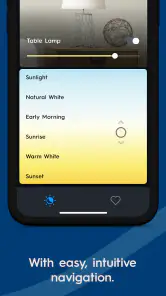
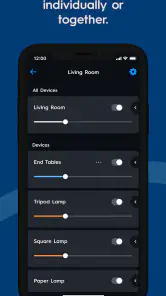
The user interface is incredibly intuitive. Everything is laid out in a way that feels natural, and the app is surprisingly responsive. I’ve tried other smart home apps before, and they can be clunky and slow, but not Cync. It’s smooth sailing all the way.
In an ordinary evening, the practical benefit is having a familiar place to adjust a connected light or thermostat instead of reaching for each device’s controls. Voice control through Alexa or Google Assistant can suit moments when your phone is across the room, while the app gives you a direct way to manage devices and routines. Compared with using separate controls for each product, a central app is easier to keep organized. If your home already relies on another ecosystem and its app handles your devices well, however, switching just for a new interface may not be worth the effort.
Where setup can feel less simple
Moreover, the customer support is top-notch. I had a minor issue with setting up one of my devices, and the support team was quick to respond and incredibly helpful. It’s rare to find such prompt service these days, so this was a pleasant surprise.
The most important expectation to set is that the app is for Cync and C by GE products, not a universal controller for every connected-home brand. Before planning a larger setup, check that the products you intend to manage belong in this ecosystem. If a device is not appearing or a control does not behave as expected, I would first confirm that I selected the right product during setup and that it is assigned to the room I meant to use. Keeping the first test simple makes those checks less frustrating.
Who will get the most from it
I’d recommend Cync to someone starting with compatible products who wants phone control, scenes, and schedules without having to piece together separate controls. It can also suit an existing Cync household that wants to make a few everyday actions easier to repeat. On the other hand, someone looking for one app to manage a mixed collection of unrelated smart-home brands should compare their current ecosystem’s compatibility before committing. The same goes for anyone who prefers manual switches and has little interest in routines: the app’s value depends on wanting to manage connected devices from a phone or through supported voice assistants.
For a first-time user, the next useful question is what to add after that initial light responds. I would choose a second device only when it serves the same real habit, such as preparing a room for the evening, rather than adding products simply to make the app feel more complete. A small setup is easier to understand: you can tell which control belongs to which room, and a scene remains easy to edit when your preferences change. If you share the home, agree on straightforward room and scene names before several people begin making their own. That little bit of planning reduces the chance of ending up with controls whose purpose is obvious only to the person who created them.
A realistic use case is a household where someone gets home at a fairly predictable time but does not want to keep the same lighting throughout the day. A schedule can handle a regular light change, while a scene can be the manual choice for nights when the household wants a different feel. I would not treat the schedule as a substitute for checking the home or as a security system; it is simply a convenient way to repeat a lighting action. If your arrival time changes often, a scene you activate when needed may be less irritating than a schedule that repeatedly runs at the wrong moment.
There is also a practical distinction between controlling a device and automating a habit. App control is useful when you want to make an occasional adjustment from the sofa or another room. A schedule earns its place when you make the same adjustment often enough that remembering it becomes a chore. A scene is most useful when several compatible changes belong together. Starting with that distinction helps avoid overbuilding: if a setting does not save time or make the home more comfortable, there is no need to create a routine for it.
Choosing a setup that fits your home
The main trade-off is ecosystem focus. A dedicated app can make the products it supports easier to find and operate than a collection of separate manufacturer apps, but it is not automatically the best hub for a home with devices from many unrelated brands. Before buying more equipment, I would compare the products you already use and decide which app you want to open most often. If your current smart-home platform already brings your devices together reliably, keeping it as the main control point may be simpler than moving routines to another place.
For someone starting from scratch with compatible Cync products, the opposite may be true: beginning in the app made for those products can be more straightforward than trying to assemble a mixed system immediately. The choice is less about which app has the longest feature list and more about whether your devices, household habits, and preferred voice assistant line up. I would also keep a basic way to operate essential lighting available outside the phone. An app is convenient, but people at home should not have to learn a complicated routine just to perform a simple everyday action.
Another worthwhile habit is to test a new scene while you are at home and able to see what changes. If it combines more than one adjustment, check the result before relying on it as part of a regular evening routine. When something is off, simplify the scene and test again rather than changing several settings at once. This is a low-effort way to identify whether the issue is the device selection, its room assignment, or simply a combination that does not suit the space.
The app is free and rated for Everyone, which makes trying it less of a commitment than buying into a new setup blindly; the products you choose are a separate consideration. Its current version is 6.22.1.23-733578a, and it supports Android 8.1 and later. Those details are useful when deciding whether an older phone can run it, but the more important question is whether the devices you already own fit the Cync family.
A measured recommendation
In a nutshell, Cync is a fantastic choice for anyone looking to dip their toes into the world of smart homes or even for seasoned pros looking for a reliable app to manage their devices. Its ease of use, combined with a wide range of features, makes it a standout option in the smart home market. Whether you’re looking to automate your daily routines or simply want the convenience of controlling your home with your voice or smartphone, this app has got you covered.
I’d approach it as a practical companion to compatible devices rather than a reason to automate everything at once. Start with one control that solves a small daily annoyance, then add a schedule or scene only if you find yourself repeating the same action. That gradual approach keeps the setup understandable and makes it easier to tell whether the app is genuinely helping. For a Cync-focused home, that is a sensible way to begin; for a home built around another system, the better choice may be the app that already brings those devices together.
So, if you haven’t tried it yet, what are you waiting for? Give Cync a shot and let it transform your home into the smart haven you’ve always dreamed of!
Cync (the new name of C by GE) Frequently Asked Questions
Can I use Cync to manage devices from one app?
Cync is the app for Cync and C by GE, bringing those product names together in one connected app. It is intended for managing compatible products within that ecosystem, so it may be useful if you already own or are considering Cync devices. Before downloading, consider which products you want to manage and whether they are Cync or C by GE products.
What kind of app is Cync, and who is it designed for?
Cync is a Lifestyle app designed for people who want to use a connected app with Cync and C by GE products. Its focus is on managing products from that ecosystem rather than serving as a general-purpose smart home app. If you are interested in Cync or C by GE devices, the app is the software companion to consider.
What can I check before downloading Cync to make sure it suits my phone?
Cync is a Lifestyle app for managing Cync and C by GE products. Before downloading, check that your device runs Android 8.1 or later, the stated minimum operating system. The app is free and rated for Everyone. Its current version is 6.22.1.23-733578a, so reviewing your phone’s system compatibility first can help you decide whether it is ready to install.
Is Cync free, and what does its user reception look like?
Cync is free to download. It has an average rating of 4.5 from around 83,000 ratings, with about 12,000 written reviews, giving prospective users a substantial body of feedback to browse. Those opinions can offer different perspectives on using the app, but your experience will depend on your devices and needs. The app is developed by Savant Systems, Inc.
What is Cync, and how does it differ from C by GE?
Cync is the rebranded name of C by GE, offering a more seamless and integrated smart home experience. While C by GE focused primarily on smart lighting solutions, Cync expands its offerings to include various smart home devices such as cameras, thermostats, and sensors. This new branding aims to provide a more cohesive and user-friendly ecosystem for managing your smart home devices.
Pros
- User-friendly interface for seamless navigation.
- Wide range of smart home integrations.
- Energy-saving features available.
- Customizable lighting scenes.
- Remote control via mobile app.
Cons
- Limited compatibility with non-GE devices.
- Occasional connectivity issues reported.
- Subscription needed for premium features.
- Setup can be complex for beginners.
- Limited customer support options.

- Category
- Lifestyle
- Version
- 6.22.1.23-733578a