

Curb - Request & Pay for Taxis
- 3.88K
- 3.0
- Installs
- 1.00M
- Price
- Free

Screenshots
Analysis by Reviewed
For me, the most useful idea behind Curb - Request & Pay for Taxis is bringing the taxi hail and the payment into one phone-based routine. That matters most when I want a cab without waving at passing traffic, then would rather finish the trip without sorting out payment at the curb. It is a focused convenience, not a promise that every ride will be instant or every trip will suit an app.
When booking by phone makes a difference
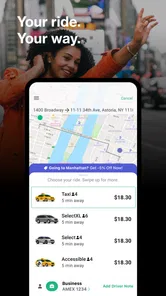
I see the strongest case for Curb when a taxi is the preferred ride but flagging one down feels uncertain: leaving a busy venue, heading out in poor weather, or carrying bags that make waiting on a street corner awkward. Booking from the phone gives the process a clear starting point, while automatic payment can make the end of the ride simpler. If I use taxis only occasionally, the app can still be useful as a backup rather than something I need to open every day.
Making a pickup work smoothly
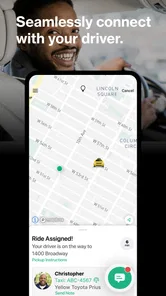
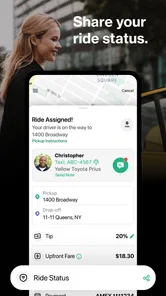
In an everyday scenario, I might be leaving a restaurant and need to get home without lingering outside. I would request a cab, use the tracking view to follow its approach, and keep my attention on the pickup location so I can meet the driver smoothly. Tracking helps me make a better estimate of when to step outside, but I would still allow a little flexibility: a live map is useful for coordination, not a guarantee that traffic or a busy pickup point will behave exactly as expected.
Taxi booking versus other ways to get around
Compared with a typical ride-hailing service, Curb is specifically centered on licensed taxis. That distinction can be a plus if I want a cab rather than a general car service, but it also means the experience depends on whether taxi coverage is practical where I am. A street hail or a local taxi phone line may be the better fallback when I need immediate help or the app is not connecting me to a ride. I would check the pickup details before committing, especially around crowded entrances where a nearby address may not be the easiest place for a driver to stop.
Seamless Taxi Booking Experience
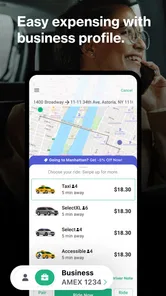
First off, let’s talk about how easy it is to book a ride. With just a few taps on your smartphone, Curb lets you request a taxi from the nearest licensed cab driver. It’s like having a personal chauffeur at your fingertips! The interface is super user-friendly, so even if you’re not tech-savvy, you’ll get the hang of it in no time.
Real-Time Tracking
Once you’ve booked your ride, you can track your taxi in real-time. This feature is a lifesaver, especially when you’re in a rush or just want to keep tabs on where your ride is. It gives you peace of mind knowing exactly when your driver will arrive, so no more standing awkwardly on the curb wondering where your taxi is.
Effortless Payment Options
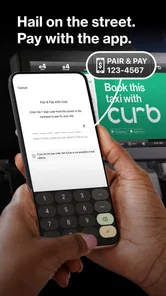
One of the standout features of the Curb app is the payment system. You can pay directly through the app, which is super convenient. No need to scramble for cash or worry about whether your card will be accepted. The app securely stores your payment information, making the entire process smooth and hassle-free.
More From Our News Desk

 Weather - By Xiaomi
Weather by Xiaomi Review: Clear at a Glance, Less Clear Up Close
Xiaomi’s weather app makes everyday forecasts quick to scan, but its calm surface can leave useful details and recovery paths harder to find than they should be.

 X
XX Under Pressure: Can It Recover When Posting Goes Wrong?
A resilience-focused review of X, examining setup, mistaken posts, interruptions, weak connections, and the gaps that matter when recovery needs to be dependable.

 Clash of Clans
Clash of Clans Is Won Between the Battles
Its raids are quick; its community is a long-term project of coordination, teaching, rivalry, and shared responsibility—with all the friction that entails.

 Android Auto
Android Auto Makes the Case for Quieter Car Software
The car interface is no longer judged by how much it can do, but by how quietly it helps. Android Auto shows what drivers now expect—and what still gets in the way.

 MobiOffice: Word, Sheets, PDF
MobiOffice: Transforming Mobile Productivity with Seamless Integration
MobiOffice: Word, Sheets, PDF is redefining mobile productivity with a surprising blend of functionality and innovation.

 EA SPORTS FC Soccer Mobile 26
EA SPORTS FC™ Mobile Soccer: Redefining Mobile Sports Gaming
Dive into EA SPORTS FC™ Mobile Soccer, where immersive gameplay and strategic depth transform mobile sports gaming.
Latest News



What automatic payment changes at the curb
The practical benefit of paying through the app is less about saving a dramatic amount of time and more about removing one small decision at the end of a ride. I can leave the cab without searching through a wallet or figuring out how to settle the fare on the spot. That is especially welcome when I am juggling a bag, helping someone else get out, or arriving somewhere crowded. I would still pay attention to the ride and confirm that I have reached the right destination; hands-free payment should simplify the finish, not make me switch off.
For someone deciding whether to use it, a natural question is whether the payment setup is worth doing for occasional trips. I think it is if taxis are already part of your routine or you often find yourself needing one at inconvenient moments. If you take a cab once in a long while, setting up a phone-based option may feel like extra preparation for little return. The value comes from having the booking and payment routine ready before you need it, not from installing another app just to try it once.
How I’d judge it for regular use
That convenience is the main reason I would keep Curb installed, but I would not make it my only plan for getting around. It is a free Maps & Navigation app from Curb Mobility, LLC, currently at version 6.12, and its taxi-first approach is more specific than a broad navigation app or a general ride-hailing service. Its 2.9 average from around 8,200 ratings and roughly 3,800 reviews suggests a mixed reception, so I would treat the smooth booking path as a useful option rather than assume every request will be effortless. The app has over a million installs, is rated for everyone, and dates back to March 13, 2010.
Why the taxi-first focus matters
That focus is a real trade-off rather than a small branding detail. A general ride-hailing app may give me more kinds of rides to compare, while a navigation app is better for figuring out a route on foot, by car, or on transit. Curb makes more sense when the decision is already “I want a taxi” and I would like to handle the request and payment from my phone. I would not open it expecting it to plan an entire day of travel or tell me whether walking or a bus is the better choice.
There is also a useful difference between using a booking app and simply looking for a cab on the street. The app gives me a way to coordinate around a requested pickup, which can be helpful when I am not standing somewhere with passing taxis. But if I am already at a taxi stand or on a street where cabs are readily available, hailing one directly may be faster and involve fewer steps. I see Curb as another way into taxi service, not a universal replacement for every local habit.
Availability and the importance of a good pickup point
The app is available in numerous major cities, making it a reliable option whether you’re in your hometown or traveling. It connects you with professional taxi drivers, ensuring safety and reliability. So, next time you're in New York, Chicago, or Los Angeles, give Curb a try and enjoy a stress-free ride.
For a visitor, I would think about the pickup spot before tapping to request. A hotel entrance, a large venue, and a busy curb can each have several plausible places to meet, and the nearest map point is not always the clearest one for a driver. I would choose an easy-to-recognize location where stopping is sensible, then stay attentive to the tracking view as the taxi approaches. That small bit of planning can matter more than repeatedly checking the map from a vague or crowded corner.
Preparing before a time-sensitive journey
For a regular commute, I would try the app once on a day when I have a little time to spare. That lets me learn the pickup flow and payment setup before using it for a tight connection or an important appointment. I would also keep the street address and a recognizable meeting point in mind; a precise pickup spot can save confusion when several doors or curbside areas share the same block. If I need directions for walking or public transit rather than a taxi, a dedicated map or transit app is the more suitable tool.
I would use the same cautious approach for an airport run, a station connection, or any trip where arriving late would create a real problem. The app can help me request and follow a taxi, but I would leave a buffer rather than treating an on-screen approach as a fixed arrival promise. If a taxi is essential at a particular time, I would consider arranging transport through a local service or another option with a booking process that suits that requirement. Curb is most comfortable when I have some room to adapt.
What the mixed reception means to me
The average rating is a reason to keep expectations measured, not a verdict that every ride will go badly. Taxi availability and the clarity of a pickup can vary with the place and the moment, so an app that works conveniently on one trip may be less useful on another. I would judge it by trying a straightforward ride first and noting whether the request, meeting point, and payment flow fit my habits. If any step feels unreliable in my area, I would keep a local taxi number or another transport option close at hand instead of depending on one route to a ride.
Who will get the most from it
Overall, the Curb - Request & Pay for Taxis app is a fantastic tool for anyone who frequently uses taxis. It streamlines the process of booking, tracking, and paying for rides, all from the comfort of your phone. If you’re tired of the traditional way of hailing cabs and want a more modern, efficient experience, then Curb is definitely worth checking out. Happy riding!
I would especially consider it if I live in, work in, or regularly visit an area where taxis are a familiar option and I want a phone-based way to request one. It can also suit someone who prefers the taxi model to a general ride-hailing service, or who values having payment handled through the app after the trip. The app is free, carries an Everyone age rating, and has been available since March 13, 2010, so it is aimed at a broad range of everyday users rather than a narrowly specialized audience.
When I would choose another option
I would skip Curb as my main transport app if taxis are scarce where I travel, if I need a guaranteed pickup time, or if I mostly plan routes rather than book rides. In those situations, a local cab service, a broader ride-hailing option, or a navigation app may fit better. For someone who prefers licensed taxis and values app-based tracking and payment, though, it is a practical alternative to flagging down a cab and handling the fare separately.
My bottom line is that Curb is worth considering when the taxi itself is what you want and the convenience of requesting and paying on your phone solves a real annoyance. I would not rely on it blindly for every journey, and I would keep a backup when timing or local coverage matters. Used with a clear pickup point and sensible time allowance, it offers a more organized route to a taxi; if those conditions do not fit your usual trips, another way of getting around will likely feel simpler.
Curb - Request & Pay for Taxis Frequently Asked Questions
Can I book a taxi for later, or is Curb only for immediate rides?
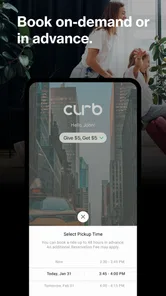
Curb supports both requesting a taxi for an immediate ride and booking one in advance, so it can suit different plans. If you already know when you need to travel, arranging the ride ahead of time may be more convenient than requesting it at the last minute. You can also use the app to request a ride when you are ready to go.
Is Curb free to download, and what devices can run it?
Curb is free to download and is intended for everyone. It is a taxi-booking app in the Maps & Navigation category, developed by Curb Mobility, LLC. On iOS, it requires version 9 or later. Before installing, check that your device meets that minimum requirement and has enough available storage for the app.
What is Curb and how does it work?
Curb is a convenient app designed to streamline the taxi booking process. By connecting users with licensed, professional taxi drivers in their vicinity, it ensures safe and reliable rides. Users can request a taxi through the app, track its arrival in real-time, and pay securely using various payment methods. This seamless integration makes urban transport hassle-free and efficient.
Is Curb available in my city?
Curb operates in numerous cities across the United States, including major metropolitan areas like New York City, Chicago, and Los Angeles. However, its availability can vary, so it's recommended to check the app's coverage on their official website or within the app itself to ensure service is available in your specific location before downloading.
How do I pay for rides on Curb?
Curb offers flexible payment options to enhance user convenience. Riders can pay for their taxi rides directly through the app using credit or debit cards. Additionally, users have the option to use digital wallets like PayPal. This variety ensures that passengers can choose the payment method that best suits their needs, making the payment process quick and efficient. Curb also lets riders pay automatically through the app, so the fare can be handled from your phone rather than requiring payment arrangements entirely outside it.
Pros
- Easy to use interface
- Wide availability in major cities
- Multiple payment options
- Option to pre-book rides
- Real-time tracking of taxis
Cons
- Limited to taxi services only
- Higher fares during peak times
- Requires internet for booking
- Occasional app crashes
- Not available in all cities











