

Coupe - cocktail recipes
- 10.00
- 4.6
- Installs
- 10.00K
- Price
- Free

Screenshots

Analysis by Reviewed
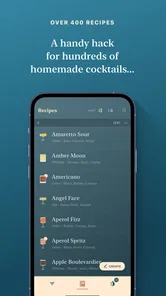
I enjoy cocktail apps most when they help me make a better drink without turning the kitchen into a research project. Coupe takes that focused approach: it is a free Food & Drink app from Studio Kamay built around cocktail recipes for people who already have some interest in mixing at home. After spending time with it, I found it more useful as a carefully selected digital recipe book than as a complete bar-management tool. That distinction matters, because it explains both its appeal and its limits.
The app has a polished, grown-up feel that suits its subject. It does not try to be a social network, a shopping service, or a noisy feed of unrelated food content. Instead, it keeps attention on drinks, ingredients, preparation, and the small decisions that make a cocktail work. I would recommend it to someone who wants inspiration for an evening drink or wants to move beyond randomly searching the web every time a bottle is added to the cabinet.
What using Coupe feels like in a real home bar
My first impression was that the app is easiest to appreciate when I approach it with a specific mood rather than a strict inventory. If I want something elegant, spirit-forward, or suitable for a coupe glass, browsing a curated collection feels more pleasant than opening a general search engine. The experience encourages me to consider a recipe as a complete drink instead of treating it as a list of ingredients.
That curation is the central strength. A broad recipe website may offer hundreds of variations, but the abundance can create its own problem: too many near-identical results, unclear quality, and pages surrounded by unrelated material. Coupe feels more deliberate. The trade-off is that a smaller selection may not satisfy somebody looking for every classic, every substitution, or a recipe based on one unusual bottle.
I can imagine using it on a quiet Friday evening. I have a few basic spirits, some mixers, and no clear plan. Rather than decide on a drink from memory, I browse the app, choose a recipe that matches what I have, and use the instructions as a short checklist. That workflow is especially helpful when I am hosting one or two friends and want to spend less time scrolling and more time talking.
The app is also a good fit for a beginner who is willing to learn gradually. Cocktail terminology can feel intimidating, but a focused recipe collection gives the learner a manageable starting point. I would still keep a measuring tool nearby, because a good recipe cannot correct an inaccurate pour. The app can guide the choice and sequence; the physical quality of the drink still depends on technique, ice, glassware, and ingredient freshness.
A curated book rather than a complete bar assistant
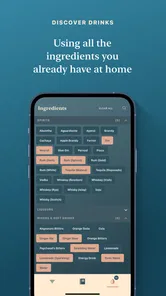
It is important not to expect Coupe to replace every kind of cocktail utility. If the main goal is to enter a home inventory and receive recipes based on exactly what is available, a dedicated bar-inventory app may be a better fit. If the goal is to learn professional shaking, dilution, or garnish technique through extensive instruction, a video-first service may offer more depth.
More From Our News Desk

 Gmail
GmailGmail in a Busy Inbox: Who Benefits Most?
From first account to crowded workday, Gmail earns its place through dependable search and flexible sorting—but its best fit depends on how much inbox maintenance you can tolerate.

 Prime Video
Switching to Prime Video: What Changes in Your Viewing Routine
Prime Video can make a compelling second home for streaming, but switching means learning a different catalog, rental layer, and route from browsing to playback.

 Universal TV Remote Control
Universal TV Remote Control Works Best as a Reliable Backup
A phone remote earns its place through quick setup and reliable habits. Here is how to get more from Universal TV Remote Control—and where its limits show.

 Weather - By Xiaomi
Weather by Xiaomi Review: Clear at a Glance, Less Clear Up Close
Xiaomi’s weather app makes everyday forecasts quick to scan, but its calm surface can leave useful details and recovery paths harder to find than they should be.

 X
XX Under Pressure: Can It Recover When Posting Goes Wrong?
A resilience-focused review of X, examining setup, mistaken posts, interruptions, weak connections, and the gaps that matter when recovery needs to be dependable.

 Clash of Clans
Clash of Clans Is Won Between the Battles
Its raids are quick; its community is a long-term project of coordination, teaching, rivalry, and shared responsibility—with all the friction that entails.
Latest News



Coupe works best in the middle: more intentional than a random web search, but lighter than a full cocktail education platform. I like that focus because it keeps the app approachable. At the same time, users who want exhaustive coverage may eventually find themselves supplementing it with books, bartender channels, or specialist ingredient references.
The store summary presents it as a curated cocktail recipe book for the sophisticated home bartender, and that description matches my experience without needing to oversell it. The word “sophisticated” does not mean you need an expensive bar. It means the app is aimed at someone who cares about balance, presentation, and choosing a drink thoughtfully rather than simply mixing whatever is closest.
How the recipe workflow helps
The most useful way to use the app is to read the whole recipe before touching a bottle. That sounds obvious, but it prevents a common home-bar mistake: discovering halfway through that the drink needs a chilled glass, a particular garnish, or an ingredient that is not actually available. I treat each recipe as a preparation plan, not just a set of quantities.
A second helpful habit is to compare the recipe’s character with the occasion. A strong drink may be enjoyable after dinner but less suitable when I am serving several guests who prefer something lighter. A carefully presented cocktail may be worth the extra effort for one person, while a simpler high-volume option makes more sense for a group. Coupe encourages this kind of decision because its presentation is part of the appeal.
There is also a useful learning opportunity in repeating one recipe rather than constantly chasing new ones. I can make the same drink twice, adjust the chill or dilution slightly, and notice how much those details change the result. That is a more practical route to improvement than collecting dozens of recipes without learning any of them well.
Where the app earns trust, and where I stay cautious
Trust in a recipe app is not only about whether the drinks look attractive. I also want to know what kind of app I am installing, what choices it presents, and whether it asks me to surrender more control than the basic task requires. Coupe is a free app, which makes trying it easy, but free access should not automatically be confused with an absence of commercial considerations.
The app is marked for Teen users, so I would not treat that label as a substitute for responsible drinking guidance at home. The presence of cocktail recipes makes adult judgment important regardless of the store age category. I would keep it away from children, avoid serving alcohol to anyone who should not consume it, and remember that a visually elegant recipe can still contain a substantial amount of alcohol.
In practical terms, I prefer using any app like this with attention to the permission prompts and account screens that appear on my own device. I do not grant access that seems unrelated to browsing recipes, and I read any request for sign-in, notifications, or personalization before accepting it. Those are simple habits, but they preserve a useful boundary between a recipe reference and the rest of my personal information.
The editorial angle here is important: I would judge the app by the controls and choices I can actually see, not by assumptions about hidden behavior. A store page can tell me that the app is free and identify its developer, but it cannot replace reading the permission dialog presented during installation. I therefore recommend checking those prompts yourself, especially if you are careful about account creation or device access.
Free access and the paid extras
Coupe can be installed without paying, which lowers the barrier to testing its style and recipe selection. There are also in-app purchases priced at $6.49 per item. That means I would inspect the purchase screen carefully before confirming anything, particularly if I am only trying the app casually or letting another person use my device.
This pricing structure creates a reasonable but important trade-off. A free starting point is convenient, while paid items may be worthwhile for a committed home bartender who finds the additional material useful. I would not purchase immediately on the strength of attractive photography or a promising recipe title. I would first use the free experience long enough to decide whether the app’s organization and writing style genuinely fit my habits.
For families sharing a device, purchase controls matter even more. I would use the operating system’s purchase authentication and avoid leaving a payment confirmation screen unattended. That advice is not a criticism of Studio Kamay; it is simply the sensible way to handle any app that offers individual paid items.
Data-sensitive moments during everyday use
The most privacy-sensitive moments are usually not the recipe pages themselves, but the points where an app asks for an account, notifications, personalization, or a connection to another service. If Coupe presents those choices, I would decide based on what I actually need. A person who only wants to read recipes may reasonably prefer the smallest setup that allows that use.
I also avoid entering unnecessary personal details into a food or drink app. There is no reason for a recipe reference to become a detailed record of my identity, household, or social habits unless I deliberately choose a feature that needs such information. Keeping my use narrow makes it easier to understand what the app is doing and easier to stop using it later.
Notifications deserve a similar decision. A reminder about a saved recipe might be useful to one person and annoying to another. I would leave alerts off unless they solve a real problem, then revisit the choice if they become distracting. The same principle applies to any optional personalization: convenience is valuable only when it gives me something I will actually use.
When I am connected to a public network, I am also more cautious about signing into any account or completing a purchase. I prefer to browse casually and handle account or payment actions on a connection I trust. This is a small part of the overall experience, but it is the kind of practical discipline that protects user agency better than vague promises.
Current version, compatibility, and who should install it
The current version is 2.2.1, and the app supports devices running Android 5.0 or later. That broad compatibility is useful for people who keep an older phone as a kitchen device or do not upgrade hardware frequently. I would still check how comfortably it runs on my particular phone, because an older operating system can support an app while the overall experience depends on screen size, speed, and available storage.
Coupe was released on December 20, 2023, and it has built an average rating of 4.6 from around 248 ratings, with over 10K installs. Those figures suggest that the app has found an audience, but I would treat them as context rather than proof that it will suit every bartender. A high average cannot tell me whether the recipe depth matches my skill level or whether the purchase model feels worthwhile to me.
The app is free to download, so the sensible approach is low-risk testing: install it, inspect the first-use screens, browse enough recipes to judge the curation, and pay attention to any permissions or account requests. If the free portion already feels too narrow, paid additions are unlikely to solve the underlying mismatch. If the organization feels natural and the recipes fit my taste, an optional purchase may make more sense.
Small details that make a difference at the counter
One non-obvious advantage of a focused recipe book is that it can reduce decision fatigue. I do not need to compare a long list of search results while holding a jigger in one hand. I can decide on a style first, gather the ingredients, and then return to the recipe. That separation between choosing and mixing makes the process calmer and reduces forgotten steps.
Another practical insight is to use the app before shopping, not only after. I can browse for a drink family, note which ingredients appear repeatedly, and build a more coherent home bar instead of buying isolated bottles for one-off recipes. This is especially useful for a modest setup where every new bottle should earn its space.
A third is to treat the app as a conversation starter when hosting. I can offer two or three options from the collection and ask guests which direction sounds appealing. That is more welcoming than presenting a single complicated drink, and it lets me choose a recipe whose ingredients and preparation time match the group.
There is a trade-off in this curated approach: it may encourage aspiration more than improvisation. If I have only a basic spirit and a supermarket mixer, I may need a simpler general-purpose recipe source. Coupe is more rewarding when I am prepared to care about the final drink, but less convenient when I want an instant answer from a random collection of leftovers.
When another option is better
I would skip Coupe if my main requirement is a searchable database organized around every possible ingredient. A large recipe site will usually be faster for finding a very specific combination, especially when substitutions are the priority. I would also look elsewhere if I want nutrition tracking, alcohol-unit calculations, shopping lists, or a detailed inventory of bottles already opened.
I would choose a book or a structured course instead if I wanted to understand cocktail history, classic ratios, or professional technique in depth. The app is convenient for making a drink tonight, but convenience is not the same as a complete curriculum. Someone serious about bartending should use it alongside more educational resources.
On the other hand, I would choose Coupe over a generic search when presentation and selection matter. Its focused identity makes it easier to enter the right mood, and it avoids the feeling that every recipe is competing for attention. For a home bartender who wants a refined, compact source of inspiration, that is a meaningful advantage.
My cautious recommendation
After using it as a recipe companion, I see Coupe as a pleasant choice for a particular kind of drink maker: someone who wants curated cocktail ideas, enjoys preparing drinks with care, and does not need the app to manage an entire bar. Studio Kamay has kept the concept focused, and the free entry point makes it easy to decide whether that focus works for me.
I would approach the paid items slowly, review every purchase confirmation, and make my own decisions about optional permissions, accounts, and notifications. I would also remember that the Teen content label does not remove the need for responsible alcohol use. These checks do not make the app less enjoyable; they let me keep the experience on my terms.
My final view is cautiously positive: Coupe is worth trying if you want a more considered alternative to scattered online cocktail searches. It is not the right tool for exhaustive ingredient matching, advanced bar education, or detailed personal inventory management. But for a relaxed evening, a small gathering, or a home bartender building better habits one recipe at a time, it offers a focused and attractive place to start.
Coupe - cocktail recipes Frequently Asked Questions
Is Coupe - cocktail recipes suitable for a home bartender who wants a curated collection?
Coupe is a cocktail recipe app from Studio Kamay, presented as a curated recipe book for the sophisticated home bartender. It focuses on discovering drinks and following their recipes, making it a natural fit for someone who enjoys preparing cocktails at home. If you are looking for a general food or meal-planning app, its cocktail-centered purpose may not match what you need.
What does the Teen content rating mean for Coupe - cocktail recipes?
The app has a Teen content rating. Since Coupe is focused on cocktail recipes, that rating is worth considering before downloading, particularly for families choosing apps for younger users. The rating is a useful starting point when deciding whether the app is appropriate for a particular device or household; parents and guardians can also review the app themselves before allowing access.
What is Coupe - cocktail recipes, and what can I do with it?
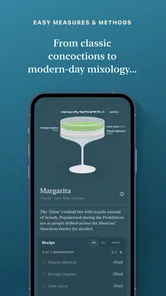
Coupe - cocktail recipes is a mobile app designed to help users discover, prepare, and organize cocktail recipes. It typically presents drink ingredients, preparation steps, serving suggestions, and useful details such as glassware or garnish ideas. After exploring the app, it feels aimed at both beginners looking for simple guidance and more experienced users who want inspiration for their home bar.
Does Coupe - cocktail recipes include recipes for beginners?
Yes, the app is suitable for beginners because its recipes are presented in a practical, easy-to-follow format. Users can check the required ingredients and follow the preparation instructions step by step instead of relying on prior bartending experience. However, some drinks may require spirits, syrups, bitters, a shaker, or other bar tools, so beginners should review the full recipe before starting.
Do I need special ingredients or equipment to use the recipes?
The equipment and ingredients depend on the cocktail you choose. Many recipes can be prepared with common spirits and basic kitchen items, while others may require a cocktail shaker, strainer, jigger, mixing glass, particular liqueurs, fresh garnishes, or specialty bitters. Checking each recipe in advance is recommended, especially if you are building a bar collection or want to avoid buying uncommon ingredients.
Pros
- Clear step-by-step instructions make recipes easy to follow.
- Useful ingredient measurements help maintain consistent results.
- Recipe variety suits casual drinkers and cocktail enthusiasts.
- Compact format makes it convenient to browse while mixing.
- Helpful inspiration for discovering unfamiliar cocktail combinations.
Cons
- Some recipes may require premium or hard-to-find ingredients.
- No built-in shopping list may make ingredient planning less convenient.
- Flavor descriptions may be limited for users choosing a drink.
- Results can vary depending on glassware
- ice
- and ingredient quality.
- The app may not offer enough guidance for complete cocktail beginners.











