

Contigo
- 5.00
- 3.5
- Installs
- 100.00K
- Price
- Free

Screenshots


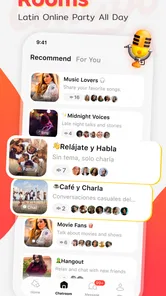


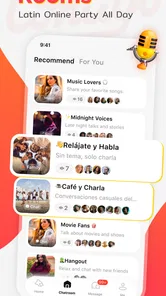

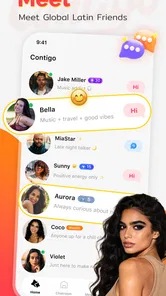
Analysis by Reviewed
I approached Contigo as a social app for people who want conversations to feel more personal than a text-only feed. Its central idea is simple: connect with people around the world and share moments through voice and conversation. In practice, that makes it most interesting for users who enjoy talking, listening, and building casual connections rather than only reacting to photos or short written posts.
What stood out to me first was the promise of a more direct social experience. Voice can make a conversation warmer, but it can also create extra demands: you need a reasonably quiet place, enough confidence to speak, and a way to follow a conversation as it moves. That tension is important when judging this app. Contigo can feel inviting in the right setting, yet it is not automatically comfortable or equally usable for every person or situation.
ContigoTeam is the developer behind the app, which is listed in the Social category and offered free to install. It is aimed at a Teen audience, and the current release is version 1.2.1.0. The app has passed the early discovery stage with over one hundred thousand installs, although its average rating sits at 3.3 from roughly one hundred twenty ratings. I read that combination as a sign of curiosity and reach, but also as a reason to approach the experience with realistic expectations rather than assuming it will suit everyone.
How readable navigation affects the first conversation
For a social app built around voice and conversation, the opening moments matter more than they might in a photo-sharing service. I want to understand where to find people, how to begin a conversation, and what action will publish or send something before I commit to speaking. A clean path through those steps is especially helpful for anyone who finds dense screens, unfamiliar icons, or rapidly changing feeds tiring.
My practical advice is to explore Contigo when you have a few uninterrupted minutes instead of trying to learn it during a busy commute. Start by identifying the main conversation area, the controls for sharing a moment, and the places where account or interaction settings are reached. This is not just a beginner habit. Social apps often hide important choices behind small symbols, and learning the layout before joining a live exchange reduces the chance of an accidental tap or an awkward interruption.
Voice-led interaction changes what “easy navigation” means. A button can be visually obvious and still be difficult to use if it is close to another control, disappears during a conversation, or requires precise timing. Conversely, a short spoken exchange may be easier than typing for someone who has difficulty using a small on-screen keyboard. The important distinction is that Contigo’s strongest path may be conversation itself, while the surrounding navigation still needs to be comfortable for the individual user.
I also think about readability beyond font size. A person may need high contrast, a predictable order of controls, or extra time to understand what is happening. Someone with attention-related difficulties may prefer a calm, focused route to one conversation rather than a busy stream of competing social prompts. Since people use social platforms differently, I would judge the app during a real trial: can you locate the action you need without repeatedly backing out, and can you tell whether a message or voice exchange has actually been sent?
More From Our News Desk

 Instagram
Instagram’s Power Comes From Its Place in Your Phone
A close look at how Instagram turns Meta’s reach, recommendation systems and everyday camera habits into durable platform power—and what that costs users.

 Gmail
GmailGmail in a Busy Inbox: Who Benefits Most?
From first account to crowded workday, Gmail earns its place through dependable search and flexible sorting—but its best fit depends on how much inbox maintenance you can tolerate.

 Prime Video
Switching to Prime Video: What Changes in Your Viewing Routine
Prime Video can make a compelling second home for streaming, but switching means learning a different catalog, rental layer, and route from browsing to playback.

 Universal TV Remote Control
Universal TV Remote Control Works Best as a Reliable Backup
A phone remote earns its place through quick setup and reliable habits. Here is how to get more from Universal TV Remote Control—and where its limits show.

 Weather - By Xiaomi
Weather by Xiaomi Review: Clear at a Glance, Less Clear Up Close
Xiaomi’s weather app makes everyday forecasts quick to scan, but its calm surface can leave useful details and recovery paths harder to find than they should be.

 X
XX Under Pressure: Can It Recover When Posting Goes Wrong?
A resilience-focused review of X, examining setup, mistaken posts, interruptions, weak connections, and the gaps that matter when recovery needs to be dependable.
Latest News



That small test answers a useful question before you invest much time: is the app understandable without relying on memory? If you need to keep guessing which control starts a conversation, the voice concept will not rescue the experience. If the route feels clear after a short session, the app becomes more approachable for users who prefer direct interaction over a complicated collection of social tools.
Voice can reduce typing, but it does not remove communication effort
One of the more interesting trade-offs is that voice may help people who find extended typing uncomfortable, slow, or physically demanding. A quick spoken thought can be less tiring than composing a long written message. It can also make a person feel more present in a conversation, especially when text replies seem too formal or emotionally flat.
At the same time, speaking is not an easier replacement for everyone. Users with speech differences, anxiety about being heard, limited privacy, or difficulty processing spoken language may prefer text. A conversation that feels natural to one person can feel exposed to another. I would not treat voice as inherently more accessible; I would treat it as an alternative interaction mode that needs to match the user’s abilities and surroundings.
Motor, sensory, and communication considerations
Contigo’s concept creates several possible benefits for motor access. If the main social action is a short spoken contribution, the user may spend less time performing repeated typing gestures. That can matter when keyboard use causes fatigue or when entering text on a phone is frustrating. A person who can comfortably tap a few controls and speak may find a voice-centered exchange more manageable than a text-heavy network.
The opposite can also be true. Holding a phone in position, selecting a conversation, starting a recording, and ending it at the right moment may still require accurate touch control. Users with tremors, reduced dexterity, or limited reach should pay attention to whether the interaction gives enough tolerance for imperfect taps. I would test it with the phone resting on a surface rather than assuming every conversation has to be managed one-handed.
For blind or low-vision users, the meaningful question is not simply whether voice is present. The entire route to voice must be understandable through the device’s own assistive tools, including the labels and order of interactive controls. I cannot responsibly promise that every part of the experience works equally well with screen-reading or magnification tools, so I would recommend a short personal test before depending on Contigo for regular social contact. The same principle applies to visual users who need larger text or stronger contrast: the conversation may be appealing, but the controls still determine whether it is practical.
For people who are hard of hearing or who process speech differently, a voice-first service can be limiting if a conversation does not offer an equally useful written path. This is where Contigo may be less suitable than a messaging app designed around text, captions, or clearly visible transcripts. Even users with typical hearing can struggle in noisy environments, and a voice exchange may become difficult when the phone speaker is competing with traffic, machinery, or other people.
Users with sensory sensitivities may want to control when sound enters their day. A sudden voice interaction can be more demanding than a written notification, particularly in a crowded room or during a quiet routine. I would use headphones only when they are comfortable and safe for the setting, and I would avoid treating audio as the default choice when awareness of surrounding sound matters. The best social tool is the one that fits the moment, not necessarily the one with the most intimate format.
A realistic everyday use case
Imagine finishing a study session or a shift and wanting a low-pressure way to talk with someone outside your usual circle. You have ten minutes at home, the room is quiet, and you would rather speak than write a long update. Contigo makes sense in that situation because the voice-and-conversation focus can turn a small moment into a more human exchange. I would begin with a short contribution instead of trying to explain everything at once, then check whether the other person’s pace and communication style feel comfortable.
Now change the setting to a bus, a shared office, or a family room where other people are nearby. The same feature becomes less convenient. You may not want strangers hearing your side of a conversation, and background noise can make listening difficult. In that context, a conventional text messenger is probably the better choice. This is a useful distinction: Contigo is not simply good or bad for accessibility; its value changes sharply with privacy, noise, energy, and the user’s preferred way of expressing themselves.
Situational access and choosing the right moment
The app’s global social angle can appeal to people who want conversations beyond their immediate contacts. Voice may help cultural exchange feel more spontaneous, and it can be easier to communicate emotion through tone than through short written messages. Still, international conversation also requires patience. Different speaking speeds, accents, language abilities, and expectations about personal space can affect whether an exchange feels welcoming.
I would approach new conversations with a clear boundary: share only what you are comfortable saying publicly or to a new contact, and do not let the immediacy of voice push you into revealing personal details. The Teen content rating is a useful reminder that younger users and families should think about social context, privacy, and contact choices before treating the app as a casual place to speak with anyone.
Another situational issue is energy. Some people can participate socially for longer through text because they have time to edit, pause, or reread. Voice removes some of that control. For users who need processing time, a conversation may be easier if they can prepare a few points beforehand or keep exchanges brief. I found that the most sustainable approach is to treat voice as a small, intentional activity rather than an always-on social obligation.
There is also a benefit for people who want to share a moment without producing polished content. A spoken observation can feel more natural than composing a carefully edited post. That makes the app potentially attractive to users who dislike the performance pressure of highly visual social networks. However, less polished does not always mean less pressure. Being heard can make some users more self-conscious than being seen in a photo or represented by text.
How it compares with familiar social alternatives
Compared with a standard messaging app, Contigo appears better suited to discovery and voice-centered social contact than to efficient private coordination. If your goal is arranging dinner, sending an address, or keeping a searchable record of details, text messaging remains more practical. Text also gives more control over pace and can be used quietly in places where speaking is inappropriate.
Compared with visual social networks, Contigo’s appeal is less about presenting a polished identity and more about conversation. That can feel refreshing for someone tired of endless image-based comparison. On the other hand, users who rely on captions, written context, visual browsing, or silent interaction may find the format less comfortable. A voice-centered community does not automatically replace the accessibility advantages of a text-and-image service.
Compared with dedicated audio communities, the key question is whether Contigo’s simpler identity is enough for your needs. People who want advanced moderation controls, organized rooms, detailed discovery tools, or highly structured group discussion may prefer a more specialized platform. Someone looking for a lighter way to meet global friends may appreciate not having to learn a large ecosystem of features.
The free price makes trying it relatively easy, but the app includes in-app purchases ranging from forty-nine cents to ninety-nine dollars and ninety-nine cents per item. I would not spend immediately. Use the free experience long enough to decide whether the conversation style, navigation, and social boundaries work for you. The broad purchase range means it is especially important to understand what an optional payment changes before confirming anything, particularly for a Teen user whose purchases may need family oversight.
Remaining barriers that affect real-world use
The biggest limitation is the dependence on conditions that many users cannot control. A quiet room, stable attention, privacy, and comfortable hearing all influence the quality of a voice conversation. When one of those is missing, the app can shift from friendly to exhausting. That does not make the design idea weak, but it does mean Contigo should be treated as one tool in a social routine rather than a universal communication solution.
Social uncertainty is another barrier. Voice exposes tone, pauses, pronunciation, and background sounds in a way text does not. New users may worry about being misunderstood or judged. I would start with short, low-stakes conversations and avoid using the app when tired or rushed. This gradual approach is not a feature claim; it is a practical way to test whether the format supports your confidence and communication style.
People who need written records may also feel restricted. Voice is useful for emotion and spontaneity, but it is not ideal for remembering exact instructions, comparing options, or revisiting a detailed discussion. If a conversation includes important information, I would move the final details into a written channel. That workflow combines Contigo’s human element with the clarity of text instead of forcing one format to do everything.
There is a similar trade-off for multilingual users. Spoken conversation can make language practice engaging, yet it leaves less time to translate mentally than a written message does. If you are using Contigo to meet people across language boundaries, keep exchanges simple at first and confirm important meaning in writing elsewhere. That can prevent a friendly misunderstanding from becoming a practical problem.
The rating of 3.3 from around one hundred twenty ratings suggests that user experiences are mixed rather than universally enthusiastic. I would interpret that carefully: it is enough to show that people are trying the app, but not enough to assume that every device, communication style, or social expectation will be handled smoothly. The sensible decision is to test the exact situations that matter to you: quiet conversation, noisy surroundings, short sessions, and any assistive settings you rely on.
Who should try it, and who should skip it
I would recommend Contigo to a user who enjoys spontaneous voice interaction, wants to meet people beyond their local circle, and is comfortable setting personal boundaries with new contacts. It may also suit someone who finds typing tiring but can speak comfortably, or someone who wants a less polished alternative to image-focused social media. The free entry point makes a cautious trial reasonable.
I would suggest looking elsewhere if you need dependable text-first communication, detailed written archives, strong control over every interaction, or a social experience that works quietly in public. It may also be a poor fit for anyone who finds voice socially stressful, cannot reliably hear spoken exchanges, or needs communication to be paced and reviewed before sending. In those cases, a conventional messenger or a platform with robust text and caption support is likely the more respectful choice.
Families should also make the Teen rating part of the decision rather than treating it as a minor label. Discuss who the user may speak with, what personal information should stay private, and how purchases are handled. Because the app connects people through conversation, good judgment matters as much as the interface. A young user who understands those boundaries is in a much stronger position than someone encouraged to explore without guidance.
My inclusive verdict after weighing the trade-offs
Contigo has a clear personality: it wants social connection to sound and feel conversational instead of reducing every interaction to typed reactions. I like that focus because it can make a brief exchange warmer and can give some users a welcome break from polished, image-heavy networks. Its global orientation also gives the app a natural reason to exist beyond simply copying a standard messaging inbox.
My reservation is equally clear. Voice is not a universal accessibility feature. It can reduce typing for one person while creating privacy, hearing, speech, sensory, or confidence barriers for another. The app is at its best when the user can choose the right time and place, understand the navigation, and keep an alternative written method available for important details.
With a current version of 1.2.1.0 and a growing install base, Contigo is worth a careful trial rather than an automatic switch from every other social app. I would spend a short session checking the route from opening the app to joining a conversation, then test it in both a quiet room and an ordinary noisy environment. That comparison will tell you more than the concept alone.
My recommendation is conditional but positive: try Contigo if voice makes socializing easier or more genuine for you, and keep your expectations grounded about the situations where it may be difficult. For a reader who values silent, highly controllable, or text-archived communication, another app will probably be the better daily companion. For someone seeking casual global conversation and willing to adapt the setting, Contigo offers an approachable way to make voice the starting point.
In the end, I see it as a useful addition to a social toolkit, not a replacement for every other channel. Its most inclusive use comes from choice: speak when that feels natural, pause when the environment is wrong, and move important or sensitive details to a format that gives you more control. That balance lets the app’s conversational strength shine without ignoring the people who need a different route into social connection.
Contigo Frequently Asked Questions
What devices are compatible with Contigo?
Contigo is a social app for connecting with global friends and sharing moments through voice and conversation. On Android, it requires version 7.0 or later, so check your device’s operating system before downloading. If you use an iPhone, confirm that Contigo is available for your device in the Apple App Store and review the compatibility details there.
What is Contigo and what can I use it for?
Contigo is a mobile application designed to help users stay connected, access its available services, and manage relevant information from one place. The exact experience may vary depending on the version, region, and account type. Its social focus is connecting with global friends and sharing moments via voice and conversation. Before downloading, review the app description and supported features to confirm that it provides the tools you need and is available for your device.
Is Contigo free to download and use?
Contigo is free to download, but some features or services could require payment through in-app purchases. Downloading the app does not always mean that every function is free. In-app purchases range from $0.49 to $99.99 per item, so check the pricing details and any terms shown during registration to understand possible charges before using paid features.
Does Contigo require an account or personal information?
Depending on the features you want to use, Contigo may ask you to create an account and provide information such as your name, email address, phone number, or other details. Some functions may also require verification. Read the privacy policy and permission requests carefully, and only provide information you are comfortable sharing. Avoid entering sensitive data unless the app clearly explains why it is needed.
Is Contigo available for both Android and iPhone?
Contigo availability can depend on your country, operating system, and device model. Look for the official listing in Google Play or the Apple App Store rather than downloading an unofficial file from an unknown website. Before installing, confirm the required Android or iOS version, available storage, developer name, recent update date, and user reviews to ensure compatibility and authenticity.
Pros
- Simple interface makes core features easy to find.
- Useful for staying connected with friends and family.
- Notifications help you keep up with important updates.
- Runs smoothly on most modern Android and iOS devices.
- Convenient access to content and services in one place.
Cons
- Some features may require a stable internet connection.
- Notification settings could be more flexible.
- The app may use noticeable battery during frequent use.
- Limited customization options for advanced users.
- Availability of certain features may vary by region.











