

Contacts: Call Log & Dialer
- 17.00
- 4.3
- Installs
- 50.00K
- Price
- Free

Screenshots
Analysis by Reviewed
Contacts: Call Log & Dialer is the kind of communication app I notice most when I am in a hurry. Instead of treating calling as something buried inside a larger phone experience, it puts the practical parts of calling in one focused place: contacts, recent call activity, and the path to starting a call. That narrower purpose gives it a clear identity, especially for anyone who wants less searching before speaking to someone.
I tested it as a lightweight phone utility rather than expecting a complete messaging suite. The result is straightforward: it can make everyday calling feel more deliberate and easier to reach, but it is not automatically the best replacement for every phone app. Its value depends on whether your main frustration is finding people and reviewing calls, or whether you need a much broader communication system.
Making calls feel less scattered
The app comes from HD Camera Developer and sits in the communication category. It is free to use, rated for Everyone, and works on Android devices running version 8.0 or later. The current release is version 1.6, while its public reception stands at a 4.3 average from around four hundred ratings. More than fifty thousand people have installed it, which gives it a modest but meaningful presence for a focused utility.
What I like about the concept is its restraint. Contacts: Call Log & Dialer is not trying to turn a phone into a social network, a chat platform, or an all-purpose organizer. Its central job is helping me move from “I need to call somebody” to the right person with fewer distractions. That sounds simple, but the difference matters when the standard phone interface makes me pass through several screens or mix contacts with unrelated communication tools.
For a busy day, that directness changes the rhythm of communication. I can think about the call itself instead of spending time navigating toward it. If I need to call a family member after work, return a missed call, or reach a service contact already saved in my phone, the app’s focus makes the action feel more intentional. It is a small improvement, but small improvements are often the ones that survive daily use.
What the focused layout is good at
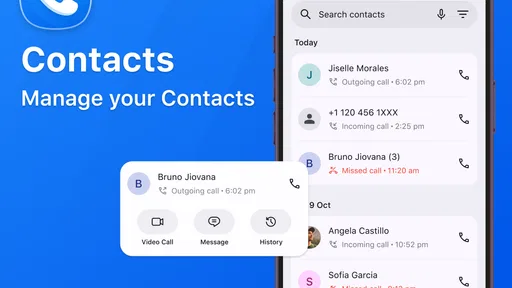
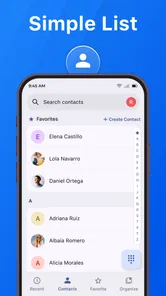
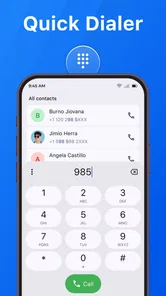
The three areas implied by its purpose work together naturally. Contacts are for choosing someone I already know, call history is for reconstructing what happened recently, and the dialer is for reaching a number directly. Keeping those actions close together is useful because real communication rarely follows one neat pattern. Sometimes I remember a name, sometimes I recognize a missed call, and sometimes I only have a number written on a note.
That flexibility is more useful than it first appears. A contact list is best when I know who I want. Call history is better when I remember the event but not the exact time or name. Direct dialing is the fallback when the number is not saved. I appreciate having those different starting points available without needing to switch between unrelated apps.
More From Our News Desk

 Gmail
GmailGmail in a Busy Inbox: Who Benefits Most?
From first account to crowded workday, Gmail earns its place through dependable search and flexible sorting—but its best fit depends on how much inbox maintenance you can tolerate.

 Prime Video
Switching to Prime Video: What Changes in Your Viewing Routine
Prime Video can make a compelling second home for streaming, but switching means learning a different catalog, rental layer, and route from browsing to playback.

 Universal TV Remote Control
Universal TV Remote Control Works Best as a Reliable Backup
A phone remote earns its place through quick setup and reliable habits. Here is how to get more from Universal TV Remote Control—and where its limits show.

 Weather - By Xiaomi
Weather by Xiaomi Review: Clear at a Glance, Less Clear Up Close
Xiaomi’s weather app makes everyday forecasts quick to scan, but its calm surface can leave useful details and recovery paths harder to find than they should be.

 X
XX Under Pressure: Can It Recover When Posting Goes Wrong?
A resilience-focused review of X, examining setup, mistaken posts, interruptions, weak connections, and the gaps that matter when recovery needs to be dependable.

 Clash of Clans
Clash of Clans Is Won Between the Battles
Its raids are quick; its community is a long-term project of coordination, teaching, rivalry, and shared responsibility—with all the friction that entails.
Latest News



There is also a subtle benefit for attention: the app encourages a task-based decision. I open it to identify a person, check a previous call, or begin dialing. That is different from opening a general communication hub where messages, alerts, promotional prompts, and other conversations compete for attention. For people who feel pulled into their phone whenever they intend to make one quick call, a narrower tool can create a cleaner mental boundary.
A realistic everyday call workflow
Imagine I leave work and notice that I missed a call from a local number saved under a short contact name. In a typical phone routine, I might open the phone app, scan the list, accidentally enter another contact, and then return to the recent activity screen. With this app, I can begin from the call history, identify the entry, and decide whether to return it immediately or wait until I have more privacy.
That last decision is important. A call log should not merely encourage instant callbacks. It can also help me pause. Seeing the recent activity gives context: was this a single missed call, or part of an ongoing exchange? If I am about to enter a meeting, the clearer choice may be to leave it for later. The app supports the practical step, but the better habit comes from using the record to make a choice rather than reacting automatically.
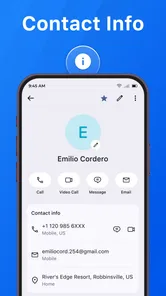
Another useful workflow is calling someone whose number is saved but whose name is easy to confuse with another contact. I can use the contact view first, verify the identity, and then place the call. That is safer than relying on memory when two people share similar names. I would still recommend checking the contact carefully before tapping the call action, particularly when a wrong call could create an awkward situation.
Where it saves attention, and where it cannot
The strongest attention benefit is the reduction of hunting. When the app puts calling-related information in one place, I spend less time deciding which screen contains the action I need. That matters for people who make repeated practical calls during the day, such as coordinating family plans, checking appointments, or returning calls from customers.
However, a focused dialer does not remove every source of interruption. Calls themselves still demand attention, and the app does not turn an unsuitable moment into a suitable one. I would not use its convenience as a reason to call while driving, during a meeting, or while handling another task that needs concentration. The best use is to make the start of a call clearer, then choose the right time to follow through.
There is another trade-off. People who prefer one unified place for calls, texts, video conversations, and contact notes may find this approach too narrow. A broader phone experience can be more convenient when the next step after a call is a message or a video chat. Contacts: Call Log & Dialer makes the calling path easier, but it does not replace the full range of communication habits many people have built around their phone.
Using the call history without letting it control you
The call history is most useful when I treat it as a memory aid rather than a demand list. A recent entry can remind me to follow up, clarify whether I already spoke with someone, or help me find a number I did not save. It can also prevent unnecessary duplicate calls when I am unsure whether I already made contact.
My practical tip is to use the history in batches when possible. If I have several calls to return, I can review the list first, decide which conversations matter now, and then work through them in a sensible order. That is better than reacting to every missed call the moment it appears. The app’s focused design supports this because the relevant information is close at hand, but the discipline still comes from the user.
I also find that call history can improve clarity in family or work situations where several conversations happen close together. Before calling back, I can use the recent record to orient myself: who contacted me, which interaction was most recent, and whether the call was likely part of a larger sequence. It is not a replacement for written notes, but it can reduce the mental effort of reconstructing a busy afternoon.
Boundaries around availability
Communication tools often make it easy to be reachable and quietly difficult to be unavailable. A dialer can contribute to that pressure if every recent call feels like an obligation. My experience is better when I separate access from responsibility. The app gives me a quick route to a caller; it does not decide that I owe an immediate response.
For personal use, that distinction can make calling feel less intrusive. I can check who reached me, decide whether the conversation deserves a return call, and choose a moment when I can listen properly. For work, I would use the same approach by setting a simple rule: review the call history at a planned time instead of repeatedly checking it throughout the day. That turns the app into a communication organizer rather than another source of alerts in my attention.
There is also a privacy habit worth keeping in mind. Because contacts and call activity are sensitive parts of a phone, I would install the app only from a trusted source and review the access requests shown by the operating system before continuing. I would also avoid handing my unlocked phone to someone casually if the call history contains personal or work-related information. The app’s usefulness depends on convenient access, but convenience should not mean ignoring who can see that information.
For households sharing a device, I would be especially careful. A clear call log can help one person remember a conversation, but it can also expose names and calling patterns to another person using the same phone. In that situation, the right choice may be keeping the standard phone experience or using the device’s existing privacy controls rather than adding another calling interface.
Who will appreciate the simpler approach
I think this app is a good fit for someone who wants a clean route to saved contacts, recent calls, and direct dialing. It makes sense for people who regularly return missed calls, keep a large contact list, or feel that a general phone interface asks them to do too much before reaching a basic calling action.
It can also suit an older relative or a less technical phone user who values a clear communication purpose over a crowded feature set. I would still test the layout with that person instead of assuming simplicity for everyone. Familiarity matters, and changing the usual phone workflow may briefly create confusion even when the new arrangement is logically organized.
People who make many short coordination calls may benefit as well. A parent arranging pickups, a freelancer speaking with clients, or someone managing appointments can move between contact lookup and recent activity without treating every call as a separate search task. The advantage is not that the app makes conversations better by itself; it makes the route into those conversations more predictable.
Who should keep the usual phone app
I would skip it if your current phone app already gives you an uncluttered contact list, reliable recent-call access, and a dialer you understand immediately. Installing another interface only helps when it solves a real friction point. If your existing setup already feels fast, the change may add adjustment without adding much value.
I would also look elsewhere if your communication life revolves around messaging, group chats, video calls, or detailed contact management. This is a calling-centered tool, and its strongest qualities come from that narrow focus. A broader communication app or the phone experience built into your device may be a better match when calls are only one small part of how you stay in touch.
Users who need advanced business calling workflows should be cautious too. If you depend on specialized call routing, team records, deep scheduling, or integrated customer management, a simple contacts-and-dialer arrangement is unlikely to cover the whole job. In that case, the app might still be useful for personal calls, but I would not make it the center of a professional communications system without testing it against those needs.
How it compares with common alternatives
The standard phone app usually has the advantage of being familiar and already connected to the device’s calling behavior. It may be the better choice when you want the fewest changes or when your phone’s manufacturer has already created a strong contact and call-history experience. Contacts: Call Log & Dialer is more appealing when that default interface feels cluttered or when you want a more deliberately focused route to calling.
Messaging platforms offer richer conversation context. They can keep text, media, group discussion, and sometimes calling in one thread, which is useful when a phone call is only one stage of a longer exchange. The trade-off is that they can bring more notifications and more visual noise. This app is better when the goal is simply to identify the person and place a conventional call.
Dedicated contact managers can go further with labels, notes, groups, and relationship details. That depth is valuable for people who organize contacts as a database. The focused dialer is more practical for someone who wants quick access without turning contact upkeep into a project. I see it as a middle path: more intentional than a cluttered default screen, but less ambitious than a full contact-management system.
Small habits that make the app more useful
My first tip is to decide whether you are looking for a person or a conversation before opening the app. If you know the person, start with contacts. If you are responding to something recent, begin with call history. This sounds obvious, but choosing the right entry point reduces unnecessary scanning and helps preserve the app’s main advantage.
My second tip is to pause before returning an unfamiliar recent call. Use the entry as a prompt to identify the number and consider the timing, rather than treating every missed call as urgent. That habit protects attention and reduces the chance of interrupting yourself for a low-priority conversation.
My third tip is to use direct dialing only when saving the number would not be useful. If the person or organization is likely to matter again, saving a clear contact name can prevent confusion later. Direct dialing is convenient for one-off calls, but a well-organized contact list becomes more valuable over time than repeatedly searching through old activity.
Finally, I would give the app a short trial alongside my existing routine instead of switching blindly. Notice whether it actually reduces taps and hesitation, or whether it makes you think about where a familiar action moved. A communication tool should lower friction after the learning period, not merely look different on the first day.
My verdict on the communication rhythm
Contacts: Call Log & Dialer succeeds because it understands a basic need: sometimes I do not want a full communication platform, I just want to find the right person, understand a recent call, and speak. Its free price and Everyone rating make it easy to consider, while support for Android 8.0 and later keeps it accessible on a wide range of devices.
Its real strength is not a dramatic feature; it is the way a focused calling space can make communication feel less reactive. I can review who contacted me, choose when to respond, and begin a call without wandering through unrelated parts of the phone. That supports clearer boundaries, especially on days when every notification seems to ask for an immediate answer.
My reservation is equally clear: this is not a universal communication replacement. If your default dialer already works well, or if your important conversations happen through messages and video services, the benefit may be too small to justify changing habits. The app is at its best for people who want calling to be the center of the experience and who value a direct, calmer route into everyday conversations.
My recommendation: try it if your current calling routine feels scattered, slow, or unnecessarily distracting. Keep it if the contact view and call history help you make calls on your own terms. If it does not reduce that specific friction, return to the familiar phone app; in this category, clarity matters more than having an extra interface.
Contacts: Call Log & Dialer Frequently Asked Questions
Is Contacts: Call Log & Dialer free to download, and which devices can run it?
Contacts: Call Log & Dialer is free and is intended for phone-management tasks, including organizing contacts, viewing call history, and making calls quickly. It is an app in the Communication category, and its content rating is Everyone. Compatibility depends on the device: the listed minimum operating-system requirement is Android 8.0, so check that your phone meets it before downloading.
What is Contacts: Call Log & Dialer, and what can I do with it?
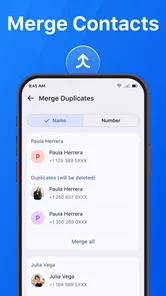
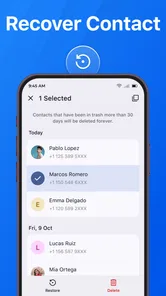
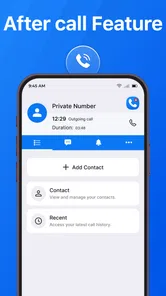
Contacts: Call Log & Dialer is a phone-management application designed to bring contacts, recent calls, and dialing tools together in one place. After opening it, users can search saved contacts, place calls, review incoming and outgoing call history, and access common contact actions more quickly. It is mainly intended for people who want a simpler alternative to navigating several separate phone and contacts screens.
Does Contacts: Call Log & Dialer replace my phone’s default dialer?
The app may work as an alternative dialer, but whether it can fully replace the built-in Phone application depends on your Android or iOS version and the permissions you grant. On supported devices, you may be able to set it as the default calling app. Some system features, carrier functions, emergency calling behavior, or device-specific options can still remain controlled by the original phone application.
What permissions does Contacts: Call Log & Dialer require?
Because its main features involve calling and contact management, the application may request access to contacts, phone status, call history, and sometimes microphone or notification functions. These permissions are necessary for features such as displaying caller names, showing recent calls, and starting phone conversations. Before accepting, review the permission prompts and disable any access you do not consider necessary.
Can I use the app to block unwanted calls or identify callers?
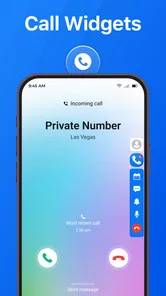
Depending on the version and device support, Contacts: Call Log & Dialer may include tools for recognizing, filtering, or blocking unwanted calls. However, these capabilities are not always identical across platforms, regions, or operating-system versions. Caller identification can also depend on available databases and permissions. The app should therefore be viewed as a convenient call-management tool rather than a guaranteed spam-protection service.
Pros
- Quick access to contacts
- favorites
- and recent calls
- Smart search helps find people by name or phone number
- Clean interface makes everyday calling easy
- Useful call history filters improve navigation
- Supports contact management directly from the dialer
Cons
- Some features may require premium access or contain ads
- Call recording availability depends on device and region
- May request extensive permissions for full functionality
- Contact syncing can vary between Android devices
- Advanced customization options may feel limited











