CloudEdge
- 13.90K
- 4.4
- Installs
- 1.00M
- Price
- Free

Screenshots
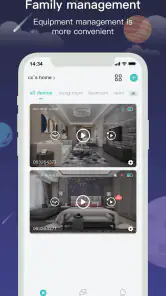
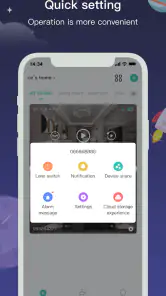
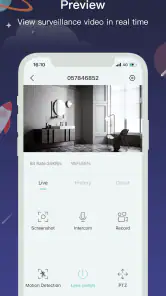
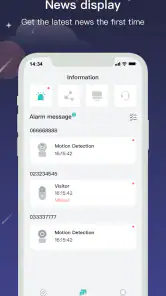
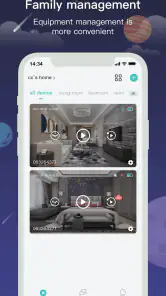
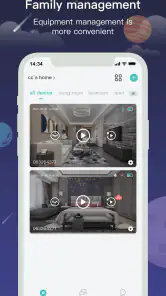
Analysis by Reviewed
I see CloudEdge as a practical companion for people who already have compatible cameras or video devices and want to check them through a phone. That focus is also its main boundary: this is not a general home-security system by itself, and the experience depends on the equipment and services you pair with it. For a household that wants a straightforward way to keep an eye on a doorstep or another familiar space, it can make sense; for someone expecting a complete, independently useful security solution, it is worth looking elsewhere first.
What the app is for—and what that means in practice
CloudEdge is a free lifestyle app from Hangzhou Meari Technology Co., Ltd. Its role is to connect users with video services for home or business settings, so the most useful question before installing it is whether the camera or device you intend to use works with it. An app cannot make an incompatible camera useful, and choosing software before checking the device ecosystem can lead to avoidable setup frustration.
I would treat it as the viewing and management side of a camera setup, not as a substitute for choosing the right camera, placing it well, or deciding how you want to handle recordings. If you are shopping for equipment, check compatibility before making a purchase and think about where the camera will sit, what you need to see, and how you will review footage. Those choices shape the day-to-day experience as much as the app does.
It has a 4.4 average from around 87,000 ratings, and more than a million installs suggest that many people use it. Those figures are useful context, but they do not tell me whether a particular camera will work well in a particular home. I would use them as a reason to take a closer look, not as a replacement for checking the device and service requirements that matter to my own setup.
A sensible setup starts with the right expectations
The app is free to install and is rated for everyone. It has in-app purchases, with listed items ranging from $1.99 to $359.99, so I would check what a particular device or service requires before relying on cloud recording or another paid option. The presence of a free app does not necessarily mean every part of a camera system is free, and the cost can depend on the equipment and services involved.
CloudEdge was released on November 23, 2017, and its current version is 6.0.2. It supports Android 5.0 and later, which makes it available to a wide range of Android devices, though I would still check that the phone I plan to use can run the version offered in its app store. Before setup, I would also have the camera, phone, and home network ready together; doing the initial pairing while moving between rooms or relying on a weak connection is an easy way to turn a simple task into a drawn-out one.
One practical habit is to decide in advance who in the household needs access and what they should use the app for. A person checking a delivery has different needs from someone responsible for reviewing security footage. Agreeing on those expectations early can prevent a shared camera from becoming a source of confusion, especially when several people receive alerts or check the same view.
More From Our News Desk

Clash of Clans Is Won Between the Battles

Android Auto Makes the Case for Quieter Car Software

MobiOffice: Transforming Mobile Productivity with Seamless Integration

EA SPORTS FC™ Mobile Soccer: Redefining Mobile Sports Gaming

How Microsoft OneDrive Became a Mobile Productivity Giant

How Google Translate Breaks Language Barriers Effortlessly
Using CloudEdge in everyday life
Let's dive into the world of CloudEdge, the app that's quickly becoming a staple for those keen on enhancing their home security. If you're like me, you're always on the lookout for user-friendly tech that doesn't require a degree in computer science to figure out. Well, CloudEdge might just be the answer to our prayers.
Why Choose CloudEdge?
When it comes to security, ease of use is paramount. I mean, who wants to spend hours trying to configure an app? With CloudEdge, the setup is as breezy as a Sunday morning. The app guides you through the process with simple, clear instructions that even my tech-averse grandma could follow. Once set up, you're greeted with a clean, intuitive interface that puts all the essential features right at your fingertips. No clutter, no confusion.
For example, I can see the appeal for someone who works away from home and wants to check whether a parcel has arrived without asking a neighbour to look. The useful routine is simple: open the camera view when it matters, check the scene, and decide whether any follow-up is needed. That is a smaller promise than round-the-clock professional monitoring, but it can be enough for everyday awareness. I would not assume an alert alone guarantees that a person or event has been correctly identified; notifications are prompts to check, not a substitute for judgment.
Another good fit is a small business owner who wants a convenient way to view a camera feed while away from the premises. That use depends on having suitable equipment and a reliable connection, and it should not be confused with a dedicated business surveillance system. If a business needs carefully managed access, formal retention practices, or a documented security process, I would compare purpose-built options rather than expecting a phone app to cover every operational need.
Features That Stand Out
What really caught my attention was the app's ability to send real-time alerts. Imagine getting a notification the moment someone approaches your doorstep. It's like having a personal security guard in your pocket! Plus, the video quality is top-notch, ensuring you never miss a detail. Whether it's the mailman or a suspicious character, you'll always have a clear view.
In day-to-day use, alerts are most helpful when they lead to a clear next step. I would avoid treating every notification as urgent, especially if a camera faces a busy walkway or another area with frequent movement. Reviewing the view and adjusting the camera's placement can be more useful than simply reacting to every ping. If the stream or alert feels unreliable, checking the network and the camera position is a sensible first step before blaming the app.
A small but valuable workflow is to test the whole chain before depending on it: trigger a normal event, see whether the phone receives an alert, open the live view, and confirm that the scene is actually useful from the camera's position. That quick rehearsal helps reveal whether notifications arrive at a convenient time and whether the camera covers the spot you care about. It is better to discover a blind angle during an ordinary afternoon than when you are counting on the view.
A standout feature worth mentioning is the two-way audio. I had a bit of fun with this, using it to chat with delivery drivers and surprise my friends when they came over. The audio is crisp, making conversations easy and effective.
That kind of audio is handy for brief, practical exchanges, but I would keep the setting in mind. A speaker mounted near an entrance may be useful for a delivery, while a camera placed farther away could make a conversation awkward. Before using it for anything important, I would test the sound from the place where I expect to speak and listen. It is best treated as a convenient intercom-like option, not a replacement for a phone call when clarity or privacy matters.
Seamless Integration
For those of us with a penchant for smart home devices, CloudEdge plays well with others. It integrates seamlessly with a variety of smart devices, allowing you to create a comprehensive security network. Whether it's linking with smart locks or other cameras, the app ensures everything works in harmony.
Here I would be careful not to build a setup around assumptions. The actual experience depends on which devices are compatible, so I would verify support for each camera or accessory rather than buying several products on the strength of a broad promise. If the goal is to control many different brands from one place, a dedicated smart-home platform may be a better starting point; if the goal is to view supported cameras through their intended app, CloudEdge may be the more direct route.
Compared with a camera maker's single-purpose viewing app, CloudEdge is appealing when the equipment you own is designed to use it and you want that device's video service in one place. Compared with a broader smart-home hub, it may be narrower: a hub is generally the better choice for coordinating a varied mix of household devices, while a camera-focused workflow is simpler when video is the main concern. The right choice is not whichever app claims the most, but the one that matches the gear you already have and the tasks you actually need to do.
Also, let's not forget the cloud storage option. Storing your footage securely in the cloud gives peace of mind, knowing your data is safe and accessible whenever you need it. No more worrying about local storage running out or getting damaged.
Cloud recording can be convenient because footage is not tied only to a storage device sitting beside the camera, but it introduces a cost and service consideration. Since the app includes paid items, I would check the specific plan or purchase attached to my equipment before counting on cloud access. I would also decide how long I truly need recordings available: someone checking occasional deliveries may have different needs from a household that wants to revisit incidents. If a paid option is not worthwhile for your use, compare what the camera supports locally before choosing a setup.
Where I would pause before choosing it
The central limitation is that the app’s usefulness hinges on compatible hardware and the surrounding connection. If you do not own a supported device, installing the app alone does not deliver a camera view or home protection. If your internet connection is inconsistent, remote viewing and timely alerts may also be less dependable than you want. For anyone who needs guaranteed monitoring or a tightly controlled security operation, I would choose a service designed around those requirements instead of relying on app notifications.
There is also a trade-off between convenience and simplicity. A camera app can make it easy to check a feed, but a household still has to decide who can access it, whether cloud services are worth paying for, and how much attention to give alerts. I would not add cameras to every room simply because the app makes viewing possible. Start with the location that solves a real problem, test it, and expand only if the first camera proves useful.
For privacy-minded users, the sensible approach is to think about the camera’s field of view and the people who may be captured before installing it. Aim it at the area you need to monitor rather than a neighbour’s property or a private space, and make sure household members understand where it is positioned. This is not a special CloudEdge feature; it is basic good judgment for any camera system, and it matters more than adding another notification setting.
Who gets the most from it
I would recommend CloudEdge to someone who already has compatible video equipment, wants phone-based access, and values a relatively approachable way to check a home entrance or business area. It is especially appealing when the everyday need is occasional visual reassurance rather than a full security service. The combination of alerts, live viewing, and two-way audio can make small tasks—checking a visitor, talking to a driver, or seeing whether activity needs attention—less inconvenient.
I would steer away from it if you are choosing an app first and have not confirmed what hardware it supports, or if you want one dashboard to automate a wide range of unrelated smart-home products. It is also not my first choice for someone who needs professional monitoring, strict business controls, or a guarantee that every event will be recorded and noticed. In those situations, compare specialist security services and broader home platforms, and weigh their costs and capabilities against your actual requirements.
If you are still deciding whether cloud storage is necessary, start from the kind of footage you expect to need rather than the word “cloud.” Ask whether you want to review events after they happen, how often that would matter, and whether a paid service fits your budget. For a simple live check, cloud recording may be unnecessary; for someone who needs to revisit clips, the service could be more valuable. That distinction is worth settling before setting up a camera around an assumed subscription.
Final Thoughts
In a world where security is increasingly important, having a reliable app like CloudEdge is invaluable. It's user-friendly, feature-rich, and integrates beautifully with other devices. While no app is perfect, the benefits here far outweigh any minor hiccups. If you're looking to bolster your home security without the hassle, give CloudEdge a try. Trust me, once you start using it, you'll wonder how you ever managed without it.
My verdict is more measured: CloudEdge is most convincing as the companion to a compatible camera, not as a standalone answer to home security. I like the idea of using alerts and two-way audio for everyday checks, and the free download lowers the barrier to trying the app, but device compatibility, connectivity, and the possible cost of services all deserve attention. If those trade-offs fit your situation, it is a reasonable option to explore. If you need a broader smart-home control center or a professionally monitored system, I would choose a tool built for that job instead.
CloudEdge Frequently Asked Questions
What kind of app is CloudEdge, and who might find it useful?
CloudEdge is a Lifestyle app described as a video service platform for families and enterprises. It may be worth considering if you want an app connected with video services for a household or an organization. Its usefulness depends on whether it fits the video service you need, so consider your intended setup before downloading.
Can I download CloudEdge for free, and what should I know about possible charges?
CloudEdge is free to download, so you can install it without an upfront purchase. The app also offers in-app purchases, with individual items priced from $1.99 to $359.99. Those purchases are separate from the download and may affect the overall cost depending on what you choose. Review the purchase options shown in the app before confirming a transaction.
What devices and operating systems do I need to run CloudEdge?
CloudEdge is a mobile app for managing video services for families and enterprises. It runs on Android devices with Android 5.0 or later, and its listed age rating is Everyone. Before installing, check that your device meets the operating-system requirement and has enough available space for the app and any updates.
Who develops CloudEdge, and what age group is it intended for?
CloudEdge is developed by Hangzhou Meari Technology Co., Ltd. It is intended for a broad audience, with an Everyone content rating, so it is not limited to a particular age group. The app is free to download, while in-app purchases are available and can vary in price. Consider those purchases when deciding whether it suits your needs.
What is CloudEdge and what are its main features?
CloudEdge is a security app designed for managing and monitoring smart home devices, particularly security cameras. It offers features like real-time monitoring, motion detection alerts, two-way audio, and cloud storage options. Users can view live footage, receive instant notifications, and communicate with anyone on the other side of the camera using their smartphone.
Pros
- Easy-to-use interface.
- High-quality video streaming.
- Customizable alerts and notifications.
- Supports multiple devices.
- Secure data encryption.
Cons
- Limited cloud storage options.
- Requires subscription for advanced features.
- Occasional connectivity issues.
- Limited customer support.
- Battery life could be improved.
- Category
- Lifestyle
- Version
- 6.0.2