CineDash
- 678.00
- 4.6
- Installs
- 500.00K
- Price
- Free

Screenshots
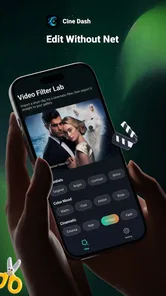
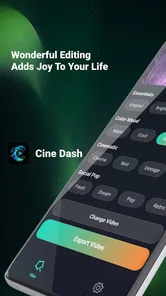

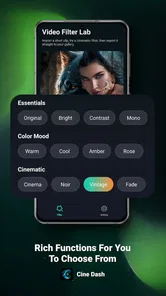
Analysis by Reviewed
I approached CineDash as a small, focused lifestyle app rather than a full video-editing suite. Its purpose is straightforward: apply filters to video, then give the result a different visual mood before sharing or saving it. That narrow focus is important. I did not expect a timeline, advanced cutting tools, or a complete production workspace, and the experience makes the most sense when treated as a quick visual adjustment tool.
For someone who records short clips on a phone and wants them to feel less flat, the appeal is obvious. You can begin with an ordinary video, test a filter, and decide whether the change improves the scene without opening a heavyweight editor. I found that simplicity useful for casual moments, social posts, travel snippets, and quick personal projects where the main decision is how the footage should look rather than how it should be assembled.
How CineDash fits into a practical video routine
The app comes from Smart it support and is listed as a free lifestyle app for everyone. Its current version is 1.0.2.0, with support starting from Android 7.0. That combination makes it approachable for people using older Android phones as well as newer devices. The audience is not limited to experienced creators; the basic idea is easy to understand even if you have never used a video editor before.
My preferred starting workflow is deliberately simple. I choose one clip that already has a clear subject, apply a filter, and watch the entire result instead of judging only the opening frame. A filter that looks attractive on a bright first shot can become distracting when the camera moves into shade, when a face fills the frame, or when a scene contains strong artificial lighting. Watching the complete clip is the first habit that separates a useful adjustment from a merely eye-catching one.
I also recommend keeping the original video untouched. CineDash is best used as a visual experiment, so I would not replace the source file immediately. Saving or sharing a filtered version while retaining the unedited clip gives me a safe fallback if the chosen look becomes tiring later. It also lets me try a different treatment without having to recreate the recording.
For a realistic everyday example, imagine recording a short clip of a child’s birthday candles in a dim room. The original may look dull, but an aggressive filter could make the flame colors look unnatural or push skin tones too far. I would test a restrained option, replay the moment from beginning to end, and compare it with the original before deciding. In this situation, the value is not making the video look dramatic; it is making the memory feel clearer without losing its character.
The same approach works for a quick walk, a meal, a pet video, or a short product demonstration. I would avoid applying a filter simply because it is available. Instead, I ask what the clip needs: more atmosphere, a different color mood, or just a little separation from the unedited camera look. That question keeps the app from turning every video into the same visual style.
More From Our News Desk

Weather by Xiaomi Review: Clear at a Glance, Less Clear Up Close

X Under Pressure: Can It Recover When Posting Goes Wrong?

Clash of Clans Is Won Between the Battles

Android Auto Makes the Case for Quieter Car Software

MobiOffice: Transforming Mobile Productivity with Seamless Integration

EA SPORTS FC™ Mobile Soccer: Redefining Mobile Sports Gaming
What to check before choosing a look
The first thing I pay attention to is lighting. Filters can change brightness and color together, so a clip recorded outdoors may respond very differently from one captured under indoor bulbs. If the footage already has strong contrast, a dramatic filter can hide details in dark areas. If it is soft and gray, a more noticeable treatment may help, but only if faces and important objects remain readable.
Movement matters too. A still-looking filter may seem fine on a paused frame, while motion reveals unpleasant shifts in color or intensity. I make a point of checking transitions between bright and dark parts of the scene. This is especially useful for clips recorded while walking, panning across a room, or moving from a window toward an interior space.
Faces deserve separate attention. A filter that works beautifully for architecture or scenery may make skin appear overly warm, pale, or saturated. When people are central to the video, I judge the result by their appearance first and the background second. That is a practical limitation of broad filter tools: they usually affect the whole image, so they cannot treat a sky, wall, shirt, and face independently.
Text and small details are another useful test. If I am editing a clip that includes a sign, menu, label, or screen, I check whether the filter reduces legibility. A stylish color shift is not worth using if the information viewers need becomes harder to read. For this kind of footage, a lighter treatment is usually more sensible than the strongest visual option.
I would also check the app’s available controls before building a repeatable routine around it. The central experience is filter-based, so users expecting detailed sliders should keep their expectations measured. If the goal is precise correction of exposure, shadows, highlights, or individual colors, a traditional editor is likely to be a better fit. CineDash is more comfortable when the user wants a quick, recognizable change rather than technical image grading.
Small habits that make the process faster
Experienced use does not require complicated tricks. I get better results by preparing the clip before opening the app. I remove accidental recordings, identify the section I actually want to use, and decide whether the video is meant to feel natural, warm, moody, or playful. That reduces random filter switching and makes the final choice easier.
For a batch of related clips, I choose one reference video first. It might be the clearest shot from a day out or the clip with the most representative lighting. I test filters on that reference, then use the same general choice for the rest of the group. This creates a more consistent set of videos than selecting a different look for every file.
Consistency is particularly valuable when several clips will be posted together. Even without advanced editing tools, using a shared visual direction can make a collection feel intentional. I would still inspect each clip individually because the same filter may behave differently on a cloudy exterior, a bright kitchen, and a nighttime street scene.
Another useful habit is to make the decision in two passes. On the first pass, I remove options that clearly damage the footage. On the second, I compare the remaining choices at normal playback speed. I do not spend too long staring at a paused image, because the video will be watched in motion. This approach keeps the process quick while avoiding the common mistake of selecting the most intense preview.
If I am working on a clip for someone else, I show the original and filtered versions side by side or one after the other before sharing. People often prefer a less dramatic treatment than the editor expects. A quick comparison prevents unnecessary back-and-forth and helps confirm that the filter supports the memory or message in the clip.
The app’s free price also makes it easy to use as a low-risk first step. I can test whether a filter-based workflow suits me without committing to a paid editing package. That does not make it a replacement for every alternative, but it does lower the barrier for casual users who only need occasional visual changes.
Where it is useful, and where another editor wins
I see CineDash working best for people who want speed over control. A casual phone user, a student preparing a short presentation clip, or someone organizing personal videos can benefit from a direct workflow. The app’s focused purpose means there is less temptation to spend time arranging a complicated project when a simple visual treatment is enough.
It is also a reasonable choice for someone who finds full editors intimidating. Many video tools expose timelines, tracks, transitions, audio controls, captions, and export settings all at once. That flexibility is valuable, but it can make a five-minute task feel like a production job. A filter-centered app offers a gentler starting point for users who mainly want to change the mood of a recording.
On the other hand, I would skip it for projects that need trimming, precise sequencing, voice-over, music mixing, captions, or multiple visual adjustments. A creator preparing a polished tutorial or a business video will usually need more than a filter. In those cases, a conventional mobile editor with a timeline is the better option because it handles structure as well as appearance.
I would also choose another tool when color accuracy is critical. Product sellers, designers, photographers, and anyone matching footage across different cameras may need individual control over color and exposure. A preset-style approach can be fast, but it is not the same as careful correction. The trade-off is clear: CineDash reduces effort, while a more advanced editor provides finer control at the cost of time and complexity.
Compared with the usual social-media camera tools, CineDash feels more suitable when I already have a video and want to revisit its appearance afterward. Camera filters are convenient during recording, but they can encourage impulsive choices and leave the original footage permanently altered if the app saves only the processed result. A separate filtering step gives me more room to compare and reconsider.
Compared with a full video editor, its advantage is focus rather than breadth. I would not install it expecting a complete project workspace. I would use it alongside a broader editor, or instead of one, when the clip is already the right length and only the visual mood needs attention.
Limits that become clearer with regular use
The narrow feature set is both the reason to try the app and the main reason some users will outgrow it. Once I want to combine several clips, the workflow naturally moves beyond filtering. The same is true when I need a specific correction rather than a general style. Users should decide whether their normal task is “make this video look different” or “build and refine a video.” CineDash is aimed at the first question.
There is also a creative limitation in applying a broad look to an entire frame. A filter cannot understand which object should remain neutral and which object should change. A colorful wall, a person’s face, and a white piece of paper may all shift together. I treat the filter as a starting point and reject it whenever it changes the meaning or clarity of the scene.
Performance expectations should remain realistic on older hardware. Because the app supports Android 7.0 and above, the range of devices is broad. A newer phone may feel more comfortable when previewing video, while an older device can make any video-processing workflow feel less immediate. I would keep clips manageable, close unnecessary apps, and avoid judging the experience from a single demanding file.
Storage habits matter as well. Video files can occupy substantial space, and creating edited copies means keeping more than one version. I prefer naming or organizing the result clearly so I do not confuse the filtered clip with the original. This is not a glamorous part of the workflow, but it prevents accidental deletion and makes later reuse easier.
Privacy-conscious users should make their own comfort decision before importing personal recordings into any editing application. I would be especially careful with videos containing children, private conversations, documents, or visible addresses. The safest everyday habit is to process only the clip needed for the task and avoid sharing it until I have checked the final result and destination.
What the community response suggests
The app has reached over 100 thousand installs and holds a 4.6 average from around 16 thousand ratings, with hundreds of written reviews. Those figures suggest that the straightforward concept resonates with a sizeable group of users. I read that popularity as encouragement for casual use, not as proof that it can replace a professional editor.
The Everyone age rating also matches the uncomplicated nature of the task. Families can understand the basic purpose, although adults should still guide younger users when videos include personal information or other people. The rating describes accessibility, not a guarantee that every sharing decision is appropriate.
Since the app is still identified by a recent release date of March 26, 2026, I would keep my expectations practical. A newer application can be appealing because its purpose is easy to grasp, but I would still watch how comfortably it fits my own phone and file habits. The version available to me is 1.0.2.0, so I would check for updates through the normal app store process before troubleshooting an issue.
My verdict after building a repeatable routine
My honest view is that CineDash succeeds when I give it a small, clearly defined job. I use it to test a visual mood, preserve the original, review the whole clip, and keep the treatment consistent across related videos. Those habits make the app feel faster and more dependable than randomly tapping through filters until something looks interesting.
The strongest reason to choose CineDash is its focused workflow, not a promise of advanced editing. It is free, approachable, and suitable for everyday videos that need a quick visual change. The developer, Smart it support, has positioned it in a useful space for people who want less complexity than a full editor provides.
I would recommend it to casual Android users, beginners, and anyone who regularly records short clips but rarely needs a timeline. I would not recommend making it the only video tool for serious content creation, detailed color work, or projects involving several layers of sound and imagery. For those needs, a fuller editor is worth the extra learning time.
In the end, I think the app is easiest to appreciate when I stop asking it to do everything. I select a suitable clip, check the lighting and faces, compare the result with the original, and use the filter as a finishing choice rather than a substitute for editing. If that matches your routine, CineDash is a sensible, low-friction addition to an Android phone.
CineDash Frequently Asked Questions
What does CineDash do with video filters?
CineDash is a Lifestyle app whose short description is simply “CineDash,” and its store summary says it adds filters to your video. It may suit people who want to change the look of video clips with filters. Before downloading, consider whether that purpose matches what you want from an app, and check its current store page for details about the available features.
Is CineDash free, and are there any costs to consider?
CineDash is free to download. That makes it easy to try without paying an upfront download price, but downloading for free does not necessarily describe every possible in-app cost. Review the app’s current store page and any purchase prompts you encounter so you understand what is included before choosing to use optional features.
What age group is CineDash suitable for?
CineDash has an Everyone content rating, so it is presented as suitable for a broad audience. Parents and other users can still review the app’s store page and privacy information before installation, especially when setting it up on a child’s device. The age rating is one helpful consideration, alongside the app’s video-filter purpose and the permissions requested.
Does CineDash work on older phones, and what system version do I need?
CineDash supports devices running Android 7.0 or later, which makes it an option for many older Android phones as well as newer models. Before downloading, check your device’s operating-system version in its settings and confirm that the app appears as compatible in your store. Keeping your system updated can also help apps run more smoothly and securely.
Who develops CineDash, and how can I make sure I have the right app?
CineDash is developed by Smart it support. Before installing, check the developer name on the app’s official store page so you can distinguish it from similarly named apps. The app is listed as a Lifestyle app, and its short description is simply “CineDash.” Confirming these details helps you find the intended application and avoid lookalikes.
Pros
- Clean interface makes browsing movies and shows quick and intuitive.
- Personalized recommendations help users discover relevant entertainment.
- Detailed titles include useful information before choosing what to watch.
- Watchlist tools make it easy to save content for later.
- Fast search helps locate specific movies
- series
- actors
- or genres.
Cons
- Availability of titles may vary significantly by country or region.
- Some features may require an account or additional permissions.
- Recommendations can feel repetitive after extended use.
- Streaming quality depends heavily on your internet connection.
- The app may consume considerable battery during long viewing sessions.











