

Christmas Photo Frames & Cards
- 6.00
- 4.4
- Installs
- 50.00K
- Price
- Free

Screenshots





Analysis by Reviewed
When I want to give a holiday snapshot a more finished feel without opening a full design program, Christmas Photo Frames & Cards is the kind of focused tool I reach for. Its appeal is straightforward: it turns a photo into a seasonal greeting by adding a frame or card-style treatment, keeping the process centered on the image rather than a long list of editing controls. That narrow purpose is useful when I want to make something personal quickly, but it also means this is not the app I’d choose for detailed retouching or year-round design work.
The key question is less whether it can decorate a photo and more whether that decoration helps the picture. A strong frame can make an ordinary snapshot feel ready to share, yet it can also draw attention away from the people in it. I get the best result when I treat the festive design as a supporting detail and let the photo remain the reason for the card.
Turning a seasonal photo into a greeting
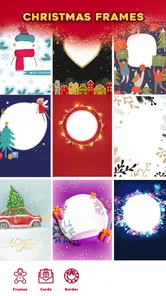
First things first, the variety of photo frames this app offers is just mind-blowing. You’ve got everything from classic holly and berry designs to whimsical Santa and reindeer motifs. It’s like having a Christmas wonderland at your fingertips! Plus, the frames are super easy to use. Just pick your favorite photo, select a frame, and voila! You’ve got a holiday masterpiece ready to share with family and friends.
In practice, I’d begin with the photo, not the decoration. A portrait with a clear subject and some breathing room is easier to pair with a bold border than a tightly cropped image where every edge is already busy. Trying a few styles before settling is worthwhile: the most colorful frame may look festive at first glance but can compete with faces, clothing, or the scene behind them. The better choice is often the one that adds mood without becoming the main event.
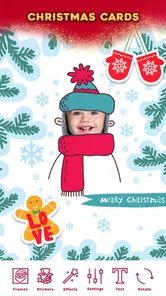
But wait, there’s more! The app doesn’t just stop at frames. It also lets you create personalized Christmas cards. Imagine sending a card that’s uniquely yours, with your own photos and heartfelt messages. It’s a fantastic way to add a personal touch to your holiday greetings, and trust me, your loved ones will appreciate the effort.
A practical use is making a small set of greetings from one family photo: choose a frame for a playful message and a different treatment for relatives who prefer something understated. I’d check how the finished image reads on a phone screen before sending it, especially if the photo itself contains small details. The point is to make the picture feel personal, not to let decorations overwhelm the message.
Keeping the decorations in balance
One of my favorite features is the array of stickers and filters available. Whether you want to add a touch of sparkle with some glittery snowflakes or go all out with a Santa hat and beard, the options are endless. The filters also help in setting the perfect mood for your photos, be it a warm vintage look or a crisp, modern style.
More From Our News Desk

 Gmail
GmailGmail in a Busy Inbox: Who Benefits Most?
From first account to crowded workday, Gmail earns its place through dependable search and flexible sorting—but its best fit depends on how much inbox maintenance you can tolerate.

 Prime Video
Switching to Prime Video: What Changes in Your Viewing Routine
Prime Video can make a compelling second home for streaming, but switching means learning a different catalog, rental layer, and route from browsing to playback.

 Universal TV Remote Control
Universal TV Remote Control Works Best as a Reliable Backup
A phone remote earns its place through quick setup and reliable habits. Here is how to get more from Universal TV Remote Control—and where its limits show.

 Weather - By Xiaomi
Weather by Xiaomi Review: Clear at a Glance, Less Clear Up Close
Xiaomi’s weather app makes everyday forecasts quick to scan, but its calm surface can leave useful details and recovery paths harder to find than they should be.

 X
XX Under Pressure: Can It Recover When Posting Goes Wrong?
A resilience-focused review of X, examining setup, mistaken posts, interruptions, weak connections, and the gaps that matter when recovery needs to be dependable.

 Clash of Clans
Clash of Clans Is Won Between the Battles
Its raids are quick; its community is a long-term project of coordination, teaching, rivalry, and shared responsibility—with all the friction that entails.
Latest News



My tip is to treat stickers as accents rather than a checklist. A single seasonal detail can give a portrait character; several competing decorations can make faces and expressions harder to notice. I’d also compare the filtered image with the original before committing, because a strong color treatment may change the feel of an otherwise natural family photo.
And let’s not forget the user-friendly interface. Even if you’re not the most tech-savvy person out there, you’ll find navigating through this app a breeze. Everything is laid out clearly, making the whole process of editing and creating a joyful experience.
That straightforward approach is useful when you’re making something on the spot, such as a quick greeting after taking a group picture at a holiday gathering. It also means I’d choose another kind of editor if I needed precise control over layers, detailed corrections, or a consistent visual style across many different projects. The convenience here comes from keeping the task simple, not from offering every tool a dedicated editor might have.
From a quick edit to a message worth sending
Once you’ve crafted your perfect holiday image or card, sharing is a cinch. The app allows you to directly upload your creations to social media platforms or send them via email or messaging apps. It’s never been easier to spread Christmas cheer far and wide!
Before sending a card to a group, I’d make one finished version and inspect it at the size people are likely to view it. This quick check helps catch a border that feels too dominant or text that is difficult to read. For a keepsake that needs careful printing or exact layout control, I’d use a design tool built for that purpose; for a casual digital greeting, this app’s narrower focus makes more sense.
That distinction matters in an everyday situation. Imagine taking a cheerful family picture at a holiday dinner and wanting to send a greeting before everyone has gone home. I’d choose a photo where faces are easy to see, add one frame that suits the mood, and keep any extra decoration restrained. Then I’d preview the result on my phone before sharing it with relatives. This is the sort of small, immediate task the app is suited to: the result can feel more considered than an untouched snapshot without turning a brief moment into a design project.
For a batch of greetings, I’d make a deliberate choice about consistency. Reusing the same photo with a different frame for each person can feel personal, but too many variations may make the set look scattered. A better approach is to settle on one visual style and vary only the message or a small decorative accent. That workflow is especially useful when the recipients are a mix of family and friends, because it keeps the cards recognizable while still allowing a personal touch.
I’d also keep the original photo available before editing. That gives me a clean version to return to if a filter changes the colors more than expected or a sticker crowds the subject. It is a simple habit, but it avoids treating a seasonal edit as the only copy of a picture I may want to use later. For an informal digital greeting, that extra choice is more valuable than adding decoration just because it is available.
In a world where everything is going digital, having an app like Christmas Photo Frames & Cards is a real game-changer for holiday enthusiasts. It combines creativity, ease of use, and a touch of personal flair into one delightful package. So, if you’re looking to up your holiday photo game this season, give this app a try. You won’t be disappointed!
There are a few useful points to weigh before installing. This is a free beauty app from Girls Photo Editor, with a Teen content rating, and it has an average rating of 4.4 from 248 ratings, with 50K+ installs. It was released on December 8, 2023, supports Android 5.1 and up, and includes in-app purchases priced at $1.99 per item. I’d treat those purchases as optional rather than assuming they are needed for a basic festive edit.
The free starting point makes it reasonable to try for a single seasonal project, while the listed purchase price is worth keeping in mind if you are considering optional extras. I’d first decide what I actually need from the finished image, then see whether the available choices meet that need before spending anything. That way, the app stays a quick creative convenience rather than an impulse purchase driven by browsing decorations.
Compared with a general photo editor, its seasonal framing and card-making focus should make a simple holiday job feel more direct, while the broader editor is the better choice for detailed adjustments or designs you’ll reuse throughout the year. A template-based design app may also be a stronger fit when precise placement, consistent typography, or a print-ready layout matters more than speed. Here, the advantage is the short route from a chosen picture to a festive image, not fine control over every design decision.
I’d skip this one if I rarely make Christmas-themed images, want extensive image-control tools, or need a polished print layout. It suits people who value speed, approachable seasonal decoration, and a personal touch in digital greetings. It is also a sensible option for someone who wants to make a casual card without learning a complicated editor, provided they are happy to keep the design simple.
For anyone wondering whether it can take the place of a regular photo editor, my answer is no—and that is not a problem if the job is occasional holiday decoration. It is better thought of as a seasonal shortcut than a complete creative workspace. If your usual goal is correcting lighting, removing distractions, or producing graphics with exact spacing, I’d use a tool built around those tasks and bring the finished photo here only if I wanted a festive frame or card treatment.
So, what are you waiting for? Grab your phone, download the app, and start creating your own festive masterpieces today. Happy holidays!
Christmas Photo Frames & Cards Frequently Asked Questions
What age group is Christmas Photo Frames & Cards intended for?
Christmas Photo Frames & Cards is rated Teen, so it is worth checking that rating before downloading, particularly if the app is for a younger user. The app is a festive photo editor for making seasonal images and cards, and its intended audience should be considered alongside the content rating when deciding whether it is suitable.
What is Christmas Photo Frames & Cards app and what can I do with it?
The Christmas Photo Frames & Cards app allows users to create personalized holiday-themed photos and greeting cards. With a variety of festive frames, stickers, and templates, users can easily customize their images to celebrate the season. The app is perfect for adding a touch of holiday cheer to your photos before sharing them with friends and family.
Is Christmas Photo Frames & Cards app free to use, or does it require a purchase?
Christmas Photo Frames & Cards app is available for free download, offering a selection of basic frames and features. However, to access premium content such as exclusive frames, advanced editing tools, and ad-free experience, users may need to make in-app purchases or subscribe to a premium version. Prices and offers may vary depending on the platform.
What Android version do I need to install Christmas Photo Frames & Cards?
On Android, Christmas Photo Frames & Cards requires version 5.1 or later. Checking your device’s software version before downloading can help you avoid installation issues. The app is a winter picture editor focused on Christmas stickers, photo frames, and cards, so it may appeal to anyone looking for a simple way to give pictures a seasonal look.
Can I share my edited photos and cards directly from the app?
Yes, the Christmas Photo Frames & Cards app provides seamless sharing capabilities. Users can share their edited photos and greeting cards directly to social media platforms like Instagram, Facebook, and Twitter, or send them via messaging apps such as WhatsApp or email. This makes it easy to spread holiday joy with your personalized creations.
Pros
- Easy to use with a friendly interface.
- Wide variety of festive frames.
- Allows customization of card messages.
- Supports both photos and videos.
- Fast processing and sharing options.
Cons
- Contains in-app purchases.
- Limited free templates available.
- Occasional ads may interrupt use.
- Requires internet connection for some features.
- May consume significant device storage.











