Chicken Salad Chick
- 2.55K
- 4.8
- Installs
- 500.00K
- Price
- Free

Screenshots
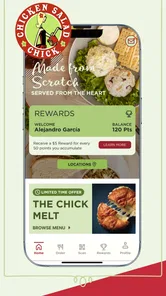
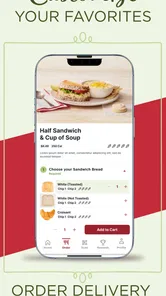
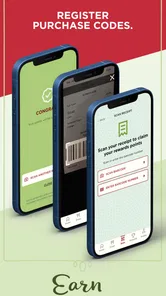
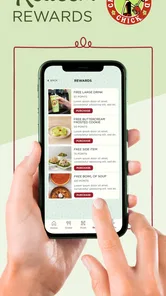
Analysis by Reviewed
I approached Chicken Salad Chick as a practical companion for visits to the restaurant, rather than as a general lifestyle app. Its purpose is straightforward: it brings the brand’s loyalty credits, rewards, and online ordering into one mobile experience. That narrow focus is also its biggest strength. If Chicken Salad Chick is already part of your routine, the app can make repeat visits easier to organize and more rewarding. If you rarely eat there, its usefulness drops quickly.
The app is free, aimed at Everyone, and comes from Chicken Salad Chick itself. It sits in the lifestyle category, although I would describe it more specifically as a restaurant loyalty and ordering tool. Its average rating is 4.8 from around 19 thousand ratings, with more than 500 thousand installs, so it has clearly found an audience beyond occasional testers. I still think the rating needs to be read in context: people who download a restaurant app are often already interested in that restaurant, which makes everyday convenience more important than broad feature variety.
How Chicken Salad Chick feels in everyday use
I find the app easiest to judge as a focused tool for people who have already chosen Chicken Salad Chick: it puts loyalty and online ordering close together, rather than helping you discover where to eat. In the sections ahead, I’d look beyond convenience to the small choices that shape a visit, especially checking rewards before committing to an order and keeping a simple fallback if using a phone becomes inconvenient.
Speed expectations before you place an order
My first impression is that this is the kind of app that should feel quick because its job is limited. I am not opening it to browse an enormous marketplace, compare dozens of restaurants, or manage complicated travel plans. I am opening it to check loyalty progress, look at available rewards, or begin an online order. That focused purpose creates a reasonable expectation: the important information should be easy to reach, and the ordering path should not feel like work.
The most useful way to use it is to open it before you are hungry enough to rush. I would check the rewards area while deciding what to eat, then start the order once I know whether I want to use a reward or continue earning credits. That small habit matters because loyalty decisions are easier when made before the final checkout step. It also prevents the common mistake of choosing food first and only afterward wondering whether a reward should have been applied.
For a regular customer, the app’s speed is less about dramatic animation or flashy presentation and more about reducing repeated effort. You already know the restaurant, and you may already know your usual meal. The value comes from having ordering and rewards in the same place instead of switching between a separate loyalty card, a browser page, and a conversation at the counter.
There is a trade-off here. A dedicated restaurant app is usually more direct than a general delivery service, but it is less useful when you are still deciding where to eat. A delivery marketplace helps compare many restaurants in one screen; Chicken Salad Chick is better when your decision has already been made. I would choose this app for a planned visit, not for open-ended food discovery.
More From Our News Desk

Weather by Xiaomi Review: Clear at a Glance, Less Clear Up Close

X Under Pressure: Can It Recover When Posting Goes Wrong?

Clash of Clans Is Won Between the Battles

Android Auto Makes the Case for Quieter Car Software

MobiOffice: Transforming Mobile Productivity with Seamless Integration

EA SPORTS FC™ Mobile Soccer: Redefining Mobile Sports Gaming
What happens during a busy lunch decision
The most realistic scenario for me is a weekday lunch when I want to order ahead, keep the process simple, and avoid making the loyalty side of the visit an afterthought. I would open the app, review the available reward situation, select online ordering, and prepare the order while I still have a few minutes. That workflow is more useful than waiting until I am standing in line and trying to remember whether I have enough credits for something worthwhile.
Heavy use in this case does not mean running a demanding game or editing video. It means moving through several connected steps in one session: account access, reward checking, menu browsing, order customization, and checkout. The app’s performance matters because a pause at any one of those points can make the convenience feel smaller. I would also avoid repeatedly closing and reopening it while deciding. Keeping one session open is the more sensible approach when the goal is a fast order.
Another practical use is planning an order for a small group. One person can use the app to collect the order details before sending them to friends or coworkers, rather than trying to coordinate everything verbally at the counter. I would still double-check the final selections before submitting, especially when several people have different preferences. Loyalty apps are helpful for organization, but they do not remove the need to review a group order carefully.
The app is also more valuable for repeat behavior than for one-off use. If I visit Chicken Salad Chick only once, the time spent setting up and learning the loyalty flow may not feel worthwhile. After several visits, the same steps become familiar, and the app starts functioning like a shortcut. That is an important distinction: its performance benefit is cumulative because the saved effort comes from repeating a known routine.
Stability and what I would do if a session breaks
I judge reliability here by whether the app supports a complete visit without making me uncertain about the status of my rewards or order. A restaurant app does not need a huge feature set to be dependable, but it does need clear transitions between browsing, earning, redeeming, and ordering. When those parts feel connected, I can trust it as a useful companion rather than treating it as an optional extra.
I would not rely on any restaurant app as my only record during a time-sensitive order. If the screen freezes, the connection changes, or I am unsure whether an action went through, I would pause before submitting the same order again. Duplicate attempts are more frustrating than taking a moment to confirm what happened. My preferred recovery routine is simple: return to the relevant order or reward screen, check the current state, and only then continue.
This is also where the difference between a loyalty app and a paper punch card becomes noticeable. A physical card is easy to understand, but it cannot help me prepare an online order. The app can bring those activities together, but it also introduces the normal dependence on a phone and a working connection. If I am already at the restaurant and the app is not cooperating, I would switch to the ordinary ordering method rather than letting a technical interruption hold up the visit.
That fallback mindset is especially important for rewards. I would check the reward status before reaching the final purchase step, not assume that a reward will automatically be obvious at the last moment. I would also keep the app updated when an update is offered through the normal store process. The current version is 4.2.23, and the app has been available since January 16, 2015, so it is not a brand-new experiment. Still, an older release history does not guarantee that every individual session will be trouble-free.
Device limits and practical resource expectations
The minimum operating-system requirement is Android 7.0, which makes the app accessible to many older Android phones. That is helpful for people who keep a reliable older device rather than upgrading frequently. At the same time, compatibility is not the same as comfort. An older phone may open the app successfully while still feeling slower when switching between screens, handling a busy order, or returning from another application.
I would be comfortable using it on a modest phone for ordinary restaurant tasks, because the app’s role is much lighter than that of a modern 3D game or a video editor. I would not expect it to be the main source of battery drain during a normal visit. The more realistic constraint is the phone’s general condition: limited storage, an aging battery, or an unstable connection can affect the experience even when the app itself is not demanding.
For that reason, I would avoid beginning an order with a nearly empty battery or while relying on an unreliable connection. This is not a criticism unique to Chicken Salad Chick; it is simply the cost of replacing a physical loyalty card and counter conversation with a phone-based process. If your device is old enough that everyday apps regularly reload, the convenience advantage may be smaller than it is on a newer, well-maintained phone.
People who use iOS should also think about the same practical question: do you want a dedicated app for a single restaurant, or would a broader food-ordering option fit your habits better? The dedicated route makes sense when Chicken Salad Chick is a familiar choice. A general alternative is more efficient for someone who wants one place to compare restaurants, even if that means giving up the direct loyalty focus.
Three ways to get more from the app
My first tip is to treat the rewards screen as part of meal planning, not as a feature to inspect only after ordering. Before choosing a meal, I would see whether using a reward makes sense today or whether saving it for another visit is better. That turns the app from a simple checkout tool into a small decision aid. It also reduces the chance of making a rushed choice because the reward was discovered too late.
My second tip is to prepare repeat orders in a calm moment rather than during the busiest part of the day. Even if the app is responsive, selecting food, checking details, and confirming an order is easier when I am not distracted by a queue or a group waiting for an answer. A few minutes of preparation can make the app feel much faster because I am not using it as a menu, loyalty card, and group coordinator all at once.
My third tip is to separate loyalty convenience from restaurant preference. A reward can make a visit feel like good value, but it should not be the only reason to choose a meal you do not actually want. I would use the app to support a Chicken Salad Chick visit I already intended to make, rather than allowing the reward system to dictate every food decision. That keeps the benefit practical instead of turning it into pressure to return unnecessarily.
A fourth useful habit is to review the order before final confirmation even when the app remembers familiar choices. Repeat customers are more likely to move quickly, and that is exactly when an incorrect item or unwanted change can slip through. The app can reduce typing and repeated browsing, but personal review remains the best protection against avoidable ordering mistakes.
Who will appreciate it, and who should skip it
I would recommend the app to regular Chicken Salad Chick customers, especially people who like ordering ahead and want their loyalty activity close at hand. It is also a good fit for someone who prefers using a phone rather than carrying a physical loyalty card. Families, office groups, and customers with a predictable lunch routine may find the combination of reward tracking and online ordering more useful than either function alone.
I would be less enthusiastic for someone who visits the restaurant only occasionally, dislikes creating accounts for individual brands, or already has a preferred general ordering service. In those cases, the app may add another destination to manage without saving enough time. It is also not the right tool for someone looking mainly for restaurant discovery, broad price comparison, or a single app covering many food businesses.
The app’s Everyone rating makes it approachable for a broad audience, but ease of use still depends on comfort with mobile ordering. Someone who prefers speaking directly with staff may gain little from moving the process to a screen. Likewise, a person with an older phone that struggles with basic applications may find the physical or in-person route less stressful, even though the operating-system requirement itself is relatively modest.
How it compares with the usual alternatives
Compared with a paper loyalty card, the app is more convenient for customers who also want online ordering. A card is immediate and familiar, but it does not help me organize a digital order or check loyalty information from the same place. The app wins on integration, while the card wins on simplicity and independence from a phone.
Compared with a mobile browser, a dedicated app can feel more natural for repeat visits because it gives the restaurant a permanent place on the phone. I do not have to remember which page to open each time. The browser alternative may be preferable for a one-time customer who does not want another app installed, but frequent visitors are more likely to appreciate the shorter path.
Compared with major delivery marketplaces, Chicken Salad Chick’s app is more focused and potentially less distracting. I am not surrounded by unrelated restaurants or encouraged to compare every possible option. That focus is good when I already know what I want. The marketplace remains better for discovery and cross-restaurant comparison, so neither option is universally superior.
Compared with ordering entirely at the counter, the app can help me prepare an order in advance and think through reward use before I arrive. The counter remains better when I need personal guidance, have an unusual question, or do not want to manage a phone during the visit. I see the app as an additional route, not a replacement for every other way of ordering.
Long-term value and the performance verdict
The strongest reason to keep using this app is not novelty. It is repetition. A restaurant loyalty app earns its place when it makes a familiar visit slightly easier each time, and Chicken Salad Chick has the right combination of functions for that purpose: rewards and online ordering in one brand-specific experience. Its rating of 4.8, supported by around 19 thousand ratings and more than 2.6 thousand written reviews, suggests that many users find that basic promise worthwhile.
My performance verdict is positive but specific. I would expect a focused, manageable experience on a compatible phone, with the best results coming from planned use rather than frantic last-minute ordering. The app does not need heavy hardware to serve its purpose, but the phone, connection, and user’s willingness to review the order still affect the overall experience. If a session becomes uncertain, I would verify the order state instead of tapping repeatedly and hoping for the best.
At no cost, it is easy for a regular customer to try without making a financial commitment. The real question is whether Chicken Salad Chick appears often enough in your routine to justify another dedicated app. For me, the answer is yes when I want loyalty rewards and online ordering tied directly to the restaurant. For a person who wants broad food discovery or rarely visits, a browser or general marketplace may be the cleaner choice.
Overall, I see Chicken Salad Chick as a practical lifestyle app rather than an essential app for everyone. It is focused, reasonably accessible, and most convincing when used as part of a repeat lunch or dinner routine. I would recommend installing it before a planned visit, checking the rewards first, preparing the order without rushing, and keeping a simple in-person fallback if the phone or connection gets in the way. Used that way, it earns its space by removing small points of friction without pretending to solve problems that a restaurant loyalty app cannot solve.
Chicken Salad Chick Frequently Asked Questions
Is the Chicken Salad Chick app free to download?
Yes, the Chicken Salad Chick app is free to download. You can install it to explore the restaurant’s menu and use its mobile ordering and rewards features. Normal mobile data charges may apply, and the cost of food orders can include applicable taxes, delivery fees, or other charges. Review the total shown at checkout before confirming an order.
Who makes the Chicken Salad Chick app, and what is it for?
Chicken Salad Chick develops this lifestyle app for customers who want to connect with the restaurant from a phone. Its central purpose is reflected in the app’s Craving Credits tagline: earn points, redeem rewards, and order online. It brings restaurant-related browsing, ordering, and account features together, making it a practical choice for people who visit Chicken Salad Chick and prefer managing those tasks digitally.
What should I know about the app’s popularity before downloading it?
The Chicken Salad Chick app has an average rating of 4.8 from around 19,000 ratings, with about 2,600 written reviews and over 500,000 installs. Those figures suggest that many customers have tried it, though individual experiences can vary depending on the device, location, and how often someone uses the app’s ordering or rewards features. Reading recent user feedback can help set expectations.
Can I use the Chicken Salad Chick app without creating an account?
You can explore the app’s basic purpose and menu before deciding whether to place an order, but ordering and account-related features may require signing in or creating an account. Having an account can also be useful for managing rewards and accessing offers associated with eligible purchases. Check the prompts shown in the app as you browse, since requirements can vary by feature.
What is the Chicken Salad Chick app used for?
The Chicken Salad Chick app is designed to make ordering from the restaurant more convenient. After installing it, you can browse the menu, review chicken salad flavors and other meals, customize available items, choose pickup or delivery where supported, and complete an order from your phone. It may also provide restaurant locations, operating hours, promotions, and account-related features.
Pros
- Easy access to the restaurant menu and locations
- Convenient ordering options for pickup or delivery
- Useful for checking current specials and promotions
- Offers a variety of chicken salad flavors and sides
- Simple interface that makes browsing quick and straightforward
Cons
- Availability depends heavily on your local Chicken Salad Chick location
- Delivery fees and minimum orders may increase the final price
- Some menu items may sell out or be unavailable during busy periods
- The app may provide limited value if no nearby restaurant supports it
- Account or location permissions may be required for full functionality











