

Chartr - Tickets, Bus & Metro
- 14.00
- 3.6
- Installs
- 1.00M
- Price
- Free

Screenshots

Analysis by Reviewed
When I’m moving through Delhi, the useful question isn’t just which route looks shortest; it’s whether I can make the next connection without wasting time or buying the wrong ticket. Chartr - Tickets, Bus & Metro is built around that practical combination of local travel planning and ticket access. I’d consider it most useful when public transport is the main plan, rather than as a general-purpose map for every kind of trip.
Planning around real travel conditions
Before relying on a route, I’d check not only the destination but also the transfer points and the direction of travel. That extra look matters when a journey combines bus and metro: a route can seem simple on screen but still require a walk between stops or a change of line. I find it helpful to treat the suggested itinerary as a plan to verify, not as a set of instructions to follow without looking up.
For a first visit to an unfamiliar part of Delhi, I’d save a moment before leaving to note the intended stop and the next leg. That way, if a bus arrival changes or I need to reconsider the connection, I know what I’m trying to preserve. This is a small workflow, but it can prevent the common mistake of reacting to one delayed leg by choosing a different route that makes the rest of the trip harder.
What to expect when you need a route quickly
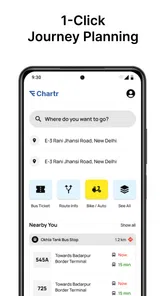
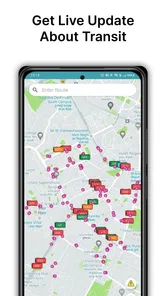
For a straightforward journey, the appeal is having bus and metro information, a trip planner and ticket buying in one place. That can reduce the back-and-forth between a route app and a separate ticket option. The live-bus element is especially relevant when a timetable alone would leave me unsure whether to wait or start walking to another stop. I’d still treat live information as guidance, not a promise: traffic and service changes can affect a journey, so checking the route before setting off is wiser than opening the app only at the stop.
A useful habit is to plan the return trip before leaving, particularly if I’m going somewhere unfamiliar. I can check whether the same line or interchange makes sense in both directions and avoid having to work it out when I’m tired. For a trip with a tight appointment, I’d also leave a buffer rather than choosing a connection that works only if every leg runs perfectly. That is a sensible way to use any live transit planner, and it matters even more when bus timing is part of the route.
Using tickets without rushing
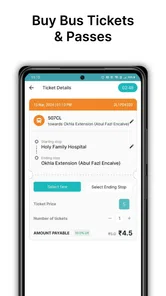
Putting ticket access beside route planning is most valuable when I can sort out the fare before I reach a busy stop or station. I’d check that the ticket I’m about to buy matches the journey I intend to take, then keep the phone easy to reach for the boarding or validation step. This is not just about saving a few taps: it keeps me from trying to make a payment decision while watching for a bus or holding up people behind me.
For visitors, the practical question is whether buying through the app feels clearer than using a separate ticket channel. The advantage is having the travel plan and purchase flow close together; the trade-off is that I still need to read the ticket details carefully. If a route changes after purchase, I would pause and confirm what remains valid before assuming the ticket automatically fits the new plan. Checking first is less stressful than discovering a mismatch mid-journey.
More From Our News Desk

 Weather - By Xiaomi
Weather by Xiaomi Review: Clear at a Glance, Less Clear Up Close
Xiaomi’s weather app makes everyday forecasts quick to scan, but its calm surface can leave useful details and recovery paths harder to find than they should be.

 X
XX Under Pressure: Can It Recover When Posting Goes Wrong?
A resilience-focused review of X, examining setup, mistaken posts, interruptions, weak connections, and the gaps that matter when recovery needs to be dependable.

 Clash of Clans
Clash of Clans Is Won Between the Battles
Its raids are quick; its community is a long-term project of coordination, teaching, rivalry, and shared responsibility—with all the friction that entails.

 Android Auto
Android Auto Makes the Case for Quieter Car Software
The car interface is no longer judged by how much it can do, but by how quietly it helps. Android Auto shows what drivers now expect—and what still gets in the way.

 MobiOffice: Word, Sheets, PDF
MobiOffice: Transforming Mobile Productivity with Seamless Integration
MobiOffice: Word, Sheets, PDF is redefining mobile productivity with a surprising blend of functionality and innovation.

 EA SPORTS FC Soccer Mobile 26
EA SPORTS FC™ Mobile Soccer: Redefining Mobile Sports Gaming
Dive into EA SPORTS FC™ Mobile Soccer, where immersive gameplay and strategic depth transform mobile sports gaming.
Latest News



Where it fits in a busy travel day
Picture a normal Delhi errand: I need to reach an unfamiliar neighbourhood, then travel onward after an appointment. A route planner can help me think through the bus and metro legs before I leave, while ticket purchasing can keep the fare step alongside the journey rather than turning it into a separate chore. If plans change, having the transport options gathered in one app gives me a place to reassess the next leg. I would keep the destination and route details clear before boarding, though; speed is no substitute for checking that the suggested direction matches where I’m actually going.
This setup suits regular public-transport riders, visitors who want help piecing together a Delhi journey, and people who prefer to sort tickets on their phone. It is less compelling if I mostly drive, walk, or need broad navigation across many cities. Compared with a general mapping app, Chartr’s focus is more local and transit-centred; compared with using separate transport and ticket tools, its convenience comes from bringing those tasks together. The trade-off is that a dedicated map may be a better choice when I need detailed walking navigation or a wider range of travel modes.
Getting Started with Chartr
Diving into Chartr - Tickets, Bus & Metro is as easy as pie. Once you download and install it, the app greets you with a sleek, user-friendly interface. The sign-up process is quick and painless—just the way I like it. Within minutes, you’re ready to explore the myriad of features it offers. The app supports most major cities, so whether you’re in New York or Tokyo, you’re covered.
Features That Stand Out
One of the standout features is the real-time tracking. I can’t stress how useful it is to know exactly when your bus or train is arriving. No more guessing games or waiting in the rain. The app provides accurate, up-to-the-minute information that keeps you in the know.
Another cool feature is the digital ticketing system. You can purchase tickets directly through the app, saving you the hassle of fumbling for change or standing in line. Plus, it’s eco-friendly! I love the convenience of just flashing my phone at the turnstile and breezing through.
Making choices when the plan changes
Transit journeys rarely stay perfectly fixed from door to door. If I have time before leaving, I’d compare the proposed bus and metro sequence with the actual purpose of the trip: arriving on time, avoiding unnecessary changes, or keeping the walk manageable. The quickest-looking option may not be the one I prefer if it depends on a tight transfer. When I’m carrying bags or travelling with someone who needs a slower pace, fewer changes can matter more than shaving a little time off the estimate.
A useful way to handle uncertainty is to decide in advance what would make me switch plans. For example, if the bus estimate becomes unreliable, I can reconsider the next leg rather than repeatedly refreshing the same screen and hoping it improves. I would avoid making a rushed change based on one surprising arrival estimate; first I’d check whether the alternative actually reaches the same area and whether the ticket still matches. That simple pause helps keep a small delay from turning into a confusing detour.
Seamless Navigation
The app’s navigation is intuitive. You can easily search for routes, and it provides step-by-step directions to your destination. I found this particularly helpful when I was in a hurry or visiting a new area. The app even offers alternative routes, so you can choose the quickest or most scenic path.
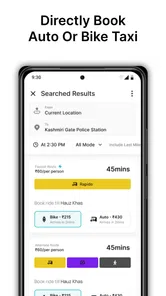
What’s more, the app integrates with other transport options like bike-sharing or ride-hailing services, giving you a comprehensive travel plan at your fingertips. It’s like having a personal travel assistant!
Speed, steadiness and device fit
For day-to-day use, I’d judge its speed less by how quickly a screen opens and more by whether it helps me make the next decision without fuss. Combining trip planning and ticket tasks can save time during a commute, especially when I already know my destination. In a crowded station, I’d prepare the route and ticket before reaching the gate instead of trying to complete every step while people are moving around me.
Any transit app depends on current service information and a working connection for its most time-sensitive guidance. If a bus arrival seems surprising, I’d compare it with what I can see at the stop and allow for a change in conditions. I’d also keep my phone charged before relying on a digital ticket for the whole journey. These small precautions are more useful than assuming an app can remove every delay or travel uncertainty.
Chartr is a free Maps & Navigation app from Chartr Mobility. It is rated for Everyone, has an average rating of 3.6 from around 36,000 ratings, and has been installed over a million times. It first appeared on September 8, 2020, and version 1.15.5.1 requires Android 6.0 or later. That makes it accessible on many older Android devices, though a phone’s age, available storage and general condition can still affect how comfortable any travel app feels to use. I’d keep the app updated when practical, since that is a straightforward way to avoid running an outdated release.
What to check on an older or busy phone
On a phone that already feels sluggish, I’d test the essentials at home or before a trip: open the app, search a familiar route and make sure I can reach the ticket area without rushing. This does not require measuring performance; it simply tells me whether my particular device is comfortable for the tasks I expect to use. If the phone is low on battery or storage, I’d deal with those constraints before depending on it for navigation and payment.
For a longer day, I’d also keep a simple fallback in mind: remember the key interchange or stop, and take note of the destination before leaving a strong connection. A phone app is most useful when it reduces mental work, but a rider should not be stranded if the screen becomes difficult to use. I would not assume every detail is available offline, so I’d check the route while connected and keep enough battery for the journey itself.
Who should choose it—and who may not
If most of my journeys are by Delhi bus or metro, the combination of route planning and ticket access is a strong reason to try it. I’d also recommend it to a visitor who wants one transit-focused place to start rather than piecing together every leg from scratch. Someone travelling with a group can use the route plan as a shared reference, but should still agree on the stop and direction before boarding; a single person’s screen cannot prevent the group from splitting up if everyone assumes a different platform or exit.
I would not make it my only travel tool if I needed extensive offline guidance, turn-by-turn driving directions, or detailed coverage beyond its intended transit context. Nor would I assume every ticket or route will suit every unusual journey: check the planned legs and ticket choice before paying, especially when changing plans or travelling at an unfamiliar time. The benefit is convenience, not a guarantee that every possible trip will be covered perfectly.
How it compares with other ways to get around
A general map remains useful when I need to combine walking, driving and several kinds of local transport in one broad view. A dedicated transit service can be preferable when I want to focus narrowly on a particular network or compare details outside Chartr’s Delhi-centred use. The practical distinction is not that one tool is universally better; it is whether I value having ticket access close to the bus-and-metro plan more than having a wider navigation toolkit.
Using separate apps can also be sensible for riders who already trust a familiar route planner and only occasionally need to buy a ticket. In that case, switching tools may add little. Chartr makes more sense when the repeated routine is public transport: look up the route, check the bus timing, then handle the fare. I’d try it on a familiar journey first, so I could judge whether that combined workflow genuinely saves effort before depending on it in an unfamiliar area.
The Bottom Line
All in all, Chartr - Tickets, Bus & Metro is a must-have for anyone who regularly uses public transportation. It’s reliable, easy to use, and packed with features that make commuting less of a chore. Whether you’re a daily commuter or just visiting a new city, this app is your ticket to stress-free travel. Give it a whirl and see how it transforms your travel experience.
So, next time you find yourself wondering how to get from point A to B, remember that with Chartr, you’re never alone in your journey. Happy travels!
Chartr - Tickets, Bus & Metro Frequently Asked Questions
Is Chartr limited to travel in Delhi?
Chartr’s stated focus is helping people get around Delhi, with bus and metro information, ticket purchases, and a trip planner. If you are considering it for a journey elsewhere, check whether the routes and services you need appear in the app before relying on it. Its Delhi-oriented features are most relevant to residents and visitors travelling around that city.
Who makes Chartr, and what kind of app is it?
Chartr is a Maps & Navigation app developed by Chartr Mobility. Its focus is public transport: the app summary highlights buying tickets and getting around Delhi with live buses, metro, and a trip planner. That makes it worth considering if you want transport information and journey planning together, rather than a general-purpose map alone.
Can I use Chartr to plan a journey before leaving home?
Yes. Chartr is designed to help with getting around Delhi by bringing together a trip planner and public transport information. You can use it to consider a route before you set off, then check live bus and metro information while travelling. An internet connection is useful for current updates, so planning ahead can help you make better use of the app on the go.
What is Chartr and how does it work?
Chartr is a mobile application designed to simplify public transportation for its users. It provides real-time information on bus, metro, and train schedules, allowing you to plan your journey effectively. The app offers features like route planning, ticket purchasing, and live updates on transit status, ensuring a seamless travel experience across various cities.
Is Chartr available for both Android and iOS devices?
Yes, Chartr is available for download on both Android and iOS platforms. You can find it on the Google Play Store for Android devices and the Apple App Store for iOS devices. The app is designed to be user-friendly and works smoothly on a wide range of smartphones and tablets, ensuring accessibility for all users.
Pros
- User-friendly interface for easy navigation
- Real-time updates on bus and metro schedules
- Secure payment options for ticket purchases
- Offline access to saved tickets for convenience
- Multiple language support for global users
Cons
- Limited availability in certain regions
- Occasional app crashes reported by users
- Requires constant internet for real-time updates
- Some users find the interface a bit cluttered
- Limited customer support options available











