ChargePoint
- 7.00K
- 4.3
- Installs
- 1.00M
- Price
- Free

Screenshots
Analysis by Reviewed
My experience with ChargePoint starts before I leave home: I need to know whether there’s a suitable place to charge along the way, not just where a pin appears on a map. This free Maps & Navigation app from ChargePoint, Inc. is built around finding EV charging stations. It has a 4.3 average from around 53,000 ratings, and more than a million installs, but the practical question for me is whether its information helps turn a planned stop into a successful charge.
Start with the trip, not the nearest pin
I get the most out of a charging app when I first think through the drive: where I’m going, how much flexibility I have, and whether a charging stop can fit naturally into the day. A nearby marker is only a starting point. A station that sits close to my destination may be awkward to reach, while one a little farther away could fit better with a meal or an errand.
That distinction matters most when I have a deadline or passengers waiting. I’d rather compare a small set of plausible stops than pick the closest result and hope it works. ChargePoint is useful at this early stage because it puts station discovery at the center of the experience, but the final choice still depends on the trip I’m actually making.
Getting Started with ChargePoint
From the get-go, downloading and setting up ChargePoint was a breeze. Available on both Android and iOS, this app is designed to help you find charging stations with ease. Once you’ve installed it, you just need to create an account, and you’re good to go. The interface is user-friendly, and I was up and running in no time.
Before setting off, I’d use the map to shortlist a station near my destination or along a route, then check the station details and recent user notes rather than choosing solely by distance. That small bit of preparation matters: the closest marker may not be the most convenient stop if reaching it means leaving the route or arriving when its status has changed. I’d also keep a backup nearby for a longer journey, so one unavailable charger doesn’t dictate the rest of the day.
Features that Stand Out
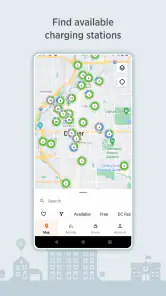
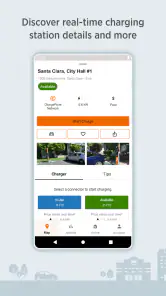
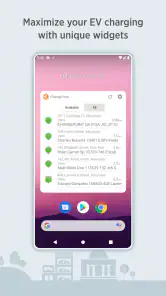
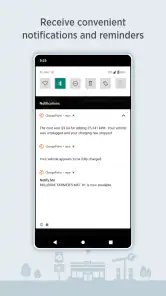
One of the most impressive features is the real-time availability updates of charging stations. There’s nothing more frustrating than arriving at a station only to find it occupied. With ChargePoint, you can see which stations are available, saving you both time and effort. Plus, the app offers a handy map view, showing all nearby stations, which makes planning your route a piece of cake.
I’d treat availability as a useful signal, not a guarantee. A status can change between checking the map and pulling into a site, so for time-sensitive trips I’d avoid planning around a single option. User comments can add context that a status indicator alone cannot: look for practical clues about access or the experience at that location, and weigh how recent the note seems before relying on it. This is especially helpful when choosing between a convenient stop and a slightly less direct backup.
More From Our News Desk

Clash of Clans Is Won Between the Battles

Android Auto Makes the Case for Quieter Car Software

MobiOffice: Transforming Mobile Productivity with Seamless Integration

EA SPORTS FC™ Mobile Soccer: Redefining Mobile Sports Gaming

How Microsoft OneDrive Became a Mobile Productivity Giant

How Google Translate Breaks Language Barriers Effortlessly
One practical habit is to check the station again shortly before committing to the detour, rather than relying on the first look at home. That gives me a chance to reconsider if the situation has shifted. I also try to separate “a charger appears nearby” from “this is a good stop for my plan”: access, timing, and how much extra driving I’m willing to do are part of the decision, not details to sort out after I arrive.
Another useful trade-off is how much confidence to place in community notes. A comment can be more informative than a simple status when it describes the on-the-ground experience, but it reflects someone else’s visit and may not match mine. I’d use notes to form better questions—such as whether the entrance is easy to find—rather than treating an old observation as a current guarantee. This is a small workflow improvement, but it helps keep the map useful without making it the sole authority.
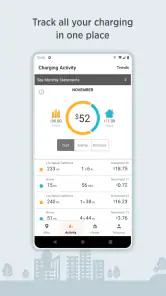
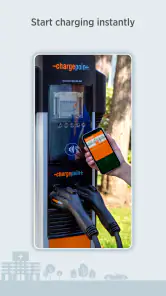
Another standout feature is the ability to start charging sessions directly from the app. You can simply tap your phone on the station to initiate charging, which feels pretty futuristic, if you ask me. The app also keeps track of your charging history, so you can easily monitor your energy usage and costs over time.
That app-to-station handoff is convenient when it works smoothly, but I wouldn’t assume the phone replaces every step at the charger. I’d open the app before reaching the station, check that I’m at the intended unit, and follow the on-screen instructions there. If a session doesn’t begin as expected, pausing to confirm the station and trying the available start method is more sensible than repeatedly tapping without checking. The history is useful afterward for reviewing your own charging activity, though it is not a substitute for checking the cost and conditions shown for a particular session.
From finding a station to finishing the session
For someone new to public charging, the app’s role is easiest to understand as a sequence: identify a candidate, check whether it suits the trip, arrive and match the app to the station, then review the session afterward. Each step hands off to something outside the map itself. The map helps with selection; the station and its instructions matter at the charger; the history helps me look back once I’m done.
That handoff is why I’d avoid waiting until I’m standing beside the unit to work out what to do. Before pulling in, I’d make sure I know which location I chose and have the app ready. At the site, I’d match the station details carefully before starting a session. If anything feels inconsistent, I’d stop and verify rather than assume the first nearby result is the right one.
A common question is whether the app is useful only for starting a charge. I find its value begins earlier, with choosing and comparing locations, and continues afterward through the session history. For a driver who already knows exactly where they charge every day, the discovery side may matter less; for someone who changes destinations or depends on public stations, the map and station-specific context become more valuable.
Community and Support
What I find particularly appealing is the community aspect of ChargePoint. Users can leave reviews and tips about specific stations, which can be incredibly helpful. It’s like having a network of fellow EV drivers sharing their insights. Additionally, if you ever run into a snag, their customer support is just a tap away, ready to assist with any issues.
For a weekday errand, I might check a station near the shop before leaving, charge while I’m already parked, and then use the history later to make sense of the session. On a longer drive, I’d use the map and availability information to compare possible stops, while leaving enough flexibility to change plans. That is where this app feels most useful: it brings station discovery, local observations, and session management into one workflow instead of making me jump between a map and separate notes.
The errand example also shows why I wouldn’t judge a station only by whether it is close to the shop. If charging can happen while I’m doing something I already planned, the stop has a different value than a special detour made solely to find a plug. I’d compare the station’s location with the time and purpose of the outing, then decide whether it genuinely simplifies the day.
For a longer trip, I’d use a different standard: resilience. I’d choose a primary stop, identify another plausible option, and keep enough room in the plan to change course. That may sound cautious, but it’s a better use of station information than assuming that a map view can remove every uncertainty. ChargePoint helps me make the decision; it cannot make the conditions at the destination stand still.
How it fits beside other navigation options
Compared with a general-purpose map, ChargePoint is more focused on EV charging and the details drivers want to consider at a station. A familiar navigation app may be better for turn-by-turn directions or combining every kind of stop into one route; I’d use that alongside this app when the trip itself needs broader planning. ChargePoint makes more sense when finding and evaluating charging locations is the main task, especially if I can benefit from station-specific community notes.
I wouldn’t expect a dedicated charging finder to replace the navigation tool I already use for the whole journey. I’d use ChargePoint to investigate charging choices, then hand the selected destination over to my usual navigation app if I want broader route guidance. That two-app approach is a little less seamless than doing everything in one place, but it plays to each tool’s strength rather than asking a station map to manage every part of a trip.
Someone who mostly charges at home and takes familiar local routes may prefer the convenience of their usual map when a public stop is only an occasional need. A driver who regularly travels beyond familiar areas, or who wants station-specific observations before committing to a stop, has a clearer reason to keep ChargePoint in the routine. The deciding factor is not how often someone drives, but how often finding a public charging location is an important part of the plan.
Who should rely on it—and who should keep looking
I’d recommend it most readily to EV drivers who need to find public charging locations and want more than a generic point on a map. It can be particularly helpful when I’m visiting an unfamiliar area, fitting a charging stop around an errand, or comparing alternatives before a longer drive. Its free price makes it easy to try as a companion to an existing navigation app, rather than requiring me to replace a tool that already works for the rest of my route.
I’d be more cautious about relying on it as the entire plan for a tight journey. If a missed stop would cause a serious delay, I’d check more than one candidate and leave room to adapt. I’d also skip it if I rarely use public chargers and have no need to search for them; a dedicated station-finding app may add little to a routine that almost never involves charging away from home.
The app is rated for Everyone, but that broad age label doesn’t change who gets the most practical benefit: people making decisions about EV charging. ChargePoint, Inc. has developed it as a Maps & Navigation app, and its long presence in the category gives it a substantial audience. I still think individual station context matters more than assuming that a large user base means every location will suit every driver.
Where the workflow can break
The main friction is the gap between planning information and what I encounter at the site. An availability update is only helpful if it remains relevant by the time I arrive, and a station that looks convenient on the map may not fit my route or timing. I’d keep the app’s information in perspective and make decisions with a fallback in mind, especially when my schedule has little slack.
The session-start step is another place where a smooth plan can become less smooth. The app can bring me to the station and help with starting a session, but I still need to make sure I’m interacting with the intended unit and following what the station asks me to do. If the first attempt doesn’t work, checking the station and the instructions is a better next move than assuming the history or map will resolve the issue for me.
Cost tracking also needs a careful reading. Reviewing charging history can help me understand my own activity over time, but I wouldn’t treat that record as a replacement for checking the conditions attached to the specific session. If I’m comparing what a stop will cost or deciding whether it suits my plans, I’d look at the information relevant to that session rather than infer a universal price from past activity.
Another question I’d ask before a longer drive is how much backup planning is sensible. My answer is proportional to the consequences of a delay: a casual local outing can tolerate a quick alternative, while a demanding schedule deserves more than one candidate stop. The app’s map and notes help me prepare, but I’d still choose a backup that makes sense geographically instead of collecting distant options just to feel covered.
The Verdict
In conclusion, ChargePoint offers a comprehensive solution for EV charging needs. Its intuitive design, real-time updates, and community features make it a must-have for any electric vehicle owner. Whether you’re a seasoned EV driver or just starting out, this app provides all the tools you need to keep your vehicle charged and ready to go. So, if you haven’t already, give ChargePoint a try and see how it can simplify your charging experience.
I’d describe it as a practical companion rather than a guarantee of a trouble-free stop. Its strongest value is helping me make a more informed choice before I arrive, then giving me a way to start and review a session. A little backup planning still matters, but that is a reasonable trade-off for an app centered on finding chargers. With around 7,000 written reviews and a history stretching back to its release in June 2011, it has a substantial user base; I’d still judge each station on its current details and context rather than assuming every location will suit every trip.
My overall recommendation is to treat it as a focused tool in a broader driving routine: use it to research charging choices, use station details and recent observations to refine the decision, and bring in another navigation option when the entire route needs attention. That approach suits the app’s strengths without asking it to promise certainty. If public charging is a regular part of your life, ChargePoint is worth trying; if it is rare, your everyday map may already cover what you need.
ChargePoint Frequently Asked Questions
Can I use ChargePoint without owning an electric vehicle?
ChargePoint is primarily useful to people who drive an electric vehicle and need to find charging stations. Its map and station information can also help someone who is comparing charging options or planning a trip with an EV driver. If you do not expect to search for EV chargers or use charging-related features, the app may have limited value for your everyday navigation.
Is ChargePoint available on Android and iOS?
ChargePoint is a mobile app for finding EV charging stations. Before downloading, check the app store on your device for its current compatibility and installation options. The app is free to download, and it is intended for a broad audience, with an Everyone content rating. Its main appeal is to EV drivers who want to search for charging locations and use the app while charging.
Can I use ChargePoint to plan a route around EV charging stops?
ChargePoint is an app in the Maps & Navigation category, with the store summary “Find EV charging stations.” Its map can help you look for stations near a destination or along the way, so you can consider charging options while planning a drive. Before setting off, review the station details and availability in the app, since a map result is only useful if the charger suits your vehicle and trip.
Do I need an account to use ChargePoint, and what should I set up first?
To use ChargePoint as described, download the app, create an account, and link a payment method. Once that setup is complete, you can search for stations, start charging sessions, and monitor progress in the app. It is worth completing these steps before you need a charger, so you have time to familiarize yourself with the map and station information rather than working through setup during a stop.
What is ChargePoint and how does it work?
ChargePoint is a comprehensive electric vehicle (EV) charging network that provides drivers with access to a vast number of charging stations across different locations. To use ChargePoint, you need to download their app, create an account, and link your payment method. Once set up, you can locate nearby charging stations, start charging sessions, and monitor charging progress directly from the app.
Pros
- Wide availability of charging stations
- Real-time station status updates
- User-friendly interface
- Multiple payment options
- Compatible with various EV models
Cons
- High charging fees at some stations
- Occasional app connectivity issues
- Limited customer support hours
- Infrequent software updates
- Inconsistent station maintenance
- Category
- Maps & Navigation
- Version
- Varies with device











