

Chargehub EV & Tesla Charging
- 619.00
- 4.7
- Installs
- 100.00K
- Price
- Free

Screenshots


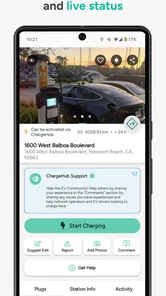
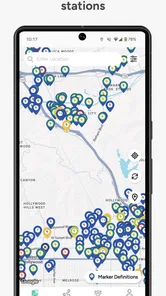
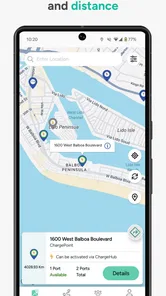

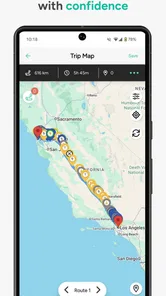
Analysis by Reviewed
Finding a public charger is easy when one is nearby, but planning an entire electric-car trip is a different problem. I tested Chargehub EV & Tesla Charging as a navigation companion for that exact situation: checking where charging stations are, comparing possible stops, and thinking ahead before the battery becomes a concern. It is a free Maps & Navigation app from Mogile Technologies, built around coverage for electric vehicles and plug-in hybrids, including Tesla models.
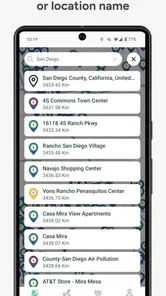
My first impression is that this is more useful as a planning tool than as something you open only after the battery warning appears. The map gives EV drivers a dedicated place to search instead of forcing them to sort through ordinary map results. That focus matters when a trip depends on the right kind of station, a sensible stop, and enough confidence that the destination will work for your car.
How Chargehub EV & Tesla Charging fits into everyday driving
The app’s main job is straightforward: help me locate charging stations for different EV and PHEV models. That broad compatibility is its strongest starting point. A driver with a Tesla can use it, but so can someone with another electric vehicle or a plug-in hybrid. I do not have to treat the app as a Tesla-only utility, which makes it more practical for households with different cars or for anyone who occasionally drives a borrowed EV.
In daily use, I would open it before leaving home, search around the destination, and then look along the route for alternatives. That order is important. The closest station is not always the best station; a location near a shopping area, workplace, or planned break can be much more convenient than one that requires a separate detour. The app is most valuable when it helps me think in terms of the whole journey rather than a single pin.
Its age also gives the product some context. Chargehub EV & Tesla Charging was released on June 29, 2012, so it is not a newly assembled utility chasing the latest EV trend. The developer, Mogile Technologies, has kept the app positioned around a problem that remains central to electric-car ownership: knowing where charging is available before I need it.
The audience response is encouraging. The app holds a 4.7 average from around eight thousand ratings, with more than six hundred written reviews, and it has passed one hundred thousand installs. Those figures do not guarantee that every station detail will suit every trip, but they do suggest that the app has found a real audience among drivers who want a charging-focused map.
What the free access gives me
The app is free to download and use as an entry point, which makes it easy to test without committing money first. That is especially helpful for a new EV owner who is still deciding which tools belong in a regular driving routine. I can see whether the map fits my local area and whether its way of presenting charging options makes sense to me before considering any paid purchase.
More From Our News Desk

 Weather - By Xiaomi
Weather by Xiaomi Review: Clear at a Glance, Less Clear Up Close
Xiaomi’s weather app makes everyday forecasts quick to scan, but its calm surface can leave useful details and recovery paths harder to find than they should be.

 X
XX Under Pressure: Can It Recover When Posting Goes Wrong?
A resilience-focused review of X, examining setup, mistaken posts, interruptions, weak connections, and the gaps that matter when recovery needs to be dependable.

 Clash of Clans
Clash of Clans Is Won Between the Battles
Its raids are quick; its community is a long-term project of coordination, teaching, rivalry, and shared responsibility—with all the friction that entails.

 Android Auto
Android Auto Makes the Case for Quieter Car Software
The car interface is no longer judged by how much it can do, but by how quietly it helps. Android Auto shows what drivers now expect—and what still gets in the way.

 MobiOffice: Word, Sheets, PDF
MobiOffice: Transforming Mobile Productivity with Seamless Integration
MobiOffice: Word, Sheets, PDF is redefining mobile productivity with a surprising blend of functionality and innovation.

 EA SPORTS FC Soccer Mobile 26
EA SPORTS FC™ Mobile Soccer: Redefining Mobile Sports Gaming
Dive into EA SPORTS FC™ Mobile Soccer, where immersive gameplay and strategic depth transform mobile sports gaming.
Latest News



There are in-app purchases priced from $3.29 to $29.99 per item. I would treat those as optional value rather than part of the basic reason to install the app. The important distinction is simple: free access lets me evaluate the core experience, while paid items are only worthwhile if they solve a specific planning problem for my driving habits. I would not pay automatically just because I own an electric car.
That pricing range makes the app easier to approach than a subscription-first product, but it also means I would inspect each purchase carefully before confirming it. A low-cost option may be reasonable for occasional use, while a higher-priced item needs to save me meaningful time or reduce enough travel uncertainty to justify the expense. The right decision depends on how frequently I plan longer EV trips, not on the app’s rating alone.
Where the app delivers practical value
The biggest benefit is concentration. Instead of using a general map and trying to identify which results are actually charging stations, I can begin with a map designed around charging. That reduces the mental work involved in preparing a route. For an EV driver, the question is not simply “where can I go?” but “where can I stop, charge, and continue without creating a stressful gap?” Chargehub EV & Tesla Charging speaks directly to that question.
A realistic example is a weekend drive to a town I have not visited before. Before leaving, I would search near the destination and also check likely stops on the way. If the final destination has limited options, I can choose a backup area rather than discovering the problem after arriving. That small habit is one of the app’s most useful roles: it turns charging from an emergency decision into part of the itinerary.
It is also helpful for PHEV owners, who can be overlooked by tools that present themselves mainly around fully electric vehicles. A plug-in hybrid driver may not need the same charging strategy as a long-range EV driver, yet finding a station can still be useful for regular commuting, workplace charging, or a trip where reducing fuel use matters. The broad vehicle focus keeps the app relevant to more than one type of electrified car.
Another non-obvious strength is its usefulness as a comparison layer. I would not rely on one map automatically deciding my route. Instead, I would use this app to identify charging possibilities, then compare the result with the navigation app I normally use for traffic and road conditions. That two-step workflow is more reliable than expecting one tool to do everything. Chargehub handles the charging question; a general navigation app may remain better for the wider journey.
Small planning habits that make it more useful
I would search in three places before a long drive: the starting area, the destination, and one or two possible fallback zones. This is better than checking only the midpoint of a route. A station can be convenient geographically but awkward in relation to the rest of the journey, so looking at several areas helps me keep options open.
I would also avoid treating a map marker as a promise that the stop will fit my exact needs. My car model, connector requirements, route timing, and personal tolerance for waiting all matter. The app’s value is in helping me locate and compare charging possibilities, not in removing the need for judgment. That distinction is easy to miss when a map looks comprehensive.
For local driving, I would use it differently. Rather than opening it for every short trip, I would identify dependable charging areas near home, work, or regular errands and remember which locations fit naturally into my routine. This makes the app less of a daily burden and more of a reference tool. It is particularly useful during the first weeks of EV ownership, when I am still learning which parts of my area are convenient.
For a shared vehicle, I would check the app before handing the car to another driver. A quick look at charging options near the destination can prevent the common problem of someone arriving in an unfamiliar area with no clear plan. That is a practical use case that goes beyond simply finding the nearest station.
Where the experience needs caution
A charging map cannot guarantee a smooth stop every time. A listed location may be busy, unsuitable for my connector, inconvenient to access, or less practical than it appears on a screen. For that reason, I would not begin a remote trip with only one charging option in mind. The app helps me prepare, but it does not replace a backup plan.
This is also why I would be careful about using it as my only navigation app. Its identity is centered on EV charging stations, while a general navigation service is usually the better place for live road guidance, traffic decisions, and the broader sequence of turns. Chargehub EV & Tesla Charging complements those tools rather than completely replacing them in my driving setup.
There is a second trade-off in the broad vehicle coverage. Supporting all EV and PHEV models, including Tesla, makes the app approachable, but different cars have different charging needs. I still have to interpret the results from the perspective of my own vehicle. A station that looks suitable in a general search may not be the right choice for my particular charging routine.
The purchase structure is another point to consider. Since the app is free but also offers paid items, I would first use the no-cost experience in my normal area and on a planned trip. Only after understanding what I actually need would I consider spending money. That approach protects the app’s value: I am paying for a clear improvement in my workflow, not for features I may never use.
Who should install it
I think Chargehub EV & Tesla Charging is a strong candidate for new EV owners, drivers who travel beyond familiar neighborhoods, and people who regularly need to coordinate charging with errands or stops. It is also a sensible second tool for anyone whose regular navigation app does not make charging research convenient. The free starting point removes much of the risk, so trying it is reasonable even if I am not yet sure it will become my main option.
It can be especially valuable for drivers who share routes with another EV owner. One person may drive a Tesla while another uses a different electric model, and a vehicle-inclusive charging map is more convenient than maintaining separate planning habits. PHEV drivers can benefit too, particularly when they want to make electric charging part of a repeatable routine rather than an occasional experiment.
I would be less enthusiastic for someone who drives only short, predictable trips and already knows every useful charger nearby. That person may open the app rarely enough that it adds little to an established routine. I would also hesitate to recommend relying on it alone for complex travel where live traffic, turn-by-turn directions, and continuously changing road conditions matter more than station discovery.
Drivers who dislike checking details before leaving may also find the app less helpful than expected. The map can make planning easier, but it still rewards a few minutes of preparation. If I want a tool that makes every charging decision automatically, this is not the right expectation. Its strength is giving me information to make a better decision, not making the entire decision for me.
My verdict on paying or skipping
My recommendation is to start with the free version. That is where the app proves its basic value: a dedicated charging map for EV and PHEV drivers, with Tesla included, from a developer that has been working in this space since 2012. I would use it locally, test it before a longer trip, and compare its results with my usual navigation app.
I would consider an in-app purchase only when it clearly improves a repeated task. Someone who plans frequent road trips may find a paid item worthwhile if it makes preparation more efficient. Someone who charges at home and rarely travels outside a familiar area should probably keep the free experience and skip spending. The available purchase range, from $3.29 to $29.99 per item, makes that personal evaluation important.
Overall, Chargehub EV & Tesla Charging earns its place as a focused charging companion rather than a universal replacement for every navigation tool. I like it most when I use it before a journey, check the destination and fallback areas, and keep my car’s specific needs in mind. Its free entry point, broad EV coverage, and strong user response make it easy to try. My final advice is simple: install it if charging discovery is part of your driving decisions, but keep a second navigation option and a backup plan for trips where an unexpected station problem would matter.
Chargehub EV & Tesla Charging Frequently Asked Questions
Does Chargehub EV & Tesla Charging work with my electric vehicle?
Chargehub is intended for drivers of electric vehicles and plug-in hybrid vehicles, with station information that can help you identify chargers suited to your car. Check the connector and charging details shown for each location before setting out, since compatibility depends on your vehicle and the equipment at the station. The app’s store summary describes coverage for all EV and PHEV models, including Tesla.
Do I need an account to browse charging stations in Chargehub?
The app is built around finding EV charging locations and reviewing station information, so browsing the map is its central purpose. Whether particular features require an account can depend on the current app version and the action you want to take. Before relying on a feature for a trip, check the in-app prompts and make sure you can access the station details you need.
What is Chargehub EV & Tesla Charging used for?
Chargehub EV & Tesla Charging is designed to help electric vehicle drivers find charging stations, plan trips, and check charger availability. The app provides information about public charging locations, connector types, charging speeds, pricing details when available, and user-submitted updates. It can be useful for everyday charging as well as longer journeys where reliable route planning is important.
Can I use Chargehub to find Tesla Superchargers and other EV stations?
Yes. The app is intended to cover Tesla charging locations alongside stations from other charging networks. You can search for nearby chargers, view station details, and filter results according to vehicle or connector requirements. However, compatibility may depend on your car model, adapter, regional standards, and whether a particular Tesla location is open to non-Tesla vehicles.
Does Chargehub show whether a charging station is available or in use?
Chargehub may display station status, including information such as available, occupied, offline, or unknown, depending on the charging network and the data supplied to the app. This information can change quickly, so it should not be treated as a guarantee. Before driving to a charger, it is sensible to confirm the latest status and check recent user comments.
Pros
- Covers Tesla Superchargers and many third-party EV networks in one app.
- Real-time station status helps identify available or occupied chargers.
- Trip-planning tools can suggest charging stops along your route.
- User reviews and photos provide useful details about individual locations.
- Includes pricing and connector information for easier charging decisions.
Cons
- Coverage and availability data can vary by network or user updates.
- Some stations may show outdated prices or incomplete connector details.
- Trip planning may require careful checking before starting a long journey.
- Charging costs and access rules differ widely between locations.
- The app may feel cluttered when viewing dense areas with many stations.











