CashCow - Play & Earn Money
- 3.07K
- 4.1
- Installs
- 500.00K
- Price
- Free

Screenshots

Analysis by Reviewed
I approached CashCow - Play & Earn Money as a lifestyle app rather than as a conventional game. Its central idea is simple: everyday spare time, including time spent commuting, can become an opportunity to earn something. That makes it more interesting than an app that only asks me to sit down and play, but it also means I judge it by different standards. I want the screens to be easy to understand, the actions to feel manageable, and the experience to remain practical when I am tired, distracted, travelling, or using a smaller phone.
The app is free, comes from CashCow Play & Earn, and is aimed at mature users aged seventeen and over. It has reached more than 500 thousand installs, with an average rating of 4.1 from roughly 14 thousand ratings and about 3 thousand written reviews. Those figures suggest that the concept has attracted a meaningful audience, although they do not remove the need to look closely at how comfortably different people can use it.
How clear the app feels when I first open it
My first impression is that CashCow has to explain two ideas at once: this is a way to earn through app activity, and it is also designed around moments when I might already be using my phone. That combination can be appealing, but it creates a readability challenge. A user should not have to guess whether a screen is showing a task, a reward status, a route-related opportunity, or a cash-out step.
I found the most useful way to approach it was to slow down during the first session instead of tapping through every prompt. In an earning app, the important information is rarely decorative. Labels, progress indicators, eligibility notes, and withdrawal instructions affect whether an action is worth my time. I recommend reading each screen completely before committing to a task, especially if you are using the app while moving between places.
The developer is CashCow Play & Earn, and the current version is 1.58.2. That version detail matters because small changes in layout can affect how quickly regular users find familiar actions. If a button or reward area appears different after an update, I would treat the first session as a quick orientation rather than assuming everything works exactly as before.
For people with reading difficulties, the app is easier to approach when used in short, deliberate sessions. I would avoid trying to understand new earning options while walking through a station or handling luggage. A quiet moment makes it easier to distinguish useful information from promotional language and to notice the conditions attached to a reward.
One practical habit helped me: I mentally separate “what do I need to do?” from “what will I receive?” Those are not always the same question. The first tells me whether a task fits my routine; the second tells me whether the effort is worthwhile. Keeping that distinction clear prevents the common mistake of treating every visible opportunity as equally valuable.
More From Our News Desk

Weather by Xiaomi Review: Clear at a Glance, Less Clear Up Close

X Under Pressure: Can It Recover When Posting Goes Wrong?

Clash of Clans Is Won Between the Battles

Android Auto Makes the Case for Quieter Car Software

MobiOffice: Transforming Mobile Productivity with Seamless Integration

EA SPORTS FC™ Mobile Soccer: Redefining Mobile Sports Gaming
Navigation that works better with a personal routine
CashCow makes the most sense when I give it a repeatable place in my day. For example, I might check it after arriving at work rather than every few minutes during the journey. This reduces unnecessary screen switching and makes the app less demanding for people who find repeated navigation tiring.
That workflow is also helpful for users who need more time to read. Instead of racing through a notification or trying to act before an opportunity changes, I can open the app when I have both hands free and enough attention to review the details. The trade-off is that a user who expects completely passive earning may find this approach less exciting; the app still requires active attention at some point.
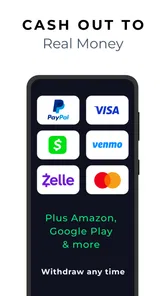
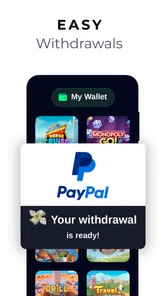
I would also keep the cash-out area in mind from the beginning. The promise of earning is only useful if I understand how progress eventually becomes something I can use. Before investing regular time, I would inspect the available steps, identify any information the process asks me to review, and decide whether that level of involvement suits me. This is especially important for users who prefer simple, predictable apps with no learning curve.
The app’s store summary presents commuting as one of its use cases. I see that as a strength for people who already spend time travelling, but not as a reason to interact with the phone constantly. The safest and most accessible routine is to prepare before leaving, use the app only when it is safe to do so, and complete any detailed reading after reaching a destination.
Motor, visual, and sensory considerations in everyday use
CashCow can fit users with different physical abilities when the interaction is kept brief and intentional. A person with limited dexterity may prefer opening the app once and completing several clear actions rather than repeatedly tapping small controls throughout the day. I would use a stable surface, keep the phone at a comfortable angle, and avoid trying to operate it while carrying bags or holding a rail.
For users with tremors or reduced precision, the main concern is not only whether a control can be tapped, but whether an accidental tap has consequences. Earning apps often involve choices that should be reviewed before confirmation. I recommend pausing on important screens and checking the selected action before continuing. If the phone’s own touch, display, or magnification settings help, I would use them alongside CashCow rather than expecting the app itself to solve every access need.
People with low vision may benefit from increasing system text size or display contrast, provided the resulting layout remains readable. Larger text can make a screen easier to scan, but it can also cause labels to wrap or require more scrolling. That is a worthwhile trade-off when accuracy matters. I would rather take an extra moment to read a reward condition than move quickly through a crowded screen.
For users who are sensitive to motion, bright visuals, or frequent alerts, a calmer routine is preferable. I would review the phone’s notification controls and reduce interruptions that are not essential to my day. This does not change what CashCow offers, but it can make the overall experience less intrusive. An app intended for spare moments should not make every spare moment feel like a prompt to act.
Users who rely on screen readers should test the main path carefully during their first session. I would pay particular attention to whether headings, buttons, progress information, and cash-out instructions are announced in a logical order. I cannot treat a familiar visual layout as proof that every control is equally understandable through assistive technology. If a critical action is unclear when read aloud, that is a serious practical barrier, and I would not build my routine around the app until the path feels dependable.
People with hearing loss can generally approach the app without assuming that sound is required for every important step, but I would still check how alerts and status changes are communicated. Visual confirmation is valuable when a phone is muted, used in a noisy environment, or kept in a pocket. If I am commuting, I prefer to review information on screen at a safe stop instead of relying on an audio cue I might miss.
A realistic commuting scenario
Imagine I have a regular bus journey and want to use that time productively. Before leaving home, I would open CashCow, review what is available, and decide whether anything fits the journey without requiring constant attention. On the bus, I would only interact when seated and when it is safe. If the vehicle is crowded, the phone is difficult to hold, or I feel motion sickness, I would wait until I arrive.
Once at work, I could check whether the activity was recorded and review my progress. This two-stage approach is better than trying to read small text while standing on a platform. It also supports users with limited balance, slower hand movements, or sensory overload because the task is divided into preparation and confirmation rather than compressed into a stressful moment.
The limitation is clear: commuting does not automatically become effortless income. The value depends on whether the required interaction fits the journey and whether the eventual reward feels worthwhile to the individual user. Someone with a long, predictable commute may find the concept convenient. Someone who drives, travels unpredictably, or cannot safely use a phone in transit may gain much less from it.
Where the experience may still create barriers
The mature age rating is an important part of deciding whether this app belongs on a family device. I would not present it as a children’s earning tool, and parents should not assume that a free download is automatically suitable for younger users. The age guidance should be treated as a real boundary, particularly when the app involves earning-related decisions and cash-out activity.
Another barrier is attention. CashCow is not ideal for someone who wants a completely passive background service. Even when the concept connects with commuting or spare time, I still need to understand what I am doing and monitor progress. Users with memory difficulties may find it helpful to keep a simple personal note about when they last checked the app and what stage they reached, without recording sensitive information unnecessarily.
Financial expectations can create a different kind of accessibility problem. People under financial pressure may be tempted to treat any earning app as a dependable income source. I would not do that. I see CashCow as a way to explore rewards during spare time, not as a replacement for employment or a guaranteed solution to money problems. If a task requires more concentration than its value justifies, skipping it is a sensible decision rather than a failure.
Compared with ordinary lifestyle apps, CashCow offers a more direct incentive to return. A calendar, travel planner, or habit tracker usually gives me organization or information without asking me to think about withdrawal. CashCow is more motivating for users who enjoy measurable progress, but it also demands more judgment. I have to consider privacy, attention, safety, and whether the reward structure suits my habits.
Compared with traditional mobile games, it may appeal to people who do not want a fictional world, long sessions, or complex controls. The downside is that users looking for deep entertainment may find the experience less satisfying. A game can justify time through challenge and story; an earning app has to justify time through practical value. Those are different expectations, and choosing between them depends on what I want from my phone.
I would also skip CashCow if I dislike reading conditions before acting, if I need guaranteed accessibility with no personal testing, or if I am likely to use it while walking, driving, or navigating a busy public place. The commuting angle is useful only when safety comes first. No reward is worth divided attention near traffic, stairs, platforms, or unfamiliar surroundings.
For people concerned about sensory load, I would start with one short session rather than leaving every possible alert active. For people with limited motor control, I would test the most important action first and confirm that it can be completed comfortably. For people with cognitive fatigue, I would use a fixed check-in time and stop when the information becomes difficult to process. These small choices make the app more manageable without pretending that one setup works for everyone.
Questions I would settle before making it a habit
The first question is whether the app costs anything to install. CashCow is free, which makes trying it less risky than paying upfront. Free does not mean effortless, though, so I would still protect my time and avoid assuming that every visible opportunity deserves attention.
The second question is whether an older phone can run it. The minimum operating system is Android 7.0, so users should check their device software before planning around the app. If the phone is older, I would also consider practical issues such as battery condition, screen readability, and whether the device remains comfortable to use during travel.
The third question is whether I need to be constantly connected to the app. The commuting focus may suggest frequent interaction, but I would not keep the screen open throughout a journey. I would prepare when stationary, use the app only when safe, and confirm progress later. That approach is better for battery, attention, and personal safety than treating the phone as something that must be watched continuously.
The fourth question is who will enjoy it. I think it suits adults who like small, structured opportunities and are willing to check details before acting. It is less suitable for anyone seeking guaranteed income, a fully passive tool, or a conventional game with rich long-form entertainment. That distinction is more useful than simply asking whether the app is popular.
The fifth question is what to do if a screen feels difficult to use. I would first adjust the phone’s text size, contrast, magnification, notification behavior, and touch settings. Then I would retry the key workflow in a quiet place. If the problem remains, I would treat it as a genuine limitation rather than forcing myself through an uncomfortable process. An accessible routine should reduce strain, not turn every reward check into a test of endurance.
My inclusive verdict after using it as a lifestyle tool
CashCow - Play & Earn Money has a clear appeal: it connects earning-related activity with moments that many people already have available, especially commuting and other spare periods. I like that it can be approached in short sessions instead of demanding the commitment of a full game. Its free price and broad device compatibility make experimentation straightforward for many Android users.
Its accessibility is more about personal setup and responsible timing than a universal, effortless design. Larger text, careful notification choices, a stable grip, screen-reader testing, and a fixed routine can make a substantial difference. At the same time, users should not assume that these adjustments remove every barrier. Reading demands, touch precision, attention, and the need to judge whether an opportunity is worth the effort remain part of the experience.
The app’s 4.1 average and audience of over 500 thousand installs show that the idea has found traction, but my recommendation is still conditional. I would suggest trying it to an adult friend who wants to explore reward-based phone activity during genuinely spare time and who is comfortable checking details carefully. I would not recommend it as a primary income plan, as a children’s app, or as something to operate while moving through unsafe surroundings.
My best advice is to begin with a quiet test session, learn the main navigation, review the cash-out path, and decide on a personal time limit. If the text, controls, and pace fit your abilities, CashCow can be a practical addition to a routine. If it makes you rush, strains your eyes or hands, or encourages unsafe phone use, a simpler lifestyle app—or no app at all—will be the better choice.
CashCow - Play & Earn Money Frequently Asked Questions
Does CashCow require an account, and what should I prepare before signing up?
CashCow is built around completing activities and collecting rewards, so expect to follow the app’s account and offer instructions before you begin. Keep the information you use consistent when opening offers, since mismatched details can interfere with tracking or eligibility. Before signing up, review the app’s privacy policy and consider whether you are comfortable sharing the information needed to use rewards features.
Can I use CashCow while commuting or during short breaks?
CashCow’s summary highlights getting paid while commuting, and its rewards activities may suit spare moments when you have time to use the app. In practice, each offer can have its own instructions and completion requirements, so a quick session may not be enough for every task. Check the details before starting, especially if an activity requires continued use or a specific milestone.
Is CashCow free, and which devices can run it?
CashCow is a free Lifestyle app from CashCow Play & Earn. It is listed for devices running Android 7.0 or later, so check your device’s operating system before downloading. The app is intended for a mature audience, with a 17+ content rating. As with any rewards app, consider whether its offers and permissions suit you before creating an account.
What is CashCow - Play & Earn Money, and how does it work?
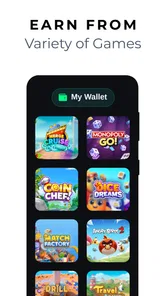
CashCow - Play & Earn Money is a rewards app that lets users collect points or virtual currency by completing activities such as playing selected games, trying sponsored apps, answering surveys, or reaching specific milestones. After building up enough rewards, users may be able to exchange them for available payout options. The exact tasks, reward values, and redemption conditions can vary by country and may change over time.
Can I really make money with CashCow, and how much can I earn?
CashCow can provide small rewards for completing eligible activities, but it should not be considered a reliable source of income or a replacement for employment. Earnings depend on the number of offers available, your location, the time required for each task, and whether you meet all tracking requirements. In practice, most users should view the app as a casual rewards platform rather than a way to make substantial money.
Pros
- Simple games make it easy to start earning rewards.
- Short play sessions suit users with limited free time.
- The app offers multiple ways to collect points.
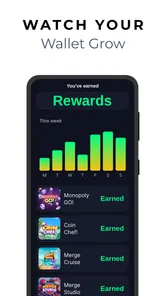
- Progress tracking helps users monitor their reward balance.
- No advanced gaming skills are needed to participate.
Cons
- Rewards may require substantial time before reaching the payout threshold.
- Earning rates can vary between games and promotional offers.
- Frequent ads may interrupt gameplay and reduce overall enjoyment.
- Availability of cash-out methods may depend on your country.
- The app may collect usage data for personalization and advertising.











