Care.com: Find Caregiver Jobs
- 6.37K
- 4.6
- Installs
- 1.00M
- Price
- Free

Screenshots
Analysis by Reviewed
Care.com can be useful when you need to find care or explore caregiving work, but I’d treat it as a starting point for conversations rather than a shortcut to a decision. Care arrangements depend on details that are hard to capture in a profile: timing, routines, expectations, and the kind of personal fit that only becomes clear when you talk. That practical balance is what I’d keep in mind while using it.
Where the process can get stuck
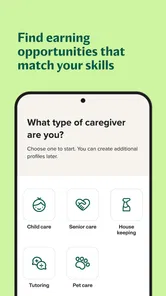
The app brings several kinds of care into one place, which is convenient, but it also means the first task is working out what you actually need. A family looking for occasional evening help has a different brief from someone arranging regular senior care; a job seeker weighing housekeeping work may have different priorities again. I’d write down the essentials before browsing so that a long list of possibilities doesn’t distract from the real requirement.
Care.com is a free lifestyle app from Care.com Inc, and its focus is connecting people with care-related opportunities and needs. It has an average rating of 3.5 from around 13,000 ratings, with roughly 6,000 written reviews and more than a million installs. Those figures suggest it has a substantial audience, but they don’t tell me whether a particular local search will be a good match. Availability and fit are personal, so I’d judge profiles and conversations on their own merits.
The breadth is useful if your household has more than one kind of need over time, but it can make the first visit feel less targeted than opening a service dedicated only to pet sitting or child care. I’d choose the category based on the actual work, not on the broadest label that seems close. For instance, help with an older relative’s daily routine and general housekeeping may overlap in a household, but they are not interchangeable responsibilities. Being precise at the beginning gives both sides a better chance to decide whether a conversation is worth having.
Make setup work for your situation
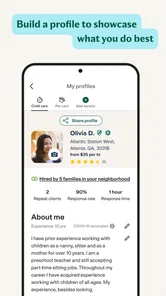
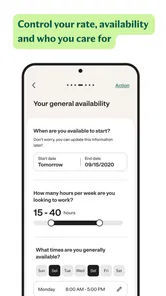
When creating a profile or searching, I’d be specific about the practical details that affect a match: the type of care, the schedule, relevant experience, and any non-negotiable needs. A caregiver can make their experience easier to understand by describing the kinds of tasks they are comfortable with, rather than relying on broad claims. Someone hiring can use the same clarity to explain what a normal day involves. This small bit of preparation can make later conversations more useful.
The app is rated for Everyone, and its current version is 25.19, with Android support from version 8.0. It is a focused option if you want caregiving in the same search space as child care, senior care, pet care, or housekeeping. I wouldn’t assume that a profile alone settles questions of suitability, though. Use the app to identify people to speak with, then discuss the details that matter to your household or work situation directly.
Before you start, it helps to decide what a successful result would look like. A parent might need coverage on particular afternoons, while a caregiver may be looking for work that fits around existing commitments. Write down the fixed points and the negotiable ones separately. That makes it easier to recognize a potentially useful profile without rejecting someone over a detail you could actually adjust, and it prevents a rushed conversation from turning into an unclear arrangement.
More From Our News Desk

Weather by Xiaomi Review: Clear at a Glance, Less Clear Up Close

X Under Pressure: Can It Recover When Posting Goes Wrong?

Clash of Clans Is Won Between the Battles

Android Auto Makes the Case for Quieter Car Software

MobiOffice: Transforming Mobile Productivity with Seamless Integration

EA SPORTS FC™ Mobile Soccer: Redefining Mobile Sports Gaming
Recover the workflow before giving up
If a search feels unproductive, I’d revisit the brief before repeating the same browsing. Check that the category reflects the actual task, loosen preferences that are genuinely flexible, and make the schedule as clear as possible. For job seekers, it can help to review whether a profile explains availability and experience plainly. For families, refining the request may be more useful than sending the same vague message to more people.
A sensible next step is to keep a short list of questions for each conversation: what the work involves, when it takes place, what experience is relevant, and how both sides prefer to handle changing plans. That makes it easier to compare candidates without relying only on a polished profile or a quick impression. If the app itself seems confusing, closing and reopening it or checking that it is up to date are ordinary first checks; they won’t solve a mismatch in expectations, but they can help separate a basic app hiccup from the search itself.
I’d also avoid making several changes at once when trying to improve a search. If you broaden the timing, switch categories, and rewrite the request together, it becomes hard to tell which change helped. Adjust one flexible condition, then look at the results again. For a caregiver, the equivalent is to make the profile easier to understand before changing the type of work being sought. This simple, deliberate approach can save time and makes it less likely that a promising search gets abandoned because the first set of results was disappointing.
When another route makes more sense
Care.com is not automatically the best choice for every care need. If you already have a trusted local referral, asking that person for an introduction may be faster and more personal. If your need is urgent, a broad marketplace search can take time, and I wouldn’t rely on it as the only plan. Likewise, someone seeking a conventional job with a fixed employer and clearly defined hiring process may prefer general job listings instead of a care-focused platform.
For a realistic example, imagine a parent who needs help after school on certain weekdays. I’d use the app to find relevant profiles, then explain pickup timing, routine, and the kind of support expected before making any commitment. If the responses don’t fit, I’d adjust the schedule or widen the search only where the household can genuinely be flexible. That approach is more useful than treating a search result as a recommendation.
For a caregiver, the same practical thinking applies in reverse. Someone who has experience with pets, for example, should make clear what kinds of care they are seeking rather than assuming that a general profile will communicate it. A person looking for senior-care work may want to explain relevant experience in terms a family can understand, while keeping the conversation focused on duties and expectations. The app can help bring a possible employer into view, but the caregiver still needs to decide whether the work and schedule are appropriate.
The User Experience
When I first downloaded Care.com, I was pleasantly surprised by how intuitive the interface was. The app is designed to be user-friendly, which is a big win in my book. You can easily navigate through various caregiving categories like babysitting, senior care, pet care, and even housekeeping. It's like having a little marketplace of caregiving services right at your fingertips!
Signing up is a breeze. Whether you’re a caregiver looking for jobs or someone in need of care, the app guides you through the process seamlessly. I really appreciated the detailed profiles and reviews, which helped me make informed decisions. It’s like reading a bunch of mini-reviews before making a choice.
Features That Stand Out
One of the standout features of Care.com is the ability to filter searches based on specific needs and preferences. Imagine looking for a babysitter who can also whip up a mean mac and cheese – the app’s got you covered! Plus, for those of us who are a bit paranoid (guilty as charged!), the background check feature is a reassuring touch.
Another cool aspect is the in-app messaging system. It keeps everything organized in one place, making communication super straightforward. You don’t have to juggle between emails and text messages – a major win for my sanity.
When messaging, I’d use the first exchange to check for mutual fit, not to settle every detail at once. A concise note that explains the situation and asks about relevant experience is easier to answer than a long list of questions. If the response seems promising, follow up on timing, duties, and any practical constraints before arranging next steps. This keeps the initial contact manageable while still making it clear that the care arrangement deserves careful discussion.
Peace of Mind with a Click
One of the things that struck me the most was the sense of security the app provides. With verified profiles and detailed reviews, you can rest easy knowing you’re making the right choice. Plus, if you’re a caregiver, the platform allows you to showcase your skills and experiences, making it easier for potential clients to find you.
Payment through the app is another feature that adds to the convenience. No need to fumble with cash or checks; everything is handled online, which is perfect for those of us who prefer a cashless world.
Even with reassuring profile information, I would keep my own decision-making process in place. A review may help identify topics to ask about, but it cannot tell me whether a person understands the particular routine in my home. I’d talk through responsibilities and expectations, and make sure both sides have the same understanding before relying on an arrangement. That is especially important when care involves someone’s home, a family routine, or a person who depends on consistent support.
Final Thoughts
All in all, Care.com is a solid app for anyone involved in the caregiving world. Whether you're looking to find reliable care or offer your services, this app has you covered. It's easy to use, packed with features, and more importantly, it provides peace of mind. If you’re on the lookout for a caregiving solution, I’d definitely recommend giving it a try!
Choosing the right expectations
The app is most useful when you can describe a real need clearly and have time to assess the people you find. I’d recommend it to families comparing options across different kinds of care, and to caregivers who want a place to present relevant experience to people seeking help. The broad range is a strength when a household’s needs change, but it can feel less direct than a specialist agency focused on one service.
One trade-off is that a profile and a review can help you decide whom to contact, but they cannot tell you how someone will handle your particular routine. I’d use an initial conversation to check practical fit, and agree on expectations before relying on any arrangement. A background-check indicator can be reassuring, but I would not treat it as a substitute for asking questions or following my own judgment.
Compared with a general classifieds feed, a care-focused service is a more relevant place to begin when the task involves a caregiving role and you want to consider profiles in that context. A specialist agency, on the other hand, may suit someone who prefers a more guided process for one type of care. Neither route removes the need to judge fit; the right choice depends on whether you value a broad place to explore or a narrower, more directed search. I’d choose based on the urgency and complexity of the situation, not simply on which option has more listings.
Small habits that make searches more useful
For caregivers, I’d tailor the profile to the work being sought instead of trying to sound suited to every role. A clear description of relevant experience and availability gives families something concrete to respond to. For someone hiring, separating must-haves from preferences helps keep filters from narrowing the search unnecessarily. If a good match is hard to find, changing one flexible preference at a time makes it easier to see what is affecting results.
Keep conversations organized by noting the key points discussed, especially schedule, duties, and next steps. Messaging in one place can reduce the chance of losing context among other chats, but it still helps to be deliberate about confirming important details. If a message or search does not behave as expected, check the connection, reopen the app, and try the task again before rebuilding your profile or changing everything at once.
A useful habit is to prepare a short checklist before speaking with anyone: the regular schedule, the main responsibilities, what experience matters, and which details are still open to discussion. Afterward, note what each person said while it is fresh. This is not paperwork for its own sake; it helps prevent two promising conversations from blurring together and makes it easier to spot a mismatch early. For job seekers, keeping a similar record of roles contacted and availability discussed can make follow-up more orderly.
What the app can and cannot resolve
Some apparent app problems are really questions of local availability or competing expectations. A search can be technically fine and still produce few suitable options if the timing is narrow or the requested duties are unusually specific. In that case, I’d consider whether the schedule can shift, whether the description is clear, or whether a personal referral or specialist service would be more effective. The app helps people discover one another; it cannot create a fit that is not there.
Care.com is free to install, which makes it approachable for exploring, and its care-focused design is more relevant than a general classifieds feed when you want to compare caregiving profiles. It is not a guarantee of a quick hire, a perfect match, or a friction-free arrangement. I’d use it with a clear brief, careful conversations, and a backup plan for time-sensitive needs. For those willing to do that follow-up, it can be a practical place to begin.
The bottom line for me is that this works best as one part of a careful search, not as a substitute for judgment or personal communication. It may be a good fit if you are willing to explain what you need, compare profiles thoughtfully, and make time for a real conversation. If you need an immediate solution, already have a dependable referral, or want a conventional employer-led job search, another route may be more efficient. For everyone else, I’d start with a focused brief, keep expectations realistic, and let the conversations—not the presence of a profile alone—guide the decision.
Care.com: Find Caregiver Jobs Frequently Asked Questions
Can I use Care.com to find work in my local area?
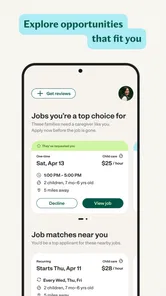
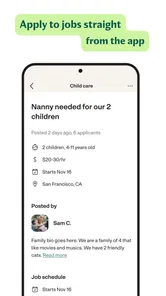
Care.com is intended to help caregivers explore job opportunities in child care, senior care, pet care, and housekeeping. You can look through listings and consider whether the roles suit your experience and preferences. The app is designed around care-related job searches, so the opportunities you see may differ depending on the type of care you are seeking and what is available to you.
Do I need caregiving experience before using Care.com?
You can use Care.com to explore caregiving job opportunities and create a profile describing your background. When setting up a profile, you can provide details about your experience and availability so families can understand what you offer. Consider reviewing each listing carefully and applying only for roles that match your skills, comfort level, and schedule.
Can I use the app for both full-time and part-time care work?
Care.com is a place to explore care-related job listings, including opportunities that may suit different work preferences. You can review each listing and decide whether its requirements and schedule fit your needs. Availability and role details can vary, so it is helpful to read the information for each opportunity before applying rather than assuming every position has the same hours.
Is Care.com only for people looking for child care jobs?
No. Care.com is intended for people looking for work across several care-related areas, not only child care. Its job opportunities include child care, senior care, pet care, and housekeeping. This range can be useful if you have experience in more than one area or want to explore different kinds of care work. Listings and suitable roles can vary from one search to another.
Can I review a job listing before applying?
Yes. Care.com lets you explore opportunities and review listings before deciding whether to apply. Taking time to read each listing can help you understand whether the role aligns with your experience and preferred type of work. Because the app covers several care categories, the information and requirements may differ between opportunities, so consider each one individually.
Pros
- Wide variety of caregiving job listings.
- User-friendly interface for easy navigation.
- Great platform for finding local jobs.
- Option to set job alerts and notifications.
- Detailed job descriptions and requirements.
Cons
- Subscription required for full access.
- Limited free features available.
- Some jobs may not be verified.
- Can experience occasional app glitches.
- Competition can be high in popular areas.











