CardSnacks: ecards, gift cards
- 7.50K
- 4.8
- Installs
- 100.00K
- Price
- Free

Screenshots

Analysis by Reviewed
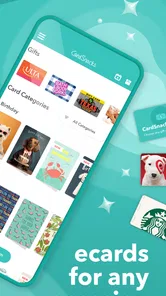
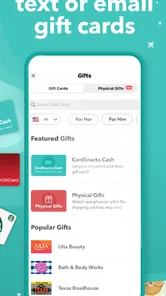
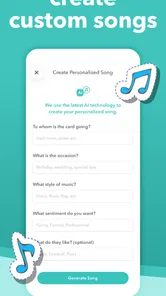
I like the idea behind CardSnacks: ecards, gift cards because it focuses on a small social problem that comes up all the time: remembering someone with more than a quick message, without turning the process into a long shopping trip. In my experience, the app is most useful when I want to send a greeting card or gift card by text or email and need to do it quickly from my phone. It belongs to the lifestyle category, but it feels especially practical for birthdays, thank-you messages, and those moments when a short digital gesture is better than saying nothing.
The important distinction is that this is not simply a messaging app with decorative images added on top. Its purpose is to help me package a greeting and a gift-oriented gesture in one place. That makes it different from sending a plain text, forwarding a web page, or opening a general-purpose shopping app and trying to make the message feel personal afterward. Whether that convenience is worth using depends on how often I send digital greetings, how much I care about presentation, and whether I am comfortable with the difference between free access and optional paid purchases.
How CardSnacks fits into everyday gifting
The app is developed by Mobigram LLC and is available as a free app for users who want to explore its basic experience without paying an upfront download price. That matters because I can install it, look through the available greeting experience, and decide whether it fits my habits before committing money. At the same time, free access should not be confused with every possible card or gift option being free: in-app purchases are listed from $2.99 to $29.99 per item. I would therefore treat the app as a free starting point with optional spending, not as a completely cost-free gifting service.
That pricing structure makes the app easier to understand when I separate three kinds of value. First, there is the convenience of having a dedicated place to prepare a digital greeting. Second, there is the personal value of sending something at the right moment instead of postponing it. Third, there is the purchase value of any paid item I choose. The first two can make the app worthwhile even before I buy anything, while the third needs a more careful decision because the price range covers individual items rather than a single all-inclusive purchase.
I appreciate that this setup leaves room for casual use. If I only need to send a thank-you note once in a while, I do not have to begin with a subscription-style commitment based on the information available for the app. If I use it regularly, I can judge each purchase separately. That is a better mental model than assuming the lowest listed price represents the cost of every card or gift. I would check the item shown in the app before confirming, especially when I am sending something for an occasion where the exact value matters.
The audience response also suggests that the concept has found a substantial user base. CardSnacks has an average rating of 4.8 from around 15 thousand ratings, with roughly 7.5 thousand written reviews and over 100 thousand installs. I see those figures as encouraging evidence that the basic idea works for many people, but not as a guarantee that every card style, purchase, or recipient experience will suit me. Ratings are useful for spotting broad satisfaction; they cannot replace checking whether the app matches my own way of sending greetings.
What I actually get from the free starting point
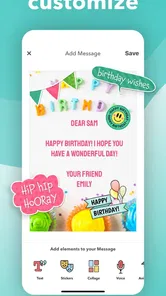
The strongest free benefit is the ability to organize a more deliberate message than an ordinary text. A plain “happy birthday” can be sent in seconds, but it can also feel rushed. A dedicated greeting gives me a reason to pause, choose the tone, and decide whether the moment calls for a card alone or a card paired with a gift card. For someone who regularly forgets important dates until the last minute, that focused workflow can be more valuable than a large collection of unrelated shopping features.
More From Our News Desk

Weather by Xiaomi Review: Clear at a Glance, Less Clear Up Close

X Under Pressure: Can It Recover When Posting Goes Wrong?

Clash of Clans Is Won Between the Battles

Android Auto Makes the Case for Quieter Car Software

MobiOffice: Transforming Mobile Productivity with Seamless Integration

EA SPORTS FC™ Mobile Soccer: Redefining Mobile Sports Gaming
I also find the text-or-email delivery model practical. It avoids asking the recipient to install the same app simply to receive a greeting, which is important when I am sending something to a relative, coworker, or friend who uses a different phone. In a realistic situation, I might remember a colleague’s birthday during a busy workday, prepare a card during a short break, and send it by the channel I already use to contact that person. The app’s usefulness comes from reducing the number of steps between remembering and acting.
There is a subtle advantage in separating the greeting from the conversation that follows. A normal message thread is useful for back-and-forth chat, but it can make a special note disappear among work updates, photos, and other notifications. A purpose-built card has a clearer occasion attached to it. I would use that distinction for a thank-you after receiving help, a birthday greeting when I cannot visit, or a small gesture to someone who lives far away.
Another useful workflow is to prepare the message before deciding on the gift. I can first ask myself whether the recipient would appreciate a thoughtful card without an additional purchase. If the answer is yes, the free part may already solve the problem. If a gift card would make the gesture more useful, I can then evaluate the individual item and its listed price instead of buying automatically just because the option appears beside the greeting.
Where the paid value can make sense
Paid value is easiest to justify when the gift card adds practical usefulness rather than simply increasing the amount of decoration. For example, if I know the recipient would genuinely use a particular gift card, combining it with a personal greeting can save me from sending two separate messages. The convenience is especially appealing when I am away from home, short on time, or trying to acknowledge several occasions without managing physical cards and separate purchases.
Still, I would not assume that every paid item offers better value than buying directly from a retailer or using a familiar gift-card service. A general shopping option may be preferable when I need a specific brand, a particular denomination, or a detailed record of a purchase. CardSnacks makes more sense when the emotional presentation is part of the point. If the recipient mainly cares about receiving the gift and does not care about the card experience, a direct alternative may be simpler.
The listed purchase range also changes how I would use the app for different relationships. A lower-priced item may suit a casual thank-you or a small personal gesture, while a higher-priced item requires more confidence that the recipient will appreciate it. Since each item is priced individually, I would avoid thinking of the app as automatically economical for every occasion. The free entry point is clear; the value of spending depends on the specific card or gift I select and the importance of the moment.
One practical tip is to treat the greeting as the part that carries the personal meaning and the gift card as an optional enhancement. That prevents the purchase from doing all the emotional work. A short, specific note about why I am thanking someone will usually feel more sincere than a larger gift paired with a generic sentence. This is where the app can be strong: it gives me a convenient format, but I still need to supply the human detail.
Small frictions I would consider before using it
The first tradeoff is the difference between convenience and control. A specialized card app can make sending faster, but a general email, messaging app, or retailer may give me more control over wording, attachments, receipts, and the exact gift product. If I am sending something important for work, a formal event, or a sensitive family situation, I would take an extra moment to confirm that the chosen style and delivery method feel appropriate.
The second tradeoff is recipient preference. Some people enjoy digital cards; others prefer a physical card, a phone call, or a direct message that feels less packaged. Sending by text or email is convenient, but it does not automatically make the gesture personal. I would use CardSnacks for recipients who are comfortable with digital communication and choose another approach for someone who values tangible keepsakes or dislikes receiving promotional-looking messages.
The third issue is purchase discipline. Because the app is free to install while offering optional items, casual browsing can turn into an unplanned purchase if I choose quickly under time pressure. My habit would be to decide the intended budget before opening the paid options, then review the item price at checkout. That simple pause protects the main advantage of the app—speed—without letting speed replace judgment.
I would also pay attention to the operating-system requirement. The current version is 20260824 and requires Android 10 or later. For users on an older device, compatibility is a practical question to settle before planning an urgent greeting. For supported phones, the current version indicates that the app is being maintained as a present-day product, but I would still keep the app updated when possible so that the experience matches the version intended by Mobigram LLC.
The Teen content rating is another small consideration for households. It means I would not treat the app as automatically designed for young children, even though sending a birthday or thank-you message sounds harmless. A parent or guardian choosing it for a younger user should review the experience and the purchase flow personally. For adults and teenagers who already communicate by text or email, the rating is less likely to affect ordinary use, but it is still worth knowing before handing over a device.
Who is most likely to get real value
I think the best audience is people who want a digital greeting to feel more intentional than a regular message. That includes busy relatives, long-distance friends, coworkers, and anyone who often remembers occasions late. It is also a good fit for people who prefer sending a card and a gift card together rather than coordinating separate services. The app’s value grows when the recipient is reachable by text or email and appreciates a quick digital gesture.
It may also help people who are not naturally good at writing occasion messages. A dedicated card format gives the moment a beginning and an end, which can make it easier to turn a vague intention into an actual action. I would still personalize the note, but I would not need to design an entire presentation from scratch. That reduction in decision fatigue is one of the app’s less obvious strengths.
On the other hand, I would skip it when I need a physical delivery, a highly customized printed design, or a gift with complicated specifications. I would also look elsewhere if I want one service that manages a broad shopping history, detailed order tracking, or a large range of non-gift-card products. CardSnacks is focused on the greeting moment, and that focus is helpful only when the occasion matches it.
It is not the right choice for someone who sends only plain messages and sees digital cards as unnecessary decoration. In that case, the free app may add an extra step rather than remove one. Likewise, if I already have a trusted service that combines my preferred retailer, delivery method, and budgeting tools, switching solely for a card format may not produce enough benefit.
My buy-or-skip verdict
I would recommend trying CardSnacks if I wanted a convenient way to send greeting cards and gift cards by text or email, especially when speed and presentation matter together. The free access makes experimenting relatively easy, while the optional purchases let me decide occasion by occasion whether a paid gift adds enough value. I would not describe it as automatically cheaper than every alternative, because the purchase price applies to individual items and the right comparison depends on what I am buying.
My approach would be simple: use the free experience for ordinary greetings, personalize the message before considering an upgrade, and compare the paid item with the direct alternative when the budget is important. That workflow keeps the app’s emotional purpose in focus instead of treating every occasion as a reason to spend. It also answers the practical question many users have after installing it: yes, I can use it without paying upfront, but I should evaluate each in-app purchase on its own terms.
Overall, the strong rating, review volume, and install count make it a credible option in the lifestyle space, but the real reason I would keep it is convenience. It turns a forgotten occasion into a manageable few-minute task and gives the message more shape than a bare text. If you want a quick digital gesture that still feels chosen rather than copied, CardSnacks is worth trying; if you need physical cards, deep shopping controls, or the lowest possible price every time, a more specialized alternative may serve you better.
CardSnacks: ecards, gift cards Frequently Asked Questions
Can I use CardSnacks to send a card for different occasions?
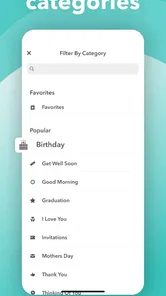
CardSnacks is made for digital greetings across a range of occasions, including birthdays, thank-you notes, holidays, anniversaries, and congratulations. You can browse the available designs and choose one that fits the moment, then add a personal message before sending. The selection and customization options may differ from one card to another, so it is worth previewing a design before you decide.
Do I need to create an account before sending a card?
CardSnacks lets users prepare and send digital greetings, but the steps and information requested can depend on the card and delivery method. Follow the prompts in the app as you select a design and enter the recipient’s details. Before sending, check that the contact information is correct and review the completed card so it is ready to share.
Can I include photos or other special features in my card?
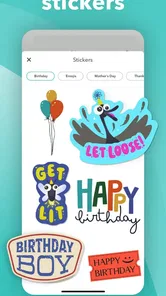
Some CardSnacks designs may offer extras such as photo support, animated elements, or music, while others may focus on a written message. Once you choose a card, review the editing options available for that particular design. This helps you see which personal touches are supported before you finish the greeting and send it.
Can I send cards to someone who does not have CardSnacks installed?
CardSnacks is intended to send greetings digitally by text or email, so a recipient can receive a card through the selected delivery method rather than needing to create the card themselves. The recipient’s experience may vary depending on the card and how it is delivered. Check the sharing and delivery details in the app before sending.
What devices can run CardSnacks: ecards, gift cards?
CardSnacks is available for Android and iOS devices, making it possible to create and send digital cards from a compatible phone or tablet. The app requires Android 10 or later, so check your device’s operating system before downloading. It is listed as a Lifestyle app and is rated Teen, a detail parents may want to consider when deciding whether it is suitable for a younger user.
Pros
- Large selection of digital cards for birthdays
- holidays
- and special occasions.
- Personalized messages and designs make cards feel more thoughtful.
- Gift card options add a practical present to digital greetings.
- Convenient for sending last-minute surprises from your phone.
- Useful reminders can help you remember important dates.
Cons
- Some premium cards and features may require additional payment.
- Recipients may prefer physical cards or gifts over digital alternatives.
- An internet connection is needed to browse and send most cards.
- Gift card availability can vary by brand and recipient location.
- Frequent notifications may feel unnecessary if reminders are enabled.











