Car Gauge Pro (OBD2 + Enhance)
- 15.00
- 3.0
- Installs
- 1.00K
- Price
- $8.99

Screenshots
Analysis by Reviewed
Let me tell you about this nifty app called Car Gauge Pro (OBD2 + Enhance). If you've ever wanted to feel like a tech-savvy mechanic or just keep an eye on your car's health without needing a degree in automotive engineering, this app might just be your new best friend.
Getting Under the Hood
First off, the installation process is as smooth as a freshly waxed car. Once you've downloaded the app, connecting it to your vehicle is straightforward. You'll need an OBD2 adapter that plugs into your car's OBD2 port. Most cars post-1996 have these ports, so you should be covered. Fire up the app, pair it with your adapter via Bluetooth, and boom—you're ready to roll.
Features That Rev Your Engine
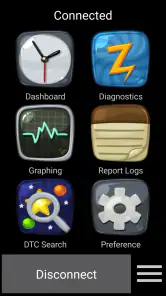
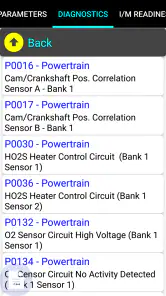
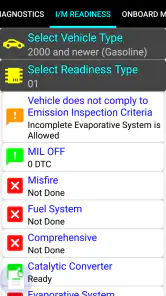
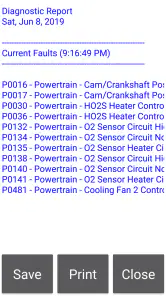
The Car Gauge Pro app is packed with features that are genuinely useful. It allows you to read and clear diagnostic trouble codes (DTCs), which is a fancy way of saying it can tell you what's wrong when that pesky "check engine" light pops up. No more guessing or unnecessary trips to the mechanic just to find out you forgot to tighten your gas cap.
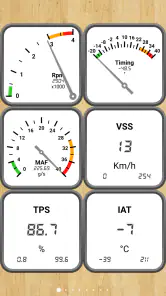
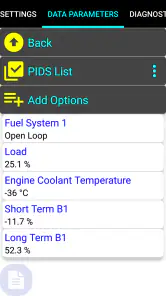
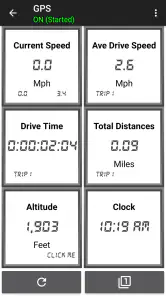
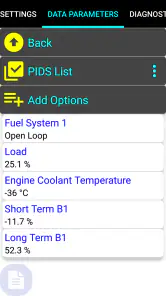
One of the coolest features is the real-time sensor data. You can monitor everything from RPMs to fuel trim, and even airflow rates. It's like having a dashboard command center on your phone. And if you’re into performance metrics, the app provides detailed reports on your car’s speed, acceleration, and more.
Why You'll Love It
What really sets this app apart is its user-friendly interface. Even if you're not a gearhead, the layout is intuitive. The data is presented in a way that's easy to understand, with graphs and charts that make complex information digestible.
It's also worth mentioning that the app supports enhanced diagnostics for various makes and models. This means you can access manufacturer-specific data that generic scanners might miss. It's like having a superpower that lets you peek into your car’s soul.
A Few Considerations
While Car Gauge Pro is impressive, it's not without its quirks. You’ll need to make sure your OBD2 adapter is compatible with the app. Some users have reported connectivity issues with cheaper adapters, so investing in a reliable one will save you headaches down the road.
Another thing to keep in mind is that while the app is a powerful tool, it's not a substitute for professional diagnostics. It's great for monitoring and understanding your car's performance, but for serious issues, a trip to the mechanic might still be necessary.
Final Thoughts
In a nutshell, Car Gauge Pro (OBD2 + Enhance) is a fantastic app for anyone who wants to take control of their car’s health. Whether you're a car enthusiast who loves to tinker or just someone who wants to avoid the dreaded "check engine" light, this app is worth considering. It's like having a mini mechanic in your pocket, ready to diagnose and demystify the inner workings of your ride.
So, if you're ready to embrace your inner car guru, give Car Gauge Pro a spin. It might just save you time, money, and a whole lot of automotive anxiety.
Pros
- Comprehensive diagnostic capabilities
- Supports multiple car models
- User-friendly interface
- Real-time data monitoring
- Customizable dashboard
Cons
- May require OBD2 adapter
- Limited free features
- Occasional connectivity issues
- Complex setup for beginners
- Interface may seem outdated

- Category
- Communication
- Version
- 8.30











