

Caddy - Second Phone Number
- 977.00
- 4.6
- Installs
- 100.00K
- Price
- Free

Screenshots
Analysis by Reviewed
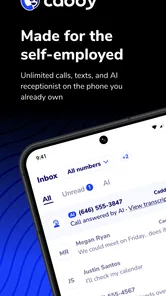
I usually judge a business phone app by one practical question: does it help me handle important conversations without making me wonder what is happening behind the scenes? Caddy - Second Phone Number takes a focused approach to that problem. It is a communication app from 800.com, LLC, designed for people who need a business line without carrying another handset or mixing every customer call with personal conversations.
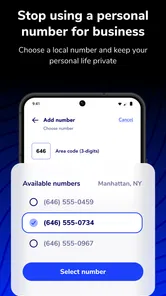
That sounds simple, but the useful part is the separation. A solo consultant, cleaner, tutor, tradesperson, or online seller can present a work number while keeping a personal number for family and friends. In my experience, that distinction matters most when work happens from a mobile phone all day. A missed call is not just an inconvenience in those situations; it can mean a lost enquiry or a customer who moves on to someone else.
Caddy is free to install and is rated for Everyone. It has reached over 100,000 installs and holds a 4.6 average from around 1,700 ratings, which gives it a reassuring level of public use without making it feel like an anonymous utility. The app was released on April 26, 2025, and the current version is 1.17.0. It runs on operating systems from version 9 onward, so many older Android devices can still be considered.
What Caddy feels like in everyday business use
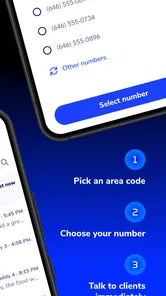
The clearest way to understand the app is to imagine a normal working day. I might publish a business number on a local listing, a social profile, or an invoice, then use Caddy as the place where those calls arrive. My personal number stays private, while the work conversation has its own boundary. That arrangement is more manageable than asking customers to contact me through a personal messaging account or relying on a second physical SIM.
The app is aimed at solopreneurs rather than large call centres. That focus is important. A one-person business often needs a professional point of contact but does not need the complexity of a full office phone system. Caddy’s appeal is therefore less about replacing every telephone tool and more about giving one person a dedicated channel they can control from a phone they already own.
I also like the idea of using a separate number during periods when availability changes. Someone who works appointments during the day can keep customer calls distinct from personal calls. A freelancer taking short-term projects can use a work identity without handing out a permanent private number. A small seller can decide whether a new enquiry deserves a call back before making the conversation part of their personal contact list.
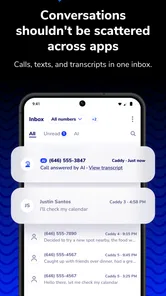
That last point is a subtle but useful workflow improvement. A second number is not only a way to look professional; it can act as a sorting layer. I can see which conversations belong to work, respond during work hours, and avoid turning every new enquiry into an interruption. It does not automatically solve time management, but it makes the boundary visible.
More From Our News Desk

 Gmail
GmailGmail in a Busy Inbox: Who Benefits Most?
From first account to crowded workday, Gmail earns its place through dependable search and flexible sorting—but its best fit depends on how much inbox maintenance you can tolerate.

 Prime Video
Switching to Prime Video: What Changes in Your Viewing Routine
Prime Video can make a compelling second home for streaming, but switching means learning a different catalog, rental layer, and route from browsing to playback.

 Universal TV Remote Control
Universal TV Remote Control Works Best as a Reliable Backup
A phone remote earns its place through quick setup and reliable habits. Here is how to get more from Universal TV Remote Control—and where its limits show.

 Weather - By Xiaomi
Weather by Xiaomi Review: Clear at a Glance, Less Clear Up Close
Xiaomi’s weather app makes everyday forecasts quick to scan, but its calm surface can leave useful details and recovery paths harder to find than they should be.

 X
XX Under Pressure: Can It Recover When Posting Goes Wrong?
A resilience-focused review of X, examining setup, mistaken posts, interruptions, weak connections, and the gaps that matter when recovery needs to be dependable.

 Clash of Clans
Clash of Clans Is Won Between the Battles
Its raids are quick; its community is a long-term project of coordination, teaching, rivalry, and shared responsibility—with all the friction that entails.
Latest News



Where the AI promise helps and where I would stay careful
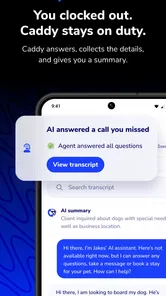
The app is presented as an AI business phone, which makes it more interesting than a basic second-number dialler. AI can be valuable when it reduces the effort involved in handling routine business communication. For a person answering calls between jobs, the possibility of assistance is attractive because the phone is often the only office they have.
At the same time, I would not treat an AI label as a reason to hand over every conversation without thought. Business calls can contain addresses, access instructions, payment questions, health-related details, or private customer information. My approach would be to start with low-risk enquiries, inspect the available choices carefully, and keep sensitive conversations under direct human control whenever the situation calls for judgement.
This is where trust matters more than novelty. I want to know what the app is asking permission to do, what choices appear during setup, and whether I can decide how much of my working life passes through it. A useful phone assistant should save time without making the owner feel that the owner has lost control.
Permissions and account choices deserve attention
Before using any business phone service, I would read every permission prompt rather than tapping through setup. The practical questions are straightforward: does the app need access to contacts, the microphone, notifications, or call-related functions, and can I deny an optional request while still using the core service? Those answers should be judged from the prompts and settings shown on the device, not assumed from the app’s category.
I would also check the account controls before publishing the number anywhere. A business number can quickly become part of signage, listings, invoices, and customer records. Changing it later may be inconvenient, so I would first understand how the account handles sign-in, number management, subscription choices, and removal. The safest habit is to establish those controls before inviting real customers to call.
Because Caddy includes in-app purchases ranging from $9.99 to $299.99 per item, I would pay particular attention to what is included at no cost and what requires payment. The free installation is useful for trying the experience, but it should not be confused with unlimited access to every business-phone capability. I would review the purchase screen slowly, identify whether charges are recurring or one-time where shown, and avoid subscribing until the cost matches my actual call volume.
This is one of the app’s biggest practical trade-offs. A separate business line can be cheaper and simpler than buying another device, but the total value depends on how heavily I use it and which functions I need. Someone receiving occasional enquiries may find the arrangement sensible. Someone expecting a complete replacement for a staffed phone system should examine the paid options and controls much more closely.
Data-sensitive moments in real conversations
The most sensitive moment is not necessarily installation. It is the first time a customer shares information that was never meant for a broad audience. A caller may give a home address, describe a child’s schedule, mention a financial problem, or provide an entry code. That is when I would pause and consider whether an AI-assisted phone workflow is appropriate for the conversation.
My rule would be simple: use the app for routing and ordinary business enquiries, but slow down when the information could harm someone if exposed or misunderstood. If a caller needs a detailed explanation, I would take over personally. If the conversation involves a dispute, a refund, or a commitment that affects the business, I would avoid letting convenience replace a careful human response.
This does not make Caddy unsuitable. It makes the app a tool that needs boundaries. The best setup is one where I decide which calls can be handled efficiently and which deserve my full attention. That decision should remain mine rather than being dictated by the excitement around automated communication.
I would also be cautious about contact syncing and notification previews. If the app offers those choices, I would consider whether customer names or message content might appear on a shared lock screen or a device used by other people. A business owner working from home may have a very different privacy need from someone operating alone in a locked office. Small visibility choices can matter more than the headline feature.
How I would build a safer routine around the number
I would begin with a small test group rather than immediately moving every customer to the new number. A few trusted contacts can reveal whether calls arrive reliably, whether notifications are easy to notice, and whether the app’s controls make sense during a busy day. This staged approach also gives me time to understand billing before the number becomes central to the business.
Next, I would write a short personal rule for the line: which calls I answer immediately, which ones I return later, and which information I will never handle through an automated flow. That sounds overly cautious until a customer calls while I am driving, serving another client, or standing in a noisy location. A written rule prevents rushed decisions.
I would keep the business number separate in my records as well. Customer contacts, invoices, and advertising should identify it as the work line, while private contacts should remain associated with the personal number. This makes it easier to review whether the arrangement is actually helping and easier to change direction if the service no longer fits.
Another useful test is to ask whether the app improves response quality, not merely response speed. If I answer more calls but sound distracted, the second number has not solved the real problem. Caddy makes the most sense when it helps me create a deliberate business channel, not when it encourages me to be reachable every minute.
Who should choose it, and who should look elsewhere
I see Caddy as a strong candidate for a one-person business that wants a work identity on a mobile device. It is especially relevant to people who do not want to publish a personal number, who need a cleaner boundary between private and customer calls, or who want to test a business phone workflow without buying separate hardware.
It may also suit someone starting a side business. A dedicated number can make a new service feel more organised from the first enquiry, while the owner can decide how much time to give it. The low barrier to installation makes experimentation easier, although the purchase range means I would still treat the trial phase as a budgeting exercise rather than assuming the long-term cost will be negligible.
I would be less enthusiastic for a team that needs extensions, complex routing, shared ownership, formal call-centre reporting, or tightly managed administrative roles. A conventional business phone platform may be better in that environment because team workflows matter more than personal convenience. Likewise, a person who only needs occasional texting may find a basic second-number service less complicated.
People who dislike AI involvement in communication should also think carefully before choosing it. The app’s positioning is a benefit for users who want assistance, but it may be a drawback for someone who expects every interaction to remain entirely manual. My recommendation would be to inspect the user choices in the actual version installed and decide based on the controls visible there.
What the public response tells me
The app’s 4.6 average across roughly 1,700 ratings is encouraging, and the number of written reviews is close to a thousand. I read that as evidence that many users find the concept useful, not as proof that every business situation will work perfectly. Communication apps are highly dependent on device settings, network conditions, notification habits, and the user’s expectations.
The developer, 800.com, LLC, has positioned the product around the needs of independent operators rather than presenting it as a general social communication tool. That gives the app a clear purpose. The question is whether that purpose matches my own working style. If I want a practical business identity and am willing to review permissions, account settings, and payment choices, the focus is appealing. If I want a complete corporate phone system, the focus may feel narrow.
The current version, 1.17.0, is another reason I would check the app’s settings after installation instead of relying on an old tutorial or a remembered screen. Phone services change quickly, and visible controls can move as the product develops. I would confirm the choices available on my device before making assumptions about how calls, notifications, or account management work.
My cautious verdict
Caddy is a thoughtful option for a specific problem: giving a solo operator a separate business phone presence without carrying another handset. I like the way that separation can improve privacy, organisation, and professional boundaries. The AI angle may make the service more useful for people who spend the day moving between tasks, provided they remain selective about which conversations receive automated help.
My recommendation comes with a clear condition: treat control and transparency as part of the product experience, not as an afterthought. Review permissions, examine account settings, understand the purchase screen, and test the number with low-risk calls before publishing it widely. Those steps are especially important because the available in-app items can reach $299.99, making casual tapping an avoidable mistake.
I would recommend it to a freelancer, local service provider, or side-business owner who needs a work line and values a mobile-first setup. I would not recommend choosing it solely because the word AI sounds convenient, and I would steer larger teams toward a service built around shared administration. Used with sensible boundaries, Caddy can be a useful communication layer; used without checking its choices, it may create more uncertainty than the personal-number problem it was meant to solve.
Caddy - Second Phone Number Frequently Asked Questions
Can Caddy help me manage calls from customers when I work alone?
Caddy is presented as an AI business phone for solopreneurs, making it relevant for people who handle customer communication without a larger team. It may help keep business calls separate from personal ones and reduce the chance of losing contact with potential clients. If customer calls are central to your work, check that the app’s available features and plan suit the way you communicate.
Is Caddy - Second Phone Number free to download, and what should I know about costs?
Caddy is free to download, while in-app purchases are available. Those purchases range from around $10 to $300 per item, so the app’s initial download price does not necessarily cover every service or feature. Before committing, review the purchase options and any plan terms presented in the app store, especially if you expect to use the number regularly.
What is Caddy - Second Phone Number used for?
Caddy - Second Phone Number is designed to provide an additional phone number on your mobile device without requiring a second physical SIM card. It can be useful for separating personal and professional calls, managing online registrations, communicating with customers, or maintaining greater privacy when sharing your main number is not desirable. The available functions may depend on your country and subscription plan.
Can I use Caddy’s number for calls, texts, and verification codes?
The app may support calling and text messaging through its assigned number, but the exact capabilities can vary by location, number type, and account plan. Users should not assume that every service will accept a virtual number for account verification. Some banks, social networks, messaging platforms, and other websites block VoIP or temporary numbers, so verification-code compatibility should be checked before relying on Caddy for an important account.
Does Caddy - Second Phone Number require a subscription or include in-app purchases?
A second phone number service commonly uses paid subscriptions, credits, or in-app purchases for obtaining a number, sending messages, making calls, or extending the number’s validity. Before downloading, review the current pricing, renewal terms, trial conditions, and cancellation process shown in the Google Play Store or Apple App Store. Costs and available plans can differ depending on your country and the selected number.
Pros
- Keeps your personal number private when calling or texting
- Useful for work
- dating
- travel
- or managing separate identities
- Simple interface makes switching between numbers straightforward
- Supports voicemail for handling missed calls more professionally
- Can help organize conversations away from your main phone line
Cons
- A reliable internet connection may be needed for calling features
- Extra numbers or advanced features may require a subscription
- Call quality can vary depending on network strength and congestion
- Not every service may accept a Caddy number for verification
- Some users may find managing two numbers confusing at first











