BuzzCast - Live Video Chat App
- 3.65K
- 4.3
- Installs
- 10.00M
- Price
- Free

Screenshots
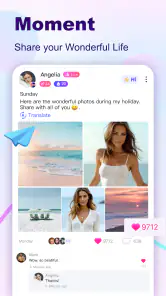

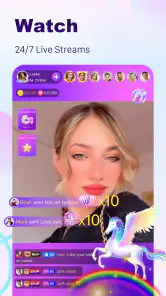
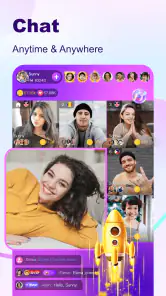
Analysis by Reviewed
Live video is most appealing to me when it feels like a conversation rather than another feed to scroll past. That is the idea I kept coming back to while trying BuzzCast, a social app from BuzzCast LIVE built around watching broadcasts and meeting people. It is free to install, but some in-app purchases range from $0.49 to $249.99 per item, so I would treat paid extras as optional and check costs before spending.
The app is rated Mature 17+, which matters here: live social spaces can involve unpredictable conversations and content, not just polished clips. I would not hand it to a younger teen as a casual video app. For adults who enjoy spontaneous interaction, though, its appeal is clear: there is always the possibility of finding a live room with a person or topic worth sticking around for.
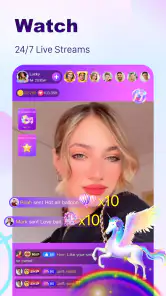
Live viewing is the main draw
What makes this experience different from a standard social feed is the sense of timing. A recorded post waits for you; a live stream is already happening, and joining means stepping into a moment that may change while you watch. That immediacy can make a quick visit feel lively, especially when a host is responding to comments rather than speaking into the void.
BuzzCast has been available since May 11, 2018, and its current version is 3.2.57. It has an average rating of 4.3 from around 129,000 ratings, with over 10 million installs. Those figures suggest a sizeable audience, which is useful for a social app where an empty-feeling space would undermine the point. They do not guarantee that every visit will turn up a stream I want to watch, so I see discovery as part of the experience rather than a sure thing.
First Impressions: The Look and Feel
When you first open BuzzCast, you're greeted with a pretty sleek and modern interface. It's got that kind of intuitive design that just makes sense right off the bat. You know how some apps take forever to figure out? This isn’t one of them. The navigation is straightforward, and everything's just a tap away.
The home screen is filled with a variety of live streams that you can dive into. It's like a buffet for live content lovers. You can scroll endlessly and find streams from all over the world. I was amazed at how easy it was to connect with people from different cultures and backgrounds.
Features That Stand Out
One thing that really caught my attention was the real-time translation feature. Seriously, how cool is that? You can chat with someone who speaks a different language and still keep the conversation flowing. It made interactions so much smoother and opened up a whole new world of possibilities.
You May Like

Clash of Clans Is Won Between the Battles

Android Auto Makes the Case for Quieter Car Software

MobiOffice: Transforming Mobile Productivity with Seamless Integration

EA SPORTS FC™ Mobile Soccer: Redefining Mobile Sports Gaming

How Microsoft OneDrive Became a Mobile Productivity Giant

How Google Translate Breaks Language Barriers Effortlessly
Another feature I found intriguing is the virtual gifts. You can send and receive these during live streams, which adds a fun element to the whole experience. It’s a nice way to show appreciation to the streamers you enjoy watching. Plus, who doesn't like getting a little digital love?
There’s also a section for short videos, kind of like TikTok vibes. You can scroll through some entertaining clips, which is perfect for when you just want a quick dose of fun.
Interacting and Engaging
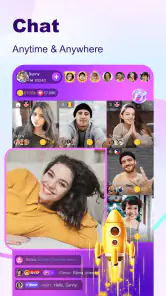
Connecting with others on BuzzCast is a breeze. The app encourages interaction through comments, likes, and the aforementioned virtual gifts. You can follow your favorite streamers and get notified when they go live, so you never miss out on any action.
I found the community to be pretty welcoming. People seem genuinely interested in connecting, and there's a variety of content to suit different tastes. Whether you're into gaming, music, or just casual chats, you'll find something that piques your interest.
Making a live session work for you
In practice, I would use the app in two different ways: browse when I have a few spare minutes, then follow a host only after I have watched enough to know I genuinely want to return. That small distinction matters. A lively room can be entertaining in the moment, but following everyone who catches my eye makes notifications noisy and turns a casual pastime into another feed to manage.
A realistic use case is a quiet evening when I want company without arranging a call with someone I already know. I can drop into a broadcast, listen first, and decide whether the tone suits me before commenting. If I do join the chat, a specific, friendly question is more likely to start a useful exchange than a string of generic greetings. The live format is best when I am willing to participate a little; if I only want something to play in the background, short videos or a familiar podcast may be a better fit.
Translation can lower the barrier to a cross-language conversation, but I would still keep messages simple and allow for misunderstandings. It helps make an exchange possible; it does not make every cultural reference or joke instantly clear. For a smoother first interaction, I would avoid sharing personal details and keep the conversation centered on the stream until I have a better feel for the person and the room.
Choosing between live chat and other social apps
Compared with a typical short-video app, BuzzCast gives more weight to being present with a host and audience at the same time. That is its strongest distinction, but it also means the experience depends more on who is live right now. A polished, on-demand clip is easier to fit into a short break; a broadcast can be more engaging, yet it may take a little browsing to find a room that clicks.
It also serves a different purpose from messaging apps built around existing friends. Those are better for dependable private conversations and sharing updates with people I already know. BuzzCast makes more sense when I want to discover a new voice or join a public social moment. I would choose based on that goal rather than expecting it to replace my usual messaging or video platforms.
Interacting and Engaging
Connecting with others on BuzzCast is a breeze. The app encourages interaction through comments, likes, and the aforementioned virtual gifts. You can follow your favorite streamers and get notified when they go live, so you never miss out on any action.
I found the community to be pretty welcoming. People seem genuinely interested in connecting, and there's a variety of content to suit different tastes. Whether you're into gaming, music, or just casual chats, you'll find something that piques your interest.
Privacy and Safety
Now, we all know how important privacy is these days, right? BuzzCast takes this seriously. They have robust security measures in place to protect users. You can report any inappropriate content or behavior easily, which is reassuring. The app also gives you control over your privacy settings, so you can decide what information you want to share.
As with any app, I recommend taking a moment to review these settings to ensure you're comfortable with what you're sharing. It’s always better to be safe than sorry, especially in the digital world.
What to keep in mind before spending time or money
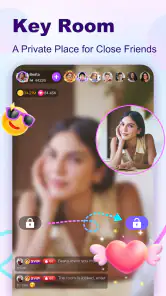
Because a live room is shaped by its participants, the quality can vary from one visit to the next. I would leave a stream that feels uncomfortable instead of waiting for it to improve, and use reporting tools when behavior crosses a line. A welcoming impression is not a substitute for personal boundaries: I would avoid sharing my location, contact details, or anything I would not want repeated outside the app.
Virtual gifts are best treated as entertainment, not a requirement for joining in. If I were tempted to send one, I would first decide what amount I was comfortable spending and remember that repeated small purchases can add up. With purchases spanning from $0.49 to $249.99 per item, it is sensible to review the item price before confirming. Anyone who wants a completely cost-free social experience may prefer to watch and chat without buying gifts.
For people wondering whether the app is easy to try on an older device, it supports Android 5.0 and later. I would still expect live video to be more demanding than simply reading a feed, so a stable connection and a device that handles streaming comfortably will make a difference to the experience. If the connection is poor, I would switch to browsing clips or come back later rather than judge the community from a choppy session.
A practical way to explore without getting overwhelmed
One useful approach is to treat the first few visits as sampling, not as a search for an instant best friend. I would watch a room long enough to understand its pace, notice whether the host actually responds to viewers, and then decide whether to comment. This is more informative than judging a stream by its first few seconds, while still giving me a clear exit if the conversation is not my kind of thing.
It also helps to separate discovery from commitment. I can browse broadly without following anyone, then follow only the hosts whose broadcasts I would genuinely choose to revisit. That makes the app feel less demanding and gives notifications a practical purpose. If a host’s room is enjoyable only once, there is no need to turn that moment into a standing part of my routine.
For a newcomer who feels awkward entering an active chat, watching quietly is a perfectly sensible first step. I would pay attention to the room’s topic and tone, then contribute something connected to what is already being discussed. That tends to feel more natural than trying to introduce myself with a personal story before I know who is listening. Live interaction rewards timing, but there is no need to rush into it.
What live socializing can and cannot offer
The phrase “make real friends” can set expectations too high if it is read as a promise of lasting relationships. I see a public live room as a way to encounter people and perhaps start a conversation; whether that becomes a friendship depends on both people and on what happens after the broadcast. Someone looking for dependable, private contact with a known circle will probably be happier with a messaging app designed around those relationships.
Likewise, the app’s mix of streams and short videos does not mean every visit will be equally social. A broadcast may invite discussion, while a clip is mainly something to watch. If I open it hoping specifically to talk, I need to be prepared for a room where the host is busy or the audience is focused on watching. That uncertainty is not a flaw unique to this app, but it is part of choosing live discovery over a scheduled call.
For people weighing the cost, the practical question is not whether gifts exist but whether they add anything to the way they want to use the app. I can enjoy the basic social idea by browsing and joining conversations without turning spending into a measure of support. If I do choose to send a gift, I would make that a deliberate choice tied to my own budget, rather than an automatic response to a lively room.
The Verdict: Worth Downloading?
So, is BuzzCast worth your time? I’d say definitely. It’s a fun, engaging app that makes it easy to connect with people from all around the globe. Whether you’re looking to make new friends, enjoy entertaining content, or just pass the time, this app has something for everyone.
It’s got a few unique features that set it apart from other live video chat apps, and the user-friendly interface makes it a joy to use. Just be sure to explore all the features and customize your privacy settings to your liking.
If you're into socializing and love the idea of live interactions, you should definitely give BuzzCast a try. Who knows, you might just find your new favorite way to connect!
Who will get the most out of it?
I would recommend it most to adults who enjoy discovering people in real time, are comfortable entering public conversations, and can take a live room for what it is: an informal social space, not a guaranteed route to close friendship. The translation feature may be especially appealing if you like meeting people beyond your usual language circle, while following a small number of hosts can make repeat visits feel more personal.
I would skip it if I mainly want private conversations with friends, a carefully curated stream of predictable videos, or a social app with no paid extras to think about. For those needs, a messaging service or a conventional on-demand video feed is the simpler choice. BuzzCast is more rewarding when I want the uncertainty and immediacy of live interaction, and less convincing when I want total control over what appears next.
BuzzCast - Live Video Chat App Frequently Asked Questions
Can I use BuzzCast to watch live streams without broadcasting myself?
Yes. BuzzCast is built around live video and social interaction, and you can watch streams hosted by other users without starting your own broadcast. You can also take part in conversations while viewing, so the experience can be more interactive than simply watching a video. If you prefer to observe at first, you can explore streams before deciding whether to go live.
Do I need an internet connection to use BuzzCast?
BuzzCast centers on live video, so you need an internet connection to watch streams, broadcast, and interact with other users. A stable connection is helpful for a smoother viewing and chatting experience, especially when video is involved. If your connection is unreliable, streams may be less enjoyable, so it is worth checking your network before joining a live session.
Can I meet people nearby on BuzzCast?
BuzzCast’s store summary highlights watching live streams around the clock and making friends nearby. The app is a social space for meeting and interacting with other users through live video, chat, and streams. As with any online social platform, approach new connections thoughtfully, avoid sharing personal details too quickly, and use good judgment when deciding how much to reveal.
Is BuzzCast suitable for younger users?
BuzzCast is intended for a mature audience, with a 17+ content rating. Because the app focuses on live video and social interaction, conversations and broadcasts may include content or encounters that are not appropriate for children. Parents and guardians should consider the age rating and discuss online safety before allowing a younger person to use the app.
What is BuzzCast and how does it work?
BuzzCast is a live video chat app that connects users from around the world through live streaming. It allows users to broadcast their own videos, interact with viewers, and join live streams hosted by others. The app is designed for real-time engagement and offers features like virtual gifts and chat rooms to enhance the social experience. Its store summary also describes watching live streams around the clock and making friends nearby.
Pros
- User-friendly interface enhances navigation.
- High-quality video streaming is consistent.
- Wide range of chat features for engagement.
- Global user base for diverse interactions.
- Regular updates improve app performance.
Cons
- Consumes significant battery life quickly.
- Requires strong internet for optimal use.
- In-app purchases can be expensive.
- Notifications can be overwhelming.
- Some features locked behind paywall.

- Category
- Social
- Version
- 3.2.57











