

BusWhere for Schools
- 150.00
- 4.4
- Installs
- 10.00K
- Price
- Free

Screenshots
Analysis by Reviewed
I find school transportation apps most useful when they remove one small but stressful question from the day: “Where is the bus right now?” BusWhere is built around that question. It is a free Maps & Navigation app from BusWhere that lets families follow a school bus, check an estimated arrival at a stop, and make the morning routine a little less dependent on guesswork.
After spending time looking at how it fits into a real school-day routine, my impression is that its value depends heavily on whether your school transportation service is connected to the platform. When it is, the app can be a practical window into the trip. When it is not, no amount of map browsing can make it useful. That distinction matters more here than flashy extras or a long list of settings.
How BusWhere fits into a school morning
The main experience is deliberately focused. Rather than trying to replace a general navigation tool, it is aimed at parents, guardians, and students who need information about a school bus route. The useful question is not simply where the vehicle is, but whether there is enough time to get ready, walk to the stop, or wait indoors for a little longer.
A typical use case is easy to imagine. On a cold morning, I would open the app before sending a child outside, select the relevant stop, and use the estimated arrival to decide when to leave the house. If the bus is still some distance away, that can avoid an unnecessary wait. If it is approaching, the family can move quickly instead of relying on a printed timetable that cannot reflect the current trip.
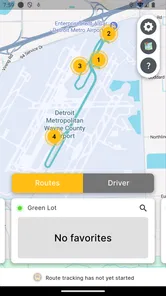
The ability to view an ETA at a stop is more useful than a moving vehicle icon by itself. A map can show activity, but a stop-based estimate turns that activity into a decision. It gives the parent a more direct answer: when should we be ready? That is the part of the design I consider most practical.
At the same time, an ETA should be treated as guidance rather than a guarantee. Traffic, loading time, weather, detours, and changes in the school route can all affect an arrival. I would still have a child ready a little before the displayed time, especially for an important morning. The app can reduce uncertainty, but it cannot remove the need for ordinary caution.
Who will get the most from it
BusWhere makes the most sense for families whose children use a participating school bus service regularly. It is particularly helpful for younger children who should not wait alone for a long period, households with several morning responsibilities, and parents who cannot stand at the stop for the entire expected window.
More From Our News Desk

 Weather - By Xiaomi
Weather by Xiaomi Review: Clear at a Glance, Less Clear Up Close
Xiaomi’s weather app makes everyday forecasts quick to scan, but its calm surface can leave useful details and recovery paths harder to find than they should be.

 X
XX Under Pressure: Can It Recover When Posting Goes Wrong?
A resilience-focused review of X, examining setup, mistaken posts, interruptions, weak connections, and the gaps that matter when recovery needs to be dependable.

 Clash of Clans
Clash of Clans Is Won Between the Battles
Its raids are quick; its community is a long-term project of coordination, teaching, rivalry, and shared responsibility—with all the friction that entails.

 Android Auto
Android Auto Makes the Case for Quieter Car Software
The car interface is no longer judged by how much it can do, but by how quietly it helps. Android Auto shows what drivers now expect—and what still gets in the way.

 MobiOffice: Word, Sheets, PDF
MobiOffice: Transforming Mobile Productivity with Seamless Integration
MobiOffice: Word, Sheets, PDF is redefining mobile productivity with a surprising blend of functionality and innovation.

 EA SPORTS FC Soccer Mobile 26
EA SPORTS FC™ Mobile Soccer: Redefining Mobile Sports Gaming
Dive into EA SPORTS FC™ Mobile Soccer, where immersive gameplay and strategic depth transform mobile sports gaming.
Latest News



It can also help when a student normally walks to a nearby stop but occasionally needs a lift from a parent. Instead of leaving at the same fixed time every day, the parent can check the trip and time the drive more sensibly. That is a small workflow change, but it can prevent both rushed departures and pointless waiting.
I can also see value for families managing different schedules. One child may have an early route while another leaves later, and the app gives the adult a way to check the relevant stop when needed instead of memorizing every timetable detail. The benefit is not advanced planning; it is having current trip information available at the moment a decision has to be made.
Students old enough to manage their own walk to the stop may appreciate the same information, although parents will usually care more about reliability and safety than convenience. For that reason, I would use the app as one part of a routine rather than as the only communication method for a child.
Where it is less suitable
I would skip BusWhere if you are looking for a general public-transit planner. It is not the kind of tool I would choose for comparing city buses, planning a train journey, or finding walking directions across town. Google Maps, Apple Maps, or a local transit app will usually be better for those jobs because they are designed around broad transportation networks rather than a school route.
It is also not the right choice for someone who expects a complete replacement for school communication. A route-tracking screen cannot explain every schedule change, cancellation, discipline issue, or pickup rule. Families should continue to follow notices from the school or transportation provider when those are available.
The biggest practical limitation is the dependency on the connected school service. A parent can install a free app, but that does not automatically mean the family will see a route. The transportation organization has to use the system and provide the relevant access. I would check that point first, before spending time configuring the app or making it part of a child’s daily routine.
What the current version tells me about its evolution
The current Android version is 3.2.172, and the app was released on April 16, 2015. That history suggests a product that has had time to settle into a specific role rather than appearing as a brand-new experiment. The important question for an existing user is not whether it tries to do everything, but whether the current release keeps the core tracking experience dependable and easy to understand.
There is a useful distinction between a version number and a visible promise. A newer release can improve compatibility or correct problems without changing the way a parent checks a stop. I would therefore judge this app by the everyday path from opening it to finding the relevant bus and ETA, not by expecting a dramatic redesign every time the version changes.
The minimum operating-system requirement is Android 7.0. That makes the app accessible to many older Android devices, which is relevant for families that keep an inexpensive or hand-me-down phone for school use. It also means I would still check the device’s general condition before blaming the app for slow performance; an older phone, weak connection, or outdated system can affect any live map experience.
BusWhere has an average rating of 4.4 from over 500 ratings, with around 150 written reviews. I read that as a sign of a generally positive reception, but not as proof that every school route will behave identically. A tracking app can feel excellent when the local transportation setup is accurate and frustrating when route information is delayed or incomplete. The local implementation matters enormously.
It has passed 10 thousand installs, which places it in the practical range of a focused service rather than a mass-market mapping platform. That is not a weakness by itself. In this category, a smaller audience can reflect a specialized purpose: the app only becomes relevant when a school or bus provider uses it.
What changes mean for people already using it
For an existing user, the safest way to evaluate an update is to check the tasks that matter before a busy morning. Can you still reach the correct route or stop? Is the ETA understandable? Does the map show enough context to distinguish the intended bus from another trip? If those basics remain clear, a quiet update may still be valuable even when there is no obvious new feature to talk about.
I recommend checking the app before the first important school day after an update, rather than waiting until the child is already heading outside. This is a simple but often overlooked workflow. Open it when there is time, confirm that the expected information appears, and make sure the family remembers the backup plan if the screen does not load.
That backup plan is especially important because live tracking depends on more than the phone. The bus may need to transmit its position, the service may need to process it, and the device needs a working connection to display the result. If the ETA looks unusual, I would compare it with the normal route timing and contact the school or transportation provider when the discrepancy could affect a pickup.
Another useful habit is to avoid treating the displayed vehicle position as permission to arrive late. The map is best used to decide when to prepare, not to cut the timing so closely that a small change causes a missed bus. In my view, the strongest use of BusWhere is reducing an unnecessarily long wait while keeping a reasonable buffer.
Small details that improve the daily workflow
First, I would establish the correct stop before relying on the app during a rushed morning. Families sometimes focus on the bus and overlook the possibility of selecting the wrong stop, especially when several stops are close together. Confirming the stop during a calm moment prevents a misleading ETA from becoming a last-minute problem.
Second, I would use the app at two different times: once to understand the normal rhythm of the route and again when the bus is actually on its way. The first check helps a parent learn how much preparation time is comfortable. The second check handles the day’s conditions. This is more sensible than opening the app repeatedly without knowing what action the information should trigger.
Third, I would teach older students to interpret the ETA as an estimate linked to a stop, not as a promise that the bus will wait. That small explanation encourages them to be ready before the arrival window and keeps the technology from creating overconfidence.
Finally, I would keep school contact details or the usual transportation notice channel accessible. If the app and the expected schedule disagree, the right response is not to keep refreshing indefinitely. A quick check with the responsible school office is more useful when the situation involves a missed route, a major delay, or a child who is waiting alone.
Remaining gaps and everyday friction
The focused design is both its strength and its limitation. I like that the app is centered on school-bus tracking, but that narrow purpose means it cannot answer every question a family may have. It does not replace a calendar, a general route planner, or direct communication with the driver or school.
There is also a human factor that no interface can solve completely. A parent may see an approaching bus but still need time to gather a backpack, coat, lunch, and younger siblings. The displayed ETA is useful only when it is combined with the household’s actual preparation time. Families should adjust their routine around what they can realistically do, not around the most optimistic interpretation of the screen.
Another point of friction is shared responsibility. If several adults care for the same child, everyone may need to understand which stop and route are relevant. A single person becoming the only one who knows how to check the bus can create a new dependency. I would make the basic process familiar to every regular caregiver.
For children who do not carry a phone, the app naturally remains a parent-facing tool. That is perfectly reasonable, but it means the benefit is strongest when an adult is available to check and act on the information. It should not be presented to a child as a substitute for adult supervision or a clear pickup arrangement.
How it compares with ordinary alternatives
A printed timetable is simple and dependable as a reference, but it cannot reflect the bus’s current position. BusWhere is better when the question is about today’s arrival rather than the planned schedule. The trade-off is that the digital estimate depends on a live service and may require more interpretation.
A phone call to the school or transportation office can provide authoritative help when something unusual happens, but it is slower and less convenient for routine checks. I would use BusWhere for ordinary monitoring and direct contact for exceptions, not force one method to handle both jobs.
General map apps are stronger for driving directions, walking routes, and public transportation across a city. They are not automatically better for a school bus that follows a private or specialized route. If your only need is tracking that school service, a dedicated tool can be more relevant than a larger navigation app with no connection to the bus provider.
In other words, BusWhere is not competing on the same terms as every mapping product. Its value comes from specificity. If your school supports it, that specificity may be exactly what makes it useful. If your school does not, a general map application will probably give you more practical value.
Privacy, safety, and sensible expectations
Live location information deserves careful handling, particularly when it relates to children and regular routines. I would avoid sharing screenshots that reveal a stop, route, or predictable schedule publicly. The app is most useful inside the trusted circle of parents and caregivers who actually need the information.
I would also explain to children that the app shows transportation information, not a guarantee of personal safety. They should still follow the school’s rules for where to wait, when to approach the bus, and what to do if the vehicle is late. Technology should support those habits rather than replace them.
The Everyone content rating makes the app broadly suitable from an age-classification perspective, but that should not be confused with independent permission for a young child to manage transportation alone. The adult’s judgment remains more important than the label on the app page.
What I would watch in future updates
For future releases, I would pay attention to improvements that make the core experience clearer rather than simply adding more screens. Better explanations when a route is unavailable, clearer handling of stale information, and an obvious distinction between a planned stop and a live ETA would all have practical value for families.
I would also look for continued support on older Android devices, since the current minimum of Android 7.0 is helpful to households using older phones. Compatibility matters here because a school transportation app is often installed on a secondary device, not necessarily the newest phone in the family.
Most importantly, I would judge future changes by whether they help a parent make a calm, accurate decision. A feature is worthwhile if it reduces confusion before pickup or drop-off. Extra complexity would be less welcome if it makes the basic stop-and-ETA workflow harder to find.
My final view is that BusWhere is a useful specialist tool when the local school bus network supports it. It is free, focused, available for a wide range of Android devices, and aimed at a problem families genuinely face every school day. I would recommend it to a parent who wants a better way to time the walk to the stop, while being clear that the app works best as a live aid rather than an absolute schedule.
The deciding test is simple: confirm that your school transportation service uses BusWhere, then see whether its stop ETA fits your family’s routine. If it does, the app can remove a surprising amount of morning uncertainty. If you need citywide navigation, guaranteed arrival times, or direct answers about unusual disruptions, another tool or a conversation with the school will be the better choice.
BusWhere for Schools Frequently Asked Questions
Is BusWhere for Schools free to download?
BusWhere for Schools is free to download, so families can install it without paying for the app itself. Its main purpose is to help users follow school transportation, including checking bus locations and estimated arrival times at stops. Access to a student’s route information generally depends on the school or transportation provider using BusWhere and connecting the family’s account.
What devices and software does BusWhere for Schools support?
BusWhere for Schools is available for devices running Android 7.0 or later. Before downloading, check your device’s operating system version so you can confirm it meets that requirement. Keeping your operating system and the app up to date can also help with compatibility and reliable access to route information and notifications.
What is BusWhere for Schools and who is it designed for?
BusWhere for Schools is a school transportation management app that helps families, schools, and transportation teams follow school buses and receive trip-related information. Parents and guardians can typically use it to check a student’s assigned route, view estimated bus location, and receive notifications, while schools and operators use the platform to improve communication and manage daily transportation more efficiently.
How can parents or guardians access BusWhere for Schools?
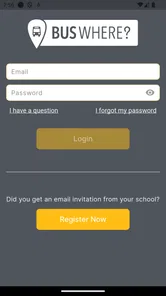
Access usually depends on the school district or transportation provider using BusWhere. Parents and guardians generally need an invitation, account credentials, or a registration code supplied by the school. After installing the app, use the email address or login details connected to your student’s transportation record. If you cannot sign in or do not see your child’s information, contact the school or bus operator rather than creating multiple accounts.
Can I track the school bus in real time with BusWhere for Schools?
The app is intended to provide bus location and route information, but the exact tracking experience depends on the school district’s setup, the vehicle’s GPS equipment, and the quality of the mobile connection. Location updates may occasionally be delayed or unavailable because of poor coverage, technical issues, route changes, or a bus not yet being active. Always follow the school’s official instructions and do not rely on the map alone for urgent decisions.
Pros
- Real-time bus locations help families plan pickups and drop-offs.
- Parents can receive useful arrival updates without calling the school.
- Route information is organized clearly for everyday school travel.
- Can improve student safety by showing expected bus movements.
- Helpful for managing changes to regular transportation routines.
Cons
- Accuracy depends on the school’s tracking equipment and data connection.
- Not every school district may support all available app features.
- Location updates can occasionally be delayed during busy routes.
- Parents may need school-provided login details to access the service.
- Background location and notifications may increase battery or data usage.











