BubbleUPnP UPnP/DLNA License
- 670.00
- 4.1
- Installs
- 500.00K
- Price
- $5.99
Screenshots
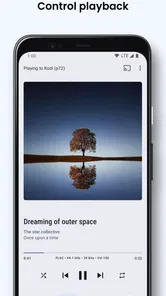
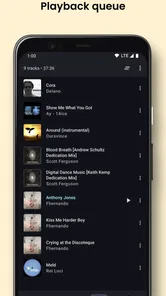
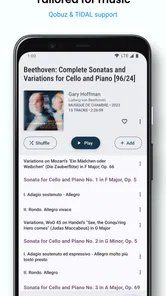
Analysis by Reviewed
I like the idea of keeping a personal media library available beyond the screen where it lives. BubbleUPnP UPnP/DLNA License is aimed at that kind of setup: it helps send media from an Android device to compatible equipment around the home. It makes most sense when you already have a TV, player, or other device that can receive streams and want a flexible way to bring your files to it.
Start with the devices you already own
Before thinking about playlists or movie nights, I would check what role each device can play. One device holds or serves the media, the phone helps you browse and choose it, and a compatible receiver plays it. Sometimes one piece of equipment can fill more than one role, but the key is that the whole chain has to cooperate. This is a different starting point from installing a streaming service, where the catalogue and playback path are already packaged together.
That distinction also helps answer a common question: does the license itself provide songs or films? I treat it as a way to manage playback of media I can access, not as a subscription catalogue. If you mainly want a ready-made library of entertainment, a streaming service is the more direct choice. If you already keep music, photos, or video on devices at home, this kind of controller can make that collection easier to use in different rooms.
When a home library is the starting point
BubbleUPnP is a music and audio app from Bubblesoft, though its appeal extends to browsing and streaming different kinds of media. The license costs $5.99, and the app is rated for Everyone. It has a 4.0 average from around 11K ratings and over 500K installs, which suggests it has found a steady audience among people who want more control over playback around the house. Its current version is 1.11, and it requires Android 5.0 or later.
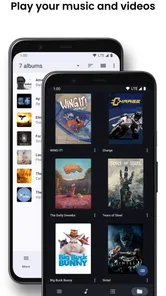
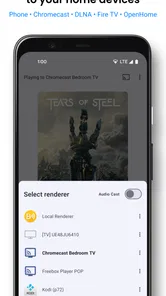
The useful distinction is that this is not simply another player for whatever is stored on the phone. The point is to connect a source of media with a compatible destination, so your phone can act as the controller while a larger screen or speaker handles playback. If that matches the way your household is set up, it can be more convenient than moving files around or relying on a single device to do everything.
From choosing media to handing playback over
When I think about moving personal media from a collection to a shared screen or speaker, I start by checking the route rather than choosing a file: what holds it, what controls it, and what can play it. That quick inventory helps me decide whether this handoff is likely to be smooth, and it sets up the practical choices that come next.
Build a low-friction routine
For a first session, I would keep the test simple: pick one short track or a handful of photos, confirm that the receiver appears, and send something small before trying a long video. This isolates the basic connection from other variables. If it works, you can then try the type of media you actually want to use. If it fails, you have not spent time arranging a whole evening around a setup that still needs attention.
More From Our News Desk

Weather by Xiaomi Review: Clear at a Glance, Less Clear Up Close

X Under Pressure: Can It Recover When Posting Goes Wrong?

Clash of Clans Is Won Between the Battles

Android Auto Makes the Case for Quieter Car Software

MobiOffice: Transforming Mobile Productivity with Seamless Integration

EA SPORTS FC™ Mobile Soccer: Redefining Mobile Sports Gaming
There is another practical question worth asking: do you need the phone to stay involved? The phone is useful as the browsing and control point, but the receiving device takes over playback when the handoff succeeds. I would still keep the phone nearby for selecting something else or adjusting the session, rather than assume that starting playback means the controller is no longer useful. This workflow suits someone who wants a convenient remote, not someone looking to turn the phone into an entirely separate, unattended media appliance.
Finding a practical workflow
In everyday use, I would treat the phone as a remote control and browser rather than the place where every file must be watched or heard. For example, if I have music or photos I want to share in a room, I can browse for the material on the phone and direct it to compatible equipment. That separation is the app’s real value: I can choose what plays without having to keep the phone as the main viewing screen.
A realistic use for me would be coming home with photos I want to show at dinner. Instead of passing a phone around, I can use it to find the pictures and send them to a compatible screen in the room. For music, I might choose a collection from a home source and let a receiver handle the sound while I do something else. In both cases, the benefit is not that the app creates new media; it makes existing media easier to present in the right place.
There is a small but important trade-off here. UPnP/DLNA streaming depends on the devices being able to see one another and on the receiving device accepting the media format. A familiar wireless network and compatible equipment matter more than a polished casting button. If a device does not appear, I would first check that both ends are on the same local network and that the receiver supports this way of sharing; changing apps will not fix an incompatible setup.
Why it differs from simpler casting
Compared with the built-in cast option in a streaming service, a DLNA tool is more about reaching personal libraries and compatible devices than launching a particular subscription app. That flexibility is useful if your files are spread across devices or stored on a home server, but it also asks you to understand the basic roles of source, controller, and renderer. Someone who only wants to tap a cast icon in a video app may find the usual built-in option quicker and less confusing.
It also occupies a different place from a basic phone player. A local player is usually the simpler pick when I only want to listen through headphones or watch something on the handset. BubbleUPnP becomes more interesting when the destination matters: another room, a larger screen, or equipment already connected to a home media setup. The trade-off is extra setup and troubleshooting in exchange for more choice about where personal media plays.
A practical habit is to test the connection with a short audio track or a small photo set before settling in for a long film. That quickly tells me whether the destination is visible and whether the handoff works, without making troubleshooting feel like an evening project. I would also keep the phone charged if I expect to browse or control playback for a long session, since the phone remains part of the workflow even when another device is playing the media.
Make format checks part of the handoff
A device showing up on the network is only the first half of a successful session. The receiver also has to handle the file you choose. If a particular video or audio file will not play, I would try a different known-compatible file first. That helps distinguish a connection problem from a format problem, and it is a more useful test than repeatedly disconnecting and reconnecting everything.
For a library with mixed file types, I would test a representative sample before relying on it for a gathering. One successful song does not prove that every video will behave the same way. This is a small preparation step, but it avoids the awkward situation of discovering a compatibility issue when everyone is waiting to see the slideshow or movie. The app can connect the pieces, but the receiver’s capabilities still shape what the final experience looks like.
Where it fits—and where it doesn’t
This app is a better fit for people who already have compatible home devices and want a central way to direct their own media. It is less suitable if you expect every television or speaker to work automatically, or if you want a service that supplies a ready-made catalogue of films and songs. It is also worth checking how your particular receiver handles the files you use most; compatibility at the network level does not guarantee every format will play smoothly.
I would also skip it if your main goal is editing, making, or publishing creative work. The app’s useful role is at the playback and sharing end of a workflow, not at the point where audio or video is produced. For creators, it may still be handy to review a finished file on a different device or show images to a group, but it is not a replacement for an editor, a project manager, or a publishing platform.
For households with mixed habits, it helps to decide who will control playback. One person can browse and send media from the phone while others watch or listen on the receiver. That can be more comfortable than handing the phone around, but it also means the person holding the controller becomes the point of contact when someone wants to change tracks or choose another photo. If everyone expects independent control, a shared streaming service or each person’s own player may be a better fit.
As a paid unlocker, the license is easiest to justify when you use the streaming workflow often enough to value fewer restrictions and a dedicated controller. If you are still unsure whether your devices cooperate, try the setup before paying and decide based on the parts of the workflow you actually need. I would not buy it just because the phrase “stream to devices” sounds useful; the receiving hardware is central to whether it earns a place in your routine.
A measured creator verdict
Although it is not a tool for making or editing creative work, it can help with the final handoff: getting finished audio, video, or photos from a personal collection onto a screen or sound system where other people can enjoy them. For a family slideshow, a music session in another room, or a film stored on a home server, that can be a genuinely handy bridge. The main question to answer first is whether your devices support the same local streaming approach.
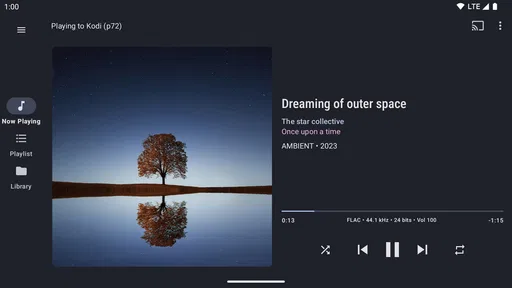
So, what exactly is BubbleUPnP UPnP/DLNA License? In simple terms, it’s an app that allows you to stream all your media from your phone to any compatible device using UPnP/DLNA protocols. Imagine having a personal media server right in your pocket! The first time I fired up the app, I was impressed by its straightforward design and the ease with which it connected to my devices. No more fiddling around with wires or complicated setups – just pure, unadulterated streaming joy.
Features that Stand Out
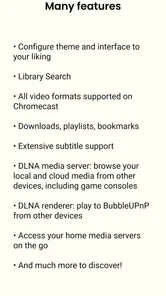
One of the standout features of BubbleUPnP is its versatility. Whether you’re looking to stream your latest holiday photos or binge-watch a series from your NAS server, this app has got you covered. The app supports a wide array of formats, ensuring that you can play almost anything you throw at it. Plus, it even offers transcoding options for those tricky formats that just refuse to cooperate.
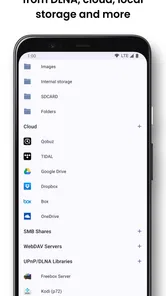
Another feature that I absolutely love is the ability to access media from various cloud services like Google Drive, Dropbox, and OneDrive. It’s like having a universal remote for all your media files, no matter where they’re stored. And let’s not forget the sleep timer – perfect for those nights when you fall asleep to your favorite tunes.
Using BubbleUPnP: My Personal Experience
Using BubbleUPnP feels like having a superpower. I remember the first time I used it to stream a 4K movie to my TV without a hitch. The quality was pristine, and the playback was smooth as butter. The app’s user interface is intuitive, and even if you’re not tech-savvy, you’ll find yourself navigating through it like a pro in no time. Setting up servers, browsing media libraries, and casting to devices – all of it feels surprisingly effortless.
Final Thoughts
In a world where convenience is king, BubbleUPnP UPnP/DLNA License truly fits the bill. It’s a robust app that delivers on its promises, making it a worthy addition to your app arsenal. Whether you’re a casual user or a media enthusiast, this app is bound to enhance your media consumption experience. Go on, give it a whirl, and unlock the full potential of your media library!
BubbleUPnP UPnP/DLNA License Frequently Asked Questions
What is BubbleUPnP UPnP/DLNA License and what does it offer?
BubbleUPnP UPnP/DLNA License is an app designed to enhance your media streaming experience across devices. It supports UPnP/DLNA protocols, allowing seamless sharing of music, videos, and photos between your Android device and compatible devices like smart TVs and game consoles. It offers features like transcoding, media download, and cloud streaming, making it a comprehensive tool for media enthusiasts.
Can I use BubbleUPnP UPnP/DLNA License to stream media around my home?
Yes. BubbleUPnP is intended for streaming media to compatible devices in your home, such as smart TVs and other network media players. Your phone and receiving device need to be able to communicate over the local network, and the receiver must support UPnP/DLNA. This makes it useful for playing your media on a larger screen or through another connected device.
Is BubbleUPnP UPnP/DLNA License compatible with all devices?
BubbleUPnP UPnP/DLNA License is compatible with a wide range of devices that support UPnP/DLNA protocols. This includes most smart TVs, gaming consoles, and other network media players. However, compatibility may vary based on the specific model and software version of the device. It is advisable to check your device's specifications or consult the manufacturer for confirmation.
Does BubbleUPnP UPnP/DLNA License require an internet connection to function?
While BubbleUPnP UPnP/DLNA License does not require an internet connection for local network media streaming, certain features such as cloud streaming and remote access do need an active internet connection. For optimal use, ensure your local network is stable, and your internet connection is sufficient to handle streaming if you plan to use these online features.
What Android version is required to install BubbleUPnP UPnP/DLNA License?
The app requires Android 5.0 or later. Before downloading, check the Android version on your device to make sure it meets that requirement. BubbleUPnP UPnP/DLNA License is an unlocker app, so it is intended to unlock features for the BubbleUPnP experience rather than serve as a general-purpose media player on its own.
Pros
- Supports various media formats seamlessly.
- Allows streaming to multiple devices.
- Integrates with cloud storage services.
- User-friendly interface and navigation.
- Robust customization options available.
Cons
- Occasional connectivity issues reported.
- Some features require in-app purchases.
- Complex setup for novice users.
- Limited free version capabilities.
- May drain battery quickly on mobile.











