

Bridgeport GBT Bus Tracker
- 45.00
- 3.8
- Installs
- 10.00K
- Price
- Free

Screenshots
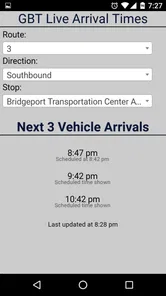
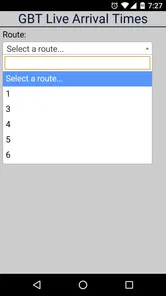
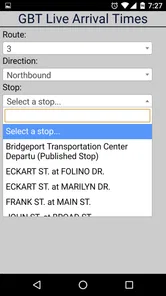
Analysis by Reviewed
I like transit apps that respect my attention, and Bridgeport GBT Bus Tracker takes that approach seriously. It is a focused Maps & Navigation app from bigreni, built around Greater Bridgeport Transit rather than trying to become an all-purpose travel planner. That narrow purpose is its biggest strength: if I need a quick way to check local bus information, the app feels more direct than opening a large mapping platform and working through several layers of menus.
At the same time, this is not the kind of app I would install expecting a complete replacement for every transit tool. Its appeal depends heavily on whether I regularly use GBT services and whether I prefer a lightweight, dedicated tracker over a broader journey-planning application. After spending time with it, my view is that it works best as a practical companion for routine local trips, especially when I already know which route or stop I need.
How the app feels today
The current release is version 4.0, and the product has been available since April 8, 2017. That history matters because this does not feel like a brand-new experiment. It has had time to settle into a clear identity: a small app for Greater Bridgeport bus riders who want relevant information without carrying a large, feature-heavy navigation package.
Its presentation is straightforward rather than flashy. I found that useful when checking transit information while walking, standing at a stop, or trying to make a quick decision before leaving home. A dedicated local tracker can reduce the mental clutter that comes with general map apps, where driving directions, walking routes, businesses, traffic layers, and unrelated recommendations compete for space.
The app is free to download, which makes trying it relatively easy. It is rated for Everyone, so it is suitable for a broad audience, including families deciding which tool a younger rider can use. The listing shows a 3.8 average from around 100 ratings, with roughly 45 written reviews. That is not enough feedback to treat the score as a definitive verdict, but it does suggest a mixed, ordinary user experience rather than universal enthusiasm.
Usage is also modest compared with major navigation platforms, with over 10 thousand installs. I see that as useful context, not a criticism. This is a local utility, and a local utility does not need enormous reach to be valuable to the people it serves. Its usefulness is better judged by how quickly a GBT rider can answer a specific question.
A good fit for routine GBT travel
I would recommend it first to someone who takes Greater Bridgeport buses often enough to care about departure information but does not want a full travel-planning suite. A commuter checking a familiar route before leaving work is a strong example. So is a student deciding whether to wait for the next bus or adjust a pickup plan, or a visitor who knows the general destination but wants a local transit view rather than a broad city map.
More From Our News Desk

 Weather - By Xiaomi
Weather by Xiaomi Review: Clear at a Glance, Less Clear Up Close
Xiaomi’s weather app makes everyday forecasts quick to scan, but its calm surface can leave useful details and recovery paths harder to find than they should be.

 X
XX Under Pressure: Can It Recover When Posting Goes Wrong?
A resilience-focused review of X, examining setup, mistaken posts, interruptions, weak connections, and the gaps that matter when recovery needs to be dependable.

 Clash of Clans
Clash of Clans Is Won Between the Battles
Its raids are quick; its community is a long-term project of coordination, teaching, rivalry, and shared responsibility—with all the friction that entails.

 Android Auto
Android Auto Makes the Case for Quieter Car Software
The car interface is no longer judged by how much it can do, but by how quietly it helps. Android Auto shows what drivers now expect—and what still gets in the way.

 MobiOffice: Word, Sheets, PDF
MobiOffice: Transforming Mobile Productivity with Seamless Integration
MobiOffice: Word, Sheets, PDF is redefining mobile productivity with a surprising blend of functionality and innovation.

 EA SPORTS FC Soccer Mobile 26
EA SPORTS FC™ Mobile Soccer: Redefining Mobile Sports Gaming
Dive into EA SPORTS FC™ Mobile Soccer, where immersive gameplay and strategic depth transform mobile sports gaming.
Latest News



The most effective way to use it is to make it part of a small routine. Before leaving, I would check the relevant stop or route, compare the displayed information with the time I actually need to arrive, and allow a little flexibility instead of treating any estimated arrival as a promise. That habit is more dependable than opening the app only after I am already late.
There is also a practical benefit to keeping a dedicated tracker separate from a primary navigation app. I can use a general map for walking directions to the stop, then use this app for the GBT-specific check. That division of labor makes sense: one tool handles the street, while the other stays focused on the local bus network.
What version 4.0 tells me about the product
The move to version 4.0 indicates that the app has gone through several stages of development, but I would not read that number as proof of a particular feature set. A version label alone cannot tell me whether a change was visual, technical, or related to transit information. What I can say is that the current product should be judged as an established iteration rather than as the original release from 2017.
That distinction is important for existing users. Someone returning after a long break should open the current version with an open mind instead of assuming the app looks or behaves exactly as it did years ago. Conversely, a new user should not expect a major platform with constant public announcements about every internal change. The experience remains centered on the simple job of checking GBT bus information.
I appreciate that the app’s evolution has not pushed it away from its local purpose. Many navigation products become increasingly crowded as developers add unrelated services. Here, the central use case remains easy to understand. The trade-off is that a focused product may feel limited beside a large app that combines transit, walking, cycling, ride services, and detailed destination planning in one place.
How I would use it during an ordinary day
Imagine I finish work on a rainy afternoon and need to get home by bus. I would check the app before leaving the building, not just when I reach the stop. If the information suggests that the next bus is not convenient, I have time to walk to another option, contact someone, or change my plan. That early check is where a tracker is most useful: it turns waiting into a decision rather than a guess.
Once I am on the way, I would avoid repeatedly refreshing it every few seconds. A transit tracker is most helpful when I use it at meaningful decision points: before leaving, while approaching the stop, and when deciding whether a delay changes my next move. Excessive checking can create false confidence because a displayed estimate can change as the service situation changes.
For a regular rider, I would keep the app alongside a simple backup habit. Know the stop name, remember the route direction, and keep enough time for a missed connection. The app can support that knowledge, but it should not replace it. This is one of the less obvious trade-offs of a lightweight tracker: its simplicity makes it quick, yet it also encourages me to do more of the trip planning myself.
Where it is stronger than a general map
Compared with a usual all-purpose mapping app, Bridgeport GBT Bus Tracker has a clearer local focus. I do not have to begin with a destination and ask a broad service to calculate an entire trip. When my question is simply “what is happening with my GBT bus?” a dedicated tool can be more comfortable and less distracting.
That difference matters most for repeat journeys. General map apps are excellent when I am unfamiliar with an area, comparing several transport modes, or walking from a stop to a precise address. But they can be excessive for a rider who already knows the route and only wants transit information. This app is better suited to that quick confirmation.
The comparison changes when the trip is complicated. If I need several transfers, a precise door-to-door itinerary, walking guidance, or a choice between bus and other transport, I would reach for a broader navigation service first. The local tracker may still be useful during the bus portion, but I would not make it my only planning tool for an unfamiliar multi-stage journey.
Small workflow choices that improve the experience
One useful approach is to separate “planning” from “checking.” I would use a broad map to understand where I am going, then open this app only for the GBT-specific part. That avoids forcing one application to answer two different questions and makes it easier to notice whether a problem is with the route plan or with the bus timing.
Another tip is to check the direction carefully before relying on the result. Local bus information is only useful when it matches the correct stop and travel direction. This sounds obvious, but it is exactly the kind of mistake that happens when I am rushing. A lightweight interface can make a quick check easy, but it cannot remove the need to read the route context.
I would also treat the app as a decision aid rather than a guarantee. If I have an appointment, I would build in extra time instead of scheduling my arrival around the closest possible estimate. That is not a flaw unique to this product; it is a sensible rule for any live transit tracker. The app helps me choose when to leave, but it cannot control traffic, boarding time, or what happens after I get off the bus.
What may frustrate new and returning riders
The narrow scope can feel restrictive if I expect a full travel assistant. I would not install it for restaurant discovery, walking tours, driving directions, or a broad regional trip planner. Its value starts and ends with the Greater Bridgeport bus use case, so people who rarely ride GBT may not open it often enough to justify keeping it installed.
The relatively moderate rating also makes me cautious about recommending it without conditions. A 3.8 average is perfectly reasonable for a small local utility, but it is not a signal that every rider will find the experience flawless. Transit apps are especially sensitive to timing, data freshness, device behavior, and local service changes. A user who needs highly polished trip planning may prefer a more established general navigation app, even if it feels less focused.
The in-app purchase range runs from under a dollar to just under ten dollars per item. That means the free entry point is not necessarily the whole commercial picture, and I would pay attention to any purchase prompt before confirming it. For someone who only needs occasional bus checks, the existence of optional purchases may be a reason to compare the app with alternatives first. For a frequent rider, the decision depends on whether the extra value offered inside the app justifies the cost.
The minimum operating-system requirement is iOS 11. That is helpful for people using an older compatible device, although device compatibility should still be checked before relying on the app for an important trip. I would not wait until the morning of a commute to discover that an old phone cannot install or properly run the current release.
Who should choose another option
I would skip this app if I live outside the Greater Bridgeport area, use several transit agencies in one journey, or need detailed door-to-door navigation. A regional traveler may be better served by a larger map application that combines multiple agencies and transport modes. Someone who mainly walks or drives will also get little value from keeping a bus-focused tool available.
I would also choose a broader alternative if I am planning a trip for someone unfamiliar with the area and need to explain every stage clearly. In that situation, the ability to see walking legs, transfers, destinations, and the final approach in one place may matter more than the local focus. This tracker can complement that process, but it is unlikely to replace it completely.
What existing users should watch
For current users, the most important thing to watch is whether version 4.0 continues to make the core check quick and understandable. I would pay attention to how easily I can identify the correct route or stop, whether the information remains useful for everyday decisions, and whether the app continues to feel lighter than a general navigation platform.
I would also watch how the app fits into my personal backup plan. If I notice that I am using it only after a bus should already have arrived, I would change my routine and check earlier. If I regularly need information beyond GBT, that is a sign that another app should take the lead. Product evolution is valuable only when it improves the task I actually perform.
For new users, I would begin with one familiar journey rather than depending on it immediately for an unfamiliar appointment. Try it before leaving, compare what it shows with your own route knowledge, and see whether the focused format suits you. That small test reveals more than the install count or rating because the right question is personal: does it help you make a better bus decision with less effort?
My final opinion is positive but specific. Bridgeport GBT Bus Tracker is most useful as a focused local companion, not as a universal navigation replacement. I like its clear purpose, free starting point, and suitability for quick GBT checks. I would recommend it to regular Greater Bridgeport bus riders who value simplicity and are comfortable keeping a broader map available for walking directions or complex planning.
I would be more hesitant for occasional visitors, multi-agency travelers, and anyone who expects a polished all-in-one trip planner. The app’s best quality is also its boundary: it concentrates on one local transit need. If that need matches your daily travel, the compact approach can be genuinely convenient. If it does not, a larger alternative will probably serve you better.
Overall, my advice is to try it as part of a two-tool routine: use a general map for the complete journey and use Bridgeport GBT Bus Tracker for the GBT-specific check. That arrangement plays to its strengths, limits the frustration caused by its narrower scope, and gives riders a practical way to decide when to leave without asking one small app to do everything.
Bridgeport GBT Bus Tracker Frequently Asked Questions
Who is Bridgeport GBT Bus Tracker intended for?
Bridgeport GBT Bus Tracker is aimed at passengers who use Greater Bridgeport Transit and want bus information in one lightweight app. It may be useful for regular commuters, occasional riders, and visitors navigating the Bridgeport area. The app focuses on GBT services rather than serving as a general-purpose transit guide for every city or transportation provider.
What is Bridgeport GBT Bus Tracker used for?
Bridgeport GBT Bus Tracker is designed to help passengers follow Greater Bridgeport Transit bus services in and around Bridgeport, Connecticut. It can provide route information, stop details, scheduled times, and, where available, real-time vehicle locations or arrival predictions. The app is most useful for checking a trip before leaving and monitoring a bus while waiting at a stop.
Does Bridgeport GBT Bus Tracker show real-time bus arrivals?
The app may display real-time arrival predictions and vehicle positions for participating Greater Bridgeport Transit routes, but availability can depend on the route, stop, operating period, and the transit agency’s live data feed. Predictions are estimates rather than guarantees, since traffic, detours, weather, equipment problems, or data delays can affect the actual arrival time.
Can I plan a complete trip with Bridgeport GBT Bus Tracker?
Bridgeport GBT Bus Tracker is primarily focused on Greater Bridgeport Transit routes, stops, schedules, and bus tracking. Depending on the version and available features, it may help you identify a route or departure, but it should not automatically be assumed to replace a full regional trip-planning service. For complex journeys involving multiple agencies, walking directions, or rail connections, verify the details separately.
Does the app require location access or an internet connection?
An internet or mobile-data connection is generally needed to download current schedules, receive service updates, and view live bus information. Location permission may be requested to find nearby stops or center the map around your position, although basic route and schedule searches may work without sharing your location. You can review or change these permissions in your Android or iOS settings.
Pros
- Real-time bus locations make it easier to estimate arrivals.
- Route and stop information helps with planning local trips.
- Useful for checking service details before leaving home.
- Simple tracking tools are convenient for regular commuters.
- Can reduce waiting time at unfamiliar stops.
Cons
- Arrival estimates may be inaccurate during delays or heavy traffic.
- Coverage is limited to Bridgeport GBT transit services.
- Requires an internet connection for current tracking data.
- The interface may feel basic compared with larger transit apps.
- Service alerts may not always appear immediately.











