

Bolt Driver: Drive & Earn
- 948.00
- 4.4
- Installs
- 10.00M
- Price
- Free
Screenshots

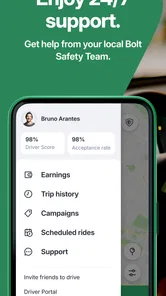
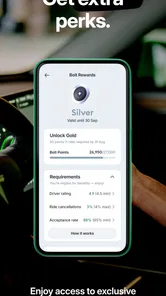
Analysis by Reviewed
When I think about a driver app, the main question is not how polished the screen looks; it is whether I can manage a ride request and navigation without losing focus on the road. That is the part of Bolt Driver: Drive & Earn I would judge most closely. It is a free Maps & Navigation app from Bolt Technology, built around helping drivers handle work through a phone rather than treating navigation as a separate task.
One workflow, from request to destination
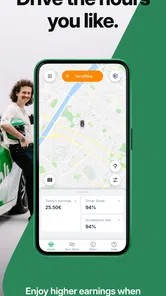
The practical appeal is having ride requests and navigation in the same driving workflow. Instead of treating a map app and a work app as unrelated tools, the driver can use Bolt Driver to set availability, respond to requests, and follow directions. In a busy shift, reducing the need to switch between apps can make the process feel more direct. I would still set up the route before moving and avoid interacting with the phone while driving; convenience is useful only when it does not distract from traffic.
The app’s purpose also shapes how I would use it: it is for people who want to drive for Bolt, not for someone simply looking for a general-purpose map. If I were planning a personal road trip, I would choose a conventional navigation app first. If I were considering ride work, however, keeping the work flow and route guidance together is the feature that makes this app relevant.
What combining work and directions changes
That combined workflow is useful for more than avoiding a quick app switch. When a request comes in, the driver is already working in the environment used to manage availability and follow a route. It can make the sequence—from deciding to work, to taking a trip, to navigating—feel easier to keep track of. I would still treat the phone as a tool to prepare while parked, not as something to operate whenever a prompt appears.
There is a trade-off in relying on one work-focused app for both tasks. A dedicated navigation app may be preferable for a driver who already knows its map display well, or who wants to plan a route independently of ride work. Bolt Driver’s advantage is not that it replaces every map app; it is that its navigation sits within the ride-driving workflow. For a personal journey with no intention of accepting requests, that distinction makes it a less natural choice.
Getting Started with Bolt
Jumping into the driver’s seat with Bolt Driver: Drive & Earn is a breeze. The app itself is straightforward, making it easy for anyone to get started without a hassle. All you need is a smartphone, a driver’s license, and a clean vehicle. Once you’ve got those lined up, you’re ready to hit the road! The registration process is surprisingly swift—no need to wade through endless paperwork. Just upload your documents, and you’re good to go!
The Driving Experience
The driving experience is where Bolt truly shines. The app’s interface is incredibly user-friendly. With just a few taps, you can set your availability and start accepting rides. One feature I particularly enjoyed is the in-app navigation, which is both accurate and reliable. It’s like having a trusty co-pilot who never leads you astray.
More From Our News Desk

 Weather - By Xiaomi
Weather by Xiaomi Review: Clear at a Glance, Less Clear Up Close
Xiaomi’s weather app makes everyday forecasts quick to scan, but its calm surface can leave useful details and recovery paths harder to find than they should be.

 X
XX Under Pressure: Can It Recover When Posting Goes Wrong?
A resilience-focused review of X, examining setup, mistaken posts, interruptions, weak connections, and the gaps that matter when recovery needs to be dependable.

 Clash of Clans
Clash of Clans Is Won Between the Battles
Its raids are quick; its community is a long-term project of coordination, teaching, rivalry, and shared responsibility—with all the friction that entails.

 Android Auto
Android Auto Makes the Case for Quieter Car Software
The car interface is no longer judged by how much it can do, but by how quietly it helps. Android Auto shows what drivers now expect—and what still gets in the way.

 MobiOffice: Word, Sheets, PDF
MobiOffice: Transforming Mobile Productivity with Seamless Integration
MobiOffice: Word, Sheets, PDF is redefining mobile productivity with a surprising blend of functionality and innovation.

 EA SPORTS FC Soccer Mobile 26
EA SPORTS FC™ Mobile Soccer: Redefining Mobile Sports Gaming
Dive into EA SPORTS FC™ Mobile Soccer, where immersive gameplay and strategic depth transform mobile sports gaming.
Latest News



What’s more, the app gives you real-time updates on ride requests, so you’re never left waiting around. Plus, the passenger rating system ensures that you know what to expect from your riders, adding an extra layer of comfort to your driving experience.
Making the workflow work for you
For a new driver, I would treat the first few sessions as practice with the interface, rather than immediately trying to squeeze every possible trip into a shift. Before setting off, take a moment while parked to check that the phone is mounted securely, the route is legible, and the app is ready for requests. That small routine matters because a navigation prompt that arrives at a complicated junction is harder to handle calmly than one you have prepared for.
In a realistic evening scenario, a driver might finish another commitment, open the app while parked, set availability, and then decide whether to accept work based on the time and energy left. During a ride, the in-app directions can keep the work task and route together; afterward, the earnings view gives a way to review the trip. I would not assume that every shift will be equally busy, so I would plan around the hours I can actually work rather than treating app access as a promise of steady demand.
A practical routine for a short shift
If I had only a limited window to drive, I would make the decision to go online before starting the car, not at a traffic light or while looking for a place to pull over. I would check that the phone is charging, the mount does not block my view, and the route can be read without leaning toward the screen. These small habits matter especially when a driver is new to handling requests and directions together.
For a first session, I would also leave room to learn how the request flow feels in the areas I know. Familiar streets can make it easier to concentrate on the app’s prompts without also trying to understand an unfamiliar neighborhood. That does not guarantee a smooth shift, but it gives a new driver a calmer way to notice where the workflow is clear and where they need to pause and check the route safely.
Earning Potential
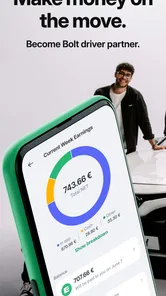
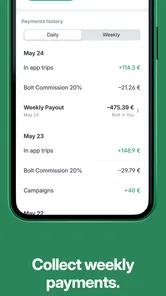
Let’s talk money because that’s what we’re all here for, right? With Bolt Driver: Drive & Earn, your earnings are directly tied to how much you drive. The app provides a clear breakdown of your earnings after each trip, so you always know where you stand.
Bolt’s commission structure is pretty competitive, and they often run promotions and bonuses to help you maximize your income. Whether you’re driving full-time or just a few hours a week, there’s definitely potential to earn a decent amount. Oh, and did I mention the instant payouts? No waiting around for your hard-earned cash!
What the numbers can—and cannot—tell you
I would use the per-trip breakdown as a record for comparing shifts, not as a guarantee of what the next one will bring. Looking at several sessions can help a driver notice whether a particular time of day or area fits their routine better. It is also sensible to account for the costs and time involved in driving, rather than judging a shift only by the amount shown after a ride. That makes the app’s earnings information more useful as a planning aid than as a reason to overcommit.
Compared with ordinary navigation apps, Bolt Driver is aimed at coordinating work rather than simply finding a route. A standalone map may offer a familiar interface for personal journeys, but it does not replace a driver-focused place to manage availability and ride requests. Conversely, if a driver already has a preferred navigation setup or does not want app-based ride work, this focused workflow may add little. The right choice depends on whether accepting rides is central to the task.
How to judge whether the routine pays off
I would keep a simple personal record of the time spent driving and the trip earnings shown in the app, then compare sessions that fit similar parts of my schedule. That is more useful than drawing conclusions from one unusually busy or quiet outing. It also helps separate the appeal of seeing trip amounts in the app from the broader question of whether driving is worth the time and vehicle use for me.
For someone asking whether the app guarantees a reliable side income, my honest answer is to treat it as a way to access ride work, not as a promise of demand or a fixed result. A driver’s actual experience can depend on their available hours, location, and willingness to drive. I would try a modest session first and make a decision from my own experience rather than committing a large part of my week based on expectations.
The Community Aspect
One thing that really stood out to me is the sense of community among Bolt drivers. The app fosters a supportive environment, allowing drivers to connect and share tips through forums and meet-ups. It’s not just about earning money; it’s about being part of a community that’s working towards a common goal.
When another tool may be a better fit
If my main need were dependable turn-by-turn directions for errands, a dedicated maps app would be a simpler choice. It is built around finding and following routes without the separate purpose of managing ride work. If I wanted to drive for Bolt, though, using only a general map would leave the availability and request side of the job outside that navigation routine. The useful comparison is therefore not which app is universally better, but whether I need a driver workflow or only a map.
I would also skip this app if I did not want to take ride requests, was uncomfortable driving while following phone-based directions, or needed an income plan with predictable returns. Being able to choose when to use a driver app can suit a flexible schedule, but flexibility does not remove the demands of traffic, attention, and time. Someone who wants to explore the idea of ride work can start cautiously; someone who dislikes those demands is unlikely to find the combined workflow appealing.
Who I would recommend it to
I see the strongest fit for drivers who want a flexible way to take ride requests and value having navigation within the same work routine. It may also suit someone testing whether occasional driving fits around other responsibilities, provided they approach earnings as variable and check the app’s requirements for their own situation before relying on it. Someone who needs predictable income, dislikes driving in changing traffic, or wants only turn-by-turn directions should consider other options instead.
The app is free and has an Everyone age rating; it has been available since July 18, 2013, and its current version is DA.124.0, with Android 7.0 as the minimum operating-system requirement. It has a 4.4 average from around 605,000 ratings and more than 10 million installs. Those figures suggest a widely used app, but they do not tell me whether driving through it will suit a particular city, schedule, or personal budget. I would make that decision based on a careful first trial, not popularity alone.
Before relying on it for regular driving
A few practical questions are worth resolving before turning a trial into a routine. Is the phone compatible with the app’s Android requirement, and can it stay powered and visible in the car? Can I give the route prompts my attention without handling the device on the move? Do I have enough flexibility to stop or decline a shift when I am tired? These are not app features; they are the conditions that make a driver-focused workflow sensible to use.
I would also check the driver requirements that apply to my own circumstances before planning around registration. The app’s onboarding may guide a person through the process, but a general review cannot determine whether an individual or vehicle qualifies. Treating that as an early check avoids spending time planning a schedule before knowing whether the work is a practical option.
For an occasional driver, the best approach is to start with a session that fits comfortably into an existing schedule, then decide whether the request-and-navigation flow feels manageable. For someone considering regular driving, I would look beyond the app’s convenience and assess the overall time commitment, driving costs, and fit with daily life. The phone can organize the work; it cannot make those personal trade-offs on the driver’s behalf.
In conclusion, if you're looking to make some extra cash on the side, or even considering a full-time gig, Bolt Driver: Drive & Earn is worth checking out. It’s not just an app; it’s a lifestyle choice that offers flexibility, community, and a chance to boost your income. So why not give it a try and see where the road takes you?
Bolt Driver: Drive & Earn Frequently Asked Questions
Can I use Bolt Driver: Drive & Earn in my city or country?
Bolt Driver is designed for people who want to work with Bolt, but whether you can register and accept rides depends on the service being available where you plan to drive. Check the app’s registration options for your location before making plans around it. Local availability matters because driver onboarding and the kinds of trips offered can vary by market.
What information and documents should I have ready before signing up?
It is helpful to have your personal details, vehicle information, and relevant driving documents ready before starting registration. The process may ask you to provide items such as a driver's license and vehicle documents so your application can be reviewed. Having accurate details on hand can make the process easier, although the specific requirements depend on where you intend to drive.
Can I use Bolt Driver if I only want to navigate and not accept rides?
Bolt Driver is primarily intended for drivers using Bolt’s ride service, rather than as a general-purpose navigation app. Its navigation assistance is connected to handling trips, alongside ride management and earnings tracking. If you only need directions for personal journeys, a dedicated navigation app may be a better fit; this app is most relevant when you plan to work with Bolt.
Is Bolt Driver: Drive & Earn free to download, and what devices can run it?
Bolt Driver: Drive & Earn is free to download and is made for Android devices running version 7.0 or later. It is a driver-focused app in the Maps & Navigation category, so its main purpose is helping drivers use Bolt’s ride service rather than serving as a general navigation tool. Before installing, check that your phone meets the operating-system requirement and has enough space for the app.
What is Bolt Driver: Drive & Earn?
Bolt Driver: Drive & Earn is a mobile application designed for drivers who want to earn money by providing rides to passengers. The app connects drivers with riders looking for convenient and reliable transportation. It offers a platform for drivers to manage their rides, track earnings, and receive navigation assistance. Bolt Technology is the developer, and the app’s straightforward “Drive and make money!” message sums up its focus.
Pros
- Flexible work hours for drivers.
- User-friendly interface for easy navigation.
- Quick and efficient ride matching.
- Transparent earnings breakdown.
- Wide availability across multiple cities.
Cons
- High commission rates for drivers.
- Limited customer support availability.
- Occasional app glitches.
- Surge pricing can deter customers.
- Inconsistent ride availability in suburbs.












