BLM Public Lands Map Guide USA
- 27.00
- 3.4
- Installs
- 5.00K
- Price
- $1.99
Screenshots
Analysis by Reviewed
My first question with a public-land map is never just “Where is the nearest green space?” It is whether a place makes sense for the kind of day I have in mind, and whether I can plan the approach responsibly. That is the lens I use for the BLM Public Lands Map Guide USA: it is a focused starting point for finding Bureau of Land Management areas, not a substitute for every navigation tool or a guarantee that a specific route is open.
Why the land-management focus matters
Public land can look simple on a broad map and become complicated when a road, trail, or boundary matters. I find a dedicated BLM guide most useful at the early planning stage, when I am comparing possible places and trying to understand where public-land exploration might fit into a trip. That focus is a real distinction from a general map, which usually prioritizes addresses, businesses, and driving directions.
I would still treat the map as one part of a decision, not the final word on access. Before leaving, I would check current official information for the area I plan to visit and consider whether the route suits my vehicle and experience. This extra step is especially worthwhile when a wrong turn could leave me far from an easy alternative.
Who benefits most from a BLM-focused map
I’d put this app on the shortlist for people who already know they want to spend time on Bureau of Land Management ground: campers comparing possible areas, hikers plotting a day outside, or road-trippers looking for a reason to take the slower route. Its focus is useful when the question is “where can I explore?” rather than “how do I get to the nearest shop?” If your plans revolve around city streets, transit, or turn-by-turn driving, a general navigation app is likely the more practical everyday choice.
A sensible workflow is to use the guide to identify a promising public-land area, then check the route and practical details with tools you already trust. I wouldn’t treat a map view as proof that every road, trail, or stopping place is open or suitable for my vehicle. Before setting off, I’d verify access and local conditions through current official sources, especially if a small change in road access could derail the trip.
Discovering the Great Outdoors
As someone who’s always on the lookout for new trails and camping spots, I was thrilled to dive into the BLM Public Lands Map Guide USA. Right off the bat, the app impressed me with its extensive database of public lands. Whether you’re into hiking, camping, or just a casual day trip, this app has got you covered. It’s like having an encyclopedia of nature right at your fingertips.
User-Friendly Navigation
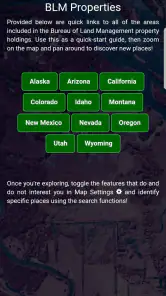
One of the standout features of this app is its user-friendly interface. I’m not exactly a tech wizard, but navigating through the app was a breeze. The layout is intuitive, with clear categories and an easy search function. Within minutes, I was able to find detailed maps and information about nearby public lands. It’s perfect for planning that spontaneous weekend getaway!
More From Our News Desk

Weather by Xiaomi Review: Clear at a Glance, Less Clear Up Close

X Under Pressure: Can It Recover When Posting Goes Wrong?

Clash of Clans Is Won Between the Battles

Android Auto Makes the Case for Quieter Car Software

MobiOffice: Transforming Mobile Productivity with Seamless Integration

EA SPORTS FC™ Mobile Soccer: Redefining Mobile Sports Gaming
For a realistic last-minute plan, I’d search around the area I’m already visiting, shortlist a couple of possibilities, and compare them before committing to a drive. That small backup plan matters: remote recreation is less forgiving than picking a different café if the first choice doesn’t work out. I’d also save the area I’m considering while I still have a connection, rather than waiting until I’m already on the road.
Detailed Maps and Information
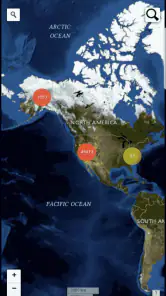
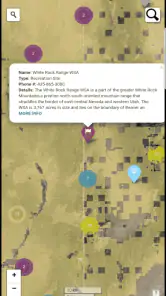
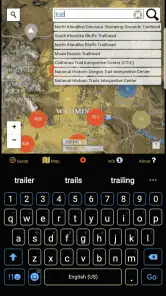
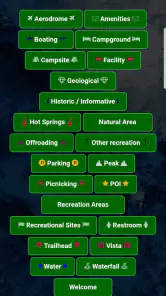
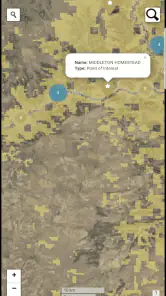
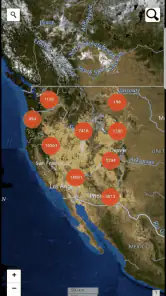
Now, let’s talk about the maps. They’re detailed, to say the least. The app provides topographic maps, satellite views, and even terrain information. It’s like having a mini-GPS system combined with a guidebook. I could zoom in and out to see trails, campgrounds, and even specific points of interest. The information is comprehensive, yet easy to digest.
Those different views are most useful when I treat them as complementary rather than interchangeable. A satellite image can help me understand the surrounding landscape, while topography gives a better sense of slopes and contours; neither should be mistaken for a promise that a route is easy or passable. For a hike or a rough-road outing, I’d review the map before leaving and keep a conservative alternative in mind if the terrain looks more demanding than expected.
That’s also where this guide differs from the usual all-purpose map. A mainstream navigation app is often better at getting me from one address to another, while a BLM-oriented guide makes public-land exploration the center of the experience. I’d use both when the trip includes a long approach drive: one for choosing an outdoor destination, the other for ordinary road directions. That division of labor is more dependable than expecting a single app to answer every question.
There is a practical planning benefit to keeping those jobs separate. I would first use the public-land view to narrow down an area, then switch to my regular navigation app for the drive to a sensible approach point. Once there, I would rely on the outdoor map to orient myself rather than assume that a road-routing app understands the details of remote access. This avoids a common planning mistake: choosing a destination because it appears close on a map without thinking through how the final stretch works.
For a day hike, I would also use the terrain view to decide whether my intended route is realistic for the group, not merely whether it looks appealing. A steep-looking section might change my timing or lead me to choose a different area; a satellite view can help me picture the landscape, but it cannot replace preparation for conditions on the ground. Those are small decisions made at home that can make the outing calmer once I am away from familiar services.
What really blew me away was the offline access feature. Once you download the maps, you can access them even when you’re off the grid. This is a lifesaver for those remote areas where cell service is as rare as a unicorn.
Offline preparation is worth doing before the trip, not at the trailhead. I’d download the areas I expect to cross, then open them once while connected so I know I can find the right map later. Offline access can help with weak reception, but it doesn’t remove the need to plan ahead: I’d still carry a charged phone and a backup way to navigate when a trip depends on finding the correct turn or returning safely.
I would think about offline coverage as a route-planning task rather than a single tap. If my day includes an approach drive, a walk, and a possible detour, I would consider the whole area I might need to consult before reception becomes unreliable. I would also check that the downloaded material is accessible before departure. That habit is useful even for a short outing, because the point of offline preparation is to avoid making an important plan depend on a connection that may disappear.
It is also worth being clear about what offline access does and does not solve. It can make a prepared map available without a live signal, but it cannot tell me that a road has just changed or that conditions are safe today. I would pair it with current checks before travel, keep my phone’s battery in mind, and avoid treating a single screen as my only safety measure on a remote trip.
Community and Updates
The app also has a community feature where users can share their experiences and tips. I found this particularly helpful for discovering hidden gems and avoiding crowded spots. Plus, the app is regularly updated with the latest information, so you’re always in the loop.
Community notes can add useful local color, but I’d weigh them as traveler observations rather than guarantees. Conditions change, and a post that helped someone on one visit may not fit a different season or vehicle. I’d use those tips to generate questions—such as whether a route feels exposed or a stop tends to fill up—then check current details before relying on them.
That distinction matters most when advice sounds very specific. A report about a particular track or campsite can be a helpful clue, but I would not assume it applies to every nearby access point or to a different vehicle. I find community input best for shaping expectations and helping me think of what to verify, rather than replacing an official check or my own judgment.
For a group trip, I would use those observations to agree on a flexible plan before everyone gets in the car. If a suggested area seems busy or the route sounds uncertain, it is easier to choose a backup while everyone still has a connection than to debate options at a remote junction. That is one of the less obvious benefits of a map-and-notes workflow: it can help the group make decisions earlier, even when the app itself is not the final authority on conditions.
What the current version means for a new user
The app is a paid Maps & Navigation option from GeoPOI LLC, priced at $1.99, with an Everyone content rating. It has a 3.4 average from around 40 ratings, alongside around 27 written reviews and over 5K installs. Those figures suggest a focused tool with a modest audience, not a universal replacement for familiar navigation apps; I’d judge it by whether its public-land focus suits my trips, rather than by popularity alone.
Its current version is 3.0.0, and it first appeared on Dec 22, 2020. That gives existing users a concrete version marker, but a version number by itself doesn’t tell me which features changed or how often map details are refreshed. If I were choosing it for a trip, I’d check that my device meets its Android 5.1 minimum, then make offline preparation part of my normal routine. The useful thing to watch over time is whether the information stays dependable for the places I actually visit.
For someone already using it, a newer version number can be a reason to check the app and make sure it still behaves as expected, but it should not be read as proof that every local detail has changed. I would keep my own routine consistent: review the area, prepare maps before leaving, and verify access through current sources. That approach remains sensible whether I am opening the guide for the first time or returning to a familiar destination.
The purchase price also makes the decision fairly straightforward: I would pay for it only if the BLM-specific focus matches the way I plan trips. Someone who visits public lands often may appreciate having a dedicated discovery tool; a person who rarely ventures beyond ordinary road navigation may get little day-to-day value from it. The modest audience and mixed average rating are reasons to read expectations carefully, not reasons by themselves to dismiss a specialized map.
On a typical weekend, I might be driving through an unfamiliar region and have a free afternoon. I would use the guide to identify a few public-land possibilities, compare their mapped terrain, and keep a second choice in mind. Then I would check current access information and use my normal navigation app for the drive. If reception might be poor, I would prepare the relevant map beforehand and tell my companions what the fallback plan is. That is where the app feels most useful: it helps turn a vague idea into a more deliberate outing.
Where it fits, and what to watch
I’d skip it if I mainly need live traffic, reliable door-to-door directions, or a broad catalog of non-BLM destinations. It makes more sense for someone who wants a map-centered starting point for recreation and is willing to pair it with current access checks. That distinction keeps expectations realistic: a guide can help me discover where to look, but good judgment still shapes the outing.
I would also look elsewhere if my main need is dependable navigation on unfamiliar streets, frequent transit planning, or a single tool for everyday errands. A specialist map is not automatically better just because a trip includes the outdoors; if I already know the destination and only need a straightforward road route, a general navigation app is the more direct choice. The best fit here is someone who values the land-focused view enough to accept using more than one source.
For families or newer hikers, I would use the guide to start a conversation about the outing rather than hand over the map and assume everything is settled. Compare the terrain, choose a manageable alternative, and make sure everyone understands that a mapped place still needs a current access check. For experienced visitors, the benefit may be less about learning how to hike and more about spotting possible public-land areas worth investigating.
What I would watch as a returning user is whether the areas I care about remain useful to plan with, whether offline preparation fits smoothly into my routine, and whether community observations help without being mistaken for official updates. Those are practical tests, not promises about future changes. If the guide continues to serve as a clear discovery layer for my trips, it earns its place alongside my ordinary navigation tools; if I need more current route certainty than it provides, I would lean on other sources for that part.
In conclusion, the BLM Public Lands Map Guide USA is a must-have for any nature enthusiast. Whether you’re an experienced outdoorsman or just getting your boots dirty for the first time, this app is a reliable companion for all your adventures. It’s like having a seasoned guide, a detailed map, and a friendly community all rolled into one. So go ahead, download it, and get ready to explore the wonders of the USA’s public lands!
BLM Public Lands Map Guide USA Frequently Asked Questions
What should I check before installing BLM Public Lands Map Guide USA?
BLM Public Lands Map Guide USA is a Maps & Navigation app from GeoPOI LLC for people interested in recreational opportunities on Bureau of Land Management public lands. Before downloading, check that your device runs Android 5.1 or later and that the app suits the way you plan to explore. The app costs $1.99, so you can also decide whether its map-focused purpose fits your needs.
What is the BLM Public Lands Map Guide USA app and what does it offer?
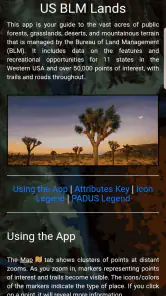
The BLM Public Lands Map Guide USA app is a comprehensive navigation tool designed for outdoor enthusiasts who explore public lands in the United States. It offers detailed maps of BLM lands, allowing users to identify public access routes, recreational areas, and other points of interest. The app is particularly useful for planning hiking, camping, or off-roading trips, ensuring users can safely and responsibly enjoy the great outdoors.
How does the BLM Public Lands Map Guide USA app ensure accurate and up-to-date information?
The app sources its data from official Bureau of Land Management (BLM) records, ensuring users receive accurate and current information about land boundaries, access points, and recreational opportunities. Regular updates are provided to reflect any changes in land use policies or access restrictions, helping users stay informed and compliant with regulations while exploring public lands.
Is the BLM Public Lands Map Guide USA app user-friendly for beginners?
Yes, the app is designed with an intuitive interface that is friendly for users of all experience levels. Beginners will appreciate the easy-to-navigate maps and straightforward search functions to locate public lands. Additionally, the app provides helpful tutorials and tips to guide new users in making the most out of their outdoor adventures.
Can the BLM Public Lands Map Guide USA app be used offline?
Absolutely! The app offers offline capabilities, allowing users to download maps and access them without an internet connection. This feature is especially beneficial for adventurers who venture into remote areas with limited or no connectivity. Users can plan their trips in advance and rely on the app to provide navigation assistance even when offline.
Pros
- Comprehensive map coverage of public lands.
- User-friendly interface with intuitive navigation.
- Offline maps available for remote areas.
- Regularly updated with new information.
- Includes detailed trail and campsite info.
Cons
- Requires subscription for full access.
- Occasional GPS inaccuracies reported.
- Limited interactive features.
- Heavy battery usage on mobile devices.
- Initial setup can be time-consuming.
- Category
- Maps & Navigation
- Version
- 3.0.0











