Black Rock Coffee Bar
- 609.00
- 4.4
- Installs
- 100.00K
- Price
- Free

Screenshots
Analysis by Reviewed
I tried Black Rock Coffee Bar as a dedicated way to interact with the chain rather than relying on a general delivery or restaurant app, and it makes the most sense when your coffee routine already includes Black Rock locations. The app is free to install, is listed for Everyone, and comes from Paytronix Systems. Its main purpose is straightforward: help me earn Bolts, place mobile pickup orders, and arrange delivery when that option is available for my location.
That focus is both its appeal and its boundary. This is not a broad coffee discovery tool, a recipe app, or a replacement for every food-ordering service. It is a brand-specific Food & Drink app designed to make repeat purchases more convenient. If I already know what I want from Black Rock Coffee Bar, the app can reduce the effort between deciding on a drink and receiving it. If I rarely visit the chain, the reason to keep it installed becomes much weaker.
How Black Rock Coffee Bar fits into a regular coffee routine
I find this app most useful when I treat it as a small part of planning a Black Rock visit, rather than something to open only once I am already in a hurry. That means deciding whether pickup or delivery suits the day, then checking the order details before I commit. From there, it is worth looking at how those choices affect repeat customers and the app’s longer-term usefulness.
A free app with a focused purpose
The clearest part of the value proposition is the cost of access: the app itself is free. That matters because I can install it and explore its ordering and loyalty experience without paying an entry fee for the software. The purchase value, of course, depends on the drinks, food, delivery arrangements, and any other charges shown during an order. I would not confuse free access to the app with free coffee, but I do appreciate that the digital layer does not require a separate subscription just to begin using it.
Black Rock Coffee Bar was released on June 24, 2024, and the current Android version is identified as 26.10.2026032702. It requires Android 10 or later, so compatibility is worth checking before planning around it. That requirement is not especially unusual for a current app, but it can matter if I am using an older phone that still works well for everything else.
The app has reached over 100 thousand installs and holds a 4.4 average from around 1.5 thousand ratings, with 609 written reviews. Those figures suggest a reasonably established user base and a generally positive reception, although they do not guarantee that every ordering experience will feel identical. Location, store workload, delivery availability, and the specific phone I use can all affect how useful it feels in practice.
What I can actually use it for
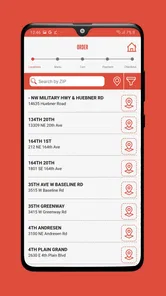
The central workflow is mobile ordering for pickup or delivery. For a pickup visit, I can make the order before leaving, select the relevant store, and arrive with the goal of collecting it rather than standing in the normal ordering line. That is most useful during a rushed morning, before work, or when I am coordinating several drinks and want to avoid repeating every customization at the counter.
More From Our News Desk

Weather by Xiaomi Review: Clear at a Glance, Less Clear Up Close

X Under Pressure: Can It Recover When Posting Goes Wrong?

Clash of Clans Is Won Between the Battles

Android Auto Makes the Case for Quieter Car Software

MobiOffice: Transforming Mobile Productivity with Seamless Integration

EA SPORTS FC™ Mobile Soccer: Redefining Mobile Sports Gaming
Delivery changes the calculation. It is convenient when I cannot leave home or the office, but it may carry additional purchase costs or depend on local availability. I treat delivery as a situational convenience rather than the default reason to install the app. A nearby pickup is usually the more predictable choice when time and cost matter, while delivery is more attractive when the saved trip is worth the extra expense shown at checkout.
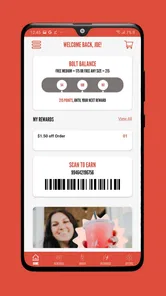
The other important element is Bolts, the app’s loyalty currency. Earning them gives repeat customers a reason to order through the brand’s own app instead of treating every visit as a one-off purchase. I found that this changes the app from a simple digital menu into a habit tool: the more consistently I use it for eligible purchases, the more relevant the loyalty side becomes.
Why the loyalty layer changes the decision
For a first-time visitor, Bolts may not be enough on their own to justify changing established habits. The benefit is cumulative, so someone who stops at Black Rock only occasionally may feel little immediate difference. A regular customer, however, can see more value in keeping orders, loyalty activity, and pickup in one place rather than switching between a physical visit and a third-party ordering service.
One practical tip is to decide on a primary ordering method before placing the order. If I begin an order in the brand app but then move to another service at the last moment, I lose the simplicity that makes the loyalty system useful. For repeat visits, I would use the app as the default channel, then compare the final pickup or delivery total when convenience and cost are both important.
I also recommend reviewing the order carefully before confirming it, especially when ordering for other people. A loyalty-focused app can make repeat purchases fast, but speed can encourage me to tap through without checking the selected store, drink choices, or pickup timing. The best workflow is to use saved familiarity for routine orders while still pausing at the final review stage.
Everyday scenario: a rushed morning pickup
Imagine that I am leaving for work with little time and want two drinks, one for myself and one for a colleague. Instead of arriving at the shop and building the order while watching the clock, I can use mobile pickup to prepare it in advance. I can check the chosen location, enter the order, and head there once it is submitted. The real benefit is not simply that the order is digital; it is that the preparation happens before I reach the store.
That scenario also shows the app’s limitation. It does not remove the need to choose the correct location or verify that pickup is practical for that visit. If I am already passing the counter with no queue, ordering in person may be faster than unlocking my phone and completing the app workflow. The app earns its place when advance preparation, repeat ordering, or loyalty tracking solves a real problem.
Comparing it with general ordering alternatives
Compared with ordering in person, the Black Rock app offers more preparation and a clearer digital record of the order. In-person ordering remains better when I need help deciding, want to ask a question, or prefer not to manage another account and app routine. A counter interaction can also feel simpler for a one-time purchase.
Compared with a general delivery platform, the brand app is more directly tied to Black Rock’s own loyalty experience. That makes it the more logical option for a regular customer who wants Bolts and expects to return. A third-party service may still be preferable when I am already ordering several restaurants together, when its delivery coverage is better in my area, or when its checkout offers a more convenient overall arrangement. I would compare the final totals rather than assuming that one channel is always cheaper.
Compared with a generic coffee app from another chain, the important difference is not a universal feature advantage; it is relevance. Black Rock Coffee Bar is useful precisely because it connects ordering and loyalty to Black Rock purchases. Someone who alternates between many unrelated coffee shops may get more value from a broader service, while a committed Black Rock customer benefits from staying within this focused ecosystem.
Tradeoffs I noticed before making it a habit
The first tradeoff is concentration. The app is designed around one brand, so its usefulness rises and falls with how often I visit Black Rock locations. Installing it for a single planned order may be unnecessary unless mobile pickup or delivery solves a specific timing problem. I would skip it if my visits are rare and I do not care about building loyalty activity.
The second tradeoff is convenience versus checking the details. Mobile ordering is faster once I know my usual order, but that speed can make mistakes easier to overlook. I would pay particular attention when ordering for a group, changing stores, or switching between pickup and delivery. The app can streamline the transaction, but it cannot make an inattentive order accurate.
The third tradeoff concerns delivery value. Delivery can save a trip, but the practical value depends on the total shown before payment and on how urgently I need the order. For a single drink, the added convenience may not feel worthwhile. For an office order or a day when leaving is difficult, it may be a sensible use of the service. I judge it order by order rather than treating delivery as automatically better.
Another subtle tradeoff is loyalty concentration. Using the app consistently can make Bolts more meaningful, but it also encourages me to direct purchases toward one chain. That is a good exchange if Black Rock is already my preferred coffee stop. It is less attractive if I value variety, compare many local cafés, or choose based on whichever shop happens to be closest that day.
Small workflow improvements that make it more useful
I would start by setting up the app when I have time, not while waiting in a crowded parking lot. The first useful session should be about learning the ordering path, checking how pickup and delivery are presented for my area, and understanding where loyalty activity appears. Once that is familiar, later orders can be much quicker.
For recurring orders, I would keep a mental distinction between “usual” and “automatic.” A familiar drink is easy to reorder, but circumstances change: I may be ordering from another location, buying for someone else, or choosing delivery instead of pickup. Rechecking those details prevents the most avoidable errors without giving up the speed of mobile ordering.
I would also use the app as a planning tool for group purchases rather than waiting until everyone is at the counter. Collecting preferences first and entering them in one session can reduce confusion. The benefit is especially clear when several drinks have different choices, although I would still review each item before submitting the order.
Finally, I would watch the loyalty side as part of my normal receipt-checking habit. The point is not to obsess over every Bolt, but to make sure I know whether I am using the intended ordering channel and whether the purchase appears connected to my account. That simple check helps preserve the reason I chose the brand app instead of ordering anonymously through a general alternative.
Who will get the most value
This app is a strong match for regular Black Rock customers who make repeat purchases and want a faster way to arrange pickup. It is also well suited to people who dislike waiting in line, people who frequently order for a colleague or family member, and customers who want their loyalty activity connected to their mobile orders. For those users, the free app can provide meaningful convenience without requiring a paid membership.
It can also help someone who lives or works near a Black Rock location but has an unpredictable schedule. Mobile pickup is useful when I know I will have only a narrow window to collect a drink. Delivery is relevant when the saved travel time matters more than keeping the order as inexpensive as possible.
I would be more cautious if I am a casual visitor, prefer speaking with staff, or use several coffee chains interchangeably. The app’s narrow brand focus may feel like extra digital clutter in those cases. I would also skip it if my phone cannot meet the Android 10 minimum, unless I have another compatible device available.
My final recommendation
Black Rock Coffee Bar delivers a clear, practical package: free access to mobile pickup and delivery ordering, plus Bolts for customers who return to the brand. I like that the app has a defined job instead of trying to become a general food platform. When I already want Black Rock coffee, preparing the order in advance is a useful improvement over starting from scratch at the counter.
My recommendation is strongest for repeat customers. They are the people most likely to benefit from combining convenience with loyalty activity, and they can choose pickup or delivery according to the situation. For occasional visitors, the app is still worth considering when a scheduled pickup solves a real timing problem, but I would not install it solely because it is free.
My verdict: use it if Black Rock is part of your regular routine; skip it if you rarely visit or want one app for many coffee brands. The free price of the app makes trying it low-risk, while the real value comes from how often its ordering and Bolt features fit the way you already buy coffee.
Black Rock Coffee Bar Frequently Asked Questions
Is the Black Rock Coffee Bar app available for my phone?
Black Rock Coffee Bar is a Food & Drink app for Android and iOS. On Android, it requires version 10 or later, so check your device’s operating system before downloading. The app is free, and its content rating is Everyone. If your phone meets the platform requirements, you can install it and explore the app’s ordering and rewards features.
Can I use the app to arrange delivery, or is it only for pickup?
The app’s summary highlights both mobile pickup and delivery, giving customers options for getting an order. The choices available can depend on the location and what ordering services are offered there. Check the options shown after selecting a store, and review the delivery or pickup details before placing an order so you know which arrangement applies.
Who makes the Black Rock Coffee Bar app, and how has it been received?
The app is developed by Paytronix Systems. It has a 4.4 average rating from around 1.5 thousand ratings, with around 600 written reviews. Those figures offer a quick sense of how other users have responded, but individual experiences can differ. Consider the app’s features and your own ordering needs when deciding whether it is worth downloading.
What is the Black Rock Coffee Bar app used for?
The Black Rock Coffee Bar app is designed to make ordering and managing your coffee purchases more convenient. Depending on your location and the available version, you can browse the menu, customize drinks, place an order for pickup, find nearby stores, and review promotions. It is especially useful for customers who regularly visit Black Rock Coffee Bar and want a faster checkout experience.
Can I order drinks and food for pickup through the app?
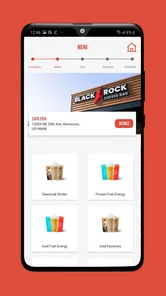
Yes, the app generally allows customers to choose a participating Black Rock Coffee Bar location, browse available drinks and food, customize selected items, and submit an order for pickup. Menu availability, preparation times, and ordering features may vary by store. Before confirming payment, carefully check the selected location, order details, and estimated pickup information.
Pros
- Easy mobile ordering helps reduce wait times during busy periods.
- Rewards program gives regular customers points and occasional perks.
- Menu includes coffee
- tea
- smoothies
- and other non-coffee choices.
- Store locator makes it simple to find nearby Black Rock locations.
- Customization options let you adjust milk
- flavors
- and drink sizes.
Cons
- Rewards and ordering features may vary by location.
- Some popular drinks can be relatively expensive without promotions.
- Peak-hour service times may still be slow at busy stores.
- The app is less useful in areas without a nearby Black Rock café.
- Menu nutrition and ingredient details may not cover every customization.











