

Bikemap: Cycling Tracker & GPS
- 525.00
- 4.2
- Installs
- 5.00M
- Price
- Free

Screenshots


Analysis by Reviewed
When I share a bike outing with someone at home, route planning becomes a small group task: one person may know the destination, while another wants a calmer way to get there. Bikemap: Cycling Tracker & GPS is useful in that situation because it gives us a place to explore cycling routes and discuss a plan before setting off. I would still agree on the route and meeting points out loud; having the same app does not automatically mean everyone sees or follows the same ride.
Planning together without sharing a device
For a household with more than one rider, I’d treat each phone as that person’s navigation tool rather than pass one device around during a ride. That keeps the map available to the person steering and avoids turning a shared screen into a point of confusion. Before leaving, we can compare route choices, note a familiar landmark as a fallback, and decide where to regroup if someone rides at a different pace.
This is especially handy when an experienced cyclist is helping a newer rider choose a route. The experienced person can look for a suitable option, while the newer rider can check whether the distance and surroundings feel comfortable. I wouldn’t assume a route’s presence in the app guarantees it will suit every bicycle, ability or preference, though. A quick look at the route and a willingness to adjust are still part of planning.
Accounts, phones and practical boundaries
If several people use one phone, I’d be careful about treating it as a shared cycling log. Ride tracking is personal in practice: one rider’s activity can become mixed up with another’s if they take turns using the same setup. Separate devices make it easier to keep each person’s navigation and ride history distinct, while a household sharing one device should agree on who is using it and when.
There’s also a useful distinction between finding a route together and coordinating a ride live. The app’s community features let cyclists connect and share routes, but I would not rely on that alone for family check-ins or urgent communication. For a group outing, decide in advance who leads, where to stop, and what everyone should do if the group gets separated. That simple plan is more dependable than assuming a navigation app can manage every part of a shared trip.
Age, trust and choosing a comfortable route
The app is rated for everyone, which makes it broadly approachable for household use, but that does not mean every route is right for every age or rider. I’d have a younger cyclist ride with an adult and review the route together, paying attention to unfamiliar streets and trail sections. The map can support a plan; it cannot replace supervision or a rider’s judgment about traffic and conditions.
I also like that the app is made by Bikemap GmbH and has a substantial audience: it has an average rating of 4.3 from around 57,000 ratings, with more than five million installs. Those figures can offer a little reassurance that it is widely used, but they do not tell me whether a particular route near home is current or comfortable. I still check the route on the day and keep a backup plan, especially for a ride with children or less confident cyclists.
More From Our News Desk

 Weather - By Xiaomi
Weather by Xiaomi Review: Clear at a Glance, Less Clear Up Close
Xiaomi’s weather app makes everyday forecasts quick to scan, but its calm surface can leave useful details and recovery paths harder to find than they should be.

 X
XX Under Pressure: Can It Recover When Posting Goes Wrong?
A resilience-focused review of X, examining setup, mistaken posts, interruptions, weak connections, and the gaps that matter when recovery needs to be dependable.

 Clash of Clans
Clash of Clans Is Won Between the Battles
Its raids are quick; its community is a long-term project of coordination, teaching, rivalry, and shared responsibility—with all the friction that entails.

 Android Auto
Android Auto Makes the Case for Quieter Car Software
The car interface is no longer judged by how much it can do, but by how quietly it helps. Android Auto shows what drivers now expect—and what still gets in the way.

 MobiOffice: Word, Sheets, PDF
MobiOffice: Transforming Mobile Productivity with Seamless Integration
MobiOffice: Word, Sheets, PDF is redefining mobile productivity with a surprising blend of functionality and innovation.

 EA SPORTS FC Soccer Mobile 26
EA SPORTS FC™ Mobile Soccer: Redefining Mobile Sports Gaming
Dive into EA SPORTS FC™ Mobile Soccer, where immersive gameplay and strategic depth transform mobile sports gaming.
Latest News



If you’re anything like me, you love cycling but hate getting lost or not knowing the best routes in town. That's where Bikemap: Cycling Tracker & GPS comes into play. This free Maps & Navigation app feels like a useful companion when I want to find somewhere new to ride without planning every turn from scratch. It has been around since March 4, 2013, and version 20.21.0 is listed for devices running OS 9 or later. The basic app costs nothing, while in-app purchases range from $0.99 to $49.99 per item. I’d start with the free experience and decide later whether any paid extras matter to my riding.
Exploring the Features
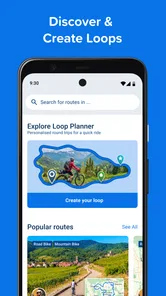
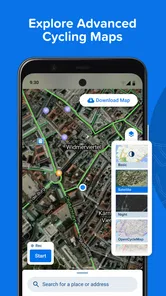
One of the first things that struck me about Bikemap is its enormous library of cycling routes. There are millions of routes around the world, so whether I’m riding through a busy city or planning a trip somewhere quieter, browsing can give me ideas I might not have found by following my usual roads. I don’t treat a large route collection as a promise that every option is perfect: I check the path against my plans and comfort level before setting off.
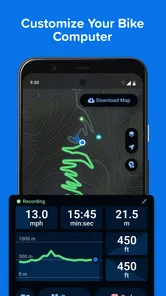
The app doesn’t just show you routes; it helps you track your rides too. It’s like having a personal trainer who doesn’t yell at you. You can track distance, duration, speed, ascent, and calories burned. Plus, the app syncs with your favorite fitness wearables, so you can keep all your data in one place. Having this data at your fingertips really motivates you to push harder and beat your personal bests. For a less competitive rider, those details can also help answer ordinary questions, such as whether a familiar loop took longer than expected or how much climbing a chosen route involved.
User Experience
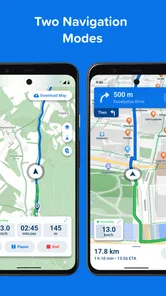
Now, let’s talk about usability. The interface is super intuitive. You don’t need to be a tech wizard to navigate through it, which is a big plus in my book. From the moment you open the app, it’s pretty simple to search for new routes or set up your own. The maps are clear, and the turn-by-turn voice navigation ensures you won’t end up in a ditch somewhere. I mean, who doesn’t love a good, hassle-free ride? My practical tip is to review the route before moving off rather than making changes while cycling; it’s easier to spot a questionable detour when you’re stopped and can concentrate.
Another cool feature is the community aspect. You can connect with other cyclists, share your favorite routes, and even join group rides. It’s like a social network for cyclists, which I think is a fantastic way to meet new people and discover new routes. We all know that cycling is more fun with friends, right? For a group ride, I’d use shared route ideas as a starting point, then agree on a pace and regrouping spots. A route everyone can see is helpful, but it doesn’t settle differences in fitness, riding style or how much traffic each person is comfortable with.
Offline Capabilities and More
Ever been stuck without an internet connection and wished you had downloaded the map beforehand? Well, Bikemap has got you covered. You can download maps for offline use, ensuring you’re never lost even when your signal drops. This feature is a lifesaver, especially when you’re exploring remote areas. I’d download the relevant map while connected and check that the route is available before leaving; offline preparation is most useful when treated as a deliberate step, not something to improvise after the signal disappears.
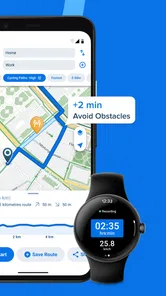
Additionally, the app provides real-time updates on route conditions. This is particularly useful if you want to avoid construction sites or traffic-heavy roads. It’s like having a personal assistant who keeps you informed about all things cycling-related. I’d still stay alert for changes that happen on the ground and be ready to choose another way if a road or path looks unsuitable. Navigation can guide a ride, but it cannot make an unsafe turn a good one.
Where it fits among cycling apps
Compared with using a general-purpose map app, Bikemap puts cycling routes and ride tracking at the center of the experience. That focus is valuable when I’m looking for a route other cyclists have shared or want ride details in the same place as navigation. A general map may be quicker for a simple address-to-address trip, especially if cycling-specific discovery is not important. Conversely, riders who mainly want structured training analysis may prefer a dedicated training tool; Bikemap’s appeal is the combination of route exploration and practical ride guidance, not a promise to replace every specialist app.
For an everyday example, imagine I’m cycling home by a different route after work and want to avoid repeating the same streets. I can browse for an alternative before leaving, check its shape, and use voice directions rather than repeatedly stopping to inspect the phone. If the ride takes me beyond reliable reception, an offline map is worth preparing first. If I’m only making a familiar short commute and already know the way, opening a route app may add little; I’d save it for discovery, uncertain turns or trips where I want to review the ride afterward.
Making route choices work in practice
When I’m choosing between several options, I look beyond the destination and route outline. A route that appears direct may still be a poor fit if it crosses streets I dislike riding or includes a section that feels uncomfortable for someone in the group. I use the map to narrow down possibilities, then check the route at a stop and make sure everyone understands the broad plan. That small pause is more useful than trying to interpret a map while moving.
For a weekend ride with a mixed-ability group, I’d agree on a route that the least confident rider is happy to attempt, rather than asking them to keep up with the most experienced person. I’d also choose a clear regrouping landmark before setting off. This makes shared route discovery useful without treating the app as a substitute for conversation, and it gives riders a simple reference if the group naturally spreads out.
Who should use it—and who may not need it
I’d recommend trying Bikemap if you regularly ride somewhere unfamiliar, enjoy collecting route ideas, or want navigation and basic ride tracking together. It also makes sense for households whose riders plan outings together but prefer each person to navigate on their own phone. The main trade-off is that finding a route is only the beginning: you still need to judge whether it fits your bike, confidence and conditions, and offline use calls for a bit of preparation.
If you rarely leave a familiar route, want only turn-by-turn directions to a destination, or need a highly specialized training workflow, a simpler map or a dedicated fitness app may suit you better. The free starting point makes it easy to see whether the route library and tracking fit your habits, but I wouldn’t pay for an extra simply because it is available. I’d first identify a feature I genuinely need and check whether it changes how I ride.
What I’d check before relying on it for a trip
A common question is whether I can count on a route when reception is patchy. I’d prepare the relevant offline map in advance and check the planned ride while still connected. That reduces the chance of discovering too late that I haven’t prepared what I need. I’d also keep the route simple enough to remember in broad strokes, especially if I’m heading somewhere unfamiliar or riding with someone who may need extra reassurance.
Another practical question is whether it works for a short commute as well as a leisure ride. It can help when I want to test a different way home, follow turns without repeatedly checking a phone, or keep a record of the ride. But I wouldn’t open it automatically for every trip. If I know the route and don’t want to track anything, a regular map—or no navigation at all—can be the more sensible choice.
For someone deciding whether paid extras are worthwhile, my advice is to ride with the free app first and identify a specific limitation you actually encounter. The in-app purchase range is broad, so I wouldn’t assume every rider needs the same upgrade. If the features you use already cover route discovery, navigation and the level of ride recording you want, there may be no reason to spend. If a particular extra would solve a recurring problem, then it becomes a more grounded decision.
A sensible fit for a cycling household
For families and housemates, I see the strongest value in planning together while keeping the actual ride personal. Each rider can use their own device, choose a comfortable pace and follow a route they have reviewed. If devices are shared, agreeing on who is using the app and when helps avoid mixing up navigation or ride records. I wouldn’t treat a shared account or phone as a live family-safety arrangement; clear meeting points and ordinary check-ins matter more.
The age rating makes the app approachable for a broad audience, but route suitability still depends on the rider and the place. With a younger cyclist, I’d review the route together and ride with them rather than assume that a clear map makes independent travel appropriate. For adults with different confidence levels, I’d do the same kind of check: discuss any unfamiliar stretch, choose a fallback landmark and leave room to change plans if the conditions feel wrong.
In conclusion, Bikemap: Cycling Tracker & GPS is more than just an app; it’s a comprehensive tool for anyone serious about cycling. With its vast array of features, user-friendly interface, and community-driven approach, it’s designed to enhance every aspect of your cycling experience. Whether you’re a casual rider or a hardcore cyclist, this app deserves a spot on your home screen. So, grab your bike, download the app, and start exploring the world like never before! For a household, I’d call it a strong route-planning companion rather than a family coordination system: use it to discover and follow rides, then handle supervision, meeting points and check-ins with clear agreements. That balance is what makes it most useful in everyday riding.
Bikemap: Cycling Tracker & GPS Frequently Asked Questions
Does Bikemap work on both Android and iOS?
Bikemap is available for Android and iOS, making it an option for cyclists using either platform. Before installing, check that your device runs a compatible operating system; the minimum requirement is version 9. Its navigation and route-planning tools are intended to support rides, but the experience may vary with your phone and the conditions where you cycle.
Can I record a ride with Bikemap as well as find routes?
Yes. Bikemap is built for both discovering cycling routes and tracking rides, so it can serve as a companion before and during a trip. You can explore routes, follow navigation, and keep track of a ride rather than using it only as a map browser. If you plan to rely on GPS throughout a long outing, consider your phone’s battery and make sure the app is ready before you set off.
Is Bikemap suitable for planning a route before I leave home?
Bikemap can help you browse cycling routes and choose an option before starting a ride. Its worldwide route collection makes it useful for comparing possibilities at home or while travelling, while navigation can help you follow the selected ride once underway. Take time to review the route before you depart and choose one that suits your plans, riding ability, and local conditions.
Can I use Bikemap for cycling trips in different countries?
Yes. Bikemap is designed for discovering cycling routes around the world, so it can be useful when planning rides at home or while travelling. You can browse routes suited to different kinds of cycling and use the app’s navigation to follow a chosen ride. Check your route and navigation needs before setting off, especially if you expect to ride somewhere with limited connectivity.
What is Bikemap: Cycling Tracker & GPS used for?
Bikemap: Cycling Tracker & GPS is a versatile application designed for cycling enthusiasts who want to explore new routes, track their rides, and improve their cycling experience. It provides access to a vast collection of cycling maps worldwide, offers real-time GPS navigation, and allows users to track their performance metrics like speed, distance, and elevation. Whether you're a casual cyclist or a professional, Bikemap enhances your biking adventures with its comprehensive features.
Pros
- User-friendly interface for easy navigation.
- Comprehensive map coverage worldwide.
- Real-time route tracking and sharing.
- Integration with various fitness devices.
- Offline maps for areas with poor signal.
Cons
- Premium features behind a paywall.
- Occasional GPS signal issues.
- Battery drainage during long rides.
- Limited social features for community interaction.
- Infrequent updates and bug fixes.











