

Better Buzz
- 364.00
- 4.8
- Installs
- 50.00K
- Price
- Free

Screenshots
Analysis by Reviewed
I installed Better Buzz to see whether it could become part of a normal coffee run rather than simply sit on my phone as another brand app. It is a free Food & Drink app from Better Buzz Admin, aimed at people who already visit Better Buzz Coffee or want a more direct way to interact with the chain. My first impression was that it feels most useful when I begin with a clear plan: I know I want coffee, I have a rough idea of what I want, and I want to make the ordering step more deliberate before I reach the café.
The app has a 4.8 average from around 3K ratings, with 50K+ installs, so it has clearly found an audience beyond a handful of early testers. It is rated for Everyone, costs nothing to install, and the current version is 2.1. Better Buzz Admin released it on Jan 11, 2022, and it requires iOS 11 or later. Those details matter less than the everyday question: does it make getting a drink easier than walking in and ordering at the counter?
From deciding on a drink to completing the coffee run
I found the app most useful when I made the drink decision before the café visit, so this section looks at how that preparation fits into a real coffee run. I also weigh the moments when the digital route feels less convenient than simply talking to someone at the counter, because a smoother order depends on choosing the right approach for the situation.
Starting with the real problem: choosing before the queue
My most useful test was a familiar weekday situation. I was leaving home late, wanted coffee on the way to work, and did not want to spend extra time studying the menu once I arrived. In that situation, Better Buzz makes sense as a preparation tool. I could open it before leaving, browse the available choices, and think through my order while I still had a little time.
That sounds simple, but it changes the rhythm of the visit. Ordering at a counter often combines several tasks: remembering what you want, checking the menu, asking about options, deciding whether to add something, and then communicating the final choice. Doing the browsing first separates the decision from the handoff. I found that especially helpful when I was ordering for more than one person and needed to avoid mixing up drinks.
The app is not something I would open just to pass time. Its value depends on having a real coffee-related task. If you rarely visit Better Buzz Coffee, the experience is less compelling because the app is tied to that particular business rather than functioning as a general café guide. For regular customers, however, the focused approach is more useful than an overloaded food platform that tries to cover every restaurant in town.
Reading the menu with a purpose
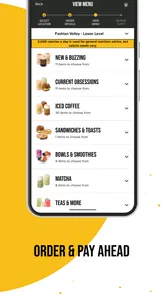
I recommend browsing before you are standing in front of the barista. That gives you room to compare the choices and decide whether the app offers the kind of order you actually want. It also helps separate curiosity from commitment: I can look at something new without feeling pressured to make a quick decision while other customers wait behind me.
More From Our News Desk

 Gmail
GmailGmail in a Busy Inbox: Who Benefits Most?
From first account to crowded workday, Gmail earns its place through dependable search and flexible sorting—but its best fit depends on how much inbox maintenance you can tolerate.

 Prime Video
Switching to Prime Video: What Changes in Your Viewing Routine
Prime Video can make a compelling second home for streaming, but switching means learning a different catalog, rental layer, and route from browsing to playback.

 Universal TV Remote Control
Universal TV Remote Control Works Best as a Reliable Backup
A phone remote earns its place through quick setup and reliable habits. Here is how to get more from Universal TV Remote Control—and where its limits show.

 Weather - By Xiaomi
Weather by Xiaomi Review: Clear at a Glance, Less Clear Up Close
Xiaomi’s weather app makes everyday forecasts quick to scan, but its calm surface can leave useful details and recovery paths harder to find than they should be.

 X
XX Under Pressure: Can It Recover When Posting Goes Wrong?
A resilience-focused review of X, examining setup, mistaken posts, interruptions, weak connections, and the gaps that matter when recovery needs to be dependable.

 Clash of Clans
Clash of Clans Is Won Between the Battles
Its raids are quick; its community is a long-term project of coordination, teaching, rivalry, and shared responsibility—with all the friction that entails.
Latest News



One small but practical habit is to use the app as a pre-order checklist, even when I am not trying to rush. I choose the drink category first, then review the details, and only afterward decide whether I want food or another item. This prevents the common mistake of building an order around the first appealing picture or name and then realizing that the rest of the group wants something completely different.
For a household or office order, I would write down each person’s choice before opening the app. The app can support the selection process, but it cannot replace basic organization between people. That is an important distinction: Better Buzz helps me prepare an order, while the quality of the overall handoff still depends on how clearly I communicate with the people I am ordering for.
Moving from browsing to the actual order
The next step is where the app needs to prove its worth. A café app should reduce uncertainty, not create another layer of it. In my experience, the best workflow is to make the drink decision first and then follow the available ordering path carefully, checking each screen before moving on. I avoid tapping quickly through the process because a rushed order is harder to correct than a slow one.
The useful rule is simple: decide first, submit second, and verify last. I check the selected location or pickup context, review the items, and make sure the order reflects what I intended. This is especially important when I am ordering several drinks. A small mistake at this stage can turn a convenient app-based visit into a conversation at the counter, which defeats much of the purpose.
The app works best for a customer who already understands the basic shape of the visit. It is not a substitute for knowing whether a particular store is convenient, whether the timing suits the customer, or whether a group order has changed at the last minute. I treat it as one stage in the coffee run, not as an all-in-one guarantee that every part of the visit will be effortless.
The handoff between phone and café
This handoff is the part I paid closest attention to. An app can capture the order, but the café still has to prepare it and the customer still has to collect it. That means the phone is only one link in the chain. I keep the app available until I have confirmed that the order details are correct, then I shift my attention to the physical visit.
For a solo morning run, this feels fairly natural. I can prepare the order before leaving, travel to the café, and focus on getting in and out. For a larger order, the handoff becomes more fragile. Someone may change their mind, a drink may be intended for another person, or the group may arrive at different times. In those cases, I would confirm the final details with the group before submitting rather than relying on memory.
Another practical point is that app convenience does not remove the need to pay attention to the store environment. A busy café can still involve congestion, limited counter space, or confusion when several customers are waiting. I found the app most helpful when I used it to reduce decision time, not when I expected it to eliminate every part of the in-person process.
What the completed visit feels like
When the workflow goes well, the result is modest but worthwhile: I arrive with a decision already made, spend less mental energy on the menu, and can concentrate on collecting the order. That is the strongest reason I would recommend it to a regular Better Buzz customer. It does not need to transform coffee buying to be useful; it only needs to remove a few avoidable steps from a familiar routine.
I also like that the app is free. There is no purchase barrier to testing it against your normal café habit, which makes the decision easy. If it saves time or makes group orders less stressful, it earns its place. If you prefer spontaneous counter service and do not mind deciding in the moment, the benefit will be smaller.
The result is not identical for every visit. On a quiet day, ordering in person may be just as fast. On a busy morning, preparing ahead can feel much more valuable. The app’s usefulness therefore depends on timing, familiarity, and the number of decisions involved. That is a more honest assessment than calling it essential for everyone.
Where the workflow breaks down
The first weak point is last-minute change. If I decide to alter the order after submitting it, the app cannot make the situation disappear. I may need to resolve the issue through the café’s normal process, and that can be less convenient than simply speaking to a person before the order is finalized. I therefore avoid submitting until everyone has agreed on the order.
The second weak point is expectation management. A digital order can feel finished once I tap the final button, but the physical result still depends on the café’s preparation and the accuracy of the handoff. I do not treat the app as a promise that the visit will take a particular amount of time. I use it to prepare, then allow room for the real-world part of the process.
The third issue is audience. Someone looking for broad restaurant discovery, independent cafés, grocery delivery, or a universal rewards wallet should choose a different type of app. Better Buzz is more focused. That focus is a strength for people who already want Better Buzz Coffee, but it is a limitation for anyone who wants one application to manage many food and drink businesses.
How it compares with ordering at the counter
Compared with walking in and ordering verbally, the app gives me more time to decide and makes a planned visit feel more organized. The counter still wins when I need to ask a question, change an item at the last moment, or explain an unusual request in conversation. Human interaction is often more flexible than a fixed digital flow.
Compared with a general delivery or restaurant marketplace, Better Buzz feels narrower but potentially cleaner for its intended use. A broad marketplace is better when I am comparing many businesses or arranging delivery from different places. This app is better when the destination is already Better Buzz and I want the brand’s own ordering path rather than a third-party layer.
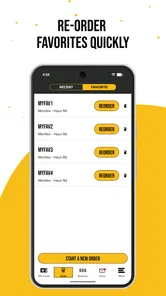
Compared with simply saving a favorite order in my notes, the app is more connected to the café visit, but a note can be faster for remembering a complicated group order. I use both approaches differently: the note helps me collect everyone’s choices, while the app handles the actual Better Buzz workflow. That division reduces the chance of submitting an incomplete order.
Who will get the most from it
I would recommend Better Buzz to frequent customers, commuters, and people who often order for a partner, family member, or small office group. It is also a good fit for anyone who dislikes making menu decisions under pressure. Preparing the order away from the counter gives those users a calmer way to decide and a clearer transition into the café visit.
It is less suitable for occasional visitors who do not yet know what they like at Better Buzz Coffee. For them, a conversation with staff may be more useful than browsing alone. I would also hesitate to recommend it as the main tool for people who want café discovery across multiple brands, because its usefulness is tied to one coffee business.
Parents and caregivers may appreciate the ability to organize a drink run before arriving, but they should still double-check each item before submitting. The app can reduce the number of decisions at the café, yet it cannot know whether a family member has changed their preference or whether the order has been assigned correctly within the group.
Small habits that make the app work better
My first tip is to browse before you are in transit. Trying to make a detailed decision while walking, driving, or managing children is exactly when mistakes happen. I choose the order while stationary, then use the travel time only for the handoff.
My second tip is to treat group orders as a two-stage task. I collect names and choices outside the app, then enter them carefully and review the complete order. This is more reliable than passing one phone around while everyone speaks at once.
My third tip is to keep counter ordering as a fallback rather than viewing it as a failure. If the app flow does not match the situation, if someone needs a last-minute change, or if I need personal guidance, speaking with the café is the better option. The strongest users of this app are not the ones who force every visit through it; they are the ones who recognize when digital preparation helps and when human service is faster.
Everyday value after repeated use
After using it as part of a normal coffee routine, I see Better Buzz as a practical companion rather than a destination app. Its best contribution is reducing friction before the café handoff. That may sound minor, but repeated small improvements matter when a drink run happens several times a week.
The app also encourages a more intentional order. Instead of choosing under pressure, I can look at the available options, consider what I actually want, and then submit with fewer distractions. For someone who tends to order the same thing automatically, that can make the app feel less like a shortcut and more like a simple planning tool.
Still, I would not install it expecting a universal solution for food and drink. Its value is closely connected to Better Buzz Coffee, and the people who benefit most are those who already have a reason to visit. That narrow purpose is not a flaw by itself; it simply defines the right audience.
My final view after following the full workflow
Better Buzz succeeds when the starting condition is clear: I want something from Better Buzz Coffee, I have enough time to prepare, and I prefer to settle the order before reaching the counter. From there, the flow is straightforward in concept: browse, decide, review, submit, and complete the café handoff. The result is a smoother visit, especially during a busy morning or when I am coordinating several drinks.
Its limitations appear when the order is uncertain, the group keeps changing its mind, or I need advice that is easier to get from staff. In those situations, traditional counter service can be the better choice. A general marketplace is also more appropriate for comparing unrelated cafés or arranging broader food options.
For the right customer, I would recommend installing it because it is free, focused, and easy to test against an existing Better Buzz habit. My honest conclusion is that Better Buzz is most valuable as a pre-visit ordering and planning tool, not as a replacement for every part of the café experience. If that matches the way you buy coffee, it can make the routine feel noticeably more organized.
In short, I would keep it on my phone if Better Buzz Coffee were part of my regular week. I would skip it if I visited only once in a while or wanted one app for many restaurants. That distinction captures the experience better than any broad promise: the app earns its place by making a specific coffee run easier, one prepared order and one clearer handoff at a time.
Better Buzz Frequently Asked Questions
Is Better Buzz available for my phone, and what age group can use it?
Better Buzz is a Food & Drink app for Android and iOS, with a minimum operating-system requirement of version 11. Its content rating is Everyone, so it is intended for a general audience. Before downloading, check your device’s operating-system version and the app’s page in your platform’s official store to ensure it is compatible with your phone.
Who makes Better Buzz, and does it appear to have an active user base?
The app is developed by Better Buzz Admin and is associated with Better Buzz Coffee®. It has more than 50,000 installs and an average rating of 4.8 from around 3,000 ratings, giving prospective users a sense of its reach and reception. Those figures are only a starting point; your experience may depend on how well its features fit your needs.
What is Better Buzz, and what can I use it for?
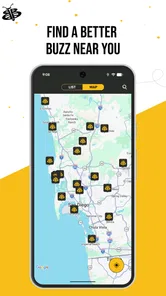
Better Buzz is a mobile app connected with the Better Buzz Coffee experience, helping users discover menu items, browse drinks and food, and stay informed about the brand. Depending on the version available in your region, it may also support account features, promotions, loyalty rewards, store information, and mobile ordering. The exact options can vary by location and app updates.
Can I order coffee and food through the Better Buzz app?
The Better Buzz app may allow customers to view the menu and place mobile orders at participating locations, making it easier to schedule pickup and avoid waiting in line. Before downloading, keep in mind that ordering availability, pickup options, payment methods, and menu selection can differ between stores. Check that your preferred location is supported after installing the app.
Does Better Buzz offer rewards, discounts, or loyalty benefits?
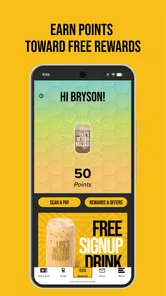
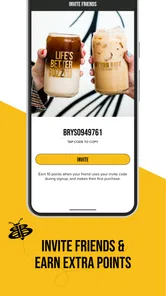
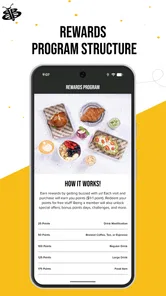
Better Buzz may include loyalty features that let registered customers collect rewards or receive promotional offers when using the app. These benefits can be subject to eligibility rules, participating locations, expiration dates, and changing promotional terms. You may need to create an account and identify yourself during a purchase, so review the reward conditions carefully rather than assuming every visit qualifies.
Pros
- Simple interface makes browsing and discovering content quick.
- Personalized recommendations help surface relevant posts and discussions.
- Community interaction encourages users to share opinions and experiences.
- Notifications can keep you updated on activity and new content.
- Content is easy to access on compatible Android and iOS devices.
Cons
- Recommendation quality may vary depending on your activity and interests.
- Frequent notifications can become distracting without careful settings.
- Some features may require account registration or profile information.
- User-generated content can differ widely in accuracy and quality.
- Performance may depend on device compatibility and internet speed.











