

Back Seat Navigator
- 344.00
- 3.2
- Installs
- 100.00K
- Price
- Free

Screenshots
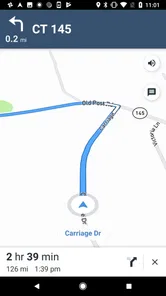
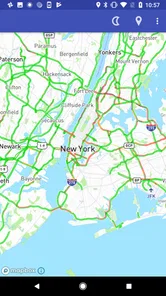

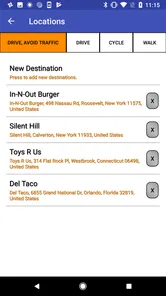
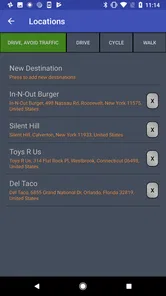
Analysis by Reviewed
I approached Back Seat Navigator expecting a deliberately different kind of navigation app, and that is exactly what it is. Instead of trying to sound calm and neutral, it gives route guidance a complaining, back-seat-passenger personality. That idea will either make a routine drive more entertaining or become irritating very quickly, depending on what you want from your phone.
This is a free Maps & Navigation app from Affiliated Apps LLC, with the short description “Back Seat Navigator.” It has passed the early novelty stage and has more than one hundred thousand installs, yet its average rating sits at 3.2 from around six hundred ratings. To me, that combination says the concept is memorable but not universally comfortable. People understand what makes it unusual, although not everyone will enjoy hearing navigation presented with attitude.
I would not treat it as a direct replacement for a dependable everyday mapping service in every situation. I see it more as a personality-driven companion for familiar trips, road humor, and drivers who want their directions to feel less mechanical. The important question is not simply whether it can guide you, but whether you want commentary to be part of the journey.
How I would use it on an ordinary trip
My baseline workflow would be simple: prepare the destination before moving, start the route, and leave the phone where I can hear it without needing to handle it. That sounds obvious, but this app’s character makes preparation more valuable than it is with a silent map. If I am already driving and still deciding where to go, a sarcastic voice is more distraction than help.
For a familiar commute, I can see the appeal. The route itself may be routine, so the personality gives the trip a small change without requiring a podcast or a playlist. I would use it on a drive with friends, especially when everyone understands that the commentary is part of the joke. It can also suit a short errand where I know the general area but still want turn guidance.
For an unfamiliar city, a complicated interchange, or a time-sensitive appointment, I would be more cautious. Standard navigation apps are usually better at presenting a broad set of map tools, traffic context, place information, and route alternatives. A playful tone cannot compensate for missing context when I need to make a difficult decision quickly.
That distinction is the first practical lesson: use the app when its personality adds value, not when you need the most comprehensive navigation workspace. I would test it on a route I already know before trusting it for an airport run, a long-distance drive, or an unfamiliar neighborhood. That lets me judge whether the voice is amusing, distracting, too repetitive, or simply not my style.
More From Our News Desk

 Weather - By Xiaomi
Weather by Xiaomi Review: Clear at a Glance, Less Clear Up Close
Xiaomi’s weather app makes everyday forecasts quick to scan, but its calm surface can leave useful details and recovery paths harder to find than they should be.

 X
XX Under Pressure: Can It Recover When Posting Goes Wrong?
A resilience-focused review of X, examining setup, mistaken posts, interruptions, weak connections, and the gaps that matter when recovery needs to be dependable.

 Clash of Clans
Clash of Clans Is Won Between the Battles
Its raids are quick; its community is a long-term project of coordination, teaching, rivalry, and shared responsibility—with all the friction that entails.

 Android Auto
Android Auto Makes the Case for Quieter Car Software
The car interface is no longer judged by how much it can do, but by how quietly it helps. Android Auto shows what drivers now expect—and what still gets in the way.

 MobiOffice: Word, Sheets, PDF
MobiOffice: Transforming Mobile Productivity with Seamless Integration
MobiOffice: Word, Sheets, PDF is redefining mobile productivity with a surprising blend of functionality and innovation.

 EA SPORTS FC Soccer Mobile 26
EA SPORTS FC™ Mobile Soccer: Redefining Mobile Sports Gaming
Dive into EA SPORTS FC™ Mobile Soccer, where immersive gameplay and strategic depth transform mobile sports gaming.
Latest News



The app is free to download, which makes that trial easy. It is aimed at mature users and carries a Mature 17+ content rating, so I would not install it on a child’s device or assume that its jokes are suitable for every passenger. The age classification is a meaningful part of the decision, especially if the phone is shared with family members.
What the basic experience is really good at
The strongest part of the concept is emotional rather than technical. Ordinary navigation can feel cold: a voice announces a turn, I follow it, and the interaction disappears. Here, the navigation is framed as a character. That makes it easier to remember why I opened the app, and it can make a short drive feel less repetitive.
I also like the possibility of using it as a social tool. On a group trip, one person can set the destination while everyone else reacts to the commentary. That is different from asking a conventional map to entertain the car. The app gives the route a recognizable mood, although that mood will not work for every group.
There is a trade-off. A joke that lands once can become tiring when repeated during several turns. I would not assume that a funny first impression will remain funny during a long journey. My practical habit would be to keep a conventional navigation option available and switch when the personality starts competing with the instructions.
Settings and preparation that deserve attention
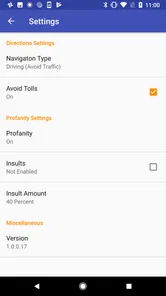
I would spend a few minutes checking the available settings before the first real trip rather than opening the app at the curb and immediately driving away. In a personality-led navigator, audio behavior matters as much as the map itself. I want to know how the guidance fits with music, whether the voice is easy to hear, and whether the tone feels acceptable with the people in the car.
I would also check the app’s current behavior after installation and after updates. The current version is 2.31.16.306, and the application supports devices running Android 6.0 or later. That makes it accessible to many older phones, but compatibility alone does not guarantee that an aging device will feel comfortable for navigation. Before relying on it, I would confirm that the phone remains responsive while the route is active and that the screen does not become difficult to read in the car.
Another useful habit is to set the destination while stationary. This is not an exotic feature; it is simply the safest way to use a navigation app with a strong voice personality. If the app makes a comment that catches my attention, I do not want to be tapping through menus at the same time. I would mount the phone, choose the route, adjust sound, and only then pull away.
Because the app’s appeal depends on its delivery, I would judge it with the car’s normal audio setup rather than headphones. Headphones are a poor fit for driving because they can reduce awareness of the road. A phone speaker may be enough for a short trip, while a car connection can make the voice clearer. The right choice depends on the vehicle, but the principle is consistent: directions should remain understandable without forcing me to stare at the screen.
I would also treat the content rating as a settings-and-audience issue, not just a store label. If I am driving with colleagues, children, or passengers who dislike edgy humor, I would use a neutral alternative. That is not a criticism of the app’s identity; it is a reminder that the same joke can be welcome in one car and awkward in another.
Repeatable habits for faster, calmer trips
Experienced use here is less about discovering a secret button and more about building a repeatable routine. I would save the app for routes where I already know the broad plan, prepare destinations before leaving, and use the same phone position each time. That removes unnecessary decisions and lets me concentrate on whether the commentary is helping.
For a daily commute, I would start the route before entering traffic and avoid changing destinations while moving. If I often travel to the same place, I would use whatever normal phone shortcuts are available for entering that destination quickly, but I would not assume that the app itself offers a special shortcut unless I can see it in the interface. The best efficiency gain comes from reducing interaction, not from chasing undocumented tricks.
A useful pattern is to divide trips into three types. Familiar local drives are the best match because the app can add personality without carrying the entire burden of orientation. Social drives are good when the passengers enjoy the humor. High-consequence drives are the weakest match because I value clarity, traffic awareness, and predictable instructions more than entertainment.
I would also create a simple fallback habit. Before starting a longer trip, I would know which conventional map app I can open if the tone becomes distracting or the route presentation is not enough for the situation. This does not undermine the app; it makes the choice practical. A distinctive navigator is easier to enjoy when I am not pretending it must handle every possible journey.
Another non-obvious trade-off is passenger control. If friends are in the car, I would let them know that the app may speak in a deliberately complaining style before starting. That prevents the first unexpected remark from becoming the main event. In a solo drive, I can decide quickly whether the voice works for me. With passengers, the social cost of a bad fit is higher.
I would avoid judging the experience from a single short demonstration. A novelty app can be impressive for five minutes and exhausting after several turns. I would test one short familiar route, one slightly less familiar route, and one drive with passengers. That small comparison tells me much more than the first laugh.
Where it falls short of conventional navigation
The central limitation is that personality is not the same thing as navigation depth. Conventional alternatives are generally designed around information density and practical decisions. They may be better suited to comparing routes, finding nearby places, checking broader travel context, or handling a journey where conditions change. I would choose those tools when the map itself is the priority.
Back Seat Navigator makes more sense when I already know what I want from the trip: spoken guidance with a distinctive attitude. If I need a full travel-planning workspace, I would not make this my only option. A witty instruction cannot tell me everything I might want to know before a complicated trip, and I would rather have fewer surprises when driving somewhere unfamiliar.
The rating of 3.2 is worth considering in that context. It does not make the app unusable, but it suggests that the unusual presentation creates a divided response. The app is not trying to be universally bland, so a mixed reception is understandable. I would read that rating as a reason to test the personality personally rather than as proof that the concept succeeds for everyone.
There is also a cost question beyond the free entry point. In-app purchases range from $3.99 to $29.99 per item. I would not spend money until I had used the basic experience long enough to know that I actually want more from it. A personality-based app has a narrower value proposition than a general-purpose map, so the purchase decision should be based on repeated use, not first-day curiosity.
The developer, Affiliated Apps LLC, has kept the product focused around its character rather than presenting it as a complete replacement for every navigation need. That focus is its identity and its constraint. I appreciate a clear idea, but clarity of purpose also means I can identify the moments when another app is the better tool.
Who should install it, and who should skip it
I would recommend trying it if you enjoy novelty, want a more expressive driving companion, or regularly take familiar routes that have become dull. It is especially suitable for someone who likes sharing unusual apps with friends and can treat the commentary as optional entertainment rather than essential guidance.
I would skip it if I want a quiet, professional voice, dislike sarcasm, or need navigation to stay completely neutral around passengers. I would also avoid making it my sole choice for demanding journeys. Drivers who depend on detailed route planning, broad map context, or the most conventional interface will probably feel more comfortable with an established general-purpose alternative.
Privacy and safety-minded users should approach it like any navigation app: review what the phone asks the app to access, keep the device secured in a stable position, and do all setup before moving. I am not suggesting permissions or behavior beyond what I can see; I am saying that a navigation tool deserves the same cautious handling as any app used in a vehicle.
My verdict after looking past the joke
The real strength of Back Seat Navigator is its clear personality, not an attempt to out-feature every map app. I find that refreshing. It knows how to make a familiar drive feel different, and the free price makes experimentation straightforward. The experience can be genuinely fun when the route is simple and the passengers are in the mood.
At the same time, I would keep my expectations disciplined. This is not the app I would reach for when I need the broadest navigation toolkit or the least distracting presentation. Its mature rating, divided average score, and optional purchases all reinforce the same conclusion: it is a specific kind of tool for a specific kind of driver.
My recommendation is to test it on a short, known route, with the phone prepared before departure. If the complaints make you smile without obscuring the directions, it may earn a place in your rotation. If the voice distracts you after a few turns, return to a conventional navigator without hesitation. For me, it works best as a repeatable change of pace rather than a universal replacement, and that narrower role is exactly what makes the app worth trying.
Back Seat Navigator Frequently Asked Questions
Is Back Seat Navigator suitable for children and families?
Back Seat Navigator is rated Mature 17+, so families should consider that age rating before installing it on a young person’s device. Its navigation focus may make it useful on family journeys, particularly for passengers following a route, but the rating is an important part of the download decision. Parents can review the app’s store page and device controls before deciding whether it is appropriate.
What is Back Seat Navigator, and who is it designed for?
Back Seat Navigator is a travel and navigation app intended to make journeys easier for passengers who are not driving. It can help users follow a route, understand upcoming turns, explore the surrounding area, and stay informed during a trip. It is especially useful for people sitting in the back seat, families, tourists, and passengers who want more context than a standard navigation screen provides. Its store summary describes an app that complains, giving it a distinctive, potentially humorous angle alongside its navigation purpose.
Does Back Seat Navigator require an internet connection to work?
The app’s available features may depend on an active internet connection, particularly when loading maps, receiving live traffic information, searching for destinations, or updating route data. Before traveling through areas with weak coverage, users should check whether the required maps or trip information can be prepared in advance. Offline functionality can vary by device, operating system, app version, and selected destination.
Is Back Seat Navigator safe to use while traveling in a car?
Back Seat Navigator is designed for passengers, not for drivers who need to concentrate on the road. Passengers can use it to follow the journey or explore navigation information, but the driver should never interact with the phone while the vehicle is moving. For safety, the device should be securely held or mounted, and users should follow local laws regarding mobile phone use in vehicles.
What permissions and personal data might Back Seat Navigator require?
Depending on the features enabled, Back Seat Navigator may request access to location services, internet connectivity, notifications, and possibly device storage for saved routes or map data. Location access is generally needed for position tracking and navigation-related functions. Before accepting permissions, users should review the app’s privacy policy and privacy settings, and disable access that is not necessary for their intended use.
Pros
- Helps passengers explore nearby places without distracting the driver.
- Useful for discovering restaurants
- attractions
- and services along a route.
- Can make long road trips more engaging for back-seat passengers.
- A practical idea for families and groups traveling together.
- May reduce the need to pass a phone around while navigating stops.
Cons
- Its usefulness depends heavily on accurate location and route data.
- Not ideal for solo drivers
- since it is designed for passenger use.
- Suggestions may be less relevant in rural areas with limited listings.
- Using the app can increase battery and mobile data consumption.
- The experience may vary depending on device compatibility and screen size.












