

Aurevion Phone Cleaner
- 28.00
- 3.9
- Installs
- 50.00K
- Price
- Free

Screenshots


Analysis by Reviewed
When a phone starts warning me about storage, I usually want a quick explanation rather than another complicated dashboard. Aurevion Phone Cleaner is built for that moment: it is a free tools app from FULL FAST FABULOUS CO., LIMITED that brings storage review, app management, and file organization into one place. I found its appeal easy to understand, especially for someone who does not want to hunt through several Android settings screens before deciding what can be removed.
My overall impression is cautiously positive. The app has a clear everyday purpose, supports devices running Android 8.0 or later, and is suitable for Everyone. Its current version is 6.0, and the product appears to be in an active stage rather than being a forgotten utility. At the same time, a cleaner app should never be judged only by how many items it can identify. The important question is whether it helps me make safe decisions without turning routine maintenance into guesswork.
How Aurevion Phone Cleaner feels in its current form
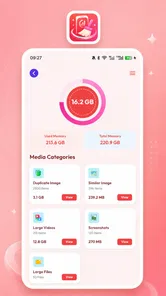
The first useful distinction is that this is not simply a one-tap “make my phone faster” button. Its stated role covers three related jobs: checking how storage is being used, managing installed apps, and organizing files. Those tasks overlap, but they are not identical. A storage overview tells me where space is going; app management helps me decide what no longer belongs on the device; file organization deals with the less obvious clutter that tends to accumulate over time.
That combination makes sense for people who want a practical starting point. If I have a phone filled with old downloads, forgotten applications, and miscellaneous media, I would rather see those categories together than open the system settings, a file manager, and an app list separately. The value here is mainly in reducing the amount of searching I need to do before taking action.
The app is also approachable for less technical users. The Everyone age rating and the straightforward storage focus make it feel aimed at ordinary household use rather than advanced device administration. I would be comfortable recommending it to someone who wants help identifying clutter but does not enjoy sorting folders manually. That recommendation comes with one condition: I would still expect the user to review suggested items instead of approving every cleanup action automatically.
Its public reception is reasonably encouraging without being definitive. Aurevion Phone Cleaner holds a 3.9 average from around 250 ratings and has attracted more than 50 thousand installs. Those figures suggest that people are trying it, but they do not prove that every device or Android configuration will behave the same way. I would treat the rating as a useful signal of mixed-to-positive satisfaction, not as a guarantee of a perfect cleanup experience.
What I would use it for first
My first pass would be a storage audit, not an immediate deletion session. I would open the app when the phone is close to full, look for the largest sources of usage, and separate obvious disposable material from files that might still matter. That order is important because storage tools can make clutter look more urgent than it really is. A large video, an old document, and a temporary-looking file may all appear in the same general cleanup context, but they do not deserve the same treatment.
More From Our News Desk

 Gmail
GmailGmail in a Busy Inbox: Who Benefits Most?
From first account to crowded workday, Gmail earns its place through dependable search and flexible sorting—but its best fit depends on how much inbox maintenance you can tolerate.

 Prime Video
Switching to Prime Video: What Changes in Your Viewing Routine
Prime Video can make a compelling second home for streaming, but switching means learning a different catalog, rental layer, and route from browsing to playback.

 Universal TV Remote Control
Universal TV Remote Control Works Best as a Reliable Backup
A phone remote earns its place through quick setup and reliable habits. Here is how to get more from Universal TV Remote Control—and where its limits show.

 Weather - By Xiaomi
Weather by Xiaomi Review: Clear at a Glance, Less Clear Up Close
Xiaomi’s weather app makes everyday forecasts quick to scan, but its calm surface can leave useful details and recovery paths harder to find than they should be.

 X
XX Under Pressure: Can It Recover When Posting Goes Wrong?
A resilience-focused review of X, examining setup, mistaken posts, interruptions, weak connections, and the gaps that matter when recovery needs to be dependable.

 Clash of Clans
Clash of Clans Is Won Between the Battles
Its raids are quick; its community is a long-term project of coordination, teaching, rivalry, and shared responsibility—with all the friction that entails.
Latest News



I would then move to app management. This is particularly useful after trying several applications for a short period. Instead of remembering which ones I installed months ago, I can use a dedicated management view as a prompt to reconsider them. The practical benefit is not just reclaiming space. Removing unused apps also makes the home screen easier to navigate and reduces the number of applications competing for attention.
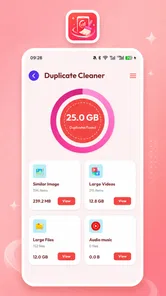
File organization is where I see the most potential for a regular routine. I would use it before a long trip, after transferring photos, or following a period of heavy messaging. Those are the moments when duplicate-looking material and forgotten downloads build up quickly. A short review every few weeks is safer than waiting until storage is critically low and then deleting items in a rush.
A realistic everyday cleanup session
Imagine I am preparing for a weekend away. My phone has accumulated screenshots of tickets, several downloaded documents, old images from group chats, and a couple of apps I installed for a previous journey. I would begin by checking the storage picture in Aurevion Phone Cleaner, then inspect the file groups rather than treating every result as disposable. Travel documents would stay, redundant screenshots could go, and apps with no current purpose would be considered separately.
The useful insight in that scenario is that cleanup is not one decision. It is a sequence of decisions with different levels of risk. Files that can be recreated are easier to remove than personal photos. An unused app can be reinstalled later, but a deleted document may not be recoverable. Using the tool as an inspection assistant, rather than as an automatic judge, is the approach I would trust.
What the current version suggests about product evolution
Version 6.0 gives the app a more established feel than a newly launched experiment, although a version number alone cannot tell me how dramatic each update has been. The app was released on May 3, 2026, so its development timeline is still relatively recent. I would read the current release as a sign that the developer is shaping a complete storage utility, not merely publishing a single-purpose shortcut.
The important change in direction is the breadth of the toolset. A narrow cleaner might focus only on temporary files, while Aurevion Phone Cleaner presents storage review, app management, and file organization as connected parts of the same workflow. That broader approach is more useful to me because low storage is usually caused by a mixture of content, not one mysterious category.
There is also a difference between identifying clutter and managing it responsibly. The current version’s usefulness will depend on how clearly it distinguishes those jobs in practice. A good storage overview should help me understand why space is being used. A good app manager should make removal deliberate. A good file organizer should reduce confusion without encouraging careless mass deletion. These are the standards I would apply when judging version 6.0, rather than assuming that a newer number automatically means a better result.
For existing users, the main effect of this broader positioning is convenience. Someone who already checks storage through Android’s built-in tools may not need a separate app for basic information. However, a dedicated utility can still be worthwhile if its presentation makes the review process easier to follow. The benefit is strongest for users who want one place to begin, not for people who already maintain a carefully organized file system.
How it compares with the usual alternatives
The obvious alternative is the storage section built into Android. That option has a major advantage: it is already part of the operating system, so I do not need to install anything else to see basic usage information or manage applications. For a user who only needs occasional checks, the built-in tools may be enough. They are also the more natural choice when I want the most direct connection to system-level settings.
A dedicated file manager is another alternative. File managers are usually better when I need to browse folders, rename items, move documents, or understand exactly where a file lives. Aurevion Phone Cleaner is more appealing when my starting question is, “What is taking up space, and what should I review first?” If my task is detailed folder administration, I would choose a full file manager instead.
Automatic cleaner utilities offer a different trade-off. They may promise speed through quick scans and bulk actions, but convenience can come at the cost of context. I prefer a tool that encourages inspection, especially when personal media and documents are involved. Aurevion Phone Cleaner makes more sense to me as a guided review companion than as a magic performance booster.
That distinction matters because removing files does not automatically make every phone feel faster. It can create free space and simplify the device, but performance depends on many other factors. I would not install this app expecting it to repair every slowdown, extend battery life by itself, or transform an older phone into a new one. Its strongest case is storage organization, and that is where I would keep my expectations.
Three practical habits that improve the experience
First, I would perform a scan when I have enough time to inspect the results. Running a cleanup while rushing out the door encourages bad decisions. A calmer review lets me compare file names, locations, and relevance before removing anything. This is a small habit, but it changes the app from a pressure button into a useful maintenance workspace.
Second, I would separate “large” from “unwanted.” Size is a helpful sorting clue, not proof that a file is useless. A large offline map, a family video, or a work presentation may be worth keeping. I would use Aurevion Phone Cleaner to surface candidates, then decide based on whether I still need them. That approach is especially important for anyone whose phone contains irreplaceable photos.
Third, I would review applications by purpose rather than by age alone. An app that has not been opened recently may still be important for travel, work, banking, or authentication. Before uninstalling, I would check whether it stores local information or has a role I might need later. The app can make the list easier to examine, but only I know the consequences of removing a particular application.
A fourth habit is to clean in stages. I would begin with clearly disposable downloads, move to apps I recognize as unnecessary, and leave uncertain personal files for last. This staged workflow reduces the chance of deleting something important simply because it appeared beside obvious clutter. It also makes it easier to stop once enough space has been recovered.
Where the experience may still feel limited
The biggest limitation is inherent to the category: a cleaner cannot understand personal value as well as its owner. A file may look old but still be needed. An application may seem unused but be essential at a particular moment. For that reason, anyone hoping for completely hands-off maintenance may find the experience less satisfying than expected.
I would also be careful about confusing organization with deep system repair. Storage tools can help me locate and manage content, but they are not a substitute for diagnosing a failing battery, an unstable operating system, poor network performance, or an application that constantly crashes. If those are my main problems, Android’s system settings, an app-specific fix, or professional support would be more appropriate.
Another possible friction point is that the usefulness of any storage review depends on how understandable the results are on a particular device. Android versions and manufacturer interfaces can handle storage differently. Since Aurevion Phone Cleaner supports Android 8.0 and later, it targets a broad range of phones, but broad compatibility also means users may encounter different system behavior. I would judge the app by whether it explains actions clearly on my device, not merely by whether it opens successfully.
Privacy-conscious users should also think carefully before granting access to personal files or installed applications. A storage organizer needs visibility into the areas it is helping me review, but that does not mean I should approve permissions without reading the prompts. I would install it only from a trusted source, examine what access it requests, and avoid treating any cleaner as automatically safe simply because its purpose sounds familiar.
Who should use it, and who should skip it
I see Aurevion Phone Cleaner as a good fit for Android users who regularly lose track of downloads, installed apps, and scattered files. It is especially suitable for someone who wants a single starting point for storage maintenance and prefers guided categories over manual folder browsing. The fact that it is free makes trying that workflow easy, provided the user is comfortable reviewing cleanup suggestions thoughtfully.
I would also consider it for a family member who repeatedly asks why the phone is full. Instead of explaining several separate settings screens, I could show them how to inspect storage, reconsider unused apps, and organize files in a more deliberate order. The Everyone rating supports that broad audience, although I would still supervise the first cleanup if the device contains important personal material.
I would skip it if my phone has plenty of free space and I already use Android’s own tools confidently. Adding another utility would then create little benefit. I would also choose a dedicated file manager if my main requirement were moving folders, renaming documents, or maintaining a precise archive. Likewise, users seeking a guaranteed speed boost or a comprehensive security solution should look elsewhere because storage organization is a narrower promise.
What I would watch as the app develops
For future use, I would watch how clearly the app communicates the difference between safe-to-review items and files that deserve caution. That communication matters more than flashy cleanup language. I would also pay attention to whether app management remains convenient as a device accumulates more software, and whether file organization continues to feel understandable rather than crowded.
I would be interested in improvements that make recurring maintenance more controlled: clearer grouping, better explanations for why an item is suggested, and an easy way to pause before irreversible actions. These are expectations, not claims about features already present. They are simply the areas that would make a storage utility more dependable for everyday use.
The developer, FULL FAST FABULOUS CO., LIMITED, has room to strengthen the product by focusing on trust and clarity. In this category, users remember a cleaner that helped them recover space safely, but they also remember one that made them nervous about what might disappear. A calm review flow, understandable labels, and careful confirmation steps would do more for long-term confidence than aggressive promises.
My final view after weighing the trade-offs
I think Aurevion Phone Cleaner is worth considering if storage clutter is a recurring annoyance and I want a free tool that combines several review tasks. Its current version, 6.0, gives it a reasonably mature starting point, while its recent release history suggests there is still room for the product to evolve. The 3.9 average shows a generally workable experience with enough mixed feedback to remind me that it will not be equally useful for everyone.
My recommendation is to use it as an organizer and decision aid, not as an automatic cure for every phone problem. Start with an audit, remove only what you recognize, and keep personal files under your own control. If that sounds like the kind of help you need, the app’s free price and broad Android compatibility make it a low-risk utility to try.
The best reason to use Aurevion Phone Cleaner is not the promise of instant magic; it is the chance to turn a vague “my phone is full” problem into a series of manageable choices. That is useful, practical, and honest about what a storage tool can realistically do.
Aurevion Phone Cleaner Frequently Asked Questions
What should I check before installing Aurevion Phone Cleaner?
Aurevion Phone Cleaner is a Tools app from FULL FAST FABULOUS CO., LIMITED, intended for reviewing storage use, managing apps, and organizing files. Before installing, check that your device runs Android 8.0 or later and that you are downloading the app from the official store for your platform. It is rated for Everyone, and its current version is 6.0.
What is Aurevion Phone Cleaner and what does it do?
Aurevion Phone Cleaner is designed to help users review and organize storage on an Android or iOS device. Its main purpose is generally to identify unnecessary files, duplicate or similar photos, large items, and other data that may be taking up space. Before deleting anything, review the suggested items carefully, since some files may still be important to you.
Is Aurevion Phone Cleaner safe to use on my phone?
A cleaning app can be useful when it clearly explains what it wants to access and what it plans to remove. Before using Aurevion Phone Cleaner, check its permissions, privacy policy, developer information, and the confirmation screen shown before deletion. Avoid granting access that seems unrelated to storage management, and keep a backup of important photos, videos, documents, and contacts.
Can Aurevion Phone Cleaner improve my phone’s performance?
Removing unnecessary files may free storage space and can make it easier for the device to manage updates, downloads, and new media. However, a cleaner cannot fix every performance problem, and deleting cache or files does not automatically make a phone faster in all situations. Its most dependable benefit is helping you find storage-consuming content and manage it.
Does Aurevion Phone Cleaner delete photos, videos, or personal files automatically?
You should not assume that the app will delete content without your approval. Cleaning tools commonly scan for items and present recommendations, but the exact behavior depends on the version and device platform. Carefully inspect each category, preview photos and videos where possible, and read the final confirmation before proceeding. Also check the device’s trash or recently deleted folder afterward.
Pros
- Quickly identifies large files and unused media.
- Simple interface makes routine storage checks easy.
- Useful duplicate-photo detection can free up extra space.
- Helps organize cluttered downloads and video files.
- Provides a convenient overview of available device storage.
Cons
- Cleaning recommendations may require manual review before deletion.
- Performance can vary depending on device storage size and file count.
- Some features may be limited behind premium access.
- Scanning large media libraries can take noticeable time.
- Automatic cleanup may not remove app cache on every device.








