AstroMatrix Birth Horoscopes
- 8.03K
- 4.6
- Installs
- 1.00M
- Price
- Free

Screenshots
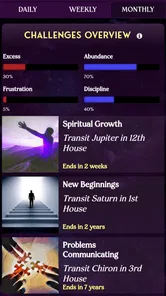
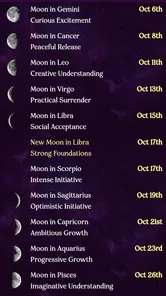
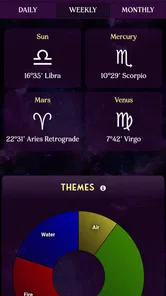
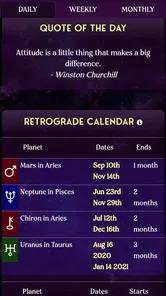

Analysis by Reviewed
I approached AstroMatrix Birth Horoscopes as a lifestyle app for people who want astrology to feel more personal than a short sign-based forecast. Its focus is on birth charts, relationship comparisons, tarot, and daily horoscopes, so it sits somewhere between a reflective journal companion and an astrology reference tool. I found it most interesting when I used it to slow down and examine patterns rather than treating every interpretation as a fixed prediction.
The app is made by AstroMatrix and is free to install, with optional in-app purchases ranging from $1.49 to $49.99 per item. It is rated for Everyone, which makes it approachable for a broad audience, although the subject matter can still feel quite detailed for someone who only wants a quick daily message. With a 4.6 average from around 31 thousand ratings and more than a million installs, it has clearly found an audience beyond occasional horoscope readers.
How AstroMatrix feels to use in everyday life
I find AstroMatrix easiest to approach when I decide what I want from a session before opening it: a brief daily check-in, a closer look at a personal theme, or a prompt for thinking through a relationship. That small choice helps me keep a detailed astrology app from becoming a stream of interpretations to browse without purpose. It also sets up a useful question: which parts of that routine deserve more time?
Readable information, but not always lightweight information
The biggest difference between this app and a typical newspaper-style horoscope is the amount of material it tries to bring together. A daily horoscope can be a quick check-in, but the birth-chart side invites a much longer session. Instead of stopping at a broad description of a zodiac sign, I could move toward a more individualized reading based on chart details and then compare that with other areas of the app.
That depth is useful for readers who enjoy learning the vocabulary of astrology. It also creates the first accessibility trade-off: more context can make the experience more meaningful, but it can also make the screen feel mentally busy. Someone new to houses, planets, aspects, or chart relationships may need to read slowly and return to the same explanation more than once. I would not describe it as an instant-answer tool. It rewards patience.
I found the clearest way to use it was to choose one question before opening the app. For example, I might look at a birth-chart interpretation to understand a recurring personal theme, or use the synastry area when thinking about communication with someone close to me. This prevents the many available readings from turning into an endless scroll through interpretations that are interesting but not especially useful at that moment.
The app’s combination of chart readings and daily content also supports two different reading styles. A person with limited time can open it for a short horoscope and leave. Someone who prefers a quieter, more analytical activity can stay with the chart material. That flexibility is valuable, although the experience is easier for users who are comfortable deciding how much information they want rather than expecting the app to guide every step.
More From Our News Desk

Weather by Xiaomi Review: Clear at a Glance, Less Clear Up Close

X Under Pressure: Can It Recover When Posting Goes Wrong?

Clash of Clans Is Won Between the Battles

Android Auto Makes the Case for Quieter Car Software

MobiOffice: Transforming Mobile Productivity with Seamless Integration

EA SPORTS FC™ Mobile Soccer: Redefining Mobile Sports Gaming
Navigation works best when I use a deliberate routine
Astrology apps can become confusing when they place several related tools side by side, and this one has enough variety that a casual tap-through session can lose direction. My practical advice is to treat the main areas as separate tools: daily horoscopes for a quick check, birth charts for personal exploration, synastry for relationship comparison, and tarot for a more symbolic prompt.
That simple division makes navigation easier because each section has a different purpose. I would not open the app while distracted and expect to understand everything immediately. It is better suited to a calm moment when I can read a paragraph, consider it, and decide whether I want to continue.
For someone with attention-related challenges, this matters. The app can be useful as a structured reflection activity, but the amount of interpretive content may also encourage hopping between topics. I get better results when I choose one reading and take a note elsewhere about the point I want to remember. That turns the app from a stream of content into a manageable routine.
Readers who need very plain language may find the astrology terminology demanding. The app is more approachable if you already know basic sign names and chart concepts, but beginners should expect a learning curve. I see that as a limitation of the subject as much as of the interface: a personalized chart naturally carries more information than a generic horoscope.
Visual and sensory comfort depends on the person
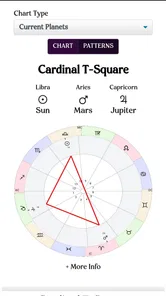
Astrology is often presented with decorative symbols and a strong visual identity, and that can make the experience feel inviting. At the same time, visual symbolism is not equally easy for everyone to interpret. A reader who prefers direct text may need to focus on the written explanations rather than relying on icons, chart shapes, or visual associations.
I would approach the app with the device’s own display settings adjusted to personal comfort. Larger text, increased contrast, reduced brightness, or a quieter environment may make longer readings easier to handle. I cannot treat those adjustments as features of AstroMatrix itself, but they are sensible ways to make a text-heavy astrology session less tiring.
The reading experience is especially different for people who are sensitive to dense screens. A birth chart can be fascinating, yet it may feel visually crowded compared with a simple daily horoscope. I would start with the written interpretation and only then explore the chart presentation. That order reduces the pressure to decode everything at once.
For users with visual impairments, the most important question is whether the device’s own accessibility tools work comfortably with the app’s text and controls. I would test that before committing to extended use. The app can be worthwhile if the written content remains easy to enlarge and follow, but anyone who depends on highly predictable screen-reader behavior or carefully optimized visual controls should evaluate it directly on their device rather than assuming every chart element will be equally accessible.
People with hearing-related needs are unlikely to be affected by the core appeal of the app, since the main activity is reading interpretations and engaging with visual chart or tarot material. The more relevant sensory concern is cognitive and visual load: long sessions may be tiring even when the content itself is engaging.
Situational access: when the app fits and when it does not
AstroMatrix works well in small pockets of quiet time. I can imagine using it during a morning routine, after writing in a journal, or before making time for a personal check-in. The daily horoscope is suitable for a brief visit, while a birth chart or relationship comparison is better saved for a moment when I am not rushing.
A realistic example would be a user preparing for a difficult conversation. Rather than asking the app to decide what to say, they could read a relevant chart interpretation, use the reflection as a prompt, and then write down the practical issue they actually need to address. In that role, the app supports self-awareness without replacing judgment. The synastry material may help someone think about communication patterns, but it should not be used as proof that a relationship will succeed or fail.
The same principle applies to tarot. I found the tarot element more useful as a question generator than as a source of certainty. Drawing attention to a feeling or concern can help a person name what is already on their mind. It is less suitable for someone seeking factual answers about health, money, legal matters, or other high-stakes decisions.
The app is also a reasonable choice for people who want astrology available in one place instead of switching between a horoscope site, a chart calculator, and a separate tarot application. That convenience has a cost: a single app may not be the absolute best tool for every one of those activities. A dedicated chart service may offer a more specialized experience, while a simple horoscope app may be faster for a user who does not want technical detail.
For shared use, privacy and personal boundaries are worth considering in a practical sense. Relationship readings can feel intimate, so I would avoid treating another person’s chart as a label or using an interpretation to pressure them. The app is best used as a private reflection aid, not as a substitute for a direct conversation.
Small workflows that make the readings more useful
One useful workflow is to separate “information” from “reflection.” I first read the chart or horoscope, then write a short sentence about what actually connects with my current situation. This prevents me from accepting every line as equally important. It also makes the app more accessible for users who become overwhelmed by long passages.
A second approach is to compare a daily reading with the broader birth-chart material only after forming my own impression. If I read both at the same time, it is easy to search for confirmation. Reading the daily horoscope first, noting my reaction, and then checking the chart gives me a clearer sense of what feels relevant rather than letting the app steer the entire interpretation.
For synastry, I would use a specific relationship question instead of asking whether two people are simply “compatible.” Questions about listening, conflict, expectations, or emotional distance are more practical. The chart can provide language for reflection, but it cannot account for respect, shared effort, circumstances, or personal growth. That distinction is one of the most important ways to use this app responsibly.
Tarot can follow a similar structure. I would ask an open question, read the result, and then identify one action that is within my control. If the reading makes me more anxious, I would stop rather than keep drawing interpretations in search of reassurance. The app is more helpful when it encourages a pause than when it becomes a repetitive checking habit.
These workflows also answer a common practical concern: do I need to be an astrology expert to benefit from the app? No, but I do need to accept that the experience is partly educational. Beginners should start with one topic and avoid trying to master the whole chart immediately. Experienced readers may appreciate having several formats together, although they may still prefer a specialized service for detailed technical analysis.
Where the experience still creates barriers
The main barrier is interpretive density. A short horoscope can feel welcoming, but the deeper chart features may require concentration, familiarity with astrology terms, and enough time to read carefully. Users looking for a single sentence each morning may find the broader experience more involved than expected.
There is also a risk of emotional overreliance. Personalized language can feel persuasive, especially when it touches on relationships or uncertainty. I would not recommend using the app as the final authority for major choices. Its strongest role is reflective: it can help me frame a thought, notice a feeling, or start a conversation with myself.
Cost can become another consideration for people who want to explore everything. The app is free to install, but optional purchases are present, and individual items can range from $1.49 to $49.99. I would begin with the free experience and decide whether any paid material genuinely adds value to my routine. Anyone on a strict budget should pay attention before confirming a purchase, particularly if curiosity makes it tempting to unlock several readings at once.
Device compatibility is relatively broad because the app requires Android 7.0 or later, but that does not automatically guarantee an identical experience on every phone. Older devices may make long, visually detailed sessions less comfortable, while users with specialized accessibility needs should test the navigation and text presentation in their own setup.
The age rating of Everyone makes the app broadly approachable, but that should not be confused with guidance for every situation. Younger users may still need help understanding that astrology and tarot are interpretive practices, not guaranteed forecasts. Adults who are especially vulnerable to anxiety should also keep a healthy distance from readings that seem negative or definitive.
Who should choose it over simpler alternatives?
I would recommend AstroMatrix to someone who wants more than a generic sign forecast and enjoys exploring personal symbolism. It is especially suitable for a user who likes journaling, self-reflection, relationship questions, and learning how different astrology tools connect. The mixture of birth charts, synastry, tarot, and daily horoscopes gives that person room to move between quick and deep sessions.
I would point a different way for someone who wants a clean, minimal daily notification and nothing else. A simpler horoscope app may be less demanding and easier to check without learning chart terminology. Likewise, a serious astrology student who wants highly specialized technical controls may prefer a dedicated chart platform rather than an app that also includes tarot and daily content.
People who dislike predictive language, symbolic systems, or interpretive readings should skip it. The app cannot become a conventional planning tool just because it includes daily content. Its value depends on being open to astrology as a reflective framework.
For users with accessibility needs, I would describe it as potentially workable rather than automatically inclusive for every ability. The text-led nature of many readings is helpful, and the range from short horoscopes to deeper chart exploration lets users choose their level of engagement. However, dense chart presentations, unfamiliar terminology, and the need to verify compatibility with personal device settings remain real considerations.
My inclusive verdict after using the app
AstroMatrix is a thoughtful choice for people who want astrology to be personal, layered, and available in several formats. I like that it can serve a quick daily habit or a longer reflective session, and I found the best results came from using it as a prompt rather than a verdict. The combination feels more substantial than a basic horoscope feed, but it also asks more from the reader.
Its accessibility story is strongest when I control the pace: one section at a time, readable device settings, and a clear question before opening a chart or tarot reading. That approach helps with attention, visual comfort, and emotional boundaries. It does not remove every barrier, especially for people who need extremely simple navigation or highly specialized accessibility behavior.
The app has been available since November 3, 2015, and its current version is 10.9.8. Those details matter less to me than the practical conclusion: this is a mature-feeling astrology companion for curious readers, not a universal answer machine. I would recommend trying the free version first, keeping purchases intentional, and using the readings alongside real-world communication and judgment. If that balance sounds right to you, AstroMatrix is one of the more versatile lifestyle apps in this space.
AstroMatrix Birth Horoscopes Frequently Asked Questions
Is AstroMatrix Birth Horoscopes suitable for iPhone and iPad users?
AstroMatrix Birth Horoscopes is presented as an app for Android and iOS, so it may suit people who want astrology tools on either platform. The experience centers on personalized birth charts, synastry charts, tarot, and daily horoscopes. Before downloading, check the app store on your device for compatibility and the current version available for your operating system.
What can I explore in AstroMatrix besides birth charts?
The app’s feature mix goes beyond a personal natal chart. Its tools include synastry charts for comparing relationship charts, tarot, and daily horoscopes, alongside astrology interpretations. These options can make it appealing if you want several kinds of astrology-related content in one app. Individual features and access may vary, so review the available app-store details before installing.
What devices can run AstroMatrix Birth Horoscopes?
AstroMatrix Birth Horoscopes is a lifestyle app for Android and iOS users. On Android, it requires version 7.0 or later, so checking your device’s software version before downloading is worthwhile. The app is designed around astrology features such as personalized birth charts, synastry charts, tarot, and daily horoscopes, making it most relevant to users who want those tools on a mobile device.
Is AstroMatrix Birth Horoscopes suitable for beginners?
Yes. The app can be a useful starting point if you are curious about astrology and want to explore a birth chart, planetary placements, zodiac signs, and related interpretations. Its personalized readings may also appeal to people who already know some astrology. As with any astrology app, the interpretations are best treated as prompts for reflection or entertainment, not as a substitute for professional advice or a basis for major decisions.
What is AstroMatrix Birth Horoscopes used for?
AstroMatrix Birth Horoscopes is an astrology app designed to help you explore your natal chart, planetary placements, zodiac signs, houses, and aspects based on your birth information. It presents interpretations for personality, relationships, life themes, and current planetary movements. The app is best viewed as a self-reflection and entertainment tool rather than a scientifically proven method for predicting events or making important personal decisions.
Pros
- Detailed natal charts with planetary positions and house placements.
- Includes daily
- monthly
- and transit-based astrology insights.
- Offers compatibility tools for comparing two birth charts.
- Supports multiple house systems and zodiac calculation options.
- Clean layout makes complex astrological data easier to explore.
Cons
- Many advanced interpretations and features require in-app purchases.
- The amount of information may overwhelm users new to astrology.
- Some readings can feel repetitive across different sections.
- Accurate results depend on entering the correct birth time and location.
- Notifications and promotional prompts may feel intrusive to some users.











