Astrology Zone Horoscopes
- 1.78K
- 4.6
- Installs
- 500.00K
- Price
- Free

Screenshots


Analysis by Reviewed
I approached Astrology Zone Horoscopes as a small daily ritual rather than a tool that demands constant attention. It is a free lifestyle app from Astrology Zone, built around Susan Miller’s astrology content, and its appeal is easy to understand: open it when you want a horoscope, read for a few minutes, and return to your day. My experience was most enjoyable when I treated the app as reflective reading instead of a source of fixed answers.
The app has been available since August 15, 2014, and its long presence is reflected in a 4.6 average from around 19 thousand ratings. It has also passed 500 thousand installs, which makes it considerably more established than a newly released horoscope experiment. The current version is 4.9.7, and it runs on Android 7.0 or later. Those details matter if you are using an older phone or deciding whether this is a mature app worth trying.
How Astrology Zone fits into a connected mobile routine
I treat a connected horoscope app as one small stop in a broader phone routine, not as a place to keep every personal thought. When a reading prompts me to remember something, I carry that idea into a calendar or private note rather than expecting the app to manage the next step. That simple handoff keeps reflection useful and leaves room to consider how the app fits alongside other everyday tools.
Reading works best when the connection is reliable
The first practical point is connectivity. This is an app whose value depends on being able to reach its astrology content when you open it. I found that the experience makes most sense when I had a normal mobile or Wi-Fi connection available, especially during quick checks in the morning or between errands. I would not choose it as my only source of reading for a commute where the signal is unpredictable, because the usefulness of the session depends on the content loading at the moment I want it.
That network dependence is not necessarily a flaw. Horoscope reading is generally something people do in changing circumstances: while waiting for coffee, sitting in a parked car, or taking a short break at work. A connected app can fit those moments neatly, but it also means the app should be approached differently from a downloaded ebook or a notebook. I learned to open it before settling into a quiet moment rather than expecting it to behave like a completely self-contained reference.
There is also a subtle advantage to this style. When I read a horoscope through a connected app, I am less likely to build a huge archive of old entries and overanalyze every sentence. I read what is available for the moment, consider whether it speaks to my situation, and move on. For me, that kept the experience lighter than browsing long astrology websites with many competing sections.
Short mobile sessions are its natural strength
Astrology Zone Horoscopes feels most comfortable on a phone because its purpose is immediate and personal. I could check it during a small pause without needing a desk, a notebook, or a long setup. The format suits someone who wants a daily prompt about relationships, work, mood, or timing, then prefers to interpret the message privately.
More From Our News Desk

Weather by Xiaomi Review: Clear at a Glance, Less Clear Up Close

X Under Pressure: Can It Recover When Posting Goes Wrong?

Clash of Clans Is Won Between the Battles

Android Auto Makes the Case for Quieter Car Software

MobiOffice: Transforming Mobile Productivity with Seamless Integration

EA SPORTS FC™ Mobile Soccer: Redefining Mobile Sports Gaming
A realistic use case would be a busy weekday morning. Before starting work, I might open the app while having breakfast, read my horoscope, and choose one idea to keep in mind during the day. If the reading suggests being more patient in a conversation, I would use that as a reminder rather than treating it as a prediction. That is where the app becomes useful: not because it replaces planning, but because it can give a familiar pause before the day becomes crowded.
It can also work during travel, provided the connection cooperates. I would use it while waiting at an airport or sitting at a station, but I would not make it part of a time-sensitive travel plan. A horoscope is optional reading, so a delayed loading screen should never become a source of stress. The best approach is to let it occupy spare attention, not essential attention.
Readers who prefer detailed birth-chart analysis may find the mobile format too narrow. A full astrology website, specialist chart service, or printed reference can be better for comparing planetary placements, studying terminology, or returning to a large amount of material. This app is more appealing when you want a readable daily experience connected to Susan Miller’s work, rather than an extensive astrology workstation.
What to do when the app does not load smoothly
Connectivity problems change the mood of any lightweight lifestyle app. If the content does not appear immediately, my first recommendation is simple: check whether the phone has a working connection, then try again later instead of repeatedly tapping through the same screen. Since the app is designed for casual reading, there is little benefit in turning a brief horoscope check into a troubleshooting session.
I also found it helpful to separate a temporary loading problem from a deeper issue with the installation. If other connected apps are working, closing and reopening Astrology Zone Horoscopes is a sensible first step. If the problem continues, checking whether the app is current is worthwhile, particularly because version 4.9.7 is the current release listed for the app. On an older device, the minimum Android requirement of 7.0 is another practical checkpoint.
The most useful recovery habit is to avoid depending on one exact reading time. If I wanted a quiet moment with the app, I would leave enough flexibility to read later in the morning or evening. That sounds minor, but it matches the nature of the product. A connection failure does not erase an appointment, interrupt a game session, or block a work document; it simply postpones optional reading.
I would also avoid assuming that every interruption means the content has disappeared. A failed load can be caused by the current network, a temporary service issue, or the phone itself. Restarting the phone may be reasonable if other apps are behaving strangely, but I would not jump straight to reinstalling unless simpler steps had failed. Reinstallation can be inconvenient, and there is no reason to take that step for an occasional delay.
Using it carefully on mobile data
For data-conscious users, the important trade-off is frequency. A single short horoscope check is unlikely to feel like the same kind of activity as streaming video, but repeated refreshing, browsing for long periods, or opening the app whenever you are bored can still turn a casual habit into regular background consumption. I prefer using it intentionally: open it once, read carefully, and close it when the session is finished.
That habit is especially useful when traveling or using a limited mobile plan. I would check the app over Wi-Fi before leaving home if I knew I wanted to read it, while still avoiding any assumption that the reading would remain available later without a connection. The safest way to manage expectations is to treat the app as a connected reader, not as a guaranteed offline library.
There is another data-related consideration: the app is a lifestyle product, not a private journal. I would avoid typing sensitive personal information into any optional area unless I had a clear reason to do so. Horoscope reading does not require me to share intimate details with the app, so I keep my interpretation in my own head or in a separate notebook. This creates a useful boundary between consuming astrology content and documenting personal events.
The free price makes experimentation easy, but the app includes in-app purchases ranging from $6.99 to $59.99 per item. I would not pay simply because a reading feels emotionally relevant on a particular day. My advice is to use the free experience long enough to understand whether the writing style and rhythm suit you, then consider a purchase only if you can identify a specific benefit you genuinely want. The presence of paid items should not turn a reflective habit into an impulse-buying habit.
What the app does well for different kinds of readers
The strongest audience is someone who already enjoys astrology as a daily or occasional form of reflection. If you like reading a horoscope with your coffee, comparing how it feels with the day ahead, and keeping the interpretation flexible, the app is an easy fit. It is also suitable for newcomers who want to sample Susan Miller’s approach without immediately committing to a complex chart system.
Its Everyone content rating makes it approachable for a broad audience, although that does not mean every reader will enjoy it. Astrology is interpretive, and the app will not satisfy someone looking for evidence-based forecasting, precise scheduling, or professional advice. I would skip it if you need decisions about health, money, legal matters, or relationships to be based on verifiable information. A horoscope can be a prompt for thought, but it should not carry responsibility that belongs to qualified people or your own careful judgment.
I also think the app is less suitable for users who want a highly interactive astrology dashboard. If your priority is building charts, changing settings, comparing technical placements, or recording detailed observations, a dedicated astrology service may offer a better workflow. Astrology Zone Horoscopes is more about receiving and reading content than constructing a personal research system.
Compared with checking a horoscope through a browser, the app feels more direct for repeated mobile use. I do not have to begin with a broad web search or sort through unrelated pages. Compared with a social media feed, it is less distracting because the purpose is clearer: I open it for astrology rather than being pulled into a stream of unrelated posts. Compared with a paper horoscope column, it is more convenient when I am away from home, but it has the disadvantage of being tied to a working connection.
Three habits that make the experience better
My first practical tip is to read before reacting. If a horoscope sounds unusually positive or worrying, I wait a few minutes and ask what part is actually useful. Perhaps it suggests patience, preparation, or attention to a conversation. Turning the wording into one small action makes the reading more grounded than treating it as a guaranteed event.
Second, I would compare the reading with your own notes rather than with other people’s interpretations. After reading, write one sentence about what you expect from the day and revisit it later. This lets you judge whether the app helps you notice patterns in your thinking, without needing to decide whether every prediction was literally correct. It is a more honest way to evaluate a horoscope habit.
Third, use the app at a consistent but flexible time. A morning check can help set an intention, while an evening check can work as a reflection on what already happened. I would avoid opening it repeatedly whenever I feel uncertain, because that can encourage dependence on another reading instead of making a decision. The app works better as a prompt than as a reassurance loop.
A fourth useful boundary is to keep connectivity separate from urgency. If the app fails to load, do not interpret that interruption as a sign or keep forcing the session. Try again when the connection is better, or simply continue your day. That small rule protects the experience from becoming superstitious in an unhelpful way and keeps the technology in its proper place.
Value, purchases, and long-term use
Because the app is free to download, the main question is not whether it is expensive to try but whether you enjoy returning to its style of horoscope reading. I would give it several ordinary days rather than judging it from one unusually accurate or inaccurate-feeling passage. The real test is whether it adds a pleasant moment to your routine without making you feel pressured to check constantly.
The paid items deserve a measured approach. A purchase may make sense for a reader who already knows exactly what additional material they want, but it is not automatically worthwhile for someone who only wants a quick daily reading. The broad price range means the commitment can become significant, so I would review the purchase screen carefully and confirm that the item matches your expectations before proceeding. Free access is enough to decide whether the app belongs in your routine.
Long-term use may also depend on how much variety you want. If you enjoy returning to a familiar voice and treating astrology as a continuing personal ritual, the app can remain relevant. If you need constantly changing interaction, visual experimentation, or a deep technical archive, its focused approach may eventually feel limited. That is not a failure; it simply identifies the type of reader it serves best.
My connectivity verdict
After using Astrology Zone Horoscopes as a connected mobile reading habit, I see it as a convenient companion for people who enjoy Susan Miller’s astrology content and want a simple way to check in during the day. Its strongest moments happen when the phone has a dependable connection and I have a few unhurried minutes. Its weakest moments appear when I expect it to function like a permanently available offline reference or when I ask a horoscope to make decisions for me.
The app’s free entry point, Everyone rating, established history, and current 4.9.7 release make it approachable for a wide range of readers. Astrology Zone is the developer, and the app has earned a 4.6 average from around 19 thousand ratings while reaching over 500 thousand installs, so it clearly has an audience beyond a small niche. Still, popularity does not remove the need to judge the writing style and the paid options for yourself.
My recommendation is straightforward: try it if you want a calm, occasional horoscope check that fits around a connected phone routine. Keep a browser or another reference available if you need broader astrology research, and choose a different kind of app if you require offline certainty, technical chart work, or evidence-based guidance. Used with those limits in mind, it is a pleasant lifestyle app rather than something that needs to control your day.
Astrology Zone Horoscopes Frequently Asked Questions
Can I read Astrology Zone Horoscopes without creating a personalized birth chart?
Yes. You can read sign-based horoscope content without providing an exact birth time, since many forecasts are organized by zodiac sign. Astrology features involving a birth chart or a more personalized interpretation may ask for your birth date, time, and place. If you prefer not to share those details, you can still explore the sign-based material.
Is Astrology Zone Horoscopes available on both Android and iOS?
Astrology Zone Horoscopes is a mobile lifestyle app. Before downloading, check its availability and compatibility in the app store for your device, and make sure your operating system meets the minimum requirement. The app is free to download, so you can review the store page and the available version before installing it.
What does the free download include, and are there paid features?
The app is free to download, but access to certain features or content can depend on the current version, platform, and purchase options. Some horoscope material may be free, while additional readings or services could require payment; in-app purchases range from $6.99 to $59.99 per item. Review the purchase details in the app before buying anything, and check which content is available without an additional payment.
What devices and operating systems can run Astrology Zone Horoscopes?
Astrology Zone Horoscopes is a lifestyle app for mobile devices, and its current version is 4.9.7. Before downloading, check that your device meets the minimum operating-system requirement of 7.0. Keeping your device’s software up to date can also help with compatibility and performance when opening the app and reading its horoscope content.
What is Astrology Zone Horoscopes?
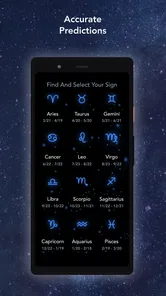
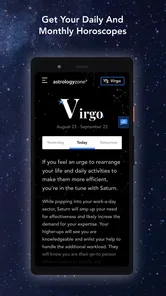
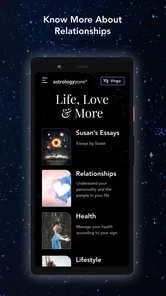
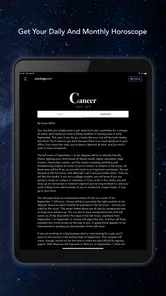
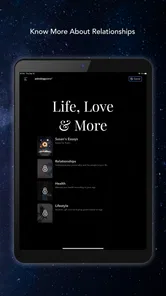
Astrology Zone Horoscopes is an astrology app based on the work of Susan Miller. It provides horoscope readings for the zodiac signs, including daily, monthly, and yearly forecasts. The app is designed for users who enjoy following astrology, checking upcoming planetary influences, and reading longer interpretations related to relationships, work, money, and personal development.
Pros
- Daily and monthly forecasts are easy to find and read.
- Covers all zodiac signs in one place.
- Useful for users who enjoy astrology-based planning.
- Regular updates keep horoscope content fresh.
- Simple layout makes browsing predictions straightforward.
Cons
- Some features may require an internet connection.
- Predictions can feel broad rather than personally tailored.
- The amount of content may feel overwhelming for casual users.
- Astrology content may not appeal to skeptical audiences.
- Notifications could become distracting if enabled frequently.











