

Argo File Cleanup
- 19.00
- 3.8
- Installs
- 10.00K
- Price
- Free
Screenshots

Analysis by Reviewed
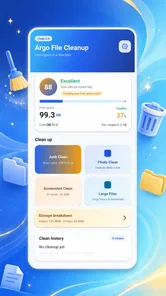
I judge a file-cleanup tool less by how many buttons it has than by whether I can understand what it is asking me to do before I remove anything. Argo File Cleanup is a free tools app from ZXISY CO., LIMITED, and its focus is deliberately narrow: helping with file cleanup through a simple interface. That makes it worth considering if you want a dedicated utility rather than a broad phone-management suite, but it also means the value depends on how clearly its cleanup choices fit your needs.
How the interface supports everyday use
I find a cleanup tool easiest to judge when its screens let me focus on one decision at a time, rather than making me rush through a pile of files. I’d use this section to consider how Argo’s focused purpose may help with that everyday task, while keeping the next section in view: a clear interface is only useful if its controls also feel manageable for the person using them.
A modest starting point, not a full phone dashboard
The appeal of Argo File Cleanup is its direct purpose. It is not presented as a social app or an all-in-one device manager; it belongs among practical tools for keeping files in order. I like that kind of focus because a cleanup task is easier to approach when the app does not compete for attention with unrelated features. Its store summary emphasizes a simple interface and easy-to-use tools, a sensible aim for an app that may be opened briefly, used to review clutter, and then closed.
That simplicity is also a useful test of readability. Cleanup software should make it clear what kind of item is being considered and what action will happen next. I would take a moment to read each screen and any confirmation prompt rather than treating a clean-looking layout as proof that every suggested removal is safe. The most important usability feature in this category is not speed; it is helping people distinguish disposable clutter from a file they still need.
The app is currently at version 3.0 and supports Android 8.0 or later. Its age rating is Everyone, so it is positioned for a broad audience. Those details make it approachable in principle, but they do not tell me how the controls are arranged or whether every screen is equally easy to follow. If you have trouble with small text, crowded layouts, or unfamiliar file terminology, try the interface slowly before making a cleanup routine part of your day.
Navigation should be judged by the task, not the promise
For me, a good cleanup flow has a clear beginning, an understandable review stage, and an obvious way to back out. That sequence matters because file removal can be consequential. A person should be able to pause and reconsider rather than feeling pushed toward a single large action. When testing any suggested cleanup, I would first use a small, familiar set of files and check what the app identifies before relying on it for a larger tidy-up.
A practical habit is to treat the first pass as an inspection, not a purge. If an item’s name or location is unfamiliar, leave it alone until you can identify it through a file manager or another trusted method. This is especially helpful for people who share a device, keep work and personal documents together, or store files for offline use. The app’s focused role may make it convenient, but your own review remains the safeguard.
More From Our News Desk

 Gmail
GmailGmail in a Busy Inbox: Who Benefits Most?
From first account to crowded workday, Gmail earns its place through dependable search and flexible sorting—but its best fit depends on how much inbox maintenance you can tolerate.

 Prime Video
Switching to Prime Video: What Changes in Your Viewing Routine
Prime Video can make a compelling second home for streaming, but switching means learning a different catalog, rental layer, and route from browsing to playback.

 Universal TV Remote Control
Universal TV Remote Control Works Best as a Reliable Backup
A phone remote earns its place through quick setup and reliable habits. Here is how to get more from Universal TV Remote Control—and where its limits show.

 Weather - By Xiaomi
Weather by Xiaomi Review: Clear at a Glance, Less Clear Up Close
Xiaomi’s weather app makes everyday forecasts quick to scan, but its calm surface can leave useful details and recovery paths harder to find than they should be.

 X
XX Under Pressure: Can It Recover When Posting Goes Wrong?
A resilience-focused review of X, examining setup, mistaken posts, interruptions, weak connections, and the gaps that matter when recovery needs to be dependable.

 Clash of Clans
Clash of Clans Is Won Between the Battles
Its raids are quick; its community is a long-term project of coordination, teaching, rivalry, and shared responsibility—with all the friction that entails.
Latest News



Making the task easier on different bodies and senses
Cleanup apps can be demanding in quiet ways: reading small labels, tapping the right control, tracking a list while scrolling, and making a confident decision under time pressure. I would use Argo File Cleanup in a calm moment, with the device held comfortably and enough time to inspect the screen. That gives people with tremor, reduced dexterity, or fatigue a chance to avoid rushed taps and mistaken deletions.
If touch accuracy is a concern, work through the app in short sessions and avoid selecting several items at once unless you are certain what the selection covers. The same approach helps anyone using a phone one-handed or while distracted. A cleanup tool is not a race, and the ability to stop after reviewing a few items is more valuable than finishing everything in one sitting.
For sensory needs, consider the setting in which you use it. A bright screen, notification interruptions, or a noisy environment can make file names harder to inspect. I would reduce distractions and use the operating system’s own display or sound settings where helpful, while remembering that these settings do not change what the app itself provides. If visual detail is difficult to read, do not guess at ambiguous labels: postpone the removal or verify the file elsewhere.
Useful in the moments when storage feels messy
A realistic use case is a person who downloads a few documents and images during a busy week, then finds it harder to locate the one needed for an appointment or a work task. A focused cleanup app can offer a dedicated moment to review files instead of letting the Downloads area become a catch-all. I would open it when there is time to make deliberate choices, rather than just before boarding a train or handing the phone to someone else.
Another good occasion is a periodic check before a trip. You may want to make room for new offline material while preserving maps, tickets, or documents already saved on the device. The sensible workflow is to identify what must remain first, then inspect possible clutter and remove only what you recognize. That order reduces the risk of clearing something useful simply because it looks old or unfamiliar.
For people who rely on a phone under changing conditions—poor lighting, limited connectivity, or a crowded commute—cleanup is usually best done later in a stable setting. File names and context are easier to assess when you are not hurried. Argo’s focused purpose suits a planned maintenance task better than an emergency fix where you are tapping quickly without checking each choice.
Where it sits beside familiar alternatives
The usual alternative is the phone’s built-in file manager or storage controls. Those tools can be preferable when you want to inspect folders directly, move files between locations, or stay within familiar system navigation. A dedicated cleanup app may feel more focused for a person who wants a separate tool for tidying, but focus alone does not make it safer or more capable. I would compare the clarity of the actual review steps, not assume that a specialized app automatically finds more or explains better.
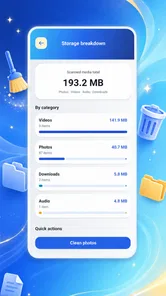
Argo File Cleanup is also different from a general device-optimization suite in its identity: it is presented as a file-cleanup app, not as a complete solution for every storage or performance concern. If your real problem is organizing important documents into folders, a conventional file manager is likely the better fit. If you need to understand which files are taking space before deciding what to do, choose the tool that gives you the clearest view and lets you make selective decisions.
The app has a 3.8 average from around 125 ratings, with 18 written reviews, and has passed 10,000 installs. I treat those figures as modest context rather than proof that it will suit every device or user. The rating suggests mixed experiences are possible, so I would install it with a specific cleanup task in mind and assess whether its flow is understandable for me, rather than expecting it to solve every kind of storage problem.
Limits worth keeping in view
The main limitation is that a simple premise does not answer every question a cautious user may have. Before removing anything, you still need to know what the item is, whether another app depends on it, and whether you have a copy elsewhere. People who want automatic decisions, detailed explanations for each recommendation, or advanced file organization should be careful not to assume those capabilities from the app’s name or its clean-up focus.
I would also skip it if you are uncomfortable reviewing file names on a small screen or if your device contains documents that are difficult to replace. In that case, manual organization through a familiar file manager, with backups where appropriate, is a better starting point. Likewise, a person looking for broader device maintenance should choose a tool built for that wider job instead of expecting this one to cover it.
For an inclusive experience, a useful cleanup app needs to make its actions understandable to people with different levels of technical confidence and different physical or sensory needs. The key question is whether you can read, inspect, and reverse your decision before a file is gone. I recommend approaching Argo with that standard: take your time, check unfamiliar items elsewhere, and use it only when the screen and process feel clear to you.
My verdict: focused, with a careful-user caveat
I see Argo File Cleanup as a reasonable option for someone who wants a dedicated, free file-cleanup tool and is comfortable making their own decisions about what can go. Its simple positioning is promising for people who prefer a task-focused app, and the broad Everyone rating makes it suitable to consider across age groups. Still, I would not recommend treating any cleanup suggestion as an automatic command.
My advice is to start with a small, low-risk review and see whether the app’s navigation feels clear and manageable on your device. Keep the phone’s built-in file tools in mind for folder-level work, and choose a more specialized alternative if you need stronger organization or a wider device-management role. If the cleanup process is easy for you to inspect at your own pace, this app may earn a place in your occasional maintenance routine; if it leaves you uncertain about what will be removed, stopping is the better choice.
A low-risk way to decide whether it fits
Rather than treating installation as a commitment to regular cleanup, I would use the first session to answer one practical question: does the app help me understand what I am looking at? Choose a file you already recognize, compare its name and location with what you see in the app, and pause before confirming any removal. That small test is more informative than attempting to clear a large backlog immediately, because it lets you judge the interface without putting important documents at risk.
If you are helping a family member or another person who is less confident with file management, sit together for that first review and agree on what should remain. The useful role here is guided decision-making, not handing the phone over and assuming a cleanup button will know what matters. This also gives the user time to ask what unfamiliar labels mean and to decide whether the screens are comfortable to read and operate.
Choose the workflow that matches the problem
One question worth asking before using any cleanup utility is whether the problem is actually excess clutter. If you keep losing files because their names and folders are inconsistent, deleting items may create space without making the remaining collection easier to navigate. In that situation, I would start with the phone’s file manager and sort out a simple folder routine. Argo is a more natural fit when the goal is to review items for possible removal, not to build a lasting filing system.
If your concern is a nearly full phone, take a moment to identify the files you cannot replace before you begin. Work-related attachments, travel documents, and material saved for offline use can look old while still being valuable. I would keep a separate note of anything that must stay, or check those items in their usual apps first. This is a small precaution, but it turns a vague cleanup session into a more deliberate review.
Who is likely to appreciate it—and who may not
I can see the app suiting someone who wants a separate, straightforward place to consider file clutter and is willing to make the final call themselves. It may also help a person who prefers a focused task over navigating a broader device-maintenance interface. The key condition is comfort with checking names and context; this is not a good match for someone who expects a tool to make deletion decisions on their behalf.
For users who need more control over folders, depend on large text or highly predictable screen-reader behavior, or find touch selection difficult, I would test the experience carefully before relying on it. A familiar system file manager may be easier to learn or better suited to detailed browsing. That is not a failure of a focused cleanup app; it is a reminder that the best choice is the one that makes the task understandable for the person doing it.
My inclusive verdict is practical rather than absolute: clarity and control matter more than a quick cleanup. Argo File Cleanup is worth trying when you want a dedicated file-review tool and can take your time, but I would keep the phone’s built-in tools close at hand and leave anything uncertain untouched. If its screens make the consequences of each choice easy for you to judge, it can be a useful occasional aid; if not, choosing a more familiar route is the safer and more comfortable decision.
Argo File Cleanup Frequently Asked Questions
What is Argo File Cleanup, and what does it do?
Argo File Cleanup is presented as a utility for helping users find and remove unwanted files from a device. Depending on the app version and platform, its tools may include identifying temporary data, large items, or other files you choose to review. Check the app’s current store listing for its exact features, since tools and availability can change between releases.
Is Argo File Cleanup safe to use, and can it delete important files?
Any cleanup tool can affect files you may want to keep, so review the app’s selection carefully before confirming a deletion. Avoid removing items whose purpose you do not recognize, and make a backup of important documents, photos, or downloads first. Also review the permissions requested by Argo File Cleanup and consult its store listing and privacy policy before granting access.
Is Argo File Cleanup free, or does it require a subscription?
Pricing can vary by platform, region, and app version. Some utilities offer basic cleanup features for free while reserving additional tools for in-app purchases or a subscription, but you should not assume Argo File Cleanup follows a particular model. Check the Google Play or Apple App Store listing for current prices, trial terms, and renewal details before purchasing.
What permissions might Argo File Cleanup need on Android or iOS?
A file-cleanup app may need access to storage or selected files so it can identify items for review, but the permissions available differ between Android and iOS. Grant only access that matches the feature you want to use, and check the system permission screen if a request seems broader than expected. You can usually change permissions later in your device settings.
How can I download Argo File Cleanup and check that it is compatible with my device?
Look for Argo File Cleanup in the official Google Play Store or Apple App Store rather than downloading an unfamiliar installation file or following an unverified link. Before installing, confirm the developer, supported operating-system version, device requirements, recent update information, and user reviews. Availability may differ by country, and a store listing is the best place to verify current compatibility.
Pros
- Quickly identifies duplicate files that may be taking up space.
- Helps surface large files for easier storage cleanup.
- Simple cleanup workflow is approachable for first-time users.
- Lets you review files before deciding what to remove.
- Useful for organizing clutter across a busy device.
Cons
- Scanning can take time when the device contains many files.
- Some suggested files may be important
- so review them carefully.
- Cleanup results depend on the storage access permissions granted.
- It may not free much space if your files are already well organized.
- Features and performance may vary between Android and iOS devices.








